The Best Open Source QuickBooks Alternatives for Freelancers
QuickBooks Online Simple Start costs $38 a month now. A few years ago, it was $25. Intuit keeps raising prices, pushing desktop users onto cloud subscriptions, and making it harder to leave. Which makes you wonder if there are no open source QuickBooks alternatives out there.
And then there’s vendor risk. Bench Accounting shut down on December 27, 2024, stranding over 11,000 businesses right before tax season. Their data was locked inside a proprietary platform they couldn’t export from.
So the search for open source QuickBooks alternatives makes sense: free software, full data ownership, no company that can pull the plug on you. But open source QuickBooks alternatives come with trade-offs most comparison articles skip past.
This guide covers the open source QuickBooks alternatives actually worth your time, what each one can and can’t do, and how to decide if going open source fits your freelance business — or if a cheaper commercial tool would serve you better.
If you’re not set on going open source, it’s also worth looking at how FreshBooks vs QuickBooks compare before ruling out paid accounting software altogether.
What Does “Open Source” Actually Mean for Accounting Software?
Open-source accounting software gives you access to the source code, the freedom to modify it, and full ownership of your financial data. But “open source” doesn’t automatically mean free, easy, or better than what you’re using now.
Open source in technology means the software’s code is open, accessible, and available for you to look at and change however you see fit.
Compare that to closed-source programs and software like video games, Google Docs, Microsoft Office, QuickBooks, etc, that hide the code from the public eye.
In the account software space, the tools available today fall into three categories, and the differences matter more than most articles acknowledge.
Desktop apps like GnuCash and Frappe Books run on your computer.
Your data lives in a local file. No server, no subscription, no internet required. This is the simplest path for non-technical users, but you lose cloud access, collaboration, and automatic backups.
Self-hosted web apps like Akaunting and Bigcapital give you a web-based interface running on your own server. Full control, multi-user access, modern interface.
But you have to set them up yourself, which usually means renting server space, installing the software, and handling updates. If that sounds like a project you don’t want, this category probably isn’t for you.
If you don’t know what Docker is, this probably isn’t for you.
Open-source with a hosted cloud option is the middle ground.
Invoice Ninja offers a paid hosted version ($10 to $14/mo) alongside its self-hosted option. You get open-source code with commercial convenience. But you’re paying a subscription again, just a smaller one.
Want the hosted version? Create a free Invoice Ninja account →
Quick note here: GnuCash and Frappe Books use true GPL open-source licenses. Akaunting uses a Business Source License, and Invoice Ninja uses an Elastic License. If data sovereignty is your primary motivation for going open source, these distinctions matter.
Which Open-Source QuickBooks Alternatives Are Actually Worth Considering?
Five tools stand out in 2026: GnuCash for power users, Frappe Books for simplicity, Akaunting for web-based access, Invoice Ninja for invoicing-heavy freelancers, and Bigcapital as the most promising newcomer.
| Tool | Price | Type | Bank Feeds | Double-Entry | Skill Level |
| GnuCash | Free | Desktop | Manual import | Yes | Advanced |
| Frappe Books | Free | Desktop | No | Yes | Beginner |
| Akaunting | Free (self-hosted) | Web | Manual import | Yes | Moderate |
| Invoice Ninja | Free (self-hosted) / $10–14/mo hosted | Web | No | No (invoicing only) | Beginner |
| Bigcapital | Free (self-hosted) | Web | Yes (Plaid) | Yes | Moderate |
GnuCash
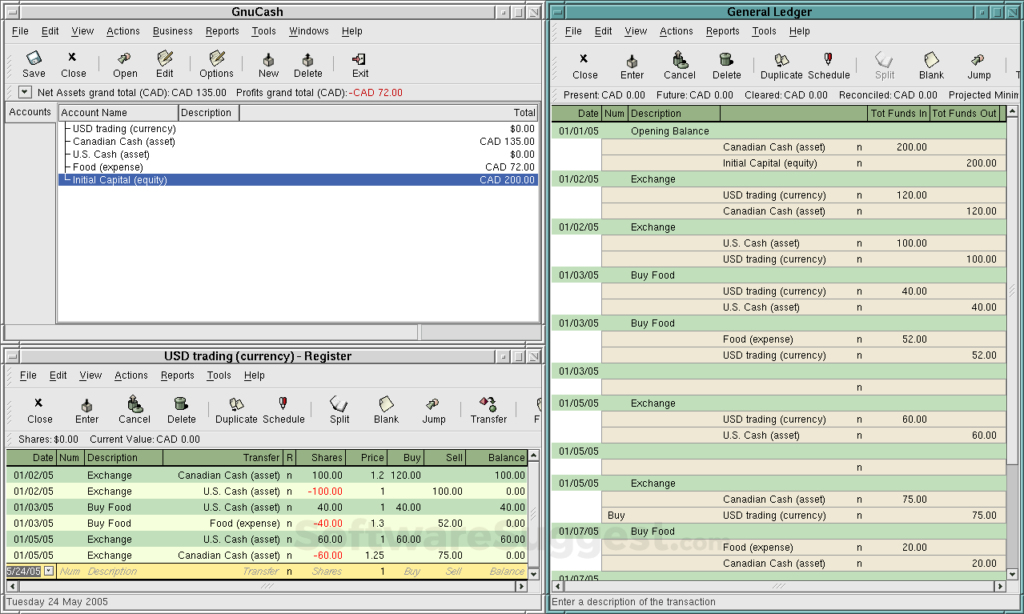
It’s been around since 1998 and runs on Windows, Mac, and Linux. It’s full double-entry accounting with a proper chart of accounts, income and expense tracking, and financial reports. That makes it closer to traditional bookkeeper software than most lightweight tools aimed primarily at invoicing. The interface looks like it hasn’t been updated since 2005.
There are no bank feeds, no useful invoicing, and no mobile app. You import bank transactions manually via CSV or OFX files. Best for freelancers who understand accounting principles and want total control over their books.
If the phrase “chart of accounts” means nothing to you, skip this one.
Frappe Books
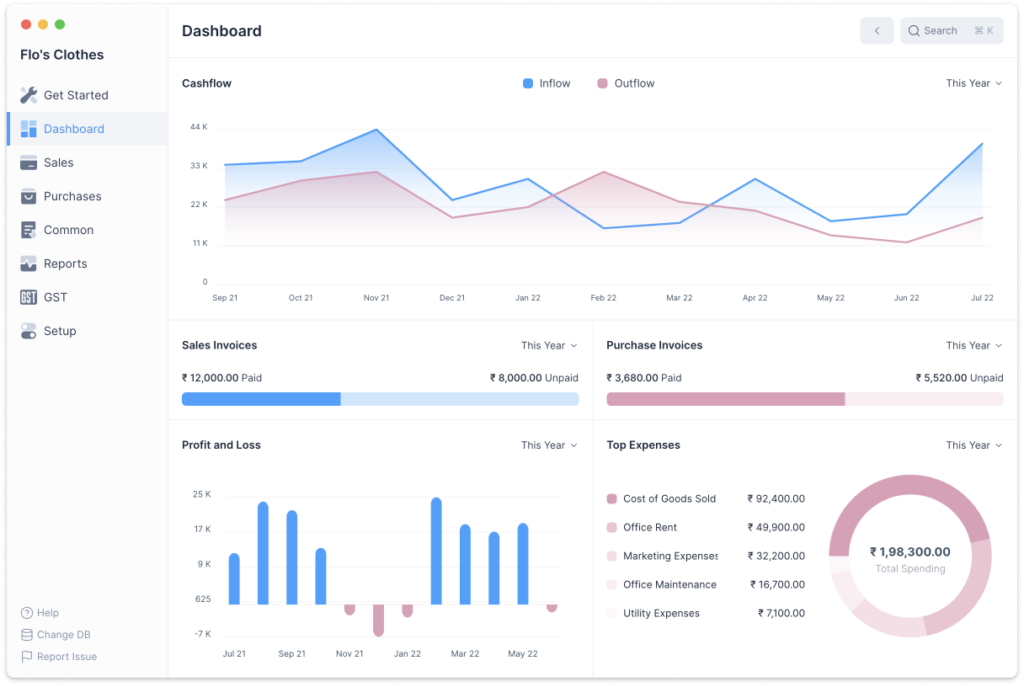
The easiest open-source accounting tool to get started with.
Download it, install it, and you’re running. Built by the team behind ERPNext, it has a clean, modern desktop interface with invoicing, expense tracking, and basic financial reports. All data is stored locally in a SQLite file on your machine.
The feature set is limited compared to GnuCash, and there are no bank feeds or cloud sync. For a small consulting business with more complex billing, recurring expenses, or accountant collaboration, that may not be enough.
But for a freelancer who needs to track income, expenses, and generate a profit and loss report? It works. And it’s genuinely pleasant to use.
Akaunting
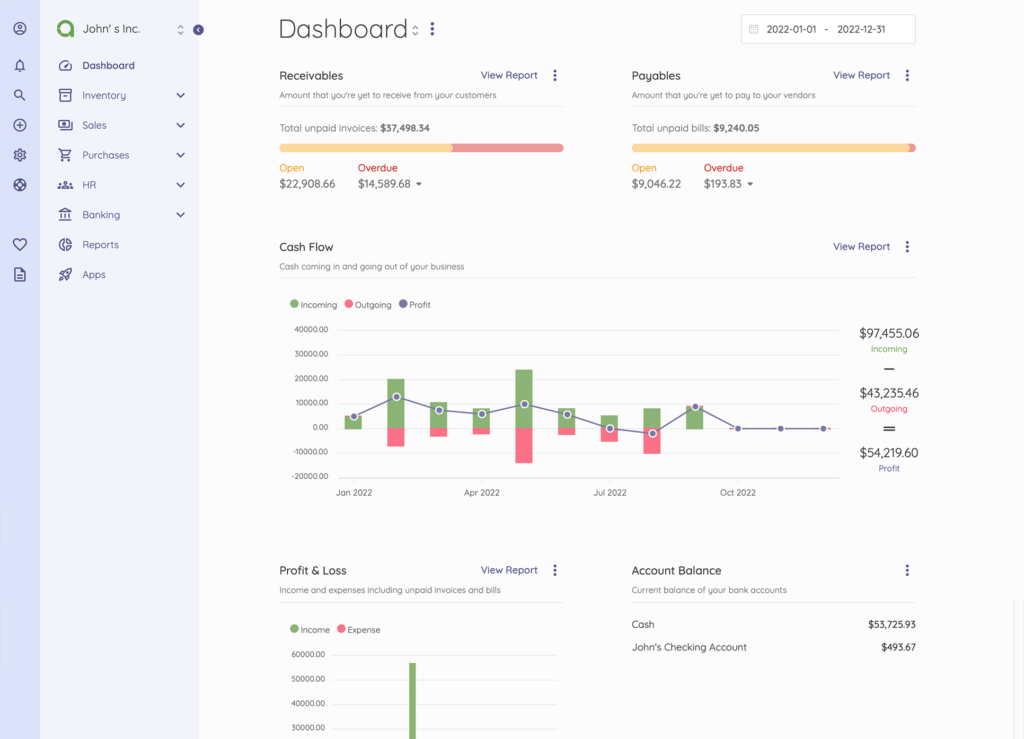
The most feature-rich web-based option. Invoicing, expense tracking, bank reconciliation (manual import), multi-currency support, and financial reporting.
The catch: while the core is open-source, many useful features on the cloud version (recurring invoices, payment tracking, and inventory) require paid plugins. Self-hosting gives you the full experience but means running your own web server.
User reviews are mixed. People praise the interface but criticize the upsell model on the hosted version.
Invoice Ninja
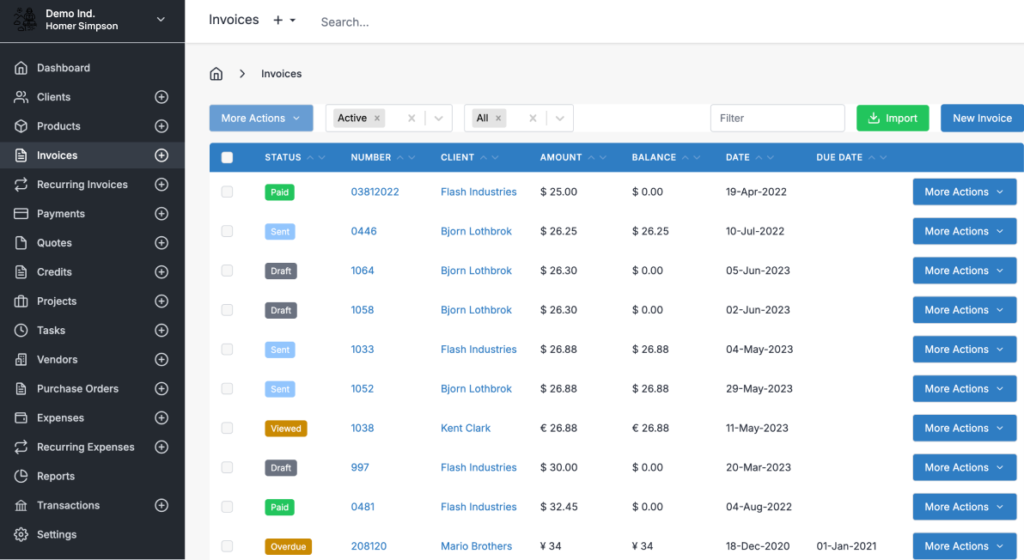
This isn’t full accounting software.
It’s an invoicing and billing platform that handles quotes, proposals, time tracking, and payment processing. If your accounting mostly means sending invoices and tracking who’s paid, Invoice Ninja does that well. Self-hosted is free.
The hosted version, priced at $10 to $14 a month, is far cheaper than QuickBooks. But you’ll still need a separate tool or a spreadsheet for expense tracking and tax prep.
Note: If billing is the main problem you are trying to solve, choosing an invoicing tool for freelancers may make more sense than replacing QuickBooks with another full accounting system.
Bigcapital
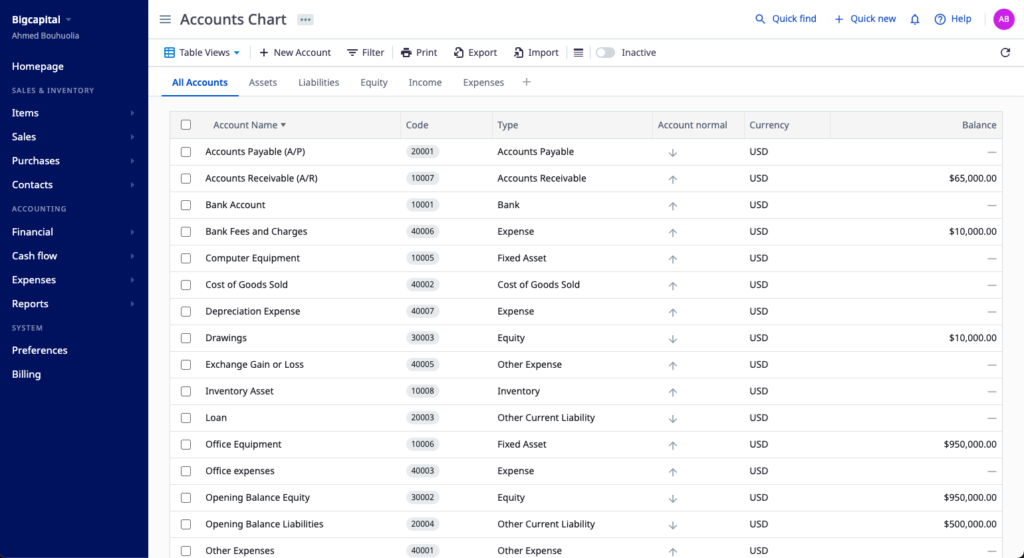
The one to watch. It’s the only open-source accounting tool that connects to your bank account via Plaid for automatic transaction imports.
Modern UI, double-entry accounting, and financial reporting. But it’s young (launched around 2022), the team is small, and documentation is thin.
Promising, but probably not ready to bet your tax compliance on it if reliability matters to you right now.
Which Open Source QuickBooks Alternatives Fit Your Situation?
The five tools above each suit a specific kind of freelancer. Use this to narrow down before you download anything.
| If you are… | Best tool | Why |
| A writer, designer, or consultant who wants something that just works | Frappe Books | Cleanest interface, fastest setup, no server needed. Free forever. |
| An accounting nerd who wants total control | GnuCash | True double-entry, mature, handles complex books. Ugly but powerful. |
| A freelancer whose bookkeeping is mostly invoicing | Invoice Ninja | Built for billing. Hosted version at $10–$14/mo is the easiest QuickBooks escape. [Create a free account →] |
| Technical and want web-based access from anywhere | Akaunting | Self-hosted, modern interface, multi-currency. Plan on a weekend to set up. |
| An early adopter willing to test something new | Bigcapital | Only one with automatic bank feeds. Promising but young — keep a backup system. |
| None of the above | Wave or Zoho Books | Free commercial tools. Less hassle, faster, CPA-friendly. |
Accounting is only one part of running an independent business. Freelance management tools can cover the surrounding workflow — including projects, contracts, time tracking, client communication, and payments — while your accounting platform remains focused on the financial records.
What Do You Lose by Using Open Source QuickBooks Alternatives?
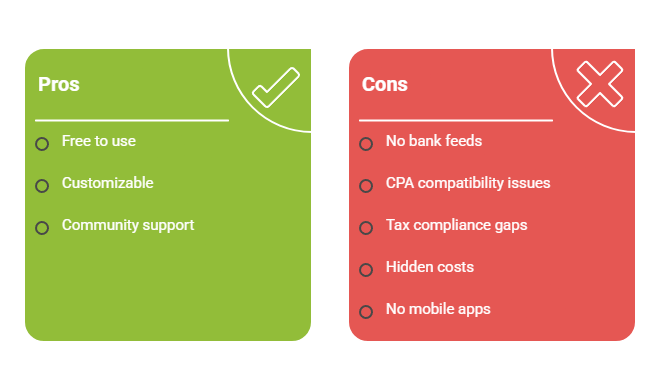
Automatic bank feeds, CPA compatibility, tax automation, phone support, and polished mobile apps. These aren’t minor inconveniences. For most freelancers, they’re dealbreakers.
Bank feeds are the big one.
- Only BigCapital has automatic bank imports, and it’s still maturing
- Every other tool requires you to export transactions from your bank and import them manually
- 20–30 transactions a month? Manageable. 200+? A real time sink.
CPA compatibility is the second issue.
- Your accountant expects QuickBooks or Xero
- Open-source tools can export CSV and PDF reports, a CPA can work with — but no accountant is logging into your self-hosted Akaunting instance to collaborate on your books
- If your CPA insists on direct access, open source is a non-starter
Tax compliance is another gap.
- No open-source tool generates 1099s, calculates quarterly estimated taxes, or handles US payroll
- You’ll need separate tools or a CPA for all of that
And then there’s the hidden cost of “free.”
If you value your time at $50 an hour and spend 10 hours setting up and maintaining an open-source tool, you’ve already spent $500. That’s more than a full year of Wave’s free accounting plan or two years of Zoho Books‘ free tier.
These trade-offs are the reason why open source QuickBooks alternatives are not the default choice for most freelancers.
Can You Actually Move Your Data Out of QuickBooks?
Yes. QuickBooks exports to CSV, Excel, and IIF formats, and most open-source tools can import CSV transaction data.
The cleanest approach is to start fresh at a fiscal year boundary.
Export your historical data from QuickBooks, archive it, and begin the new year in your open-source tool with opening balances carried over. Trying to import years of transaction history into GnuCash or Akaunting is technically possible, but rarely worth the headache.
Keep your QuickBooks exports stored somewhere safe, regardless of what you switch to. Your CPA may need historical data for comparison, and the IRS recommends keeping records for at least three years from the date you file.
If you’re making the switch, do it in the summer when things are quieter. Never migrate accounting systems during tax season.
When Are Open Source QuickBooks Alternatives the Wrong Choice?
If you don’t want to do manual bank imports, if your accountant requires QuickBooks access, or if you’d rather spend money than time on setup, a commercial tool will serve you better.
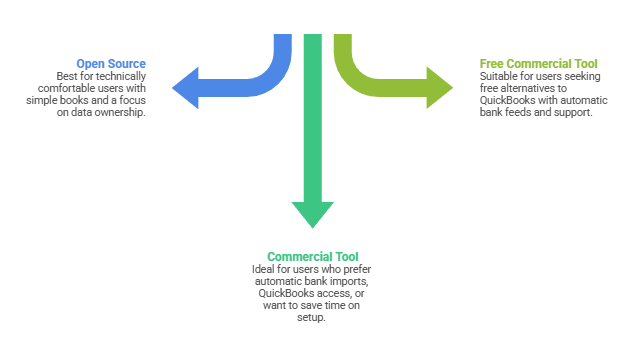
Open source works for you if:
- You’re technically comfortable — or willing to learn
- You have simple books with fewer than 50 transactions a month
- Data ownership matters to you
- You don’t need your CPA to log in directly
A freelance developer or consultant with a handful of clients and straightforward expenses is the ideal candidate.
Open source probably isn’t right if:
- You want bank feeds to work automatically
- You need payroll or 1099 generation
- Your CPA requires QuickBooks
- You don’t want to think about server maintenance
- You’d rather spend $20/month than 10 hours on setup and upkeep
That covers most freelancers, honestly. And there’s no shame in it.
Just want to escape QuickBooks pricing? You don’t need open source for that.
- Wave is free (not open-source, but free)
- Zoho Books has a free plan for businesses under $50K in annual revenue
- Both have automatic bank feeds, proper support, and CPA-friendly reports
If you want a full comparison of commercial options before you decide, check out our guide to the best accounting software for freelancers — it compares the six tools worth considering and helps you pick the right one for your situation.
The Bottom Line about Open Source QuickBooks Alternatives
The Bench shutdown proved that depending on a single vendor for your financial data carries real risk. Open source QuickBooks alternatives solve that problem. Your data sits on your hardware, under your control, and no company’s business decisions can take it away from you.
But it solves it at the cost of convenience, automation, and professional support. For the right freelancer (technically comfortable, simple books, willing to trade manual imports for independence), Frappe Books is the easiest starting point, and GnuCash is the most powerful.
For everyone else, the better escape from QuickBooks is probably a commercial tool that costs less and does more.
Note: Software is only one part of freelance finance, however. You still need a broader system for managing irregular income, taxes, reserves, insurance, and long-term financial planning.
Frequently Asked Questions
Is there an open source equivalent to QuickBooks?
Yes. Popular open source QuickBooks alternatives include GnuCash, Frappe Books, Akaunting, and Bigcapital. They offer greater control over your data and can eliminate subscription costs, but they often require more manual work and lack features such as automatic bank feeds, tax automation, and direct CPA collaboration. For many freelancers, a low-cost commercial tool may be the more practical choice.
What is the best open source accounting software for freelancers?
The best option depends on your needs. Frappe Books is often the easiest choice for beginners, while GnuCash offers the most powerful accounting features. Freelancers who prefer a web-based solution may prefer Akaunting or Bigcapital.
Is Zoho Books really free?
Yes, Zoho Books offers a free plan for businesses with annual revenue below $50,000. However, the free tier comes with usage limits, and growing businesses may eventually need to upgrade to a paid plan for additional features and capacity.
Can I move my data from QuickBooks to an open source accounting tool?
Yes. QuickBooks allows you to export financial data in formats such as CSV and Excel, which can then be imported into many open source accounting platforms. Most freelancers find it easiest to switch at the beginning of a new tax year.
What do you lose when switching from QuickBooks to open source software?
Most open source accounting tools lack the convenience features that QuickBooks users are accustomed to, such as automatic bank feeds, tax automation, accountant collaboration, and dedicated customer support. In exchange, you gain greater control over your data and avoid ongoing subscription fees.
Related guides: accounting software for freelancers · bookkeeper software · best accounting software for small consulting business · freelance finance · best invoicing tool for freelancers · freelance management tools · freshbooks vs quickbooks