How to Pick the Best Accounting Software for Freelancers
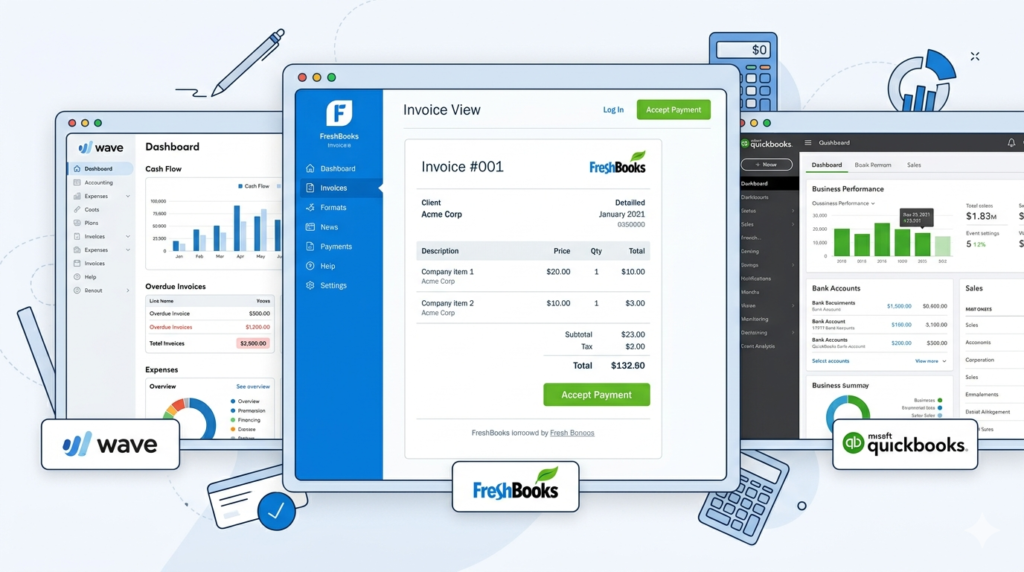
You didn’t start freelancing to spend hours dealing with accounting software for freelancers, categorize bank transactions, work out your tax, and poring over a Google spreadsheet.
Perhaps you tried a new accounting template you saw on YouTube, but the formulas broke, and now you can’t fix it.
Yet somewhere between landing your first client and filing your first quarterly tax estimate, you realize the money side of freelancing can’t run on guesswork and a prayer.
Fortunately, you don’t need to start wearing the accountant hat. The right accounting software for freelancers handles the hard work for you — and there are more good options now than ever.
Based on common freelancer use cases across designers, copywriters, consultants, and other service-based professionals, this guide breaks down what to look for, compares the six tools actually worth your time, and walks you through getting set up in about an hour.
Do Freelancers Really Need Accounting Software?
If you’re invoicing more than a handful of clients or earning over $10K a year freelancing, yes. Dedicated software saves you hours every month and prevents expensive mistakes at tax time.
Spreadsheets work fine when you’ve got two clients and ten transactions a month. But they break down fast. One missed invoice here, a miscategorized expense there, and suddenly you’re staring at a tax bill you didn’t see coming.
It’s one of the most common pain points we see across freelancers in every niche — from web designers to virtual assistants.
The IRS requires freelancers to pay estimated taxes quarterly if they expect to owe $1,000 or more. That means tracking income and expenses in real time, not scrambling through bank statements in April.
Accounting software for freelancers automates most of this. What takes three hours manually takes about fifteen minutes with the right setup, although the exact features vary considerably between different types of bookkeeper software.
And if you’re still early (just a client or two, under $10K), a spreadsheet is honestly fine for now. At that stage, building good financial habits and following a few basic accounting tips is usually more important than upgrading to more advanced software. Many freelancers start with Excel-based accounting systems before moving to dedicated software. You’ll know when you’ve outgrown it.
Managing taxes is only part of the picture though – cash flow management tools for freelancers might be worth considering to avoid running out of money between payments.
What Should You Look for in Accounting Software for Freelancers?
Focus on five things: invoicing features, tax support, bank connections, integrations with how you get paid, and whether your accountant can work with it.
A photographer who sends proposals and collects deposits has different needs than a copywriter who invoices monthly and tracks billable hours.
A consultant billing retainer clients every month needs something different again. So if you are running a consulting business instead of solo freelancing, you may want to compare this with our guide on the best accounting software for small consulting businesses.
Regardless of your type of business, before you compare pricing pages, ask yourself a few questions.
Do you bill hourly, by project, or on retainer? If you’re tracking time, you need built-in time tracking, and not all freelance bookkeeping tools have it.
Do you want help with quarterly tax estimates and Schedule C categories? Some tools handle this automatically. Others don’t touch taxes at all.
This can also make it much easier to track freelance tax deductions throughout the year instead of sorting through expenses when tax season arrives.
Budget matters too, obviously, especially if you’re also comparing other types of finance software alongside your accounting platform. There are genuinely good free options (more on that below), but know what you’re trading off.
And don’t forget to ask your CPA what they prefer before you commit.
Freelancers on Reddit call it the “CPA boomerang.” You pick a tool, get comfortable with it, and then your accountant tells you they only work with QuickBooks. Now you’re migrating mid-year. Save yourself the headache and check first.
The Best Accounting Software for Freelancers Compared
Here are the six best accounting tools for freelancers in 2026 — Wave, QuickBooks Solopreneur, FreshBooks, Xero, Zoho Books, and Bonsai. Each fits a different type of freelancer and budget.
| Tool | Starting Price | Best For | Standout Feature |
| Wave | Free (Pro: $16/mo) | Best free option | Free double-entry accounting |
| QuickBooks Solopreneur | $20/mo | Best for tax prep | TurboTax integration |
| FreshBooks | $23/mo | Best for invoicing & time tracking | Client portal + payment reminders |
| Xero | $20/mo | Best for scaling freelancers | 1,000+ app integrations |
| Zoho Books | Free (<$50K revenue) | Best value overall | Most generous free tier |
| Bonsai | $25/mo | Best all-in-one for creatives | Contracts + proposals + accounting |
Pricing verified March 2026. Introductory discounts excluded.
Wave — Best Free Option
Wave is the best free accounting software for freelancers — full stop. It offers real double-entry accounting, not simplified bookkeeping, completely free. Unlimited invoicing, financial reports, and estimates on the free Starter plan.
The catch? Bank auto-import now requires the $16/mo Pro plan (this changed in 2024 and caught a lot of longtime users off guard).
Wave is owned by H&R Block, so there’s a built-in tax filing integration too. If you’re earning under $50K and your needs are straightforward — which covers most solo copywriters, tutors, and consultants in their first few years — Wave handles it.
If you are specifically looking for open source or free QuickBooks alternatives, there are a few other solid options worth comparing.
QuickBooks Solopreneur — Best for Tax Prep
QuickBooks Solopreneur (formerly Self-Employed) is the clear winner if tax season is your biggest headache. It automatically separates business and personal expenses, tracks mileage via GPS, and maps everything to IRS Schedule C categories.
The real selling point is the TurboTax integration — come tax season, your data flows straight into your return.
But be honest about what it is: simplified bookkeeping, not full accounting. There’s no balance sheet, and if you outgrow it, migrating to QuickBooks Online isn’t as smooth as you’d expect. Best suited for sole proprietors with relatively simple finances who want tax prep on autopilot.
FreshBooks — Best for Invoicing & Time Tracking
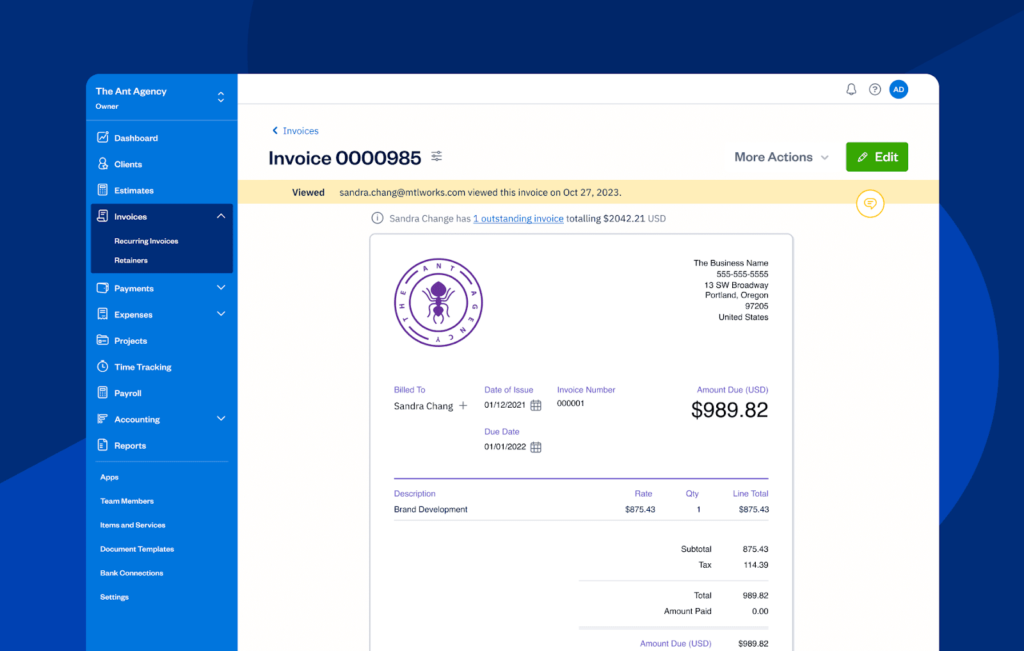
FreshBooks has the best invoicing experience of any accounting app for freelancers on this list. Clean interface, built-in time tracking on every plan, automated payment reminders, and a client portal that actually looks professional.
The Lite plan is $23/mo but caps you at five billable clients, and that counts historical clients, not just active ones. If you’re a service provider who lives and dies by your invoices — think graphic designers, consultants, or marketing freelancers billing hourly — FreshBooks is the one. Less useful if you don’t send many invoices.
For a more direct comparison with QuickBooks, see our FreshBooks vs QuickBooks guide, which breaks down the differences in invoicing, accounting features, pricing, and tax support.
Xero — Best for Scaling Freelancers
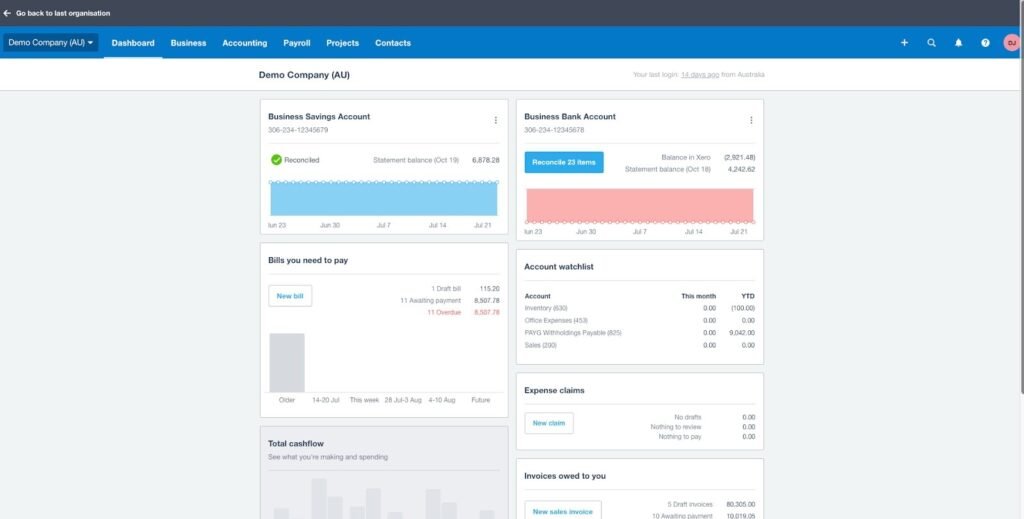
Xero is the freelance accounting software that freelancers tend to grow into. Its integration library is enormous (over 1,000 apps), every plan includes unlimited users, and bank reconciliation is genuinely excellent.
The Early plan starts at $20/mo but caps invoices and bills, so most freelancers end up on Growing at $47/mo. Steeper learning curve than FreshBooks or Wave, but more powerful under the hood.
If you already work with an accountant or plan to scale past solo freelancing — maybe hiring subcontractors or building a small agency — Xero is worth the ramp-up time. It’s the tool most UK and Australian accountants prefer, which matters if you’re working internationally.
Zoho Books — Best Value Overall
Zoho Books is the quiet value pick that more freelancers should know about. Its free plan covers businesses earning under $50K a year and includes invoicing, expense tracking, and basic reports. That’s more than Wave’s free tier in some respects. Paid plans start at $20/mo.
The interface isn’t as polished as the competition, and the US user community is smaller, but the feature-to-price ratio is hard to beat. If you’re already using other Zoho products (CRM, Projects, etc.), the ecosystem integration is a bonus.
Bonsai — Best All-in-One for Creatives
Bonsai takes a different approach entirely. It combines contracts, proposals, invoicing, CRM, and accounting into one platform. Starts at $25/mo per user.
The accounting features aren’t as deep as a dedicated tool like Xero or even Wave, but that’s not really the point. The workflow integration is. Based on what we’ve seen across creative freelancers — designers, photographers, videographers, and brand consultants — the biggest time-saver isn’t a better spreadsheet, it’s not having to switch between four different apps. That’s where Bonsai wins.
Is Free Accounting Software Good Enough?
For freelancers earning under $50K with straightforward invoicing needs, yes. Wave’s free plan or Zoho Books’ free tier handles everything you need to stay organized and tax-ready.
But “free” doesn’t mean “no cost.” Wave charges 2.9% + $0.60 per credit card transaction for payment processing. If you invoice $50K a year through Wave, that’s roughly $1,500 in processing fees. Zoho’s free plan limits you to one user and doesn’t include bank connections.
Worth noting: free options are shrinking across the industry. Wave’s shift to tiered pricing in 2024 moved features that were previously free (bank auto-import, receipt scanning) behind a paywall.
If a free tier works for you today, great. But plan for the possibility that it won’t stay free forever.
The honest test? If you’re spending more time working around your free tool’s limitations than a $16–23/mo subscription would cost in billable hours, it’s time to upgrade—or consider desktop accounting software without subscription if you prefer a one-time purchase. For QuickBooks specifically, our QuickBooks Online vs Desktop comparison explains which versions are still available, how Online and Desktop differ, and who Desktop still makes sense for. Most freelancers we’ve spoken to hit that tipping point somewhere around the $30–50K revenue mark or when they pass five regular clients.
How to Set Up Accounting Software for Freelancers
Open a separate business bank account, connect it to your accounting software, set up your expense categories, and automate as much as possible. The whole process takes about an hour.
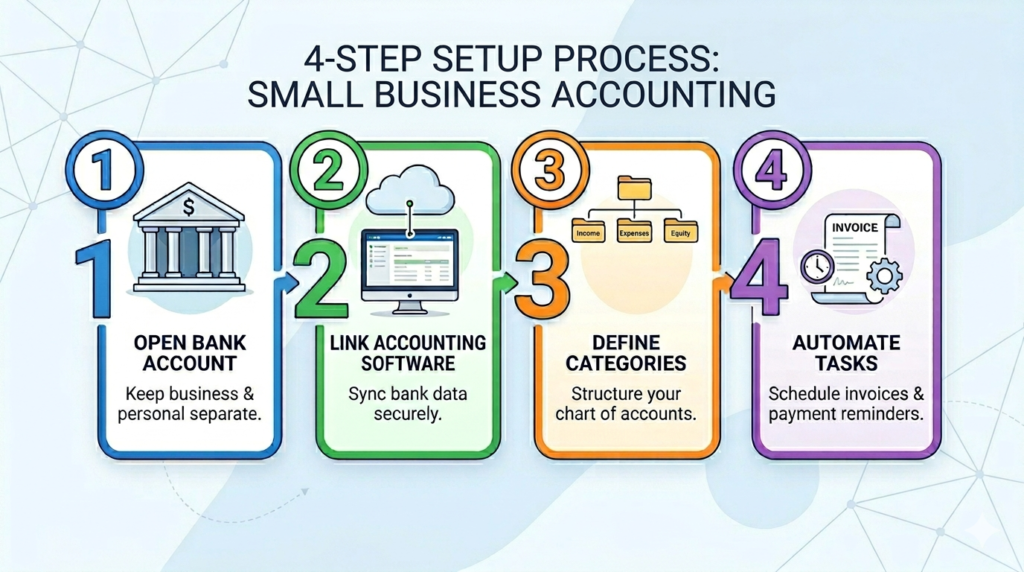
Seriously, step one is a dedicated bank account.
According to SCORE’s small business guidelines, mixing personal and business finances is one of the most common mistakes new freelancers make, and it’s one of the easiest to fix. Most online banks offer free business checking, but it’s worth comparing bank accounts before opening one since fees, interest rates, and business features vary considerably.
Once your account is open, connect it to whichever tool you picked. Set up expense categories that match the IRS Schedule C categories: advertising, office expenses, professional services, and travel. Your software probably has templates for this.
Then automate what you can. Set up recurring invoices for retainer clients. Turn on payment reminders. If your tool supports it, connect PayPal or Stripe so incoming payments are automatically categorized.
If you also manage multiple client agreements, it’s worth tracking contracts and expenses together so you always know what you’ve agreed to, what you’ve spent, and what you’re still owed.
And build one small habit: spend fifteen minutes every week reviewing transactions and categorizing anything the software didn’t catch. That’s it. This is the workflow most solo freelancers settle into within their first few months — fifteen minutes a week keeps you tax-ready year-round.
Set aside 25–30% of every payment for taxes, and you won’t be surprised by a quarterly estimate again.
When Should You Switch or Upgrade Your Accounting Software?
Switch when you’re spending more time working around your tool’s limitations than a paid upgrade would cost. That’s usually around $50K in annual revenue or 10+ active clients.
The most common path looks like this: spreadsheets to Wave, then Wave to FreshBooks or Xero once the business grows. Some freelancers skip the free stage entirely and start with QuickBooks because their accountant told them to. That’s fine too.
One piece of timing advice: never switch tools during tax season. Do your migration in the summer when things are quieter. Export your data, set up the new tool, run them side by side for a month, then cut over.
And if bookkeeping still makes you want to pull your hair out, even with good software? That’s when you hire a bookkeeper. A decent one costs $200–400/mo and gives you back hours of your time every week, which should be worth way more than that.
There’s a point where that trade-off makes sense, and good freelance accounting software makes their job easier, too.
Pick the Right Freelance Accounting Software and Start
The best accounting software for freelancers is the one you’ll actually use. Consistently. Every week.
But accounting software is only one part of freelance finance. It helps you record what happened, while the broader financial system also has to cover irregular income, taxes, cash reserves, insurance, and long-term planning. A simple cash flow projection template can help you see what’s coming before a slow month catches you off guard — and help you spot potential cash flow problems before they become serious. If you want to automate that process, cash flow forecasting software can handle the projections for you and update them as your numbers change.
If you’re just getting started, Wave’s free plan is the smartest first move. If you already know you need strong invoicing, go with FreshBooks. And if tax season gives you nightmares, QuickBooks Solopreneur exists specifically for that.
And if you’re earning enough that you have an accountant, ask them what freelance bookkeeping software they prefer — then do what they say.
Don’t overthink it. Pick one, set it up this weekend, and get back to the work you actually started freelancing to do.
Frequently Asked Questions
What is the best accounting software for freelancers?
For most freelancers, Wave is the best place to start — it’s free, offers real double-entry accounting, and handles invoicing and basic reporting without a subscription. If you need strong invoicing and time tracking, FreshBooks is the better pick. And if tax prep is your priority, QuickBooks Solopreneur is purpose-built for that.
Do freelancers really need accounting software?
If you’re earning over $10K a year or invoicing more than a few clients, yes. Dedicated accounting software for freelancers automates expense tracking, invoicing, and tax prep — saving most freelancers several hours a month compared to spreadsheets. Below that threshold, a simple spreadsheet is fine. But remember that accounting software is only one piece of a complete financial plan as a freelancer.
Is free accounting software for freelancers good enough?
For freelancers earning under $50K with straightforward needs, free tools like Wave or Zoho Books cover the essentials. But free plans come with trade-offs — limited bank connections, transaction fees on payments, and features that may move behind a paywall over time. If you’re regularly working around limitations, a $16–23/mo paid plan is usually worth the upgrade.
What accounting software for freelancers do most people use?
Based on common usage across designers, copywriters, consultants, and other self-employed professionals, Wave and QuickBooks are the two most popular choices. Wave dominates among budget-conscious freelancers, while QuickBooks is the default for anyone whose accountant requires it. FreshBooks is a strong third for service-based freelancers who prioritize invoicing.
Can I do my own bookkeeping as a freelancer?
Absolutely. Most solo freelancers handle their own bookkeeping — especially in the early years. The key is choosing accounting software that automates the repetitive parts (bank imports, expense categorization, recurring invoices) so your weekly time commitment stays around fifteen minutes. Once you’re earning $75K+ or your finances get more complex, a bookkeeper ($200–400/mo) can be a smart investment.
How much should a freelancer spend on accounting software?
Most freelancers spend between $0 and $25/mo. Free plans from Wave or Zoho Books work well under $50K in revenue. Mid-range options like FreshBooks ($23/mo) or QuickBooks ($20/mo) make sense once you need stronger invoicing, time tracking, or tax features. Spending more than $50/mo on accounting software alone is rarely necessary for a solo freelancer.