What are the Best Tools for Managing Freelance Teams?

Picture your current roster. If you’re searching for the best tools for managing freelance teams, you probably recognize this setup: a designer pulled in for this launch, a developer hired for a six-week sprint, maybe an editor who picks up overflow.
Four time zones. Four contracts. Not one of them works only for you.
Now try to run that group the way you’d run a team of employees — set hours, a shared office rhythm, one payroll run — and watch it fall apart by Wednesday.
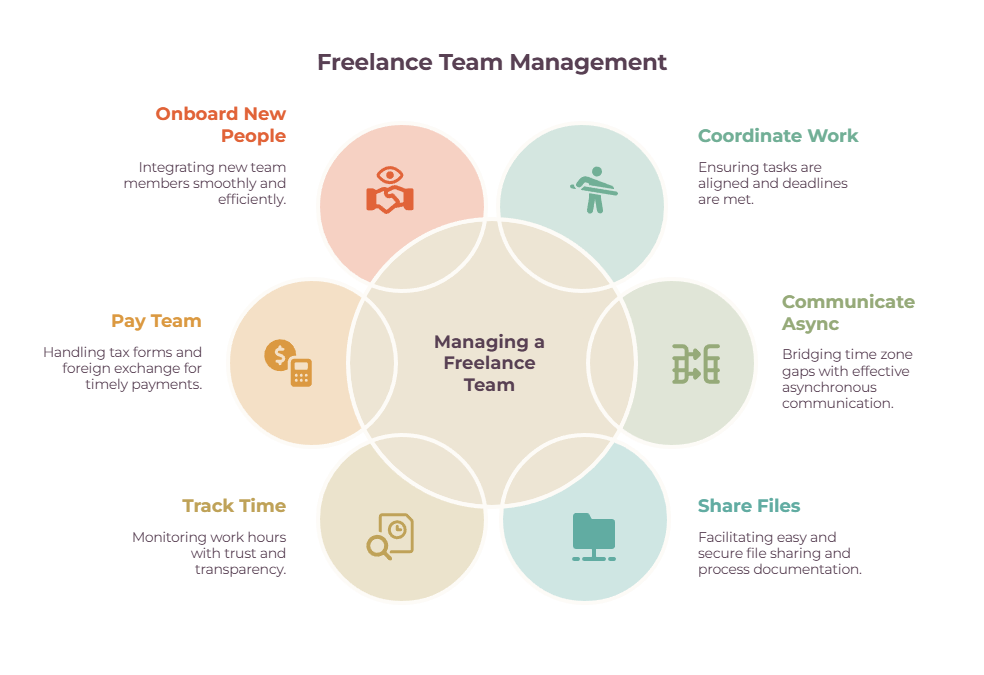
Managing a freelance team is its own discipline. It’s also why “what’s the best tool?” is the wrong question. There isn’t one. What you need is a small stack, each tool solving a specific job, a distributed, ever-changing roster throws at you:
- Coordinating the work
- Communicating across time zones
- Keeping files and processes straight
- Tracking time
- Paying everyone
- Bringing new people on
Get the jobs clear, and the tools pick themselves. This guide walks all six, plus the glue that holds them together.
It’s the team-level companion to our piece on how to assign tasks to freelancers, which covers briefing one person well — that’s the prerequisite skill; this is about coordinating many at once.
And it’s no longer niche: 64 million Americans freelanced in 2023 — 38% of the workforce, by Upwork’s count. Managing a team of them has quietly become a mainstream operating skill.
Quick Takeaways
- There’s no single best tool: you build a stack around six jobs — coordinate, communicate, share files, track time, pay, and onboard.
- Managing a freelance team isn’t managing employees: no shared office, no payroll, different time zones and contracts, and a roster that keeps changing.
- Paying a fluid roster is the hard part: W-9s, 1099s, international contractors, and currency conversion — not one simple transfer.
- The 1099-NEC reporting threshold jumped from $600 to $2,000 for 2026 — the first increase since the $600 figure was set in the 1954 tax code.
- Start lean and add a tool only when the pain is actually there; a full freelance management system earns its keep around 10+ contractors.
Job 1: Coordinate work with the best tools for managing freelance teams
The backbone of the whole operation is one place where you can see who’s doing what, by when, and what’s stuck — with guest access so each contractor only sees their own lane.
| Tool | Best for | Free tier | 2026 price (billed annually) | Main limitation |
| ClickUp | Budget teams wanting depth | Yes (unlimited members) | ~$7/user/mo Unlimited | Learning curve, 2–4 weeks |
| Asana | Cleanest experience | Up to 10 users | ~$11/user/mo Starter | Time tracking gated to higher tiers |
| Monday | Visual dashboards | 2 users | ~$12/user/mo Standard | 3-seat paid minimum |
| Trello | A solo operator with a few contractors | Generous | ~$5/user/mo | Not built for complex dependencies |
| Notion | PM plus knowledge base in one | Yes | ~$10/user/mo Plus | Not a dedicated PM engine |
If you only adopt one tool from this whole guide, make it this one. A shared project board is what stops the “wait, who’s handling the homepage copy?” panic, because the answer is always visible instead of buried in your memory or someone’s inbox.
ClickUp has the most generous free tier in the category and bends to almost any workflow, at the cost of a steep learning curve.
Asana is the one I reach for when I want something a new contractor can understand in five minutes, though its time tracking and portfolio views sit on pricier tiers.
Trello is perfect when you’re running two or three people, and a full project tool would be overkill. Notion doubles as your knowledge base if you’d rather keep tasks and documentation under one roof.
Whichever you pick, set it up so each freelancer sees only their assignments, not the whole company’s. Our deeper guides to the best project management software for freelancers and task management tools break these down feature by feature.
Job 2: Communicate async-first across time zones
A distributed roster can’t run on real-time meetings. Lead with async updates in your project tool, add a few overlap hours for the things that genuinely need a conversation, and write your communication norms down so a new contractor doesn’t have to guess.
The mistake here is importing the always-on, instant-reply expectation from an in-house team. Your freelancers are asleep, on another client, or deliberately heads-down when your message lands, and that’s fine.
Slack is the default, with a channel per client or project and guest access for contractors, but watch two things: per-user pricing climbs fast, and it can become a productivity sink.
More than one agency owner will tell you to hold off on Slack entirely until you’ve got five to ten people, because below that, it’s just another inbox to check.
Microsoft Teams is the cheaper move if you already live in Microsoft 365.
And Loom is the quietly essential one: instead of scheduling a call across three time zones to explain something visual, you record a two-minute walkthrough once, and everyone watches it when they’re awake.
The habit that makes all of this work is separating your internal team chatter from client-facing channels, and writing a short norms doc — where to ask questions, what response time is realistic, where decisions get recorded — so a new contractor can self-serve instead of pinging you to learn the rules.

This is what lets the team scale without you becoming the bottleneck for every question. Keep one source of truth for files and brand assets, and write your processes down once, so onboarding runs on documentation instead of your memory.
Google Workspace is the default for a reason: real-time co-editing, shared drives, and per-user pricing that starts cheap.
Notion earns its keep as the place where your standard operating procedures, brand guidelines, and a simple freelancer database all live together, which becomes genuinely valuable the moment your roster grows past what you can hold in your head.
Dropbox is the better choice if your team moves heavy creative files all day. Whatever you use, keep your logos, fonts, and templates in one findable place so every contractor’s output lands on-brand without you having to re-explain the rules each time.
The single highest-leverage habit in this entire guide lives here: the second time you explain something to a freelancer, write it down.
A short SOP, or even a Loom, turns a conversation you’d otherwise repeat for every new hire into a link you send once. That’s how a team scales past you.
The freelance management platforms covered elsewhere in our cluster fold a lot of this onboarding documentation into one place.
Job 4: Track time and deliverables without surveilling people
Pick a trust-based time tracker, not a monitoring tool. Screenshot-and-keystroke surveillance corrodes your relationship with skilled freelancers and rarely returns what it costs you in goodwill.
| Tool | Best for | Free tier | 2026 price | Monitoring? |
| Toggl Track | Trust-based teams | Up to 5 users | ~$9/user/mo Starter | No, privacy-first |
| Clockify | Cheapest paid tracking | Up to 5 users | ~$5–7/user/mo | No |
| Harvest | Billing clients by the hour | 1 seat, 2 projects | ~$9/seat/mo Teams | No |
| Hubstaff / Time Doctor | Field or BPO teams | Trials | ~$5–7/user/mo | Yes, screenshots/activity |
There’s a values decision buried in this job, so let me be direct about it. The monitoring industry is booming — Coworker.org’s research database tracks over 550 employee-monitoring (“bossware”) products logging keystrokes, screen recordings, and webcams, and most remote workers are now subject to some form of monitoring.
For a team of skilled creative or knowledge freelancers, that monitoring almost always backfires. People who feel surveilled disengage, and the best freelancers — the ones with their pick of clients — simply won’t work that way.
Toggl and Clockify track time cleanly without any of it (note Clockify capped its free plan at five users in 2026), Harvest adds the best built-in invoicing if you bill clients by the hour, and tools like Hubstaff and Time Doctor have their place in field or BPO contexts where monitoring is genuinely expected — but not with a roster of designers and developers. Default to trust; you hired these people for their judgment.
Our time tracking guide goes deeper on the billing side.
Job 5: Pay a team of freelancers

Paying one freelancer is a single transfer. Paying a team across several countries means tax forms, currency conversion, and bulk payouts — and it’s where managing a team diverges hardest from managing one person. It’s also where most guides go quiet.
The tax mechanics (not tax advice — confirm with your accountant)
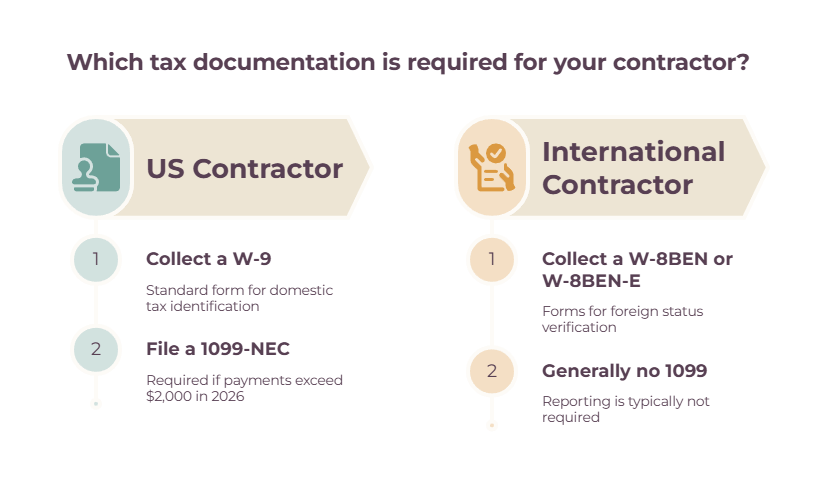
For US contractors, collect a W-9 before their first payment and file a 1099-NEC for anyone you pay at or above the reporting threshold.
That threshold matters this year, because it just rose for the first time since the $600 figure was set in the 1954 tax code: for the 2026 tax year, it went from $600 to $2,000, so the first filings under the new number cover work done in 2026 and go out in early 2027.
For contractors outside the US, you collect a W-8BEN (or W-8BEN-E for a company) instead, and if they’re non-US people doing all their work outside the country, you generally don’t issue a 1099 at all — you just keep the W-8 on file to show why.
None of this is legal or tax advice; the rules shift, and they vary by state, so run your specific setup past an accountant.
The payment tools
| Tool | Best for | Handles | Rough 2026 cost |
| Gusto (Contractor Only) | US-only rosters | Unlimited pay + auto 1099-NEC | $35/mo + $6/contractor |
| Deel | Global rosters at scale | Contracts, FX, tax forms, payouts | ~$49/contractor/mo |
| Wise | Low-cost international transfers | Mid-market FX, bulk pay | Per-transfer fee |
| Payoneer | Mass payouts, 190+ countries | Marketplace-style payments | Layered fees |
| Bill / Melio | US bill-pay inside bookkeeping | ACH, W-9 collection | Melio free to start |
For a US-only team, Gusto‘s Contractor Only plan is the cheapest correct answer, at $35 a month plus $6 per contractor, with 1099 filing handled automatically and contractors onboarding themselves.
Deel is the consolidator once you go global: compliant contracts, payment in 120-plus currencies, tax forms, and bulk payouts in one system, at around $49 per contractor per month — though watch the currency-conversion markup that doesn’t always show up itemized on the invoice.
Wise is the small operator’s favorite for direct international payments, with the mid-market exchange rate and bulk transfers, on the understanding that you handle the tax paperwork yourself.
Payoneer suits very large payout volumes, and Melio or Bill keep US contractor payments inside your bookkeeping workflow.
If a meaningful slice of your team is overseas, the single most valuable hour you can spend is comparing Deel versus Wise on total cost once you add the platform fee to the FX spread.
One thing no tool fixes, so I’ll say it plainly: pay people on time, every time. Nothing drives a great freelancer toward a more reliable client faster than chasing you for money. Treat reliable payment as the retention strategy it is.
Our guides to finance automation and cash flow management help you keep those payment runs predictable.
Job 6: Hire, onboard, and manage at scale
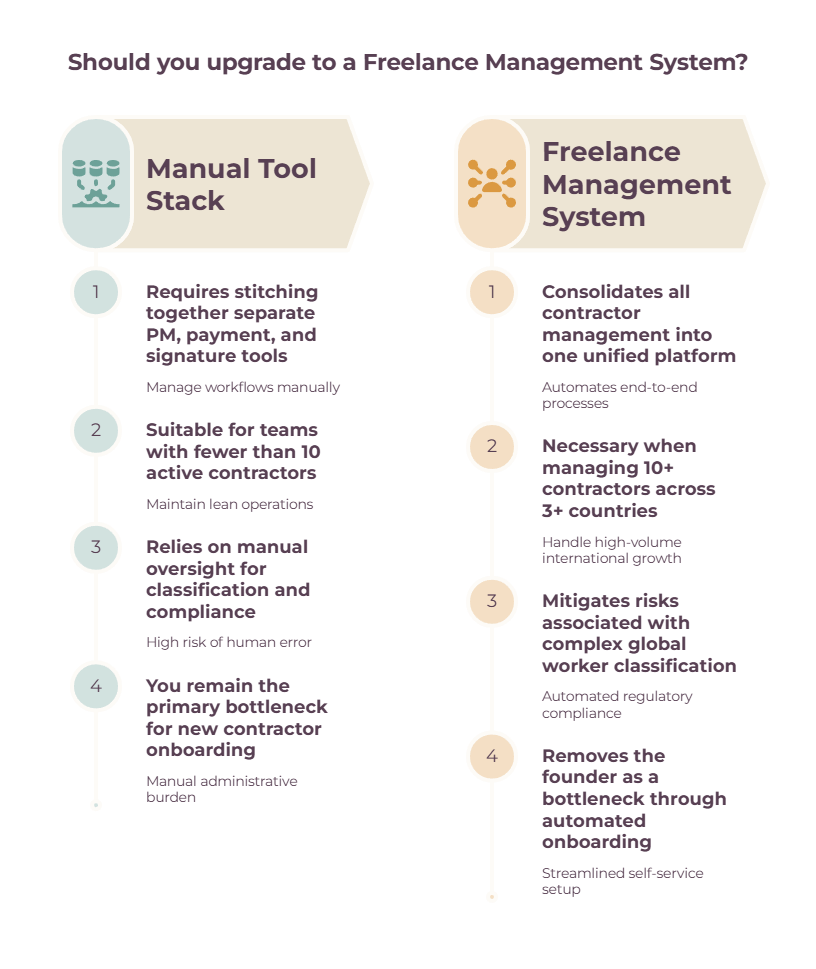
Once you’re stitching together too many separate tools — roughly past ten contractors — a freelance management system consolidates sourcing, onboarding, compliance, and payment into a single platform.
| Tool | Best for | Consolidates | Rough cost |
| Worksuite | Mid-size to large rosters | Onboarding, 1099s, payment | ~$35/contractor/mo |
| TalentDesk | End-to-end control | Onboarding, consolidated invoicing | Quote-based |
| Worksome | Bulk onboarding + classification | Compliance, misclassification cover | Small per-payment fee |
| Deel | Global, doubles as payment | Contracts, compliance, payouts | ~$49/contractor/mo |
A freelance management system (FMS) is a single platform for sourcing contractors, onboarding them with contracts and tax forms, checking classification, tracking work, and paying everyone, all in one place.
Our guide on freelancer management platforms goes deeper into what these systems do, how they differ from the tools you already use, and when they become worth paying for.
You don’t need one early.
But there’s a point — usually somewhere around ten active contractors — where the spreadsheet-and-six-apps approach stops scaling, and the compliance risk mounts, and that’s when an FMS like Worksuite, TalentDesk, or Worksome starts saving more than it costs.
Below that line, a contract tool like DocuSign or PandaDoc, plus a documented onboarding flow — contract, then tax form, then access, then SOPs — does the job fine. The point isn’t the software; it’s having one repeatable path every new freelancer walks down.
For the relationship side of running ongoing work, see how to manage freelance projects with clients.
The glue: connect your stack so it doesn’t become sprawl
A pile of apps turns into a coherent stack when they talk to each other. Zapier or Make wires the pieces together, and connecting what you already own is how you avoid buying yet another tool.
The automations that matter are unglamorous and save hours: a signed contract in DocuSign creates a contractor record in Notion, a completed task in Asana posts to the right Slack channel, and approved hours in Toggl flow toward your next payment run.
Before you buy a new tool to solve a problem, check whether two tools you already pay for can be connected to solve it instead.
That single question is the best defense against tool sprawl there is.
How to build your stack by team size
Start lean, and add a tool for a job only when that job actually starts hurting. Here’s the stack of where you are right now.

| Stage | Coordinate | Communicate | Track + Pay | Onboard |
| Solo, 2–3 freelancers | Trello / ClickUp Free | Slack Free | Wise or PayPal | Manual W-9s |
| Studio, 4–9, some international | Asana / ClickUp Unlimited | Slack Pro + Loom | Toggl + Gusto or Deel | DocuSign |
| Agency, 10+ | Keep your PM tool | Slack | FMS or Deel | FMS-managed |
If you’re running two or three freelancers, keep it almost free: a Trello board, free Slack, Google Workspace, and Wise or PayPal for payment, with W-9s collected by hand. Don’t buy an FMS, and don’t buy a monitoring tool.
As you grow into a studio of four to nine, add a proper project tool, a time tracker, Loom for async, and a proper payment layer — Gusto if you’re US-only, Deel once you’ve got people overseas — and wire them together with Zapier.
And once you’re a full agency juggling ten or more, that’s the threshold where a freelance management system or Deel’s contractor product beats stitching everything yourself, because consolidated onboarding, compliance, and one-invoice payment finally save more than they cost.
A few signals tell you it’s time to change gears:
- Crossing ten contractors or paying people in three or more countries means it’s time to look at an FMS
- International payments above a few thousand a month means run that Deel-versus-Wise comparison
- Finding yourself the bottleneck for every status update means you have an SOP gap, not a tool gap.
Avoid the classic mistakes while you’re at it: paying for overlapping apps nobody fully uses, managing freelancers like employees, leaving every process in your head, scattering decisions across DMs, and the most damaging one of all — paying late.
Where to start
The best stack isn’t the longest one. It’s the one where every tool is doing a job you actually have, and nothing is there because a listicle told you to buy it.
So map your six jobs against what you’re running today, fill only the ones that genuinely hurt right now, and let the rest wait until the team grows into them.
If you do nothing else this week, get a shared project board up and make sure your payment process is reliable — because those two jobs, knowing who’s doing what and paying people on time, are the ones that lose you,u good freelancers, fastest when they slip.
From here, the natural next steps are briefing the work well with our guide to assigning tasks to freelancers, and choosing the coordination backbone with our project management software guide.
Frequently Asked Questions
What’s the best way to pay a team of freelancers?
For a US-only team, Gusto‘s Contractor Only plan ($35/month plus $6 per contractor) handles payments and 1099 filing automatically.
For international contractors, Deel consolidates compliant contracts and payouts in one system, while Wise offers the cheapest direct transfers if you’re handling tax forms yourself. Whatever you choose, pay on time, every time.
Do I need a freelance management system?
Usually, it’s only once you’re managing around ten or more active contractors, or your compliance across states and countries gets genuinely risky. Below that, a project tool, a payment tool, and a documented onboarding flow do the job for far less money.
How do you manage freelancers in different time zones?
Lead with async communication: put updates in a shared project tool, record walkthroughs with Loom instead of scheduling calls, and reserve a few overlap hours for the things that actually need a live conversation. Write your response-time norms down so nobody’s left guessing.
What tools do agencies use to manage freelancers?
A common stack in practice is a project tool (Asana or ClickUp), Slack for communication, Google Workspace for files, a trust-based time tracker like Toggl, and a payment layer like Deel or Wise, often connected with Zapier. Larger agencies consolidate onto a freelance management system.
Related guides: freelance management tools · how to assign tasks to freelancers · best project management software for freelancers · freelancer task management tools · time tracking and invoicing software for freelancers · cash flow management tools · finance automation tools · how to manage freelance projects with clients · freelancer management platform explained