How to Choose the Best Freelance Management Tools

Every one of the freelance management tools you use eventually feeds into one question: how much money came in, how much went out, and how much do you owe the IRS?
The proposal tool generates revenue data. The time tracker measures billable work. The invoicing tool requests payment. The payment processor takes a cut. The accounting software records what’s left. And the tax return reports it all.
That makes accounting the gravitational center of your freelance business, even if it’s the last thing you set up.
Most “freelance management tools” listicles dump 30 products into categories and leave you to figure out which ones you actually need.
This guide is organized a little differently. It follows the lifecycle of money through a freelance business and recommends the best tool at each stage, at three revenue levels, with verified May 2026 pricing.
Looking for a broader software overview? Our guide to the best apps for freelancers covers the wider toolkit beyond business management, including productivity, communication, and other everyday freelance tools.
Quick Takeaways
- Every freelance tool eventually feeds your accounting — organize your stack by where the money flows, not by vendor marketing categories
- The $0/month stack (Wave + Trello + Toggl + Google Docs) covers the basics for freelancers under $50K
- Moxie at $10/month is the best all-in-one for most solos; Wave is the best free accounting tool; QuickBooks is what most CPAs expect
- Budget 1–2% of gross revenue for tool subscriptions — anything more and you’re paying for features you’re not using
- The 1099-NEC threshold rose from $600 to $2,000 for tax year 2026 under the One Big Beautiful Bill Act — most freelancer guides still show the old number
How Do Freelance Management Tools Follow the Flow of Money?
In eight stages: lead → proposal → contract → project/time → invoice → payment → bookkeeping → taxes. Every freelance management tool lives in one of these stages. The tools that matter most are the ones that hand data cleanly to the next stage, especially where money changes hands.
The first step to building a freelance management tool stack is understanding the stages through which your money flows through your business.
It generally looks like:
- The proposal becomes a contract.
- The contract defines the project.
- The project generates tracked time (if hourly) or milestones (if fixed-fee).
- Tracked time becomes invoice line items.
- The invoice triggers a payment.
- The payment becomes a bookkeeping entry.
- The bookkeeping entries become your Schedule C, your quarterly estimated taxes, and your annual return.
Every break in this chain is where freelancers lose money or time. Re-typing hours from Toggl into a Wave invoice. Manually recording a Stripe payment in QuickBooks. Searching through email for a contract you’re not sure you signed.
Those gaps aren’t always caused by the wrong software. Often, the underlying problem is that there’s no consistent process connecting one stage to the next. Here, freelance workflow management might be the better answer: creating a repeatable path every client and project follows from first inquiry through delivery, invoicing, and follow-up.
The best freelance tool stack isn’t the one with the most features. It’s the one with the fewest gaps between stages.
Some tools cover multiple stages. Moxie ($10/month), Bonsai ($21/month), and HoneyBook ($29/month) span proposals through invoicing. Some are best-in-class at a single stage. Toggl Track for time tracking. Wave for accounting.
The right combination depends on your revenue level, your billing style, and whether you already have a CPA.
Which Freelance Management Tools Handle Proposals and Contracts?
A way to send professional proposals and get contracts signed electronically. All-in-one platforms like Moxie ($10/month), Bonsai ($21/month), and HoneyBook ($29/month) bundle proposals and e-signatures with invoicing and project management. If you only need e-signatures, PandaDoc offers 5 free signatures per month and DocuSign Personal starts at $10/month.

This is where most freelance relationships start and where most payment problems are prevented. A signed contract with clear payment terms, a late-fee clause, and a defined scope is your primary protection if a client doesn’t pay.
Under the federal ESIGN Act and state UETA laws, e-signatures are legally enforceable for standard freelance contracts in all 50 states.
If you’re in New York, Illinois, California, Los Angeles, Seattle, or Minneapolis, freelance protection laws now require written contracts above thresholds of $250–$800 (depending on jurisdiction) and mandate payment within 30 days.
Penalties include double damages and attorney’s fees. These laws give your contracts real teeth, but only if you have a signed contract in the first place.
For most freelancers, the proposal-to-contract flow is the strongest argument for an all-in-one tool.
The software handles the workflow, but the agreement still needs the right terms. A freelance contract template gives you the structure for defining scope, payment, revisions, IP ownership, and cancellation before the contract goes out for signature.
Building a proposal in Moxie, getting it signed, and having the project auto-created with the agreed scope and payment schedule saves time compared to stitching together Google Docs + DocuSign + a separate invoicing tool.
The tools matter, but so does the process behind them. If you want a repeatable process for managing freelance projects and client relationships, see our guide on how to manage freelance projects with clients.
Proposals and Contracts: Tool Comparison
| Tool | Price | Best For | Link |
| Moxie | $10/mo (annual) | Solo freelancers — proposals, contracts, invoicing in one place | Visit → |
| Bonsai | $21/mo (annual) | Freelancers who also want tax prep | Visit → |
| HoneyBook | $29/mo (annual) | Photographers, event pros, client-facing creatives | Visit → |
| PandaDoc | Free (5 sigs/mo) | E-signatures only, no full proposal flow | Visit → |
| DocuSign | $10/mo | High-volume e-signatures | Visit → |
Which Freelance Management Tools Handle Projects, Time Tracking, and Invoicing?
This depends on how you bill. If you bill hourly, you need time tracking that flows into your invoicing tool. Harvest ($10.80/month), Toggl Track (free for 1 user), or the built-in trackers in Moxie, Bonsai, and FreshBooks all handle this. If you bill fixed-fee, a simple task manager (Trello free, Notion free) is enough.

The killer feature of any combined project management and invoicing tool is the time-to-invoice pipeline: track hours on a project, click “create invoice,” and the hours auto-populate as line items.
That single workflow eliminates 10–15 minutes of manual data entry per invoice.
Clockify is the only truly unlimited-free time tracker.
Toggl Track has the cleanest interface (free for up to 5 users).
Harvest is the best at turning tracked hours directly into invoices, but was acquired by Bending Spoons in 2025, and some users have reported renewal price increases since (although there’s a free plan).
These tools cover the most common setups, but time tracking software for freelancers ranges from simple manual timers to automatic trackers that record activity in the background.
Do Freelancers Really Need Project Management Software?
Most solo freelancers don’t need real project management.
They need a task list per client with deadlines. Trello (free), Notion (free), and Todoist (free for 5 projects) cover this, and for many freelancers that’s all the task management tools they’ll ever need. Once you start working with subcontractors or virtual assistants, success often depends less on the tool itself and more on assigning tasks clearly, communicating expectations, and tracking deliverables. As your contractor network grows, dedicated freelancer management platforms become a better fit for handling onboarding, compliance, contracts, and payments at scale. The software that works well for solo freelancers isn’t always the best fit once you’re coordinating a small team, especially if you need workload planning, permissions, or collaborative task management.
If you’re handling several active client projects at once, our guide to the best freelancer management tools for multi-project workflows compares the tools designed to keep deadlines, workloads, and priorities visible across projects.
If you need Gantt charts, dependencies, and workload views, Paymo ($5.90/user/month) and Avaza ($11.95/month flat) are the best values that also include invoicing.
All-in-one PM reality check: Bonsai’s “project management” is task lists. FreshBooks’ “Projects” is job-level time tracking. QuickBooks’ “Projects” is cost reporting locked behind the $115/month Plus tier. HoneyBook doesn’t have project management at all. None of these replace a dedicated PM tool if you actually need one.
For a full breakdown of the best project management software for freelancers – check out our dedicated comparison.
Time Tracking: Tool Comparison
| Tool | Price | Free Tier | Best For | Link |
| Toggl Track | Free (up to 5 users) | Unlimited tracking, 5 users | Clean, simple timer with solid reporting | Visit → |
| Clockify | Free (unlimited) | Unlimited everything | Teams needing unlimited users at $0 | Visit → |
| Harvest | $10.80/seat/mo | 1 seat, 2 projects | One-click time-to-invoice for hourly billers | Visit → |
Project Management: Tool Comparison
| Tool | Price | Best For | Link |
| Trello | Free | Simple per-client task boards with deadlines | Visit → |
| Notion | Free | Docs, databases, and tasks in one workspace | Visit → |
| Paymo | $5.90/user/mo | Gantt charts + invoicing in one tool | Visit → |
| Avaza | $11.95/mo flat | PM, time tracking, and invoicing combined | Visit → |
Which Freelance Management Tools Handle Invoicing and Payments?
If you already use accounting software (Wave, QuickBooks, FreshBooks, Xero, Zoho Books), your invoicing is built in. If you don’t, Zoho Invoice is the best free standalone invoicing tool (500 invoices/year, full branding, auto-reminders). For payment processing, Stripe (2.9% + $0.30) is the standard. ACH is significantly cheaper at 0.8% capped at $5.

Most freelancers don’t need a standalone invoicing tool. Their accounting software handles it.
For freelancers who aren’t ready for accounting software, building an invoice in Excel or Google Docs takes 20 minutes and costs nothing.
For open source and self-hosted options, Invoice Ninja handles unlimited invoices for up to 20 clients free.
But, the invoice is only half the job.
Tracking what happens after you send it is where most freelancers lose money.
The 2025 QuickBooks Late Payments Report found that 56% of US small businesses are owed money on unpaid invoices, averaging $17,500 outstanding.
Our invoice email samples cover the full 9-stage lifecycle from first send to final demand.
And if a client asks for a receipt, your invoicing tool almost certainly generates one automatically.
Payment Processing Fees Compared
| Processor | Card Rate | ACH Rate | Cost on $5K Invoice (card) | Link |
| Stripe | 2.9% + $0.30 | 0.8% (cap $5) | $145.30 | Visit → |
| PayPal | 3.49% + $0.49 | N/A | $175.00 | Visit → |
| Wave | 2.9% + $0.60 | 1% (cap $1) | $145.60 | Visit → |
| HoneyBook | 2.9% + $0.30 + 3% platform | N/A | $295.30 | Visit → |
On $100K in annual revenue, the spread between Stripe ACH and HoneyBook card processing is roughly $5,700/year. If you can get clients to pay via ACH, it’s the single biggest cost reduction in the entire stack.
Invoicing Tools: Comparison
| Tool | Price | Free Tier | Best For | Link |
| Zoho Invoice | Free | 500 invoices/yr, full branding, auto-reminders | Best free standalone invoicing | Visit → |
| Invoice Ninja | Free (self-hosted) / $10/mo cloud | Unlimited invoices, 20 clients | Open-source, self-hosted setups | Visit → |
| Wave | Free | Full invoicing + accounting | Freelancers already using Wave for accounting | Visit → |
What Tools Handle Accounting, Bookkeeping, and Financial Records?
Wave (free) is the best free accounting tool for US service freelancers. QuickBooks Online ($20–$115/month) is what most CPAs expect. FreshBooks ($21–$70/month) has the best invoicing UX for non-accountants. Xero ($25–$90/month) offers unlimited users on every plan. For desktop or perpetual-license options, GnuCash is free.
This is Stage 4, the financial core of the stack.
The IRS doesn’t care which tool you use. Publication 583 says “you may choose any recordkeeping system suited to your business that clearly shows your income and expenses.” Digital records are accepted.
What matters is that your system tracks income, expenses, and supporting documents and retains them for at least three years from filing (six years if income is underreported by more than 25%).
Our full comparison of accounting software for freelancers covers Wave, QuickBooks, FreshBooks, Xero, Zoho Books, and Bonsai side by side, but here’s the basic lowdown.
Accounting Software: Tool Comparison
| Tool | Price | Best For | Link |
| Wave | Free | US service freelancers under $150K | Visit → |
| QuickBooks Online | $20/mo | Freelancers whose CPA expects QuickBooks | Visit → |
| FreshBooks | $23/mo Lite | Non-accountants wanting cleanest invoicing UX | Visit → |
| Xero | $25/mo Starter | Freelancers sharing books with a bookkeeper | Visit → |
| Zoho Books | $15/mo | Freelancers already in the Zoho ecosystem | Visit → |
| GnuCash | Free (desktop) | Perpetual-license desktop, no subscription | Visit → |
Expense Tracking and Mileage
Wave and QuickBooks both include receipt scanning via mobile app. For freelancers who drive for work, the 2026 IRS standard mileage rate is 72.5 cents per mile (up from 70 cents in 2025).
| Tool | Price | Best For | Link |
| MileIQ | $8.99/mo | Automatic mileage tracking with IRS-ready reports | Visit → |
| Everlance | $99.99/yr | Combined mileage + expense tracking | Visit → |
| Stride | Free | Mileage tracking at zero cost | Visit → |
Which Freelance Management Tools Handle Taxes and Compliance?
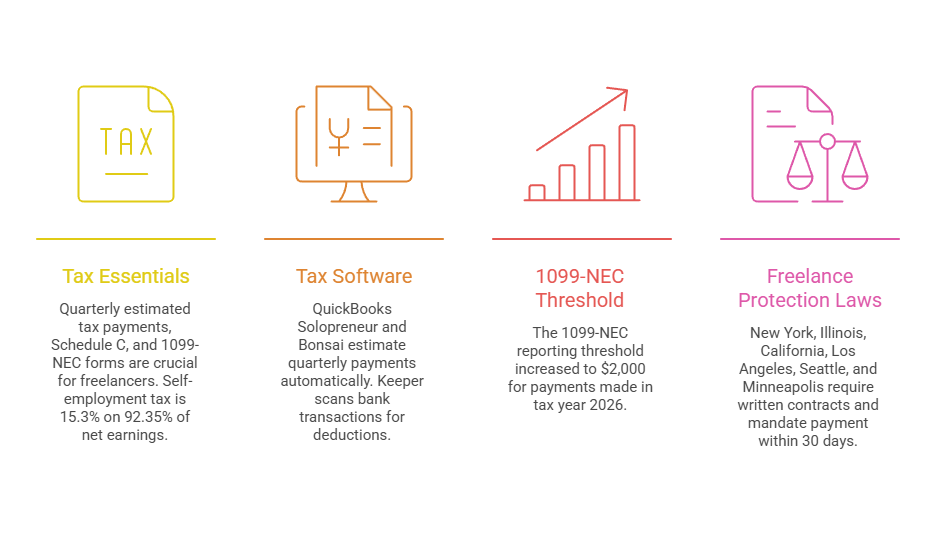
Quarterly estimated tax payments (due April 15, June 15, September 15, and January 15), Schedule C at year-end, and possibly 1099-NEC forms if you pay subcontractors. Self-employment tax is 15.3% on 92.35% of net earnings once net income exceeds $400. Most freelancers under $150K can file with FreeTaxUSA (free federal, $15.99/state).
That 15.3% self-employment tax (12.4% Social Security + 2.9% Medicare) hits hard the first time. Half is deductible above-the-line, but the quarterly payments still surprise new freelancers.
QuickBooks Solopreneur ($20/month) and Bonsai both estimate quarterly payments automatically. Keeper ($99–$399/year) scans bank transactions for deductions you might be missing.
1099-NEC threshold change for 2026: The One Big Beautiful Bill Act (signed July 4, 2025) raised the 1099-NEC reporting threshold from $600 to $2,000 for payments made in tax year 2026. If you pay subcontractors less than $2,000 each during 2026, you don’t need to file a 1099-NEC for them. The same act reverted the 1099-K threshold back to $20,000 and 200+ transactions, repealing the gradual phase-down. Most freelancer guides still cite the old $600 number.
Freelance protection laws are the compliance item most freelancers don’t know about.
New York (state and city), Illinois, California, Los Angeles, Seattle, and Minneapolis all require written contracts above thresholds of $250–$800 and mandate payment within 30 days. Penalties include double damages and attorney’s fees.
Tax Tools: Comparison
| Tool | Price | Best For | Link |
| FreeTaxUSA | Free federal / $15.99 state | Freelancers under $150K filing Schedule C | Visit → |
| QuickBooks Solopreneur | $20/mo | Automatic quarterly tax estimates + bookkeeping | Visit → |
| Keeper | $99–$399/yr | AI-powered deduction finding from bank transactions | Visit → |
| Bonsai Tax | Included in Bonsai ($21/mo+) | Tax prep baked into all-in-one | Visit → |
What Do the Right Freelance Management Tools Actually Cost?
Between $0 and $100/month for most solo freelancers. The $0 stack covers the basics. A $10–$25/month all-in-one covers most categories. A $50–$100/month best-of-breed stack is for established freelancers with a CPA. Budget 1–2% of gross revenue for tool subscriptions.
💰 The $0 Stack — $0/month
| Tool | Role | Price | Link |
| Wave | Accounting + invoicing | Free | Visit → |
| Trello | Project boards | Free | Visit → |
| Toggl Track | Time tracking | Free | Visit → |
| Clockify | Time tracking (alternative) | Free | Visit → |
| Google Docs | Proposals + contracts | Free | Visit → |
| Phone camera | Receipt capture | Free | — |
Trade-offs: No automatic time-to-invoice flow, no e-signatures, no client portal. Best for: Freelancers under $50K.
💰 The $10–$25/month All-in-One — $10–$29/month
| Tool | Covers | Price | Link |
| Moxie Starter | Proposals, contracts, projects, time, invoicing, expenses | $10/mo (annual) | Visit → |
| Bonsai Starter | Same + tax prep | $21/mo (annual) | Visit → |
| HoneyBook Starter | Best client experience | $29/mo (annual) | Visit → |
Trade-offs: Tied to one platform; PM features are basic. Best for: Freelancers earning $50K–$150K with 5–15 active clients.
💰 The $50–$100/month Best-of-Breed — $60–$100/month
| Tool | Role | Price | Link |
| FreshBooks Plus | Accounting | $43/mo | Visit → |
| QBO Simple Start | Accounting (alternative) | $20/mo | Visit → |
| Harvest | Time tracking | $10.80/mo | Visit → |
| Trello / Notion | Project management | Free | Visit → |
| DocuSign Personal | E-signatures | $10/mo | Visit → |
Trade-offs: Higher monthly cost; multiple logins. Best for: Hourly billers with a CPA who expects QuickBooks.
💰 The $150+/month Professional — $150–$350+/month
| Tool | Role | Price | Link |
| QBO Plus | Accounting | $90/mo | Visit → |
| Xero Established | Accounting (alternative) | $115/mo | Visit → |
| Teamwork | Project management | $10–$25/mo | Visit → |
| ClickUp | Project management (alternative) | $10–$25/mo | Visit → |
| Harvest | Time tracking | $10.80/mo | Visit → |
| DocuSign Standard | High-volume e-signatures | $25/mo | Visit → |
| Freelance bookkeeper | Bookkeeping | $200–$500/mo | — |
Trade-offs: Significant overhead; requires disciplined workflows. Best for: Freelancers above $200K with subcontractors and complex tax situations.
Industry Shortcuts
| Industry | Default Stack | Why | Link |
| Photographers / event pros | HoneyBook | Visual proposals, client galleries | Visit → |
| Writers / VAs | Moxie or Wave | Lowest cost, simple workflows | Moxie → / Wave → |
| Developers | FreshBooks or QBO + Harvest + Stripe | Best hourly tracking + CPA compatibility | FreshBooks → |
| Consultants | CPA’s accounting choice + Calendly | Scheduling + whatever the accountant wants | Calendly → |
Note: Some freelancers may prefer dedicated workflow platforms instead of mixing several specialized tools.
How Do You Choose the Right Freelance Management Tools?
Answer six questions: Do you bill hourly or fixed-fee? How many active clients are you juggling? Do you need proposals and contracts regularly? Are you already working with a CPA? Do you collect sales tax? And what’s your annual revenue? Based on your answers, you’ll fall into one of the four stacks above.
If you bill hourly, time tracking is essential. If fixed-fee, skip it. Should you work with a CPA, they almost certainly want QuickBooks. If you don’t, Wave or FreshBooks is fine. If you send more than 2–3 proposals a month, an all-in-one’s bundled contract flow saves enough time to justify the subscription.
So if you rarely send proposals, DocuSign Personal at $10/month or PandaDoc’s free tier will cover this.
For sales tax, most service freelancers in most states don’t collect it. If you sell digital products across state lines, Stripe Tax (~0.5% per transaction) handles calculation and filing. If you sell physical products on Shopify or Amazon, TaxJar (now Stripe-owned) automates multi-state compliance.
The meta-answer: start with the stage that’s costing you the most time or money right now. For most freelancers, that’s invoicing and getting paid. Fix that first. Build outward from there. You can always add tools later. You can’t easily undo a $100/month stack you locked into before you needed it.
Every Freelance Management Tool Is Really an Accounting Tool
The proposal defines what you’ll earn. The contract makes it enforceable. The project tracks what you deliver. The time tracker measures what you’ll bill. The invoice requests payment. The payment processor takes its cut. The bookkeeping records what’s left. And the tax return reports it all.
Pick the tools that hand data cleanly from one stage to the next. Spend 1–2% of revenue on them. And build from the financial core outward, because the IRS doesn’t care which project management app you use, but it does care that your books are right.
Frequently Asked Questions
What is the best free freelance management tool?
No single free tool covers everything, but a three-tool stack comes close.
Wave handles invoicing and accounting at $0/month with unlimited invoices and full financial reporting. Toggl Track or Clockify handles time tracking for free (both cap at 5 users).
Trello or Notion handles project boards at no cost. That’s accounting, invoicing, time tracking, and project management for $0/month. The only gaps are proposals and contracts, which Google Docs and PandaDoc’s free tier (5 signatures per month) can fill.
What is the best cheap all-in-one freelance tool?
Moxie at $10/month (annual billing). It bundles proposals, contracts, project management, time tracking, invoicing, expense tracking, and a client portal in one subscription with no per-seat pricing. T
The nearest competitors are Paymo at $5.90/user/month (stronger PM, weaker on proposals) and Bonsai at $21/month (adds tax prep but was acquired by Zoom in late 2025).
HoneyBook used to be the budget pick at $19/month, but the February 2025 price hike pushed Starter to $29/month annual.
What are the top tips for managing a freelance business?
Open a separate business checking account and card. Park 25–30% of every payment in a tax savings sub-account, because self-employment tax alone is 15.3% on top of income tax.
Pay quarterly estimates on time (2026 deadlines: April 15, June 15, September 15, January 15 2027). Send a written contract with a deposit, late fee, and kill fee on every project.
And track your time even on fixed-fee work so you can price the next project accurately.
What are good productivity tools for freelancers?
Beyond your billing and accounting stack:
- Calendly (free, or $10/seat/month) for scheduling
- Notion for notes and lightweight project tracking
- Loom for async video updates to clients
- Slack for client communication channels (free tier keeps 90 days of message history)
- Bitwarden for password management (free)
- Grammarly for editing (free tier)
- A Google Workspace or personal Google account for email, Docs, and 15 GB of Drive storage.
Is QuickBooks good for freelancers?
Yes, but the right version matters.
Intuit retired QuickBooks Self-Employed in 2024 and replaced it with QuickBooks Solopreneur at $20/month. Solopreneur handles mileage tracking, basic invoicing, and Schedule C categorization well.
The catch: it’s not full QuickBooks Online, there’s no double-entry accounting, and there’s no upgrade path to QBO.
If you outgrow it, you’ll cancel and start over on Simple Start at $38/month. For freelancers under $50K, Wave does the same job for free.
Do freelancers need a corm?
Not until you’re juggling more than about five active leads at once.
Below that, a spreadsheet or Notion board tracks everything you need. Above it, dropped follow-ups start costing real money. If you already use Moxie, Bonsai, or HoneyBook, client management is built in and a separate corm is redundant.
If you use Wave or QuickBooks (which don’t include corm), HubSpot’s free tier covers up to 1,000 contacts and two users.
How do freelancers track time?
Most use a dedicated app. Clockify is the most popular free option (unlimited tracking, 5 users).
Toggl Track has the cleanest interface (also free, 5 users). Harvest ($10.80/seat/month) is the best at turning tracked hours directly into invoices with one click.
One rule worth following even if you bill fixed-fee: track your hours anyway. It’s the only way to know your effective hourly rate per client, which tells you whether a project was actually profitable.