Ultimate Invoice Email Sample – Never Late Payments Again

Asking for money is awkward. That’s why having a good invoice email sample for every stage of the payment cycle saves you from drafting one from scratch each time.
Most freelancers have drafted a payment reminder email, stared at it for ten minutes, deleted it, rewritten it softer, then sent a version so polite it practically apologized for existing.
The fix isn’t courage. It’s having an invoice email sample ready for every situation.
One invoice email sample for each stage of the lifecycle, written in advance, ready to send when you need it. You’re not being pushy. You’re running a business.
And the data backs up the approach: FreshBooks analyzed over a million invoices and found that invoices using the word “Thank You” in payment terms were paid 89.61% of the time, compared to 78.62% for invoices without specific terms.
A polite and specific invoice email sample beats a vague and hopeful one every time.
Here are nine invoice email samples covering every stage, with subject lines and guidance on why each one works.
Quick Takeaways
- Invoices using “Thank You” in payment terms are paid 89.61% of the time vs. 78.62% baseline (FreshBooks, 1M+ invoices)
- The pre-due-date reminder is the single most effective email — most late payments are forgetting, not refusing
- 56% of US small businesses are owed money on unpaid invoices, averaging $17,500 outstanding (QuickBooks, 2025)
- The FDCPA generally doesn’t apply to freelancers collecting their own invoices — you’re the original creditor
- Tone should escalate gradually: friendly → professional → formal → legal. Never threaten an action you won’t take
What Makes an Invoice Email Actually Work?
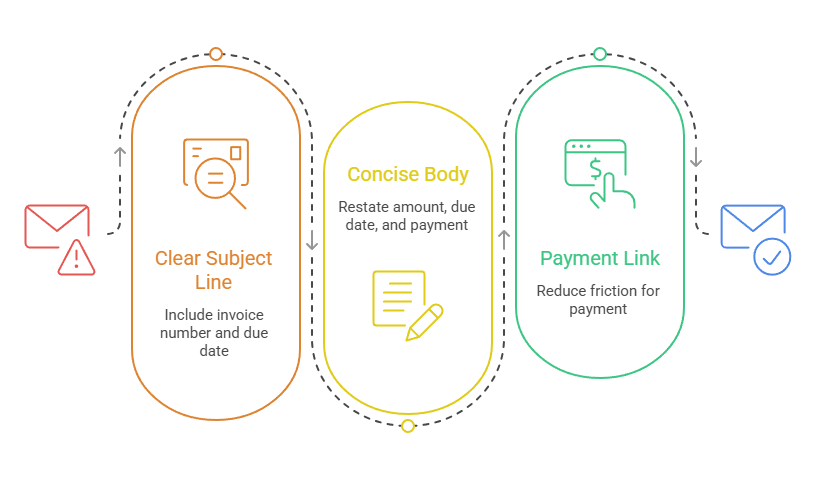
Three things: a clear subject line with the invoice number and due date, a body that restates the amount and due date in the first two lines, and a payment link or instructions that reduce the friction of paying you. Keep it short. The invoice PDF does the heavy lifting.
No major invoicing platform (QuickBooks, Wave, FreshBooks, Xero) includes the dollar amount or due date in the default email subject line. They all default to “Invoice [#] from [Business Name].”
That’s fine for the initial send, but for reminders and overdue follow-ups, adding the amount and due date to the subject line makes the email harder to ignore and easier for the client to action without opening it.
Always attach the invoice as a PDF and include a payment link in the body.
Restating the amount, due date, and payment method in the email itself means the client can act on it from their inbox without opening the attachment.
The email should take less than 30 seconds to read. No matter what stage of the payment process they’re at. Punchy, clear, no room for misinterpretation.
Invoice Email Sample: How to Email a New Client
Set the tone for the whole relationship. Reference the contract or project, explain your payment methods once, state the amount and due date clearly, and mention your late-fee policy in a single neutral line. This is the longest invoice email you’ll send. Every one after it can be shorter.
Hi [Name],
It was great working with you on [project name]. I’ve attached Invoice 2026-001 for $2,400, covering [brief description of services delivered].
Payment is due by May 30, 2026. I accept payment via bank transfer, credit card, or PayPal — details are on the invoice, and you can also pay directly here: [payment link].
Per our agreement, a late fee of 1.5% per month applies to balances past due. If you have any questions about the invoice or need anything adjusted, just let me know.
Thanks again — looking forward to more work together.
[Your name]
Why this works: It references the project (so AP knows what it’s for), states every payment detail once (so they don’t have to ask), and mentions the late-fee policy casually while the relationship is new and the tone is warm. The “looking forward to more work” close signals ongoing partnership, not a one-off transaction.
What About the Standard Invoice Email to an Existing Client?
Keep it short. Once the relationship is established, the client knows your payment methods and terms. Three to four lines is enough.
Hi [Name],
Invoice 2026-014 for $1,800 is attached, due June 15. Pay here: [payment link].
Thanks!
[Your name]
Why this works: It respects the client’s time. The subject line contains everything they need to prioritize it. The body has the amount, the due date, and the link. Nothing else is necessary.
If you’re sending invoices through software like Wave or QuickBooks, the auto-generated email follows this same pattern, and that’s fine for routine sends.
Invoice Email Sample: The Pre-Due-Date Reminder
This is the most effective email in the entire sequence. Send it 3–7 days before the due date. Most late payments happen because someone forgot, not because they’re avoiding you. A reminder before the deadline catches them while the intent to pay is still warm.
Hi [Name],
Just a quick heads-up that Invoice 2026-014 for $1,800 is due this Friday, June 15. I’ve re-attached it below for convenience.
If you’ve already scheduled the payment, feel free to ignore this. If anything needs clarifying, let me know.
Pay here: [payment link]
Thanks, [Your name]
Why this works: The “if you’ve already scheduled this” line gives them an out and avoids sounding accusatory. The tone is helpful, not naggy. Every major invoicing platform can automate this. QuickBooks, FreshBooks, Xero, and Zoho Invoice all support pre-due-date reminders. If you’re tracking invoices manually, this is the email to add to your Friday invoice review.
What Do You Say When an Invoice Is 7 Days Overdue?
Don’t overthink it. Restate the facts, reattach the invoice, include the payment link, and ask if something is blocking payment. Don’t apologize for following up on money you’ve earned.
Hi [Name],
I wanted to check in on Invoice 2026-014 for $1,800, which was due on June 15. I’ve re-attached it here for your records.
Is there anything holding up the payment on your end? If there’s a PO number I’m missing or a billing address that needs updating, I’m happy to fix it today.
Pay here: [payment link]
Thanks, [Your name]
Why this works: Reattaching the invoice eliminates the “I never received it” excuse. The “is something blocking payment” question gives the client a face-saving reason to respond (a missing PO number, an internal approval, a billing-address issue) without either of you having to acknowledge that they simply forgot.
It’s also doing diagnostic work: if there’s a real dispute, this is where it surfaces.
How Do You Write a Firmer Follow-Up at 14 Days Overdue?
This is where the tone shifts from friendly to professional. Reference your original payment terms, mention late fees if your contract includes them, and ask directly whether there’s an issue with the invoice itself.
Hi [Name],
I’m following up again on Invoice 2026-014 for $1,800, originally due June 15. This is now 14 days past due.
Per our agreement, a late fee of 1.5% per month applies to overdue balances. I’d prefer not to apply it — can you let me know when I can expect payment?
If there’s an issue with the invoice amount or the work delivered, I’d like to resolve it. A quick reply or phone call would help us sort this out.
Pay here: [payment link]
Best, [Your name]
Why this works: Mentioning the late fee without immediately applying it gives the client one more window to act. The “I’d prefer not to apply it” framing is honest and human. Offering a phone call signals that you’re escalating effort, not aggression.
This email should be sent personally, not by automated software. The client needs to feel that a real person is paying attention.
What Does a 30-Day Overdue Notice Look Like?
Drop the casual tone. State facts: invoice number, amount, original due date, days overdue, accrued fees, and a specific payment deadline. Mention that you’ll need to consider other options if it isn’t resolved.
Dear [Name],
This is a formal notice regarding Invoice 2026-014 for $1,800, issued on May 15 and due on June 15, 2026. The balance is now 30 days past due.
I’ve sent reminders on [date] and [date] without receiving payment or a response. Per our signed agreement dated [date], a late fee of 1.5% per month ($27.00) has been applied, bringing the current balance to $1,827.00.
Please arrange payment by July 22, 2026. If I don’t receive payment or hear from you by that date, I’ll need to escalate this matter, which may include pausing any ongoing work and pursuing formal collection.
I’ve re-attached the invoice and the payment link below.
Regards, [Your name]
Why this works: Listing the specific reminder dates you’ve already sent shows a documented pattern of good-faith effort. Naming a specific deadline (not “soon” or “promptly”) gives the client a concrete action date.
Mentioning escalation without specifying the exact next step leaves your options open. Only state consequences you’re genuinely prepared to follow through on.
When Should You Send a Final Demand?
At 60+ days overdue, this is the last email before formal action. Send it via email and certified mail with return receipt. State the total owed including fees, give a 7–14 day deadline, and name the specific next step you intend to take.
Dear [Name],
This letter is a formal demand for payment of Invoice 2026-014, originally issued May 15, 2026, for services rendered under our agreement dated [date].
The original invoice amount was $1,800.00. With accrued late fees of 1.5% per month as specified in our contract, the current balance due is $1,854.00.
I have attempted to resolve this through emails on [date], [date], [date], and [date], and by phone on [date]. To date, I have received no payment and no substantive response.
If I do not receive payment of $1,854.00 by [specific date, 14 days out], I intend to [file a claim in [County] Small Claims Court / refer this matter to a collection agency / pursue other available remedies].
A copy of the original invoice is enclosed. Payment may be made via [payment methods].
Sincerely,
[Your name]
[Your business name]
[Your address]
Why this works: This is the document a small claims judge may read. It’s factual, dated, specific, and demonstrates that you made multiple good-faith attempts to resolve the matter before escalating.
The FDCPA generally doesn’t apply to freelancers collecting their own invoices (you’re the original creditor, and these are typically business debts).
But even so, never threaten an action you don’t intend to take, never imply you’re an attorney if you aren’t, and never claim nonpayment is criminal fraud.
If you’re a freelancer in New York, Illinois, or California, check whether your state’s freelancer protection law (the Freelance Isn’t Free Act in New York, for example) gives you additional legal protection, including double damages and attorney’s fees for non-payment.
Should You Send a Payment Confirmation Email?
Yes. It takes 30 seconds, it confirms the transaction for both your records and theirs, and it closes the loop on a positive note. For relationship-driven freelance work, this small gesture matters.
Hi [Name],
Just confirming that I’ve received your payment of $1,800 for Invoice 2026-014. Thank you!
I’ll be in touch when the next project is ready to kick off. In the meantime, don’t hesitate to reach out if you need anything.
Best, [Your name]
Why this works: It’s warm, it’s brief, and it ends the invoice cycle on a human note instead of a transactional one. If you’re using invoicing software, most platforms (Wave, QuickBooks, FreshBooks) can send payment receipts automatically.
But a personal two-line thank-you on top of the auto-receipt goes further.
The System Beats the Script
These nine invoice email samples cover the full lifecycle of a freelance invoice, from first send to final demand. But the emails themselves are only half the system. The other half is knowing when to send each one, which requires a weekly invoice tracking routine that tells you who’s paid, who hasn’t, and what’s due next.
Build each invoice email sample once. Save them as drafts or canned responses. Drop in the invoice number, amount, and date. Hit send.
The awkwardness fades once the process is automatic, because you’re not making a personal decision to chase someone for money. It’s all automatic.
You’re running a system that does it for you.
And if you’re still creating invoices in Excel, the email that accompanies the PDF matters just as much as the invoice itself.
If you’ve outgrown manual invoicing entirely, our guide to the best invoicing tool for freelancers covers every platform that automates the send, the reminder, and the follow-up.
Frequently Asked Questions
How do I write an email for sending an invoice?
Keep the email short and professional. Include the invoice number, amount due, due date, and a payment link or payment instructions. For example: “Hi [Name], I’ve attached Invoice #1024 for $1,500, due June 30. You can pay here: [link]. Thank you, and please let me know if you have any questions.”
How do I politely send an invoice?
The easiest approach is to be clear and friendly. State the amount due, the due date, and thank the client for their business. Remember that sending an invoice isn’t asking for a favor—it’s requesting payment for work you’ve already completed.
When should I send an invoice to a client?
Send invoices as soon as the work is completed or according to the payment schedule in your contract. Delaying the invoice delays the payment, so try to issue the invoice on the same day you deliver the work.
What should I include in an invoice email?
A professional invoice email should include the invoice number, total amount due, payment deadline, payment link or instructions, and a copy of the invoice. Keeping these details in the email itself makes it easier for clients to pay quickly.
How do I follow up on an unpaid invoice?
Start with a polite reminder a few days before or after the due date. If payment is still outstanding, send progressively firmer follow-ups that reference the invoice number, amount owed, and original due date. Most late payments are caused by oversight rather than refusal to pay.