How to Find The Best Invoicing Tool for Freelancers

About 85% of freelancers have had invoices paid late at some point – which is exactly why choosing the best invoicing tool for freelancers matters.
The average wait from sending an invoice to receiving payment is 39 days.
And freelancers spend roughly 100 hours a year chasing overdue invoices. At $50 an hour, that’s $5,000 worth of time spent on follow-up emails instead of billable work.
The best invoicing tool for freelancers isn’t admin software. It’s the system that determines how fast, how reliably, and at what cost you get paid. The difference between the right tool and the wrong one is thousands of dollars a year in processing fees and recovered time.
This guide compares the tools worth considering, breaks down the fees nobody talks about, and covers what the data says actually gets freelancers paid faster.
What Features Should You Look for in the Best Invoicing Tool for Freelancers?
Online payment acceptance, automated payment reminders, recurring invoices, and professional templates. If a tool doesn’t have all four, it’s costing you money.
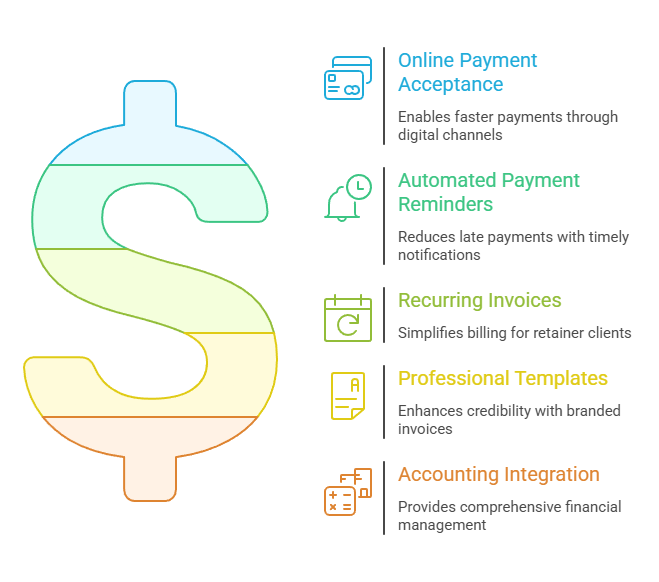
Invoices with a “Pay Now” button get freelancers paid up to twice as fast as PDFs requesting a bank transfer. That’s the single most impactful feature you can look for. Online payment acceptance isn’t a nice-to-have.
It’s the difference between getting paid in a week and waiting six weeks.
Automated reminders remove the emotional burden of chasing payments. Set them for three days before the due date, on the due date, and a few days after. Invoice automation can take this further by handling recurring invoices, payment reminders, payments, late fees, and bookkeeping sync with little manual work. Most late payments are honest oversights, not intentional.
A polite automated nudge solves the majority without you having to send an awkward follow-up. And if a client still needs a reminder, we have the right invoice email sample ready to go — from first invoices to payment reminders and overdue follow-ups.
Recurring invoices save time on retainer clients, especially when paired with scheduling tools that help manage ongoing client work.
Professional templates with your branding signal credibility. Depending on your clients, it may also be useful to check whether the tool can create a pro forma invoice before the final invoice is issued. Both matter, but neither matters as much as getting money into your account quickly. If you invoice larger companies, PO support can matter too, since some accounts payable departments require a purchase order number before they’ll process an invoice. Our guide to purchase order vs invoice explains how the two documents fit together.
One question to ask yourself, though: do you need full accounting (expense tracking, bank reconciliation, tax reports) alongside invoicing?
If so, accounting software with robust invoicing, such as FreshBooks, Wave, or QuickBooks, is the better option. We cover those tools in depth in our accounting software guide.
If you just need to create invoices, send them, and get paid, standalone invoicing tools do the job at a lower cost or for free. For freelancers who mainly need to create professional invoices quickly, receipt maker software often provides a simpler and more cost-effective solution.
What Is the Best Invoicing Tool for Freelancers in 2026?
Six tools cover the full spectrum: FreshBooks for the best overall experience, Zoho Invoice for genuinely free invoicing, Square for the fastest payment acceptance, Wave for free invoicing plus accounting, Harvest for hourly billers, and Bonsai for proposals-to-payment in one place.
| Tool | Price | Online Payments | Recurring | Time Tracking | Best For |
| FreshBooks | $19-65/mo | Cards, ACH, Apple Pay | Yes | Built-in | Best overall experience |
| Zoho Invoice | Free | Via Stripe/PayPal | Yes | Built-in | Best free standalone |
| Square Invoices | Free ($49/mo Plus) | Cards, ACH, Cash App | Yes | No | Fastest payment acceptance |
| Wave | Free ($16/mo Pro) | Cards, ACH | Yes | No | Best free invoicing + accounting |
| Harvest | Free-$11/seat/mo | Via Stripe/PayPal | Yes | Excellent | Hourly billers |
| Bonsai | $17-39/mo | Via Stripe | Yes | Built-in | Proposals + contracts + invoicing |
FreshBooks
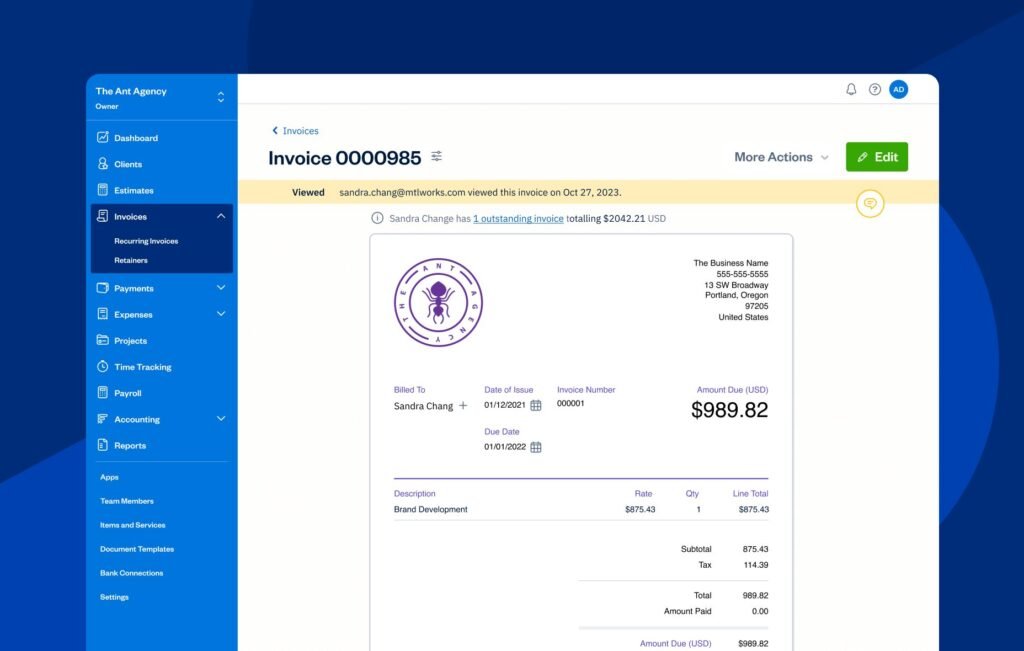
The invoicing experience that other tools get measured against.
Clean interface, polished payment pages your clients actually want to use, and built-in time tracking on every plan. Automated reminders, late payment fees, deposit requests, and estimates that convert to invoices in one click.
The Lite plan starts at $19/mo but caps at five billable clients (and that counts historical ones), so most freelancers end up on Plus at $43/mo.
Credit cards at 2.9% + $0.30, ACH at 1%. If invoicing is the core of your workflow, this is the tool to beat.
Zoho Invoice
The best free invoicing tool available right now. Unlimited invoices, unlimited clients, custom branding, recurring billing, a client portal, multi-currency support, and mobile apps. There’s no paid tier. It’s genuinely, completely free.
The trade-off: no built-in payment processing. You connect Stripe or PayPal to accept payments, so their standard processing fees apply.
And there are no accounting features. For that, you’d step up to Zoho Books. But if you need professional invoices without spending a dollar on software, this is where to start.
Square Invoices
The fastest path from invoice to payment. Clients pay by card, ACH, or Cash App directly from the invoice.
The free plan handles unlimited invoices at 3.3% + $0.30 for cards and 1% for ACH. The Plus plan ($49/mo) drops card rates to 2.9% + $0.30 and adds custom templates and milestone billing.
No chargeback fees on any plan, which is unique among these tools. No time tracking or accounting. Pure invoicing and payment collection done well.
Wave
Pairs free invoicing with free accounting. Unlimited invoices, estimates, and financial reports on the free plan. Cards at 2.9% + $0.60 (note the higher flat fee compared to competitors) and ACH at 1%.
No multi-currency support, which rules it out for freelancers with international clients. No time tracking either. But for US-based freelancers who want invoicing and basic bookkeeping in one free tool, it’s the most practical starting point.
Harvest
Built for freelancers who bill by the hour. Start a timer, track your work across projects, then generate an invoice from your tracked time in two clicks. The free plan covers one user and two projects. Pro is $11 per seat per month.
Nobody does the time-to-invoice workflow better. But it’s not a full accounting platform, so most users pair it with QuickBooks or Xero for bookkeeping. Freelancers looking for similar all-in-one solutions should also consider how well each platform handles both time tracking and invoicing.
Bonsai
Covers the entire client journey: proposals, contracts with e-signatures, time tracking, invoicing, and basic accounting in one platform.
Starts at $17/mo, though the Professional plan at $32/mo is what most freelancers need. Payments run through Stripe.
Best for freelancers who’d rather manage everything in one place than stitch together separate apps for each stage of a project.
The Overall Best Invoicing Tool for Freelancers: FreshBooks
If you want one recommendation for the best invoicing tool for freelancers without reading any further, it’s FreshBooks at the Plus tier ($43/mo).
The reasoning is simple. FreshBooks does the four things that actually move the needle on getting paid — clean payment pages, built-in time tracking, automated reminders, and deposit requests — better than any other tool on this list.
The credit card rate (2.9% + $0.30) and ACH rate (1%) are competitive. The interface is the one your clients will find easiest to use, which matters more than people admit.
The trade-off: $43/mo isn’t free.
If your invoicing is genuinely simple — a handful of clients, predictable retainer billing, no time tracking needs — Zoho Invoice (free) or Wave (free) will do the job for $0. There’s no shame in starting there.
But for most freelancers earning $40K and up, the FreshBooks subscription pays for itself in recovered hours within the first month.
Faster payment terms, fewer follow-up emails, and the kind of professional invoice that doesn’t make a client think twice before paying.
Quick picks by use case:
- Best overall: FreshBooks Plus ($43/mo)
- Best free: Zoho Invoice (genuinely free, no upsell)
- Best free + accounting: Wave (US clients only)
- Best for hourly billers: Harvest ($11/seat/mo)
- Best for proposals + contracts + invoicing in one tool: Bonsai ($32/mo)
- Best for fastest payment acceptance: Square Invoices (free, with no chargeback fees)
How Much Does the Best Invoicing Tool for Freelancers Cost?
On $100,000 in annual revenue, processing fees range from $3,200 to $4,300 depending on the platform and payment method. Switching from all-credit-card payments to mostly ACH saves $1,400 to $2,000 a year.
| Platform | Credit Card | ACH | Annual Cost at $100K (all cards) |
| QuickBooks | 2.99% | 1% | ~$3,200 |
| FreshBooks | 2.9% + $0.30 | 1% | ~$3,500 |
| Square (Free) | 3.3% + $0.30 | 1% | ~$3,900 |
| Wave | 2.9% + $0.60 | 1% | ~$3,800 |
| PayPal | 3.49% + $0.49 | ~2% + $0.49 | ~$4,300 |
| Stripe | 2.9% + $0.30 + 0.4% | 0.8% (cap $5) | ~$3,600 |
Every “free” invoicing tool still charges processing fees. Free means no subscription. It doesn’t mean no cost.
ACH payments cost roughly a third of credit card rates. If your clients can pay by bank transfer, offer it as the default and position card payment as the alternative.
On $100K in annual invoicing, a freelancer using PayPal exclusively pays about $1,100 more per year in fees than one using QuickBooks. That’s real money, and it’s an easy switch.
For large invoices, Stripe’s ACH has a $5 cap per transaction. On a $5,000 invoice, that’s 0.1% instead of the typical 1%. If you regularly invoice above $1,000, that cap adds up to significant savings over a year.
How Do You Get Paid Faster as a Freelancer?
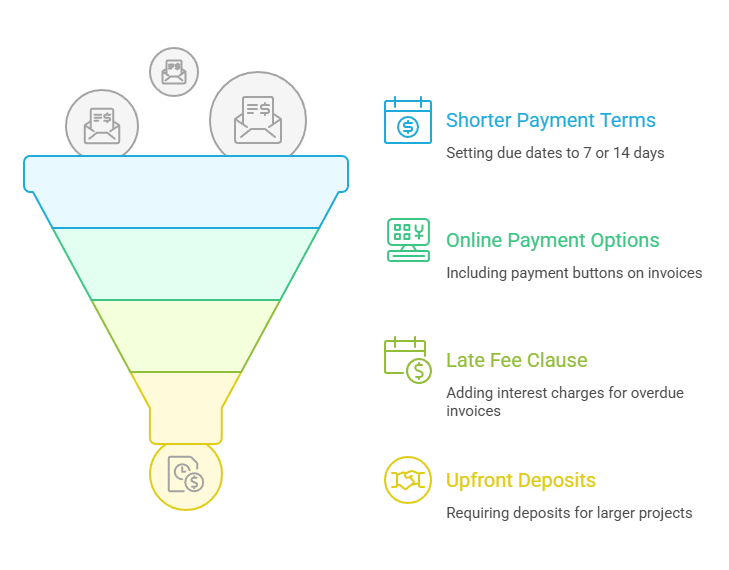
Use shorter payment terms, accept online payments on every invoice, turn on automated reminders, and include a late fee clause. FreshBooks’ analysis of 1.3 million invoices shows these changes can cut average payment time nearly in half.
Shorter terms
Set yours to “Due in 7 Days” or “Due in 14 Days” instead of Net 30. The data is clear: 58% of invoices with 7-day terms get paid within a week.
Only 40% with 30-day terms hit that same mark. Shorter terms work. Most clients won’t push back, and those who do will tell you upfront.
Online payments on every invoice
No exceptions. Invoices with a payment button get paid up to twice as fast as those requesting a manual bank transfer. If you change nothing else about your invoicing process, change this.
A late fee clause
Add “Interest charged on overdue invoices” to your payment terms. Invoices with this language show a 92% payment rate, higher than any other term tested. You don’t have to enforce it. Just having it there changes how seriously clients treat your due date.
Deposits on projects over $1,000
A 25 to 50% upfront deposit protects your cash flow and confirms the client is committed. If someone balks at a deposit, that tells you something worth knowing before you start the work.
If you’re still figuring out the mechanics of freelance invoicing, our step-by-step invoicing guide walks through the full process.
Once you have the invoicing process down, the next challenge is staying organized. Learning how to keep track of invoices helps you avoid common mistakes and ensures overdue payments never slip through the cracks.
Do You Need Standalone Invoicing Software or Full Accounting Software?
If you bill fewer than 10 clients a month and don’t need bank reconciliation or tax reports, standalone invoicing is enough. Once you need to track expenses and prepare for tax filing, accounting software with built-in invoicing makes more sense.
Standalone invoicing tools (Zoho Invoice, Square, Invoice Ninja) do one thing well: create invoices, send them, and collect payments. If you’re still working out the delivery side of the process, our guide on how to send an invoice walks through the process step by step. They’re the right choice for freelancers with simple needs and low transaction volume. As your invoice volume grows, an invoice management system can help you organize billing, track payment status, automate follow-ups, and keep outstanding invoices from slipping through the cracks. If you’re comparing different ways to manage that process, our guide to freelance billing software covers the broader range of billing platforms available to freelancers.
Pair with a spreadsheet for basic expense tracking, and you’re covered. If you want to go the DIY route, you can even make invoices in Excell, use an invoice template in Google Sheets for an easy-to-customize spreadsheet option, or use a Google Docs invoice template for a simpler browser-based option.
Accounting software with invoicing (Wave, FreshBooks, QuickBooks, Xero) makes sense when your books get complicated. Bank feeds, expense categorization, P&L reports, quarterly tax prep. A good receipt scanner app can simplify this process further by digitizing receipts and making expense tracking easier. If you’re doing your own bookkeeping, having invoicing and accounting in one tool saves a lot of duplicate entry.
All-in-one platforms (Bonsai, HoneyBook) work for freelancers who want proposals, contracts, and invoicing in a single workflow. The accounting features are lighter, and many users pair them with QuickBooks for the actual bookkeeping, while others choose project management and invoicing software that combines client work, time tracking, and billing in one platform.
The typical path: start with free standalone invoicing, upgrade to accounting software when complexity justifies it.
Most freelancers hit that point somewhere between $30K and $75K in annual revenue, or when tax season becomes painful enough to force a change.
Choose the Best Invoicing Tool for Freelancers and Stop Chasing Payments
Getting paid shouldn’t be the hardest part of freelancing. The best invoicing tool for freelancers puts a payment button in front of your client, reminds them automatically when the due date arrives, and deposits the money in your account without you sending a single follow-up email.
If you’re just starting out, Zoho Invoice (free) or Wave (free) are smart first moves. If you’re ready to invest in getting paid faster and more reliably, FreshBooks is the standard for a reason. And whichever tool you pick, turn on online payments and automated reminders before you send your first invoice.
Stop chasing. Start collecting.
Frequently Asked Questions
What is the best invoicing tool for freelancers?
For most freelancers, FreshBooks offers the best balance of ease of use, payment collection, time tracking, and automation. If you want a completely free option, Zoho Invoice is the strongest standalone invoicing tool, while Wave is ideal if you also need basic accounting features.
Is There a Free Best Invoicing Tool for Freelancers?
The short answer, yes — for many freelancers, especially beginners. Free tools like Zoho Invoice and Wave can handle professional invoices, recurring billing, and online payments without a monthly subscription. The main limitation is usually fewer advanced features like detailed reporting, project management, or deeper accounting integrations.
How can freelancers get invoices paid faster?
The biggest improvements usually come from four changes:
- Accept online payments directly from the invoice
- Use shorter payment terms (7–14 days)
- Enable automatic payment reminders
- Require deposits for larger projects
Freelancers who combine these practices typically spend far less time chasing overdue invoices.
Should freelancers use invoicing software or full accounting software?
If you mainly need to send invoices and collect payments, standalone invoicing software is enough. But once you start tracking expenses, reconciling bank accounts, or preparing tax reports, full accounting software like FreshBooks, Wave, QuickBooks, or Xero might be a better fit.
Is PayPal the best invoicing tool for freelancers?
PayPal is convenient and familiar to clients, but its fees are generally higher than alternatives like Stripe or ACH bank transfers. Many freelancers still offer PayPal because it increases payment flexibility, but it usually shouldn’t be the only payment option you accept.
Do professional-looking invoices actually matter?
Clean, branded invoices can help build trust and make clients more comfortable paying quickly. A professional invoice also reduces confusion by clearly showing payment terms, due dates, and payment options.
Should freelancers charge late fees on overdue invoices?
Including a late fee clause in your payment terms can improve on-time payment rates, even if you rarely enforce it. It signals that your payment deadlines are serious and encourages clients to prioritize your invoice.