Receipt Maker Software: The Simple Way to Send Professional Receipts
Receipt maker software sounds like exactly what you need when a client pays your invoice and asks, “Can you send me a receipt?”
You’ve never sent a receipt before, so you’re not entirely sure what a receipt is supposed to look like, or whether the paid invoice you already sent counts.
You then Google “receipt maker software” and find a page of results split between free generator tools and sites that let you create fake Walmart receipts for pranks.
Neither receipt maker option is what you need.
If you already use invoicing software like Wave, QuickBooks, FreshBooks, Zoho Invoice, Square, Stripe, or PayPal, your tool almost certainly generates payment receipts automatically when an invoice is marked as paid.
You probably don’t need standalone receipt maker software at all.
This guide covers when a receipt is actually necessary, what must be on it for IRS purposes, which free receipt maker software is worth using, and which sites to avoid.
Quick Takeaways
- A receipt is proof of payment (sent after the client pays); an invoice is a request for payment (sent before) — a paid invoice serves both functions for IRS purposes
- If you use Wave, QuickBooks, FreshBooks, Zoho, Square, Stripe, or PayPal, your tool already generates receipts when you record a payment
- Three free standalone options cover most needs: Zoho Invoice (free tier), Wave Receipt Maker (no signup), and Invoice Simple (one-off PDFs)
- The IRS “$75 receipt rule” only applies to travel, transportation, and gift expenses — it doesn’t mean you can skip receipts for general business purchases under $75
- Sites marketing “novelty” or “lost receipt replacement” generators are fraud tools — IRS civil fraud penalties are 75% of the underpayment with no statute of limitations
What’s the Difference Between a Receipt and an Invoice?
An invoice is a request for payment — you send it before the client pays. A receipt is proof of payment — you send it after they pay. For most freelancers, a paid invoice serves both functions. The IRS treats invoices, receipts, and account statements It together as “supporting documents” and doesn’t require a separately formatted receipt.
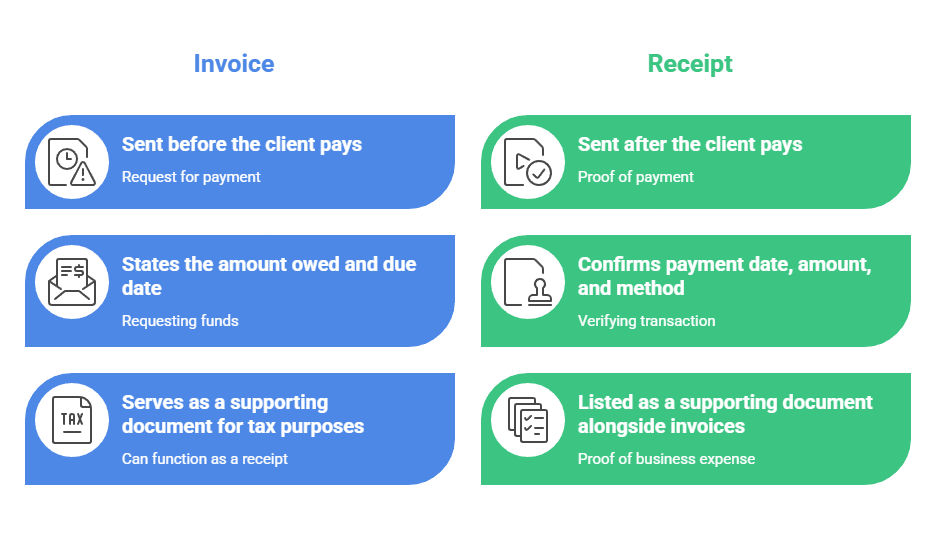
All comes down to timing and purpose.
An invoice says “you owe me $1,800 for this work, due by this date.” A receipt says “you paid me $1,800 on this date, for this work, via this method.” The information overlaps almost entirely.
IRS Publication 583 lists “sales slips, paid bills, invoices, receipts, deposit slips, and canceled checks” as supporting documents. It doesn’t rank them or require one format over another.
What the IRS needs is a combination of documents that establishes the payee, the amount, the date, proof of payment, and the business purpose. A paid invoice with a payment date and method noted covers every one of those elements.
This is the part most receipt maker sites skip: for the majority of freelance transactions, the paid invoice IS the receipt. You don’t need a second document.
And don’t confuse receipt maker software (which issues receipts to your clients) with receipt scanners like Expensify, Dext, or Shoeboxed, which digitize receipts you receive from vendors.
Those solve a completely different problem.
Does Your Invoicing Software Already Work as Receipt Maker Software?
Almost certainly yes. Every major invoicing platform generates a payment receipt or confirmation automatically when you record a payment against an invoice. If you’re already using one of these tools, you don’t need standalone receipt maker software.
Wave (free) emails a payment receipt to the client automatically when you record a payment or the client pays through Wave’s online payment link. You can resend receipts anytime from the invoice screen.
Wave also offers a separate free Receipt Maker tool on their website for one-off receipts without an account.
- QuickBooks Online ($38+/month) has a dedicated Sales Receipt document type for immediate-payment transactions like walk-ins, market sales, and cash jobs. For invoiced work, recording a payment via “Receive Payment” logs the confirmation and can email it to the client.
- FreshBooks ($23+/month) auto-generates a payment receipt when an invoice is paid, downloadable as a PDF or visible in the client portal.
- Zoho Invoice (free, up to 500 invoices/year) emails payment confirmations with your branding automatically.
- Square sends a digital receipt by email or SMS at every card transaction, customizable with your logo and notes in the Square Dashboard.
- Stripe can toggle automatic “Successful payments” email receipts to customers. PayPal sends automatic email confirmation to both buyer and seller on every transaction.
If you use any of these tools, check your dashboard before signing up for something new. The receipt function is already built in. Our guide to accounting software for freelancers covers each of these platforms in more depth.
What’s the Best Free Receipt Maker Software If You Don’t Have Invoicing Tools?
Three free tools cover most standalone receipt needs. Zoho Invoice’s free tier is the most full-featured (branding, sequential numbering, auto-reminders, 500 invoices/year). Wave’s Receipt Maker handles quick one-offs without an account. Invoice Simple’s free generator produces a clean PDF for a single transaction.
Zoho Invoice is the best option if you issue receipts regularly. It’s 100% free for small businesses, puts your logo and branding on receipts, auto-numbers them sequentially, handles sales tax, and emails them to clients.
The catch: your data is deleted after 120 days of inactivity, so log in periodically.
Wave’s Receipt Maker is a quick web-based generator for one-off receipts.
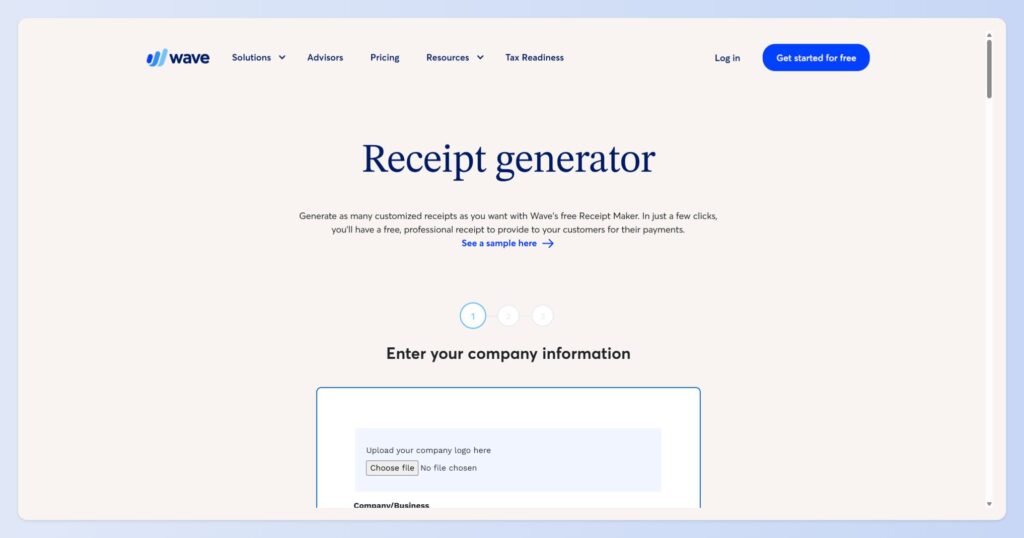
Fill in the fields, download a PDF. No account required. It’s simple and fast, but less customizable than a full Wave account (which is also free).
If you need receipts more than occasionally, just sign up for Wave’s free Starter plan and use the invoicing-with-receipt flow instead.
Invoice Simple produces a clean, professional PDF receipt without creating an account. Useful for a single transaction. The paid app starts at $6.99/month if you need ongoing receipt generation with saved client info.
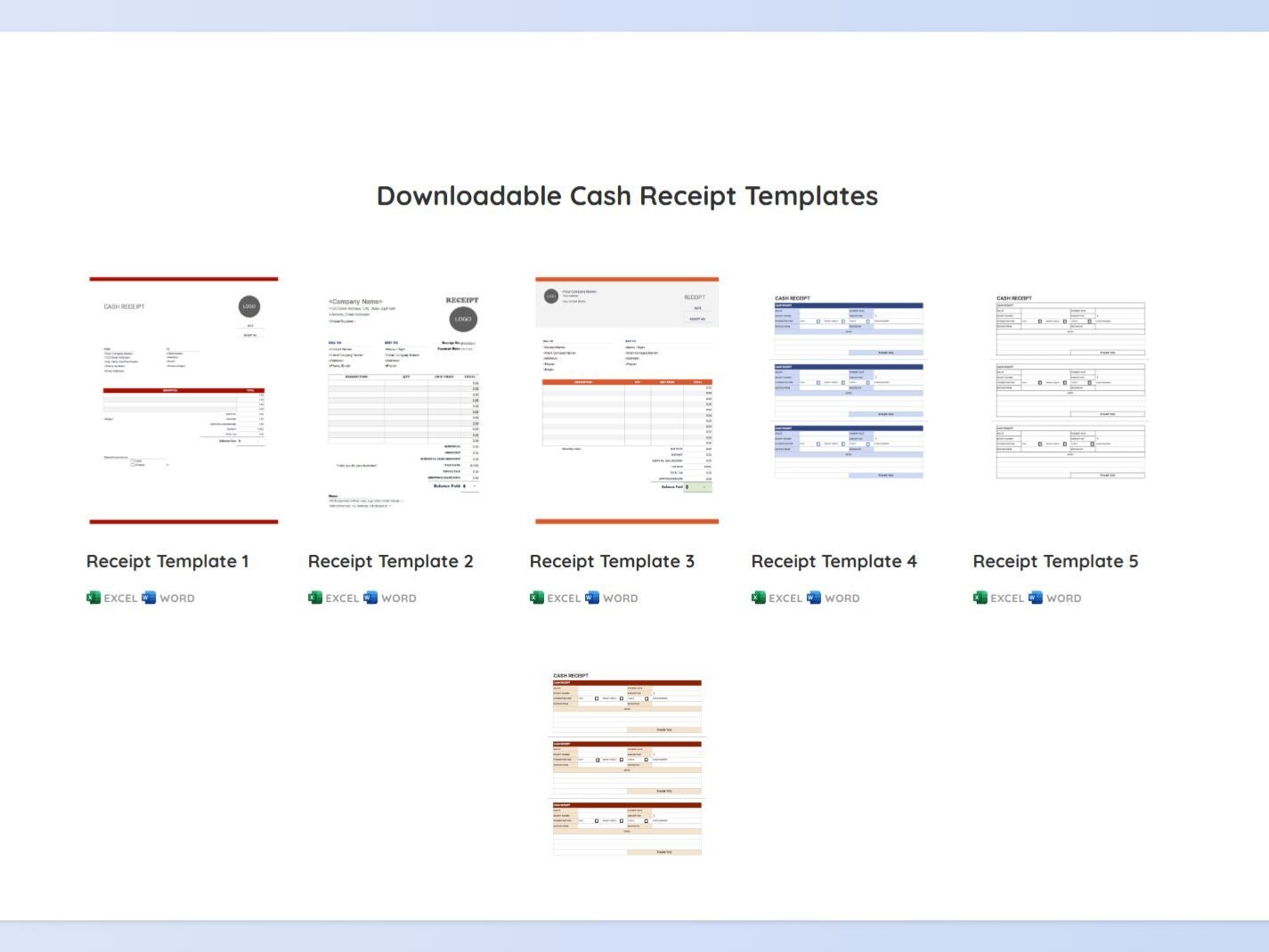
For readers who’d rather build a receipt template themselves, our guide to making an invoice in Excel covers the same layout principles and provides a free template you can use right away.
A receipt template uses the same structure with “Receipt” instead of “Invoice” at the top and “Date Paid” instead of “Due Date.”
What Must Be on a Receipt for IRS Purposes?
The IRS requires that supporting documents establish five things: who was paid, how much, when, how, and for what. A professional receipt should include your business name and contact info, a sequential receipt number, the payment date, the client’s name, a description of goods or services, the subtotal, sales tax separately stated if applicable, the total, and the payment method.

If you collect sales tax, most states require it to be separately stated on the receipt. California, New York, and Texas all have explicit rules on this point.
Just be aware of the one rule that constantly gets misquoted.
The “$75 receipt threshold” from IRS Publication 463 applies only to travel, transportation, entertainment, and gift expenses under the accountable plan rules.
It does not mean you can skip receipts for general business expenses under $75. Lodging receipts are required regardless of amount.
For how long to keep receipts: three years from the filing date is the default. Six years if you underreport income by more than 25%. Seven for bad-debt claims. Indefinitely for unfiled or fraudulent returns.
The IRS accepts digital and scanned records under Revenue Procedure 97-22. Our bookkeeping for self-employed guide covers retention rules in more detail.
When Do You Actually Need a Separately Formatted Receipt?
In five specific situations: HSA/FSA superbills for healthcare providers, cash transactions with no prior invoice, donation acknowledgments for nonprofits, rent receipts in states that require them, and when a corporate client’s AP system specifically asks for a receipt distinct from the invoice. For everything else, a paid invoice works.
1. HSA/FSA superbills for healthcare providers
If you’re a massage therapist, physical therapist, acupuncturist, or mental health provider, clients paying with Health Savings Accounts need a superbill.
That’s a receipt that includes your NPI number, license number, CPT/procedure codes, and place-of-service code. Generic receipt makers don’t generate these. Practice management tools like SimplePractice or MassageBook do.
2. Cash transactions with no prior invoice
Handymen, tutors, market vendors, and house cleaners who get paid cash on the spot need something to hand over. A carbonless receipt book from an office supply store works. So does QuickBooks’ Sales Receipt function if you have a phone with you.
3. Donation acknowledgments for nonprofits
501(c)(3) organizations must state on the receipt whether goods or services were provided in exchange for the donation.
4. Rent receipts in states that require them
Some states (Massachusetts, for example) require landlords to provide receipts on request.
5. Corporate AP requirements
Occasionally, a corporate client’s accounts payable department asks for a receipt as a separate document from the invoice for internal processing reasons. When they ask, ask them what format they need.
For every other freelance scenario, your paid invoice plus a payment confirmation email covers it.
Which Receipt Maker Sites Should You Avoid?
Any site that markets itself around “replacing lost receipts,” “novelty receipts,” or receipts designed to mimic specific retailers. Sites like MakeReceipt, ExpressExpense, and Receiptfaker openly position themselves as tools for creating custom receipts that imitate real store formats. Using fabricated receipts for expense reimbursement or tax deductions is fraud.
The IRS civil fraud penalty under 26 U.S.C. § 6663 is 75% of the underpayment attributable to fraud, and there is no statute of limitations on fraudulent returns.
Submitting fabricated receipts to an employer for reimbursement can constitute federal wire fraud under 18 U.S.C. § 1343, carrying up to 20 years imprisonment.
The DOJ has prosecuted exactly this scenario.
If you genuinely lost a receipt for a legitimate business expense, contact the vendor for a duplicate. Most retailers, SaaS companies, and service providers can reissue from their transaction records within minutes. Don’t fabricate one.
Let Your Receipt Maker Software Become the Easy Part
The answer to “what receipt maker software do I need?” is almost always “the one you already have.” Wave, QuickBooks, FreshBooks, Zoho, Square, Stripe, and PayPal all generate payment receipts the moment you record a payment.
Just check your invoicing dashboard before you sign up for something new.
If you don’t use invoicing software yet, Zoho Invoice’s free tier or Wave’s free Receipt Maker covers it.
And if a client asks “can you send me a receipt?” the fastest answer is usually a two-line payment confirmation email: “Hi [name], confirming I’ve received your payment of $1,800 for Invoice 2026-014. Receipt attached. Thanks!”
So many options. The receipt is the easy part. The system for tracking what happens after you send the invoice is what actually gets you paid on time.
Choosing the right invoicing platform affects everything from payment reminders and online payments to receipt generation and bookkeeping. If you’re still evaluating your options, read our guide on how to find the best invoicing tool for freelancers.
Frequently Asked Questions
What’s the difference between a receipt and an invoice?
An invoice is sent before payment and requests money from the client. A receipt is sent after payment and confirms that the money was received. While they serve different purposes, the information on both documents is often very similar.
Do I need a receipt if I’ve already sent an invoice?
Usually not. For most freelance transactions, a paid invoice serves as both the invoice and the receipt. Once payment is recorded, the invoice provides proof of who paid, how much was paid, when payment was made, and what the payment was for.
What is the best receipt maker?
For most freelancers and small businesses, the best receipt maker is usually the invoicing software they already use. Tools like Wave, QuickBooks, FreshBooks, Zoho Invoice, Square, Stripe, and PayPal automatically generate receipts when a payment is recorded. If you need a standalone option, Zoho Invoice’s free plan is one of the strongest choices.
Is there a free app to make receipts?
Yes. Zoho Invoice offers a free plan that includes receipt generation, while Wave provides a free online receipt maker for one-off transactions. Invoice Simple also offers a free receipt generator that lets you create and download professional PDF receipts.
How can I make my own receipts?
You can create your own receipts using Excel, Google Sheets, Word, or a receipt template. A professional receipt should include your business information, the client’s name, a receipt number, payment date, description of goods or services, amount paid, and payment method. For a reusable template, see our guide to making an invoice in Excel.