What Is the Best Time Tracking and Invoicing Software for Freelancers?
If you’ve ever finished a project, opened a blank invoice, and then tried to reconstruct from memory how many hours you actually spent across three weeks of scattered work sessions, you already know why choosing the right time tracking and invoicing software for freelancers matters.
It isn’t writing the invoice. It’s the gap between the time you worked and the time you can prove you worked, and every hour that falls into that gap is money you quietly hand back to the client.
That’s why “what’s the best invoicing tool” is the wrong question for anyone who bills by the hour. The right question is how cleanly your tracked time becomes an invoice, with no re-typing, no guesswork — and no Sunday-night archaeology.
If you bill flat project rates and just need to send clean invoices, our guide to the best invoicing tools is a better starting point.
This post is about the workflow that sits one step earlier: tracking billable hours and turning them into accurate invoices. There’s no single best app — there’s a best setup for how you work, and it comes down to one decision you’ll make in the next section.
Quick Takeaways
- The core question isn’t “best invoicing tool” — it’s whether you want one tool that tracks and bills, or a tracker that feeds a separate invoicing tool.
- Combined tools like Harvest and FreshBooks turn tracked hours into an invoice in a few clicks, with no re-entry.
- Best-of-breed (Toggl or Clockify plus Wave or Zoho Invoice) is cheaper and more flexible, but adds a sync step.
- Most freelancers bill only 50–70% of their time, so accurate capture is income, not admin.
- Free is viable: Clockify or Toggl for tracking, plus Zoho Invoice or Wave for billing costs nothing.
The time-to-invoice workflow is the question that matters
Before you compare a single tool, get clear on the one decision that matters: do you want one app that tracks your time and bills it, or a dedicated time tracker that feeds a separate invoicing tool? Everything else follows from that.
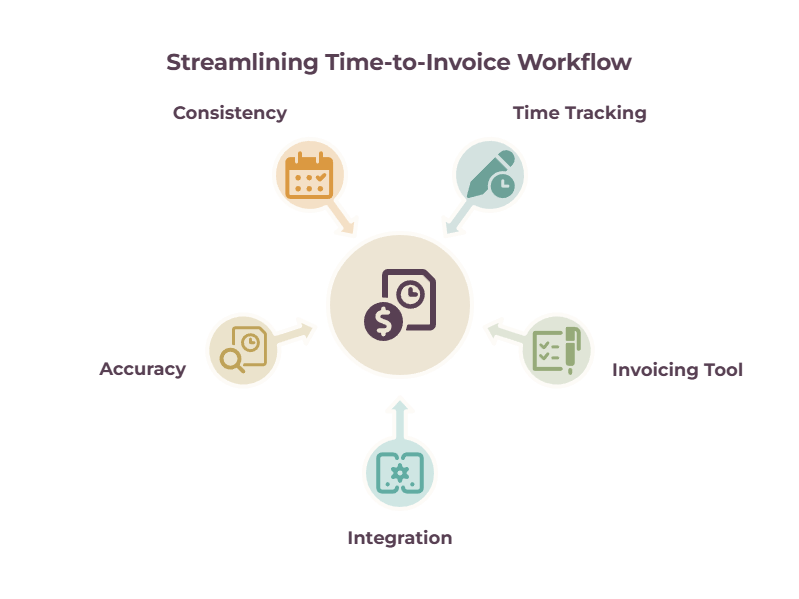
Here’s the friction you’re trying to kill. You track your hours in one place — a notes app, a spreadsheet, a timer — and then, at invoice time, you copy all of it by hand into your billing tool. That double-handling is where time leaks out.
Then you round down because you’re not sure.
You forgot the 20 minutes on a phone call. You skip the quick fix you did on a Saturday because it feels too small to log.
None of those feels like much in the moment, but billable utilization across professional services runs around two-thirds of working time (SPI/Kantata’s 2025 benchmark puts it near 66%), and sloppy capture eats into even that.
When a big chunk of your week already disappears into admin, marketing, and prospecting you can’t bill for, the billable portion is the part you cannot afford to lose to a fuzzy memory.
The fix is a workflow where the act of tracking is the act of building the invoice, where hitting stop on a timer puts a billable line item one click away from your client. Some tools do that in a single app.
Others do it by wiring a great tracker to a great invoicing tool. Both work.
Best Time Tracking and Invoicing Software for Freelancers: Track and Bill in One Flow
If you want the least friction, a combined tool tracks your hours and turns them into an invoice in a few clicks. Harvest is the benchmark, FreshBooks adds full accounting, and Paymo adds project management — pick based on what else you need the tool to do.
| Tool | Time tracking | Invoice from time | Free tier | 2026 price | Best for |
| Harvest | Manual timers, calendar | ~3 clicks, editable | Yes (1 seat, 2 projects) | Pro ~$11/seat/mo ($9 annual) | Cleanest track-to-invoice flow |
| FreshBooks | Built-in timer | Auto into invoice | No (trial) | Lite ~$19/mo | Billing + full accounting |
| Paymo | Timer + auto tracker | Timesheets to invoice | Yes (1 user) | Solo ~$5.90/user/mo (annual) | Project profitability |
| Bonsai | Project timers | One-click line items | No (trial) | ~$25/user/mo ($19 annual) | Contracts + invoicing in one |
| Zoho Invoice / Books | Built-in timer | Project billing | Yes (Invoice free) | Books Standard ~$15/mo | Free/value pick |
| QuickBooks Time + QBO | Timers, GPS | Via QuickBooks | No (trial) | ~$20/mo base + per user | Teams and payroll |
Harvest
Harvest is the one I’d hand to a freelancer who just wants the friction gone.
You track with simple start-stop timers or daily timesheets, and at billing time, Harvest flags every uninvoiced hour and builds an invoice from it in about three clicks — and you can still edit before it goes out, which matters more than vendors admit.
Clients pay by card or PayPal, reminders chase late payers automatically, and it syncs to QuickBooks or Xero if you keep your books elsewhere. The free tier includes invoicing, which almost no competitor offers.
Two catches: there’s no automatic background tracking, so if you forget to start the timer, you’ll still lose hours; and in 2026, under new owner Bending Spoons, Harvest added usage-based fees for extra invoices, projects, and clients on top of the per-seat rate, so check what your actual usage will cost.
It still rates around 4.5–4.7 across G2 and Capterra, mostly on the strength of how little it makes you think.
Fresh Books
FreshBooks is the pick when you want billing and bookkeeping in the same place. Its built-in timer logs hours against a client and pulls them straight onto an invoice, and underneath sits full double-entry accounting, expense tracking, and proposals.
The trade-off is the pricing structure: plans are capped by the number of billable clients (five on Lite, fifty on Plus), and the extras stack up. For depth on the accounting side, see our accounting software for freelancers guide.
Paymo
Paymo earns its place if you need to know not just how many hours you worked but whether the project actually made money.
It tracks with timers or an automatic background tracker, flows timesheets directly into invoices with no re-entry, and shows project profitability — the thing most combined tools skip.
Reviewers rate it highly (around 4.6–4.7), with the usual caveat that per-user pricing climbs as you add people.
It’s a natural fit alongside the tools in our freelance management tools roundup.
Other invoicing tools worth considering
Bonsai suits you if invoicing is only part of the problem and you’re also juggling contracts, proposals, and a client pipeline.
Start a timer on a project, and the hours drop into an invoice as line items; around that sits an entire freelance business suite. It moved to per-user pricing recently, and invoicing lives on its Essentials tier (around $25/user a month, or $19 annually), not the cheapest Basic plan — so check what you’re actually buying.
Zoho Invoice is the value play: genuinely free professional invoicing with time tracking, scaling into Zoho Books if you want accounting (though project timesheets sit on the paid Standard tier).
And QuickBooks Time plus QuickBooks Online is the answer only when you’re running a team or payroll; for a solo hourly biller, it’s more machine than you need.
Best dedicated time trackers that feed invoicing
If you already like your invoicing or accounting tool, don’t replace it — feed it. A dedicated tracker captures hours better than most combined tools and pushes them where you already bill.

| Tool | Tracking | Billable rates | Invoice / sync | Free tier | 2026 price |
| Toggl Track | One-click timer, idle detection | Starter+ | One-way QuickBooks sync | Yes (up to 5 users) | Starter ~$9/user/mo |
| Clockify | Timer, auto, kiosk | Paid plans | Invoicing + QuickBooks (paid) | Yes (up to 5 users) | Basic ~$3.99/user/mo |
| Everhour | Embeds in PM tools | Yes | Native sync to QBO/Xero/FreshBooks | Trial | ~$8.50/user/mo (5-seat min) |
Toggl Track
Toggl Track is the one most freelancers reach for, and for good reason — the tracking experience is the smoothest in the category. One click starts a timer, idle detection catches the time you walk away, and the browser extension means you can track from inside whatever you’re working in.
It can push billable hours into QuickBooks as a one-way invoice sync, but its native strength is capture, not billing, so the classic stack is “Toggl plus FreshBooks” or “Toggl plus Wave.”
One thing to know before you rely on it for client work: the free plan doesn’t include billable rates, so you’ll likely need Starter.
Clockify
Clockify is the budget pick.
Its Basic plan is among the cheapest in the category at around $3.99/user a month, and a free tier still exists.
But verify what that free tier covers before you build on it: in April 2026, Clockify capped the previously-unlimited free plan at five users and moved billable hours, kiosk mode, and CSV/Excel exports onto paid plans.
It’s still a strong value — just no longer the “unlimited free everything” it once was.
Everhour
Everhour is the specialist pick if your work already lives inside a project management tool. It embeds time tracking directly into Asana, Trello, ClickUp, and Notion, and it syncs invoices natively to QuickBooks Online, Xero, and FreshBooks — meaning it actually solves the double-entry problem rather than just exporting a CSV at you.
If you manage projects in one of those tools, it’s the cleanest bridge to billing there is.
Other time trackers
Tools like RescueTime and TimeCamp round out the category as automatic background trackers, useful as a proof-of-work layer when you need a record of where the day went. Our freelance management tools guide covers the wider workspace these plug into.
How to connect a tracker to your invoicing tool
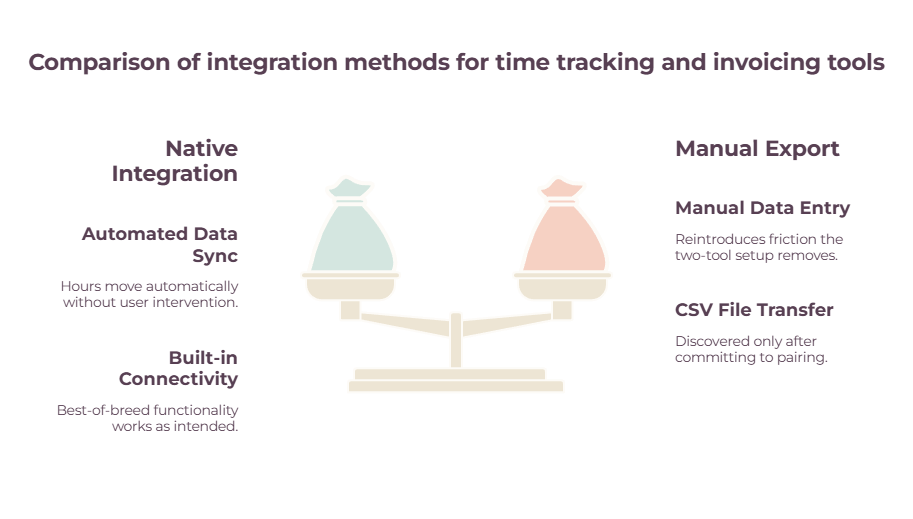
A two-tool setup only saves you time if the hours move automatically. Check for a native integration first, fall back to Zapier, and treat manual export as the last resort — because manual export is the exact friction you were trying to escape.
This is the step that decides whether best-of-breed actually works for you, and it’s the one most roundups skip entirely.
A native integration is always best:
- Toggl pushes to QuickBooks
- Everhour syncs invoice drafts to FreshBooks and Xero
- Clockify’s paid plans connect to QuickBooks.
When the two tools you want don’t share a native link, Zapier can bridge them — for instance, sending a completed time entry into a spreadsheet or triggering a draft invoice.
And if there’s no integration at all, you’re back to exporting a CSV and importing it by hand, which reintroduces every bit of friction the two-tool setup was supposed to remove.
The practical lesson, learned the expensive way: check that the integration exists and does what you think it does before you commit to a pairing.
Plenty of freelancers fall in love with a tracker, buy a year of invoicing software, and only then discover the two only “integrate” via a clunky manual export.
Which time tracking and invoicing setup is right for you
Pick by how you work, not by which tool has the longest feature list. Here are the five situations most freelancers fall into, and the setup I’d recommend for each.
| You are a… | Recommended setup | Why | Rough monthly |
| Solo hourly freelancer, wants simple | Harvest or FreshBooks | One tool, clean track-to-invoice | $11–19 |
| Project-based, needs margins | Paymo or Harvest Premium | Profitability per project | $14–24 |
| Already on accounting software | Toggl or Everhour feeding it | Don’t replace, feed | $9–18 |
| Team or subcontractors | QuickBooks Time or Harvest | Multi-seat, payroll-ready | $20+ |
| Budget-conscious, wants free | Clockify + Wave or Zoho Invoice | Costs nothing | $0 |
If you’re a solo freelancer billing by the hour who just wants the admin to disappear, a combined tool is worth the money — Harvest for the cleanest flow, FreshBooks if you also want your books handled.
A simple test: if you’re spending more than half an hour each billing cycle re-entering hours, the subscription has already paid for itself.
If you’re project-based and need to know your margins, Paymo or Harvest Premium will show you which clients are actually profitable — the kind of thing you only learn after you’ve under-quoted a few.
If you already use accounting software you like, don’t tear it out; bolt a tracker like Toggl or Everhour onto it. If you’ve got a team or subcontractors, you need multi-seat tracking and probably payroll, which is QuickBooks Time or Harvest territory.
And if you’re starting out and watching every dollar, Clockify plus Wave or Zoho Invoice covers the whole workflow for nothing — upgrade only when the manual step between them costs you more time than a paid tool’s price.
Where to start
The best time tracking and invoicing software for freelancers is the one that turns hours you’ve already worked into money with the least friction—nothing more sophisticated than that.
So start with the cheapest possible experiment: track honestly for two weeks with any free tracker, and look at how much billable time you’re actually capturing versus what you’d have guessed.
For most freelancers, that number is a small shock, and it makes the case for a proper setup better than any feature list could.
Once you’ve seen how many billable hours you actually capture, pick the setup that gets them invoiced fastest and commit to it. For the wider money toolkit around it, our finance software guide maps the whole stack, and the pillar guide to managing freelance finances covers everything the invoicing feeds into.
Frequently Asked Questions
Can one tool do both time tracking and invoicing?
Yes — Harvest, FreshBooks, Paymo, Bonsai, and Zoho all track hours and convert them into invoices in one place. Harvest has the smoothest track-to-invoice flow; FreshBooks adds full accounting; Paymo adds project profitability.
What’s the best free time tracker with invoicing?
Clockify offers free time tracking (now for up to five users), though billable rates and invoicing sit on paid plans. For a fully free combination, pair Clockify or Toggl (tracking) with Zoho Invoice or Wave (invoicing) — the whole workflow costs nothing.
Do I need time tracking if I charge fixed project rates?
Even on fixed rates, tracking shows what you actually earn per hour and stops you from under-quoting the next project. You don’t have to bill from it, but the data is how you find out which work is actually worth your time.
How do I turn tracked hours into an invoice without re-typing them?
Use a combined tool (the timer feeds the invoice directly), or connect a dedicated tracker to your invoicing tool through a native integration — for example, Everhour syncing to FreshBooks, or Toggl to QuickBooks. Avoid any pairing that only connects by manual CSV export.
Related guides: best invoicing tool for freelancers · freelance management tools · accounting software for freelancers · time tracking software for freelancers