Don’t Miss the Best Productivity Tools for Freelancers

It’s 9 a.m. You’ve got eleven browser tabs open, three to-do apps, a Notion workspace you set up once and never touched again, and a handful of other productivity tools for freelancers — yet you still have absolutely no idea what to do first. By 6 p.m., you’ve been busy all day and moved nothing important forward.
If that’s familiar, the problem probably isn’t you — and it isn’t that you haven’t found the right app yet. It’s that there’s no system underneath the apps.
That’s the reframe this whole guide is built on: a better to-do app won’t fix a broken workflow. The freelancers who actually get things done pair a small set of good tools with a few simple habits — and the habits do most of the work.
This guide covers both: the tools, organized by the job they do, and the systems that make them work. It’s about getting your own work done — for managing clients, projects, and teams, we’ll point you to the right guides along the way.
Quick Takeaways
- Productivity tools for freelancers sort into six jobs: task management, time tracking, time blocking, note-taking, email, and focus. Pick one per job — not five.
- Top picks by category: Todoist or TickTick (tasks), Toggl Track (time), Akiflow or Sunsama (time blocking), Notion or Obsidian (notes), Superhuman or SaneBox (email), Forest or Freedom (focus).
- Free tools cover most freelancers. Clockify, Google Calendar, Todoist’s free plan, and Notion’s free plan will get you a long way before you pay anything.
- The tools follow the system: the 1-3-5 rule, the 2-minute rule, and time blocking matter more than any app you install.
- More apps does not equal more productive. A lean stack you actually use beats a dozen you don’t.
What are productivity tools for freelancers?

Productivity tools for freelancers are the apps that help you manage your own work — organizing tasks, tracking and blocking time, capturing notes, taming your inbox, and protecting your focus. They work best paired with a simple system, not used as a substitute for one. In other words, the app is the easy part; the habit is the point.
Most freelancers don’t have a tool problem — they have a too many tools problem. Three half-used task apps, a notes app graveyard, and a calendar nobody looks at. The fix isn’t another download.
It’s picking one tool for each of the six core jobs and building a couple of reliable habits around them.
Throughout this guide, the honest rule holds: install the smallest set of tools that removes a real friction, and lean on the methods further down to do the heavy lifting.
Looking beyond productivity? Our guide to the best apps for freelancers covers not only productivity tools but also the broader toolkit, from managing work to running your freelance business.
The best productivity tools for freelancers, by category

The clearest way to choose is by the job you’re trying to do — manage tasks, track time, block time, take notes, handle email, or protect focus — and pick one strong tool for each. Here’s the field, category by category, with honest picks and where to go deeper.
(Prices below are approximate, in USD, and verified July 2026. Most tools change pricing often and offer a free trial or free tier — always confirm the current price before you subscribe.)
Task management and to-do list apps
For most freelancers, Todoist is the best all-around to-do list — fast, cross-platform, and simple — while TickTick edges it if you want a built-in calendar and habit tracker, and Notion wins if you’d rather run tasks, notes, and docs in one place.
Start here because a single trusted task list is the backbone of everything else.
| Tool | Best for | Price (approx) | Free tier? |
| Todoist | Most freelancers | Pro ~$5/mo (annual) | Yes (up to 5 projects) |
| TickTick | Tasks + calendar + habits | Premium ~$4/mo | Yes (generous) |
| Notion | All-in-one tasks + notes | Paid from ~$10/mo | Yes (personal) |
If you want your task list to schedule itself, that’s where AI to-do tools come in — see our guide to the best AI to-do list apps.
And if what you actually need is to manage client projects and deliverables rather than personal tasks, our freelancer task management tools guide covers that side.
Time tracking and time management
Toggl Track is the top pick for freelancers who bill by the hour — one-click tracking, clean reports, and a genuinely useful free plan for up to five users — while Clockify is the best fully free option and RescueTime is best if you want to see where your time secretly goes. Tracking your time does double duty: it makes your invoices accurate and shows you your real working patterns.
| Tool | Best for | Price (approx) | Free tier? |
| Toggl Track | Billable hours | Starter ~$9/user/mo | Yes (up to 5 users) |
| Clockify | Free time tracking | Paid from ~$4/user/mo | Yes (unlimited) |
| RescueTime | Automatic insights | Paid, ~$12/mo | Limited free |
For the full playbook on scheduling your day and billing accurately, see our guide to time management for freelancers. Tracked time also flows straight into invoicing — our time tracking and invoicing guide connects the two.
Time blocking apps
Akiflow and Sunsama are the standout time-blocking apps — both let you drag tasks straight onto your calendar so your to-do list becomes a realistic plan for the day — while Motion uses AI to schedule your tasks for you, and plain Google Calendar does the job for free.
Time blocking is the single habit that stops an endless task list from turning into an overwhelming one.
| Tool | Best for | Price (approx) | Free tier? |
| Akiflow | Drag-and-drop time blocking | ~$19/mo (annual) | Trial only |
| Sunsama | Calm, guided daily planning | ~$20/mo (annual) | Trial only |
| Motion | AI auto-scheduling | ~$19/mo (annual) | Trial only |
| Google Calendar | Free time blocking | Free | Yes |
New to the idea? Start with free time blocking in your calendar, then read our guide to the best time blocking apps if you want the drag-and-drop upgrade.
Note-taking and knowledge tools
Notion is the best all-in-one notes tool for freelancers who want notes, tasks, and client docs in one workspace, while Obsidian suits anyone who wants private, local, Markdown-based notes they fully own — and Evernote or Apple/Google Notes still work fine for quick capture.
The best notes app is the one you’ll actually open when an idea or a client brief lands.
| Tool | Best for | Price (approx) | Free tier? |
| Notion | All-in-one workspace | Paid from ~$10/mo | Yes (personal) |
| Obsidian | Private, local, markdown | Free (personal use) | Yes |
| Evernote | Classic quick capture | Paid from ~$12/mo | Limited free |
A good note system needs a good structure, not just an app. We built a free freelancer note-taking template you can drop into any of these to capture client briefs, ideas, and meeting notes consistently.
Email and inbox management
Superhuman is the fastest email experience if you live in your inbox and will pay for speed, while SaneBox works on top of your existing Gmail or Outlook to filter the noise automatically — and free Gmail filters plus a simple routine handle it for most freelancers.
Email is where freelance focus quietly leaks away, so a system matters more than the app.
| Tool | Best for | Price (approx) | Free tier? |
| Superhuman | Speed power-users | ~$30/user/mo | Trial only |
| SaneBox | Auto-filtering any inbox | From ~$7/mo | Trial only |
| Gmail filters | Free inbox control | Free | Yes |
The tool matters less than the habit of processing email in batches instead of all day — our guide to email management systems walks through building one that sticks.
Focus and deep-work tools
Forest is the best focus app for gently building the habit (it grows a virtual tree while you stay off your phone), while Freedom and Cold Turkey are the heavy-duty site-and-app blockers, and Brain.fm provides focus-boosting background audio.
These work best alongside a method like Pomodoro, below — the app enforces the focus; the method structures it.
| Tool | Best for | Price (approx) | Free tier? |
| Forest | Gamified, gentle focus | ~$4 one-time (mobile) | Yes (Android) |
| Freedom | Blocking across all devices | Paid, ~$40/year | Limited trial |
| Cold Turkey | Serious, hard blocking | Free; one-time Pro upgrade | Yes |
| Brain.fm | Focus audio | ~$7–10/mo | Trial |
Distraction at home is its own challenge — see how to stay focused when working from home for the environment and habit side, not just the apps.
Planners (digital and paper)
Not everything has to be an app. The Full Focus Planner is the best-known paper planner for goal-driven freelancers, pairing daily planning with quarterly goals — and for a lot of people, writing the day out by hand beats any screen.
Paper has no notifications, which is exactly the point.
If you’re weighing a structured paper system against a digital one, our Full Focus Planner guide covers who it’s for and the best alternatives.
One line on the rest: tools for client communication, scheduling, and invoicing — Slack, Loom, Calendly — are productivity-adjacent but really their own topic; see our guides to invoicing and managing freelance workflows for those.
Productivity methods and systems every freelancer should know

The systems matter more than the apps. Plan your day with the 1-3-5 rule, clear small tasks with the 2-minute rule, protect deep work with time blocking, and pace yourself with Pomodoro — any tool works better on top of these. These are free, they travel with you between apps, and they’re what actually change your output.
The 1-3-5 rule
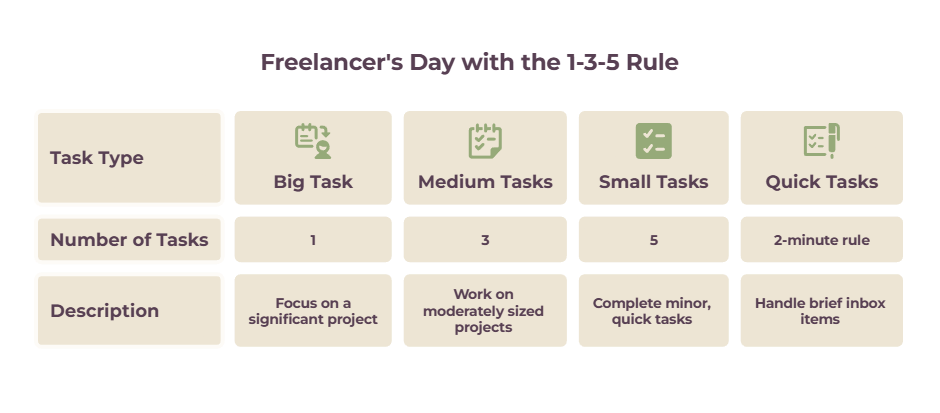
The 1-3-5 rule means planning each day around nine tasks: one big task (2–4 hours), three medium tasks (30–90 minutes), and five small tasks (5–20 minutes). Capping the day at nine forces you to choose what matters instead of drowning in a 40-item list.
The magic is in front-loading the decision: pick your nine the evening before, and you start the day executing instead of deciding.
It also sets an honest limit — you physically can’t do everything, so the 1-3-5 rule makes you decide what actually earns your hours. For the full method, examples, and how to adapt it to freelance work, see our guide to the 1-3-5 rule. For another concise overview of the method, Todoist has a useful breakdown.
The 2-minute rule
The 2-minute rule, from David Allen’s Getting Things Done, says that if a task will take less than two minutes, do it now rather than adding it to a list. Logging, re-reading, and revisiting a tiny task later cost more time than just doing it.
Allen’s own caveat matters: apply it mainly when you’re processing new input — going through your inbox, or handling something that just landed — not as an excuse to spend the whole day on two-minute busywork.
(It’s explained at Todoist and by Getting Things Done.) Note there’s a separate, similarly named “two-minute rule” from James Clear’s Atomic Habits about scaling a new habit down to two minutes — a different idea worth not confusing with this one.
Time blocking
Time blocking means assigning your tasks to specific slots on your calendar — 9–11 a.m. for writing, 1–3 p.m. for client calls — instead of working from an open-ended list.
It turns “I’ll get to it” into a concrete plan and protects deep work from being nibbled away by small stuff.
It pairs naturally with the time-blocking apps above, but you can start today in any calendar.
The Pomodoro technique
The Pomodoro technique is working in focused 25-minute intervals separated by 5-minute breaks, with a longer break after every four. It’s a simple way to beat procrastination — starting is easier when you only have to commit to 25 minutes — and it pairs perfectly with a focus app like Forest.
One more: keeping a steady workflow as a solo freelancer is less about any single trick and more about routines, batching similar tasks, and scheduling hard work for your best energy hours — we cover that in “How to maintain a steady workflow as a solo freelancer“.
How to build your freelancer productivity stack
You don’t need one of everything. Most freelancers need just one task app, one time tracker, one notes tool, and one focus habit — start lean and add a tool only when a real friction shows up. The goal is a stack small enough that you actually keep using it.
| If you’re… | A lean starting stack | Why it works |
| Just starting / budget-conscious | Todoist (free) + Google Calendar + Clockify + Forest | Every piece is free and covers a core job |
| Juggling lots of clients | TickTick or Notion + Toggl Track + Akiflow | Time blocking plus accurate billable tracking |
| Easily distracted at home | Any task app + Freedom or Cold Turkey + Pomodoro | Enforced focus, structured sessions |
| Wanting AI to plan your day | Motion or a Reclaim-style scheduler | The calendar builds itself |
Whatever you choose, resist the urge to collect tools. The best productivity stack is the smallest one you’ll still be using in three months.
How to stay focused and productive while working from home
The freelancers who stay productive at home rely on structure, not willpower — set work hours, a dedicated workspace, a distraction blocker, and a clear shutdown routine so work doesn’t bleed into the whole day.
Home has no boss walking past and no commute to bookend the day, so you build those edges yourself.
A few basics carry most of the weight: work in a spot you only use for work, put your phone in another room or on Do Not Disturb, use a blocker like Freedom during deep-work blocks, and end the day with a deliberate shutdown so your brain clocks off.
For the full version — environment, routines, and the focus tools that help — see how to stay focused when working from home and how to maintain a steady workflow as a solo freelancer.
The bottom line
Productivity as a freelancer isn’t about owning the most apps — it’s about pairing a lean set of tools with a couple of reliable systems. Pick one tool per job, choose one method to start with (the 1-3-5 rule is the easiest win), and build from there.
The system beats the software every time.
Frequently Asked Questions
What are the best productivity tools for freelancers?
The best productivity tools for freelancers, by job, are: Todoist or TickTick for tasks; Toggl Track for time tracking; Akiflow or Sunsama for time blocking; Notion or Obsidian for notes; Superhuman or SaneBox for email; and Forest or Freedom for focus.
Pick one per category rather than trying to use them all.
What’s the best free productivity app for freelancers?
For a fully free stack, our best free productivity tools for freelancers guide covers the options in detail, but it’s hard to beat Todoist’s free plan for tasks, Clockify for time tracking, Google Calendar for time blocking, Notion’s free personal plan for notes, and Gmail filters for email.
Most freelancers can run their entire productivity system without paying for anything.
How do freelancers manage their time?
Most productive freelancers combine a time-tracking tool (to see and bill their hours) with a planning method like time blocking or the 1-3-5 rule (to decide what to work on). Tracking shows where your time goes; the method decides where it should go. See our time management for freelancers guide for the full system.
What is the 1-3-5 rule?
The 1-3-5 rule is a daily planning method: choose one big task, three medium tasks, and five small tasks to complete each day — nine in total. Capping your list forces you to prioritize, and picking the nine the night before means you start the day doing rather than deciding.
What is the 2-minute rule?
The 2-minute rule, from David Allen’s Getting Things Done, says that if something will take less than two minutes, do it immediately instead of adding it to your list — because tracking and revisiting a tiny task costs more time than just doing it. Apply it mainly when processing new input, like your inbox.
How do I stay focused working from home as a freelancer?
Build structure instead of relying on willpower: set defined work hours, use a dedicated workspace, keep your phone out of reach, block distracting sites with a tool like Freedom during deep-work blocks, and end the day with a shutdown routine. Structure is what protects focus when no one’s watching.
How many productivity tools do I actually need?
Fewer than you think — usually one task app, one time tracker, one notes tool, and one focus habit. Adding more tools tends to create more admin, not more output. Start with the minimum that removes real friction and only add when you hit a genuine limit.
Related guides: AI to-do list apps · time management for freelancers · time blocking apps · note-taking template · email management systems · Full Focus Planner · how to stay focused working from home · how to maintain a steady workflow as a solo freelancer