Freelancer Management Platform Explained: Everything You Need to Know

You started with a few freelancers and a spreadsheet, and it worked fine. A designer, a writer, a developer for one project. Contracts in a shared drive, paid off invoices, the whole thing kept in your head. If you’ve ever searched for a Freelancer Management Platform Explained guide, this is the point where the story usually begins.
Then it scaled. Marketing has its own roster now. Product has three contract developers. Someone in events hired a dozen people for one conference. And when finance asks, “How much are we spending on contractors this quarter, and do we have a current W-9 for everyone we paid?” — nobody can answer.
Not because anyone dropped the ball. Because the system that worked for five freelancers quietly stopped working at fifty.
That gap is exactly what a freelancer management platform exists to close. The trouble is the category is badly explained almost everywhere you look — usually by vendors who define it in two sentences and pivot straight to a demo button.
So here’s the plain version:
- What a freelancer management platform actually is
- What it does, and how it differs from the tools you already use
- Who genuinely needs one
- And the question most explainers skip: whether you’d be better off stitching together tools you already own
Quick Takeaways
- A freelancer management platform (FMS) is one system for the whole contractor lifecycle: sourcing, onboarding, compliance, work tracking, global payments, and reporting.
- It’s not a marketplace, payroll, or a project tool; it’s the system of record sitting across all of them, built for contractors the way an HRIS is built for employees.
- The core reason it exists is risk and visibility: misclassification penalties are steep, and most finance teams can’t see contractor spend.
- You likely need one past roughly 25 contractors, but spend, cross-border risk, and fragmented hiring are better signals than headcount.
- Below that, stitching tools you already own are usually smarter and cheaper than buying a platform.
Freelancer Management Platform Explained: What it Actually Is
A freelancer management platform — also called a Freelance Management System, or FMS — is a cloud platform for running the entire lifecycle of working with independent contractors from one place: finding them, onboarding and contracting them, classifying them correctly, tracking the work, paying them, and reporting on the spend.
The cleanest way to picture it: an FMS is an HRIS, but built for external talent instead of employees. Your HR system is designed around the employment relationship. An FMS mirrors it for the contractor relationship:
| Your HRIS runs on… | An FMS runs on… |
| Payroll | Invoices |
| W-2s | 1099s |
| Permanent, indefinite tenure | Project-based engagements |
| Assumed employment | A constant “is this person actually a contractor?” check |
Same idea, mirror-image plumbing.
It manages people, not agencies.
Staffing Industry Analysts, the main analyst firm covering this space, describes an FMS as a cloud platform for initiating, managing, tracking, and analyzing engagements with individual independent workers.
That last phrase is the one doing the heavy lifting: an FMS manages your relationships with people directly, not with the staffing agencies that supply them. Hold onto that distinction — it’s the root of nearly every mix-up you’ll hit later in this guide.
And it’s not a new category, whatever the vendors imply.
SIA was writing about the rise of these systems back in 2014, and the concept traces to enterprise “talent cloud” products older than that. Treat the “brand-new” framing with the skepticism it deserves.
The problem a freelance management system solves
An FMS earns its keep at the exact moment managing contractors outgrows spreadsheets and scattered tools — the point where you can no longer answer basic questions about who you’re working with, what you’re spending, and whether you’re compliant.
Think back to that scaled-up scenario from the opening. The pain there isn’t one big failure; it’s five smaller ones that all get worse the more contractors you add:
- Onboarding becomes a fire drill because every new freelancer needs a contract, tax forms, an NDA, and bank details, and when it’s all manual, steps get skipped.
- Compliance turns into a guessing game, with different forms for different workers (a W-9 for your US contractors, a W-8BEN for the foreign ones) sitting on top of the harder question of whether each person is even classified correctly.
- Payments sprawl across dozens of invoices in different currencies through different methods.
- Spend visibility disappears because contractor costs are hidden within separate department budgets, and nobody holds the total.
- Offboarding gets unreliable, so access lingers and records you’d need for an audit are scattered across drives and Slack threads.
Why These Problems Become Expensive
The reason this matters beyond mere annoyance is risk, and the risk is expensive. Worker misclassification isn’t a paperwork slip.
In California, for example, willful misclassification carries civil penalties of $5,000 to $15,000 per violation — rising to $10,000–$25,000 per violation for a pattern or practice under Labor Code §226.8, and that’s before any federal back taxes.
(None of this is legal advice, and the rules vary by state and change often, so run your specifics past a professional.)
The way one practitioner put it stuck with me: it works until it doesn’t, and then it’s one late payment, one missed contract, or one audit away from becoming a genuine emergency. An FMS exists to keep that emergency from arriving.
What a freelance management platform does: the core capabilities
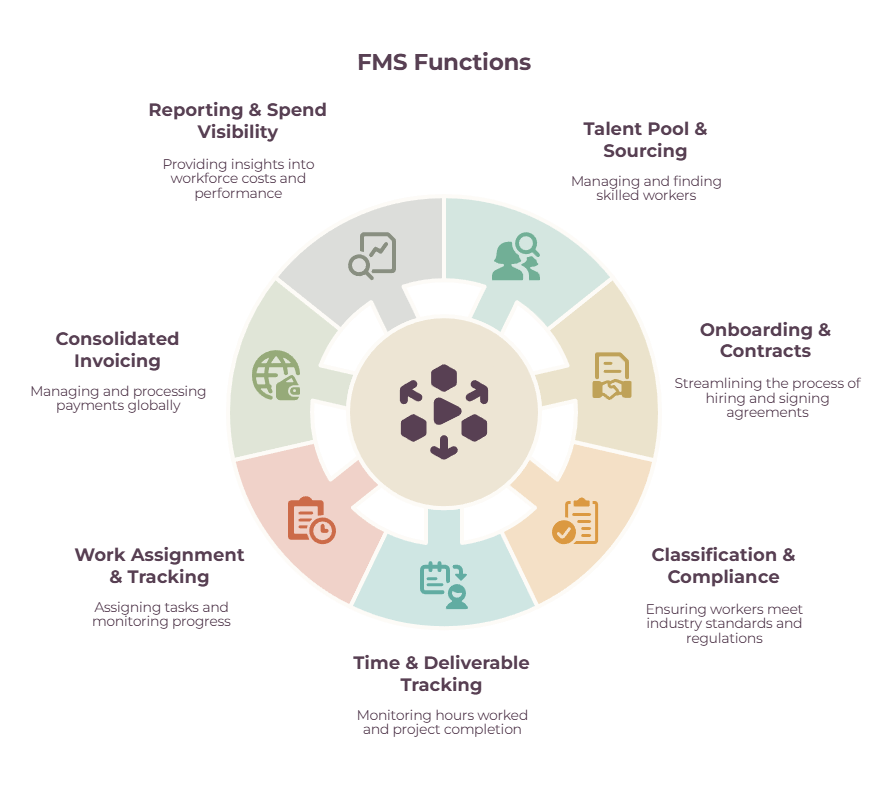
Strip away the marketing, and a freelancer management platform does seven things. Most vendors bundle them differently, but these are the buckets to look for:
- Talent pool and sourcing
A searchable database of your vetted freelancers — their skills, rates, availability, and history — so a hiring manager can find someone without starting from zero.
Some platforms bolt a broad external marketplace onto this; others focus only on cataloging the talent you already know.
That’s a meaningful fork worth noticing: a vetted in-house bench that understands your brand is a different thing from a giant marketplace where the quality varies per engagement.
- Onboarding, contracts, and e-sign
Automated workflows that collect the right documents and signatures before work starts, varying the forms by where the worker is and what kind of engagement it is.
- Worker classification and compliance
Classification questionnaires, tax-form collection (W-9, W-8BEN, 1099 generation), document storage for audits, and sometimes misclassification indemnity. Worth knowing: on some platforms, classification is built in, on others it’s a paid add-on.
- Work assignment and tracking
Assigning briefs, tracking milestones, and flagging when a project nears its budget or deadline.
- Time and deliverable tracking
Timesheets and deliverable approval that feed straight into billing.
- Consolidated invoicing and global payments
Freelancers invoice through the platform, you approve, and the system pays them in local currencies, handing you one consolidated invoice instead of fifty. The leading platforms advertise payments across 120-plus currencies.
- Reporting and spend visibility
Dashboards on spend, budget-versus-actual, and workforce composition, plus integrations into your HR, accounting, and procurement systems.
The thing that makes it a platform rather than a feature is that all seven live in one system of record, so the data flows between them instead of being re-keyed across six tools.
Freelancer Management Platform Explained: How It Differs from Other Tools
An FMS overlaps with at least five tools you probably already use, and the lines genuinely blur. The useful question isn’t what an FMS does — it’s where each familiar tool stops and the FMS picks up.
| Tool | What it’s built for | Where it stops |
| Project management (Asana, ClickUp) | Coordinating tasks, deadlines, and collaboration | No onboarding, classification, contracts, or payments. It manages the work, not the worker relationship. |
| Payroll (Gusto, ADP) | Paying W-2 employees, withholding, benefits | Built around employment. Contractors get paid by invoice and need 1099s, not W-2s. |
| Point payment tool (Wise, Bill, PayPal) | Moving money, multi-currency | Handles the transfer — the easy part — but not contracts, classification, or audit trail. |
| Freelance marketplace (Upwork, Fiverr) | Finding new talent, one engagement at a time | Each hire is a one-off. Little company-wide control or cross-roster visibility. |
| VMS (SAP Fieldglass, Beeline) | Managing staffing agencies that supply workers | Built for agency vendors, not direct engagement of individual freelancers. |
| FMS | Direct, end-to-end management of individual freelancers at scale | — |
Three of these distinctions trip people up constantly, so they’re worth spelling out.
FMS vs. VMS
A Vendor Management System is an older, procurement-born technology built to control cost and compliance when workers arrive through staffing agencies. The difference in one line: a VMS manages the vendors who manage the workers, while an FMS manages the workers directly.
Large enterprises frequently run both — a VMS for agency labor and an FMS for the freelancers they engage themselves — which is exactly why vendors increasingly sell blended platforms and muddy the water.
FMS vs. a marketplace like Upwork
A marketplace is built to facilitate one-off engagements between a buyer and a worker; an FMS enforces your company’s rules and compliance uniformly across every engagement.
Tellingly, Upwork itself built a separate enterprise product precisely because the open marketplace doesn’t give big buyers that kind of control. They’re related, but a marketplace is sourcing-first, and an FMS is management-first.
(Our project management software guide and time tracking and invoicing guide cover the work-coordination tools that sit alongside, rather than inside, an FMS.)
FMS vs. AOR and EOR
An Agent of Record (AOR) is a service that takes on the compliance burden of engaging independent contractors without becoming their employer.
An Employer of Record (EOR) goes further and becomes the worker’s legal employer — used when someone really should be an employee, especially across borders where you have no legal entity.
An FMS is the software platform, and many FMS vendors now offer AOR or EOR as services layered on top.
The practitioner’s rule of thumb?
If the role looks and behaves like a job, don’t sit in the gray area, use EOR or just hire them; if it’s genuinely independent work, an AOR (often built into the FMS) keeps it clean.
Who needs a freelance management platform, and when
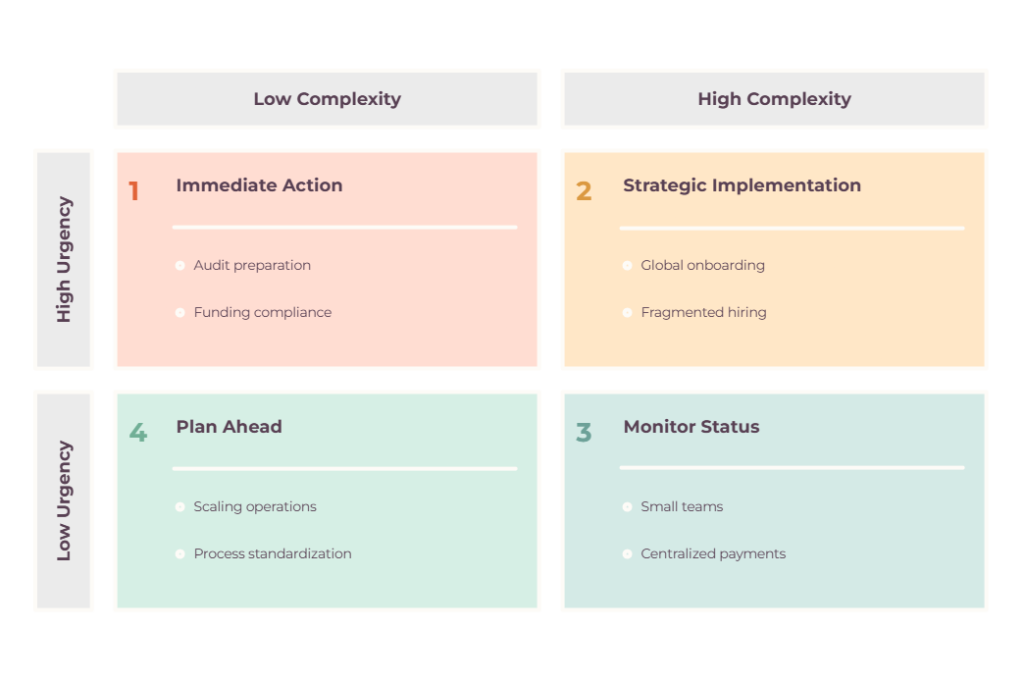
The practical threshold is roughly 25 or more contractors, but headcount is a crude proxy. The truer signals are how much you’re spending, how much classification risk you’re carrying, and how many separate corners of your company are hiring contractors without talking to each other.
ADP suggests that an organization regularly working with 25 or more freelancers is a good candidate for an FMS, while one that occasionally uses a few contractors usually isn’t ready. Other vendors put the floor lower, around ten.
But the number is the least useful part of the answer. The signals that actually tell you you’ve outgrown stitched-together tools are these:
- You can’t produce a single current list of every contractor and what you’re paying them.
- Onboarding or paying someone has become a recurring fire drill.
- Different departments are hiring independently with no shared process.
- You’re engaging people across multiple states or countries, which multiplies the compliance math.
- An audit, funding round, or finance review is forcing you to prove compliance fast, and you can’t.
The industries that lean hardest on these platforms are the ones with big, fluid creative and technical rosters: marketing and creative agencies, media and publishing, events and production, and enterprises with large distributed contingent workforces.
If that’s you, and any two or three of the signals above are ringing true, you’re in FMS territory.
When you don’t need a freelance management platform (and what to do instead)
If you run a small roster, an FMS is overkill — and you’ll get further stitching together tools you already own. That’s not a hedge. It’s what experienced operators actually do.
Listen to small employers talk about this, and the verdict is consistent: at low volume, a dedicated platform isn’t worth the cost or the setup. The pattern they describe is a simple talent tracker, contractors invoicing them directly, and payment through something like Wise — with their accountant handling the tax side.
One operator framed the tipping point better than any headcount rule I’ve seen: he wouldn’t bother paying for a tool until he was paying roughly $1,000 a month in wages. That’s the right instinct. The trigger isn’t a magic number of people — it’s the moment the cost and risk of doing it by hand exceed the platform fee.
Below that line, here’s the stack that does the job:
- A shared talent tracker — a spreadsheet, Airtable, or Notion
- A project tool to run the work
- A time-tracking and invoicing tool
- An accounting and payment rail — QuickBooks plus Bill or Wise
- A written classification policy — just as important, so you’re consistent about who counts as a contractor
The companion guides in this cluster cover most of these directly: how to assign tasks to freelancers, finance automation tools, and the broader freelance management tools overview.
Revisit the FMS question when the manual handling starts causing late payments and missed contracts — or when you cross into multi-state or multi-country work.
Build (stitch) versus buy – Freelance management platform guide
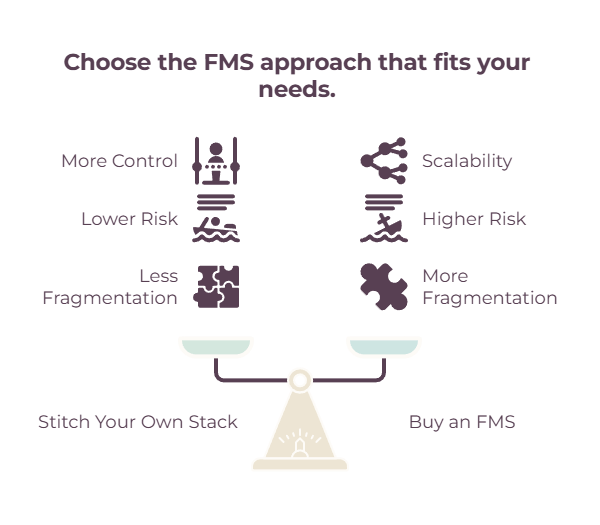
The decision is almost never “FMS or nothing.” It’s “FMS or the stack I assemble myself,” and the break-even comes down to three things: scale, risk, and fragmentation.

Stitching your own stack is cheap, flexible, and uses tools your team already knows. The cost is invisible right up until it isn’t: hours lost re-entering data between systems, no single source of truth, and compliance gaps that stay hidden until an audit drags them into the light.
Buying an FMS consolidates all of it, enforces compliance by default, and hands finance the visibility they’ve been missing — at the price of a paid subscription (often charged per active contractor), an implementation effort, and genuine lock-in once your records live inside it.
There’s also a trust cost that catches some off guard: your freelancers have to hand banking and tax details to an unfamiliar platform, and good ones are rightly cautious about doing that.
The way to call it: when scale, risk, and fragmentation are all high, buy. When all three are low, stitch. When they’re mixed, start by stitching and revisit on a schedule, because the threshold tends to arrive faster than you expect once a roster starts growing.
How to choose: an evaluation framework
If you’ve decided you need one, judge platforms against seven criteria — and run your own roster through each pricing model before you sign anything.
The criteria that separate the platforms that fit from the ones that just demo well:
- Compliance coverage and geographies. Does it actually classify workers, or merely store their documents? Does it cover every state and country you operate in? Is misclassification indemnity included or a costly add-on?
- Payment and currency reach. How many countries and currencies, how fast are payouts, and what are the FX markups? Buyers complain most about hidden currency margins and per-country surcharges.
- Integrations. Does it connect natively to your HR system, accounting, e-sign, and the project tools your team lives in? Weak integration just recreates the silos you’re paying to eliminate.
- Onboarding experience for freelancers. Your contractors have to use this thing. Friction here means resistance and slow starts.
- Pricing model. The three common shapes are per-active-contractor per month, a percentage of the spend you run through the platform, and a custom quote-based platform fee. Model your own roster against each, and watch out for per-contractor pricing that scales in a straight line as you grow.
- AOR and EOR availability. If you’ll need to engage some people as compliant contractors or occasionally convert one to an employee, can the platform handle both without a rebuild?
- Reporting and scalability. Can it give finance the spending picture they need, and will it hold up at twice your current roster?
Questions to Ask Before Choosing a Platform
When you get into demos, ask the questions vendors don’t volunteer:
- Is classification included or extra?
- What exactly triggers an add-on fee?
- What FX rates and payout times do you actually deliver? Which integrations are native versus duct-taped through Zapier?
- How long does implementation actually take, and can you show me the audit trail and reporting that a finance team would rely on?
As for which platforms to look at, names like Worksuite, TalentDesk, Worksome, YunoJuno, and Deel‘s contractor product are common starting points — but treat those as examples of the category rather than a ranked list, and dig into tool-level detail in our guide to the best tools for managing freelance teams.
So, do you need one?
The honest answer to “do I need a freelancer management platform” comes down to three numbers: how many contractors you run, how much you spend on them, and how much risk you’re carrying, especially across borders.
Run those honestly, and the decision usually makes itself. Keep stitching while doing it by hand is cheaper and safer than the fire drills; buy a platform when it isn’t.
There’s no prize for adopting enterprise software before you need it, and no glory in white-knuckling spreadsheets after you’ve outgrown them.
Either way, the goal underneath all of it is the same: know exactly who’s working for you, pay them correctly and on time, and be able to prove both when someone asks.
If you’re not at FMS scale yet, our guide to the best tools for managing freelance teams lays out the stack to stitch, and how to assign tasks to freelancers covers getting the actual work right.
Frequently Asked Questions
What is a freelancer management system (FMS)?
It’s a cloud platform for running the whole lifecycle of working with independent contractors from one place: sourcing, onboarding, contracts, worker classification and compliance, work and time tracking, consolidated global payments, and spend reporting. Think of it as an HR system built for external talent rather than employees.
What’s the difference between an FMS and a VMS?
A Vendor Management System manages the staffing agencies that supply workers to you; a Freelance Management System manages individual freelancers you engage directly. Large companies often run both — a VMS for agency labor and an FMS for direct contractors.
How many freelancers do you need before an FMS is worth it?
A common benchmark is around 25 active contractors, but spend and risk matter more than headcount. The truer trigger is the point where managing contractors by hand causes late payments, missed contracts, or compliance gaps — or where the manual effort costs more than the platform fee.
Is a freelance management platform the same as Upwork?
No. Upwork is primarily a marketplace for finding and transacting with new talent, one engagement at a time.
An FMS is built to manage the contractors you already work with across your whole company, enforcing consistent rules, compliance, and payments. Upwork built a separate enterprise product precisely because its marketplace doesn’t do that.
Related guides: freelance management tools · best project management software for freelancers · time tracking and invoicing software for freelancers · how to assign tasks to freelancers · finance automation tools · best tools for managing freelance teams