Best Tools for Tracking Freelance Contracts and Expenses Easily

The best tools for tracking freelance contracts and expenses should solve problems like this: a client emails to “just tweak a few more things” two weeks after the project wrapped. You never signed anything past the first proposal, so you do the work for free.
Same month, it’s 11 pm, and you’re scrolling six months of card statements trying to remember whether that $80 charge was a software renewal or a client dinner. One’s a deduction. One’s not. You have no idea which.
Both problems share a root: you’re running a business with none of the paperwork a business actually needs. Freelancing in the US is huge now — Upwork counted 64 million Americans freelancing, about 38% of the workforce — and most of them keep contracts in one messy place and expenses in another. Or they keep neither until a deadline drags it out of them.
So the real question isn’t “what’s the best tool.” It’s: do you need one tool that does both, two tools that each do one thing well, or just one new tool to plug the gap you’ve already got? Answer that first, and the shopping list gets short.
Quick Takeaways
- Most freelancers track contracts and expenses separately, or not at all until tax season — and that gap quietly costs money on both ends.
- You’ve really got three paths: one all-in-one tool, two specialized tools, or your current accounting app plus a contract tool bolted on.
- Moxie tracks both contracts and expenses from around $12/month. Indy handles contracts beautifully, but doesn’t track expenses at all — don’t get caught out by that.
- The IRS standard mileage rate is 72.5 cents/mile for 2026. Drive 8,000 untracked business miles, and that’s a $5,800 deduction in the bin.
- The system you’ll actually stick with beats the perfect one you abandon by February.
First, what are you actually trying to fix?
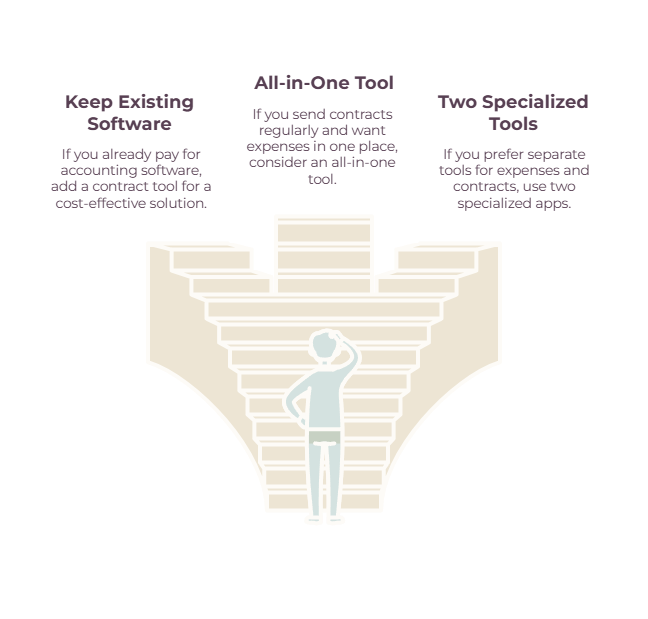
Before you compare a single tool, answer four questions: how many contracts you send in a typical month, whether you already pay for accounting software, whether you drive for work, and whether you’d rather have one tidy bill or the cheapest possible setup. Your answers drop you onto one of three paths.

Most “best tools” lists skip this step and dump fifteen options in your lap. But the right pick depends entirely on what you’ve already got and what you do all day. So:
➡️ Path one — an all-in-one tool. You send proposals and contracts regularly, you want expense tracking in the same login, and you’d rather pay one subscription than wire three apps together. This is most service freelancers: designers, consultants, photographers, writers, with a steady client load.
➡️ Path two — two specialized tools. You want the best expense tracker and the best contract tool, and you don’t mind that they live in separate logins. This suits anyone with an unusual need on one side: heavy mileage, mountains of receipts, or contracts gnarly enough to deserve a dedicated platform.
➡️ Path three — you already have accounting software. If you’re on Wave, Xero, or QuickBooks, your expenses are already handled. You don’t need an all-in-one anything. You need one contract tool added on, and you’re done for about ten bucks a month.
Figure out your path first. Then read only the section that matches it.
Beyond contracts and expenses, a typical finance software stack may also include banking, invoicing, bookkeeping, and tax tools. The same rule applies: use one good tool for each job you actually need.
If you’re still building the rest of your software stack, our guide to the best apps for freelancers covers the broader toolkit beyond contracts and expenses.
Best Tools for Tracking Freelance Contracts and Expenses (All-in-One Picks)
If you want one login for both jobs, the real contenders are Bonsai, HoneyBook, and Moxie. The cheapest that genuinely does both is Moxie, from around $12/month. And one trap to flag loudly: Indy looks like an all-in-one and handles contracts brilliantly, but it doesn’t track expenses at all.
That Indy distinction trips people up constantly, so here’s the whole field laid out plainly:
| Tool | Contracts? | Expenses / mileage? | Free tier? | 2026 starting price | Best for |
| Moxie | Yes | Yes (bank sync + P&L) | No (14-day trial) | ~$12/mo ($10 annual) | Cheapest tool that does both |
| Bonsai | Yes | Yes (Essentials tier) | No (7-day trial) | ~$25/mo ($19 annual) | One hub for contracts, expenses, taxes |
| HoneyBook | Yes | Yes (reporting + QB sync) | No (7-day trial) | ~$29/mo annual ($36 monthly) | Creative client booking |
| Indy | Yes | No | Yes (3/mo cap) | ~$25/mo ($19 annual) | Contracts on a budget |
| QuickBooks Solopreneur | No | Yes (+ mileage) | No (trial) | ~$20/mo | Tax-ready books |
| Wave | No | Yes (no mileage) | Yes | $0 (Pro $16/mo) | Free expense tracking |
| FreshBooks | Proposals (higher tier) | Yes (+ time) | No (trial) | ~$19/mo | Hourly billers |
| Expensify | No | Yes (receipts + mileage) | Yes (individuals) | $0, teams ~$5/user | High receipt volume |
| Hurdlr | No | Yes (mileage-first) | Yes | ~$8/mo ($5 annual) | Drivers |
| DocuSign | Yes (signing only) | No | No | ~$10/mo | Signatures clients recognize |
Bonsai
➡️ Bonsai is the closest thing to a freelancer command center. Attorney-vetted contract templates, e-signatures, invoicing, expense and income tracking, and tax estimates if you add Bonsai Tax.
It’s the tool people reach for when they want everything in one window and will happily pay for the convenience.
Two honest caveats: contracts and expenses live on the Essentials plan (around $25/month, or $19 billed annually), not the cheapest Basic tier, and Bonsai’s pricing has climbed hard over the past few years — one long-time user clocked an increase north of 150% — with payment-processing fees sitting on top of the subscription.
(Want the 5-minute tour? Watch an honest Bonsai walkthrough.)
HoneyBook
➡️ HoneyBook wins on client-facing polish.
Its Smart Files rolls a proposal, contract, and payment request into one branded document that the client signs and pays in a single flow, which is exactly why photographers, coaches, and event pros adore it.
It does financial reporting and syncs to QuickBooks, but there’s no project management or time tracking. The Starter price jumped sharply in early 2025, and you need a US or Canadian bank account to take payments.
(See what HoneyBook actually looks like.)
Moxie
➡️ Moxie is the value pick and the straight answer to “what’s the cheapest tool that does both.” Proposals, attorney-vetted contracts, invoicing, and proper expense tracking with bank connections through Plaid, plus profit-and-loss reporting — all from around $12/month ($10 if you pay annually).
The interface looks a couple of years behind its rivals, and the integrations are thin, but for the money, nothing else covers both sides this well.
Indy
➡️ Indy earns its spot with a free tier that’s genuinely usable for a brand-new freelancer — it caps proposals, contracts, and invoices at three each per month. Pro runs about $25/month, or roughly $19 billed annually.
The contracts are excellent. Just go in clear-eyed: no expense tracking, no bank feed, no P&L. Pair Indy with a free expense tool and you’ve got a complete setup for almost nothing.
Best tools for tracking expenses on their own
For expenses alone, your choice comes down to three questions: do you want tax-ready books, the cheapest possible option, or mileage tracking above all else? Those point to QuickBooks Solopreneur, Wave, or a mileage-first app like Hurdlr, respectively.

The right pick depends on whether you want tax-ready books, a free starting point, or something built around how you bill:
| If you want… | Use | Cost |
| Tax-ready books, hands-off | QuickBooks Solopreneur | ~$20/mo |
| A genuinely free option | Wave | Free (Pro ~$16/mo) |
| Invoicing built for hourly billing | FreshBooks | ~$19–38/mo |
QuickBooks Solopreneur
➡️ QuickBooks Solopreneur — the default for tax-ready books.
The rebuilt replacement for QuickBooks Self-Employed. Around $20/month gets you income and expense tracking, GPS mileage, basic invoicing, Schedule C categorization, and a clean hand-off to TurboTax.
It’s single-user and won’t grow into full QuickBooks Online without a migration, so don’t pick it expecting to scale a team onto it.
(Is QuickBooks Solopreneur right for you?)
Wave
➡️ Wave — the free one that isn’t a trick.
Accounting, invoicing, and expense tracking cost nothing because Wave makes its money on payments and payroll instead.
One recent change to note: automatic bank import and receipt scanning have moved to the paid Pro plan (~$16/month), so the free tier is more manual than it used to be.
There’s no mileage tracking, and support is thin, but for a freelancer watching every dollar, it’s still the strongest free starting point.
(Free Wave accounting tutorial.)
More in our accounting software for freelancers guide.
FreshBooks
➡️ FreshBooks — built for hourly billers.
Invoicing, expenses, and time tracking in one tool. Lite (~$19/month) caps you at five billable clients; Plus (~$38) lifts that to fifty and adds proposals and double-entry accounting. Its tax mapping is weaker than QuickBooks, so treat it as a billing tool first and a tax tool second.
(Getting started with FreshBooks.)
Specialist tools: receipts, mileage, and tax
If your real headache is receipts or driving rather than full bookkeeping, a focused tool beats a general one:
- Drowning in receipts? Expensify — SmartScan reads a photo and files it, and you can email receipts straight in. Free for individuals, paid team plans available.
- Driving for work? Hurdlr and Everlance are mileage-first: they log trips automatically and produce IRS-ready reports.
(Getting started with Hurdlr.)
- Want one app to hold and track the money? Found bundles business banking with bookkeeping and automatic tax set-aside.
- Want to catch missed write-offs? Keeper scans your statements for deductions you’d overlook and handles filing for an annual fee.
Best tools for tracking and signing contracts
Your choice really comes down to how many contracts you send. Here’s the short version:
| If you send… | Use | Cost |
| A handful a year | A tidy Notion or Dropbox folder | Free |
| The occasional one-off | DocuSign Personal | ~$10/mo |
| Three or more a month | PandaDoc | ~$19–29/user/mo |
DocuSign
➡️ DocuSign — the one clients already trust. Its real advantage is recognition: nobody hesitates to sign a DocuSign. It only signs documents you’ve created elsewhere, so it’s the right pick if you write contracts in Word or Google Docs and just need them executed cleanly. Around $10/month.
(How to sign a document in DocuSign.)
PandaDoc
➡️ PandaDoc — the step up for higher volume. Templates, e-signatures, and proposal workflows in one place. It earns its keep once you’re sending three or more contracts a month; below that, it’s more than you need.
(PandaDoc overview in under 7 minutes.)
➡️ Sending contracts rarely? Don’t pay for any of this. A Dropbox or Google Drive folder with a clear naming convention does the job, as do a few Notion templates. The free freelancer platform Contra even includes contracts.
Two things worth keeping in your back pocket:
- Signed PDFs hold up. E-signatures are legally binding in the US under the ESIGN Act, so you don’t need a fancy platform for a signature to count.
- Watch the renewal blind spot. Almost no freelancer-first tool nails deadline and renewal reminders — dedicated contract platforms send them, most freelancer apps don’t. If you work on retainers or annual agreements, a simple calendar reminder for each renewal date is a free fix for an otherwise expensive gap.
The tax stakes most freelancers underestimate
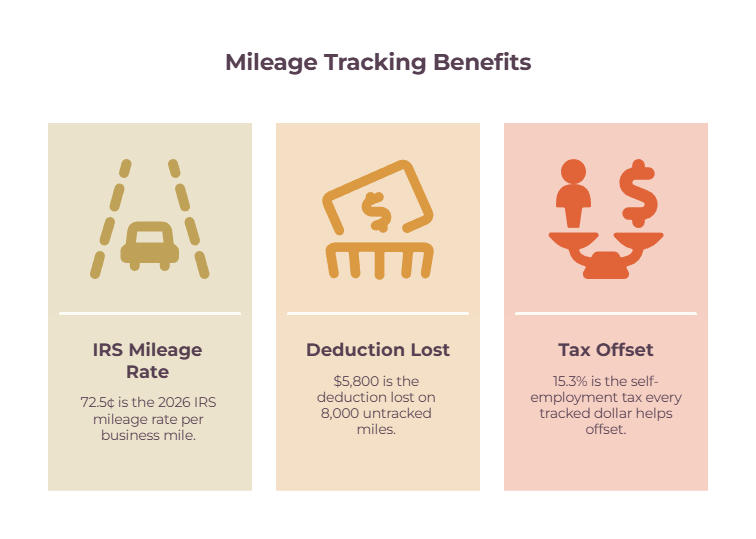
Sloppy expense tracking doesn’t just waste an April afternoon. It costs you deductions that cut both your income tax and the 15.3% self-employment tax, so every dollar you fail to track is worth more to you than it would be to a salaried employee. A few rules are worth knowing because they change how you should track.
The $75 rule gets misquoted everywhere
IRS Publication 463 says you don’t need a paper receipt for travel, certain transportation, and gift expenses under $75.
It does not mean anything under $75 can go undocumented. You still need the date, amount, payee, and business purpose for everything — and lodging always needs a receipt, whatever it costs.
The rule just gives you a little slack on the paper scrap for small travel costs.
Mileage is where casual freelancers leave the most money on the table.
The IRS standard business rate is 72.5 cents per mile for 2026, up from 70 cents in 2025. Drive 8,000 business miles and don’t log them, and you’ve waved goodbye to a $5,800 deduction.
The catch is that the log has to be contemporaneous — date, miles, destination, purpose — which is exactly why the mileage apps above (Hurdlr, Everlance) auto-track in the background.
On record retention, the IRS says keep records three years as a rule, six years if you under-report income by more than 25%, and four years for any employment-tax records. Whatever tool you pick should let you pull a clean export going back that far.
For the weekly habit that keeps all of this painless, see our bookkeeping for self-employed guide.
A freelance contract tracking system that actually sticks
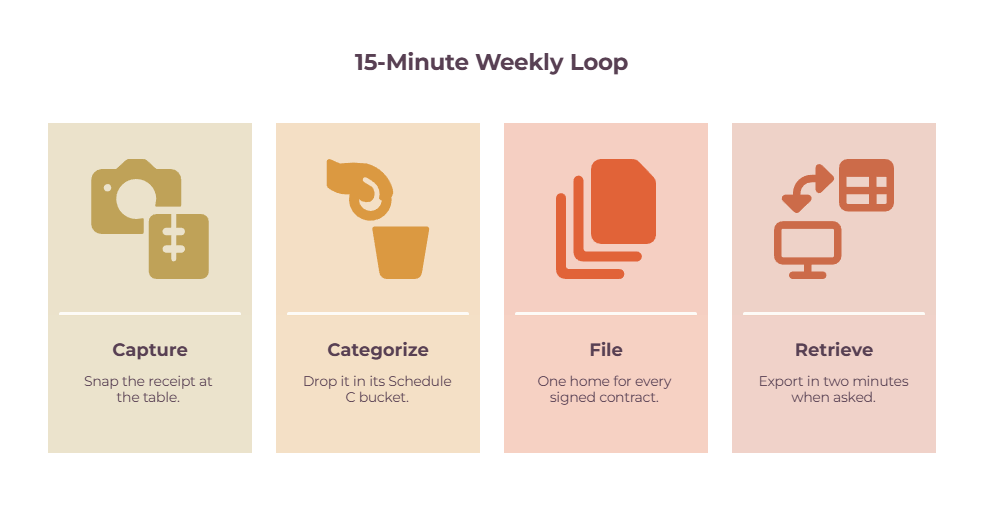
The whole workflow is four steps: capture, categorize, file, and retrieve. It takes about fifteen minutes a week. The trick isn’t doing it perfectly — it’s doing it weekly instead of cramming a year of it into one miserable April afternoon.
🔵 Capture means logging the expense the moment it happens. Photograph the receipt at the table, not three weeks later from a faded scrap at the bottom of your bag.
🟢 Categorize means sorting each expense into its Schedule C bucket as you go, so tax season is a review and not a reconstruction.
🟡 File means one home for every signed contract — one folder or one tool, somewhere you’ll actually look.
🟠 Retrieve means that when your accountant or the IRS asks, the answer is a two-minute export, not a panic.
And one move makes all four easier: open a separate business bank account and card, and run every business dollar through it.
The moment your business spending lives in its own account, your bank feed becomes your expense tracker, and the personal-versus-business guessing game disappears.
If receipts specifically are your weak point, a dedicated receipt scanner app closes that gap fast.
Choosing the Best Tools for Tracking Freelance Contracts and Expenses
Here’s the decision boiled down by the kind of freelancer you are.
Do you send contracts regularly and want one bill for everything? Pick Moxie for value, or Bonsai if you want tax estimates baked in.
For businesses where client bookings are central and the experience needs to look polished — photography, coaching, events — HoneyBook is built for you.
Already using Wave or QuickBooks? Don’t buy an all-in-one; add DocuSign for $10 and stop there. And if you drive a lot and send only a few contracts, pair a mileage app like Hurdlr with a free contract tool.
And if you’re brand new and broke, Wave plus Indy‘s free tier covers both jobs for nothing.
The worst choice is the one you keep putting off. The next contract is coming, and so is the next tax deadline.
Pick the setup that fits how you already work, spend one afternoon setting it up, and you’ll never again do the work for free or lose a $5,800 deduction to a glovebox full of receipts.
Ready to sort the expense side properly? Start with our accounting software for freelancers guide and match a tool to how you bill.
Frequently Asked Questions
Do I really need a contract as a freelancer?
Yes — even for friends and repeat clients. A signed contract or statement of work is what settles a “you said you’d include that” dispute and what protects you from scope creep. A signed PDF is legally binding under the ESIGN Act.
Is the $75 receipt rule real?
It’s real, but widely misunderstood. IRS Pub 463 lets you claim some travel expenses under $75 without a paper receipt — but you still need a record of the date, amount, and business purpose, and lodging always needs a receipt. Everything else still needs documentation, too.
Can I just use a spreadsheet?
For a brand-new freelancer with a few clients, yes. A spreadsheet plus a folder of signed PDFs works until the volume outgrows it. The inflection point is usually when you start missing expenses or losing track of which contracts are signed.
What’s the best free option for both?
Wave for expenses (free, full-featured) plus Indy‘s free tier for contracts. Together, they cost nothing and cover both jobs, with the one tradeoff that they’re two separate logins.
Related guides: accounting software for freelancers · bookkeeping for self-employed · best apps for freelancers · finance software options for freelancers and consultants