What Are the Best Freelancer Task Management Tools?

It’s Tuesday morning. You’ve got five clients, an inbox with thirty unread messages, a Slack notification blinking, and a half-finished draft from Friday you can’t quite remember the shape of. You open your laptop and just… sit there — not because you’re lazy, but because you have no idea what to actually do first, even if you’re already using freelancer task management tools.
Every client feels urgent. Everything feels like it’s slipping.
So you do the thing that feels productive, which is answer the loudest email, and an hour later, you’ve achieved nothing that moved a project forward.
That paralysis isn’t a discipline problem. It’s a load problem.
You’re not just the person doing the work — you’re also the project manager deciding what gets done and the account manager keeping every client happy. Three jobs, one brain, no handoffs.
And here’s the thing most “best freelancer task management tools” lists get wrong: they hand you a tool and assume the system will appear on its own. It won’t.
The app is the easy part. What you actually need is a system the app just happens to run — a repeatable way to decide what’s next across all your clients, without dropping anything. That’s what this guide is about.
Quick Takeaways
- A freelancer’s task problem isn’t features — it’s switching between clients without dropping anything.
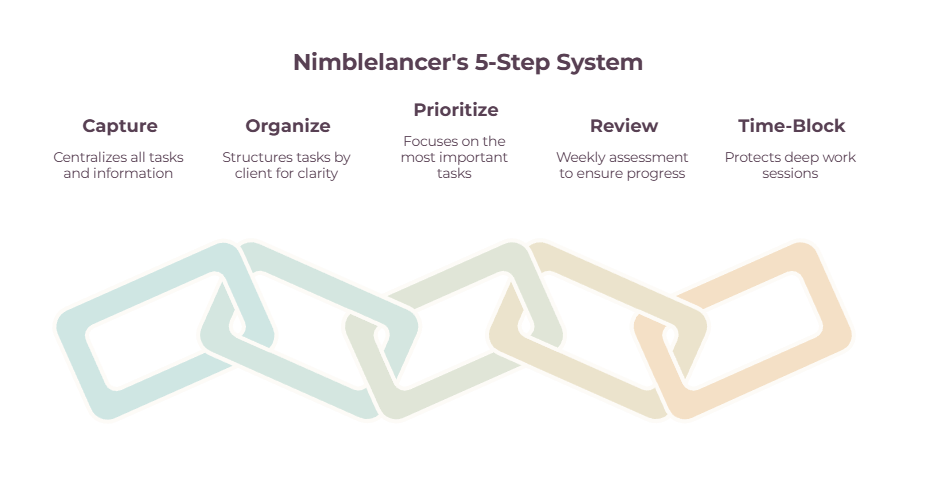
- Build a system, not a tool stack: capture everything, organize by client, prioritize, review weekly, time-block.
- Your inbox is not a to-do list — pull action items out of it into one trusted place.
- Pick one prioritization method (eat-the-frog or 1-3-5), not all of them at once.
- The weekly review is the keystone habit — skip it, and Monday becomes rescue instead of maintenance.
What task management actually means for a freelancer
Task management is the daily layer of deciding and doing what comes next across all your clients. It’s narrower than project management and broader than a basic to-do app, and getting that distinction right is what stops you from over-buying software you don’t need.
Picture a spectrum.
At one end is a plain to-do list: milk, eggs, call the dentist. At the other end is full project management — the world of Gantt charts, dependencies, milestones, and budgets that big teams use to coordinate dozens of people.
Task management sits in the middle, and it’s where freelance life actually happens.
You don’t need a Gantt chart to run your week.
You need to know that the Acme homepage copy is due Thursday, the Henderson revisions come before that, and your own invoicing has to happen Friday, or you don’t get paid.
When your projects genuinely grow teeth — multiple stakeholders, long timelines, real dependencies — that’s when you graduate to project management software, which we cover in depth separately.
The reason this layer is so hard for freelancers specifically comes down to one word: switching.
When you jump from Acme’s brand-voice headspace into Henderson’s technical documentation and then into a sales call, a piece of your attention stays stuck on the last thing — a phenomenon psychologist Dr. Sophie Leroy named “attention residue”— and it’s why bouncing between four clients in a morning leaves you exhausted, having finished nothing.
The work itself isn’t what drains you. The switching is. A good task system exists to minimize that switching, and every step below is built around it.
Step 1: Capture everything in one place
Get every task out of your head and out of your inbox into one trusted place. Your memory isn’t a to-do list, and neither is your email — both lie to you about what matters and when it’s due.

Here’s a test.
Right now, how many open loops are you holding in your head?
The follow-up you owe a client, the contract you meant to send, the idea for next month’s newsletter, the thing your accountant asked for. Every one of those is taking up working memory you could be spending on the actual work.
The first move in any system that holds up is to dump all of it into a single capture point — a brain dump — and then keep capturing the instant something new lands, before it has a chance to become a 2 am worry.
The hardest habit to break here is treating your inbox as your task list.
I get why everyone does it: the requests arrive there, so it feels natural to leave them there. But email is a terrible task manager. You can’t reorder it by priority, you can’t see your client work next to your admin, and every time you open it to “check a task,” you get pulled into ten new ones.
The fix is to process your inbox at set times, pull the action items into your task system, and let email go back to being what it is — a place messages arrive, not a place for work lives.
So when a client fires off a “quick favor” email mid-morning while you’re deep in something else, you don’t drop everything. You capture it in two seconds, finish what you’re doing, and deal with it when you’ve decided to — not when the notification decides for you.
Step 2: Organize by client

Once everything’s captured, split it by client — one list, board, or project per client — and keep the work you do for clients separate from the work of running your business.
A single giant list of forty tasks is just a different kind of overwhelm. The unlock is a structure that matches how your brain already files things, and for freelancers, that structure is almost always the client.
Give every client their own bucket — a project in Todoist, a board in Trello, a page in Notion, whatever you use — so that when you sit down to do Henderson’s work, you see Henderson’s tasks and nothing else.
That visual separation does serious cognitive work: it lets you load one client’s context fully instead of scanning a mixed pile and re-deciding what’s relevant every time.
Then make one more cut that almost nobody makes deliberately: separate your client deliverables from your business-running tasks.
The work that pays you (the designs, the code, the copy) and the work that keeps you in business (invoicing, chasing leads, marketing, taxes) are two different categories, and when they live in one undifferentiated list, the business-running stuff always loses.
It’s not attached to a client deadline, so it slides — until suddenly it’s the 15th and you haven’t invoiced anyone.
Keep a clear bucket for “running the business,” and it stops being the thing you only remember in a panic.
For the client-facing side of this, our freelance management tools guide goes deeper into keeping deliverables and communication straight.
Step 3: Prioritize what actually comes next
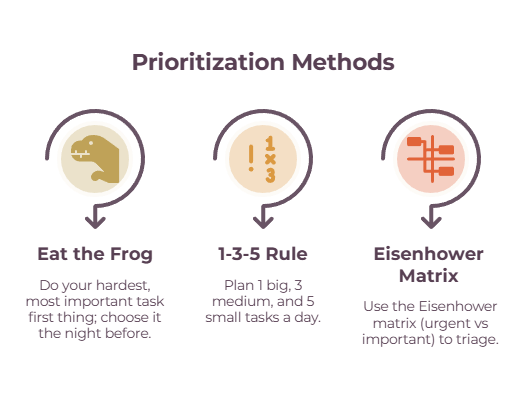
With your tasks sorted by client, you need one rule for what to do first. Pick a single prioritization method and stick with it — for most freelancers, that’s eat-the-frog or the 1-3-5 rule.
The mistake here is collecting prioritization frameworks like trading cards and using none of them. You don’t need all of them. You need one that you’ll actually run every day. Two work especially well for freelance life:
- Eat the frog means you do your most important, usually most-dreaded, task first thing, before the day fills up with other people’s urgencies. Pick the frog the night before so you’re not negotiating with yourself at 9 am.
- The 1-3-5 rule means you commit to one big task, three medium ones, and five small ones for the day — a realistic shape for a day that stops you writing a fantasy list of nineteen things you were never going to finish.
If you’re drowning in deadlines, the Eisenhower matrix (urgent versus important) is a useful backup for triage.
Whichever you pick, watch out for the trap that catches every freelancer: letting urgency masquerade as importance. The loudest client, the most recent email, the thing with the nearest deadline — none of those are automatically the thing that matters most to your business.
By a widely cited estimate from the American Psychological Association, summarizing research by psychologist David Meyer and colleagues, constantly switching tasks can eat up to 40% of your productive time.
Decide your order deliberately, in advance, and let the loud stuff wait its turn.
Step 4: Run a weekly review (and a five-minute daily plan)
The habit that holds the entire system together is a weekly review — a short session to clear the decks, look across every client, and decide your week before it decides you.
This is the step everyone skips, and it’s the one that makes the difference. Once a week — Friday afternoon works well, while the week’s still fresh — sit down for half an hour and do three things:
- Empty your capture inbox
- Look at every client’s list
- Choose the three to five things that genuinely have to happen next week.
That’s it.
The magic isn’t complexity, it’s the act of zooming out from the daily scramble long enough to see the whole board. Do it on Friday, and you walk into Monday already knowing your priorities.
Skip it, and Monday becomes triage: you spend the morning figuring out what’s on fire instead of doing the work.
Underneath the weekly review sits a five-minute daily version. Each morning (or the night before), look at your weekly priorities and shape today: what’s the frog, what are the three-to-five tasks, what meetings are fixed.
One framing that helps is sorting your week into modes — deep client work, communication and admin, and low-energy maintenance — and grouping like with like rather than ping-ponging between them.
The point of both reviews is the same: you do the deciding in a calm moment so that in the busy moments, you only have to execute.
Step 5: Time-block and protect your deep work
Tasks that never make it onto your calendar tend not to happen. Turn your priorities into actual blocks of time, batch similar work together, and defend your focus time as fiercely as you’d defend a client call.

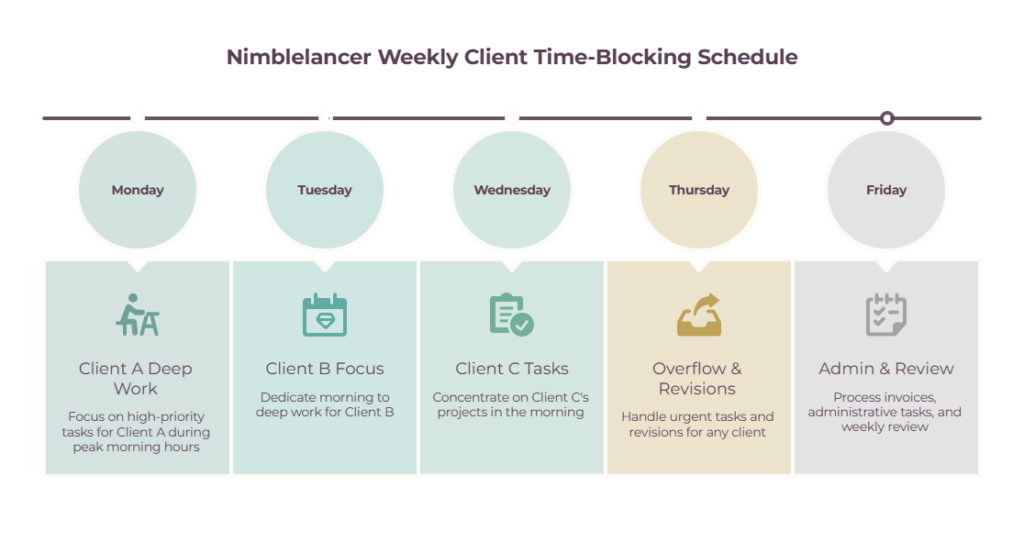
A task list tells you what to do; it doesn’t tell you when, and “when” is where good intentions quietly die. Time-blocking closes that gap: you take the priorities from your daily plan and give each one a slot on the calendar, so the two-hour Acme draft has a home at 9 am rather than floating as a someday-today hope.
The freelance-specific upgrade is to batch by client and by energy. Theme your days where you can — Acme on Mondays, Henderson on Tuesdays — so you’re loading one client’s context and staying in it, instead of paying the switching tax six times a day.
Put your hardest creative work in your peak-energy window and shove email and admin into the low-energy afternoon slump where they belong.
Then protect those deep-work blocks, as they matter. Mark them busy.
If you use a booking link for client calls, set your availability so meetings can’t land in your focus time — knowing where your billable hours actually go (a time tracker makes this visible) and guarding the blocks that produce them is most of the battle.
And leave slack: block maybe 80% of your day, not 100%, because a client will always send the “urgent” thing, and a calendar with no buffer shatters the first time reality shows up. If you do a lot of client calls, scheduling tools that protect your focus time are worth setting up properly.
The tools, briefly (top picks at a glance)
The system matters more than the software, but once you have a system, the right tool makes running it effortless. Here are the main categories and a top pick or two for each.
| Tool | Best for | Free tier? |
| Todoist | Fast capture, list-thinkers, per-client projects | Yes |
| TickTick / Things 3 | To-do plus calendar (TickTick) / Apple users (Things) | TickTick yes; Things paid |
| Trello | Visual thinkers, a board per client | Yes |
| Notion | An all-in-one “second brain” (high setup) | Yes |
| Sunsama / Motion | Daily planning ritual / AI auto-scheduling | Trial only |
| Bonsai / Moxie / Indy | All-in-one with invoicing + contracts | Indy free; Bonsai & Moxie trial |
The plain truth is that any of these will run the system above, so don’t agonize. Match the tool to how your brain works: if you think in lists, Todoist; if you think in visual boards, Trello; if you think in calendar slots, Sunsama or Motion.
We go deep on features, pricing, and head-to-head comparisons in our guide to the best project management software for freelancers, and if you want a tool that also handles invoicing, contracts, and your client pipeline, the all-in-one freelance management platforms are covered there, too.
How to build the system that fits you
Don’t copy someone else’s elaborate setup. Build the simplest version that survives a busy week, and only add complexity when the simple version starts to hurt.
Here’s the whole thing on one page.
Start with one source of truth and capture everything into it. Pick a tool that matches how you think — list, board, or calendar.
Organize by client, with a separate bucket for running the business. Choose one prioritization method and run it daily.
Add a weekly review (the keystone) and a five-minute daily plan. Time-block your priorities and protect the deep work.
That’s the system. You could set it up this afternoon.
The most common way freelancers sabotage this is over-engineering.
Building a gorgeous Notion command center with twelve linked databases feels like productivity, but it’s usually procrastination wearing a productivity costume — and a system that takes an hour to maintain is a system you’ll abandon by month two.
The other classics: running too many tools so your tasks scatter across five apps, never doing the weekly review, treating the inbox as the list, and planning with zero buffer. Start embarrassingly simple.
A to-do app and a Friday review will carry you a long way, and you’ll feel exactly when you’ve outgrown it — when client work starts colliding, and handoffs get complicated. That’s your signal to move up to a proper project management tool, not before.
Where to start
You don’t need the perfect app, and you definitely don’t need a fourteen-database productivity cathedral. You need a system you trust enough to stop carrying everything in your head.
So do two things this week: pick one place to capture every task, and book yourself a thirty-minute review for Friday afternoon. That’s the whole foundation. Everything else — the prioritization method, the time-blocking, the right tool — clicks into place much more easily once those two habits exist.
The goal is simple, and it’s worth holding onto: you open your laptop on Monday morning and, instead of that Tuesday-paralysis stare, you already know exactly what comes next.
For the tools that run all this, see our project management software guide, and for the business-running side of your task pile — the invoicing, the taxes, the cash flow — our guide to managing freelance finances covers where those tasks should lead.
Frequently Asked Questions
What’s the difference between task and project management for a freelancer?
Task management is the daily layer of deciding what to work on next across your clients — lists, priorities, and time-blocking. Project management adds the heavier machinery of timelines, milestones, dependencies, and budgets.
Most solo freelancers need solid task management and only graduate to project management software when projects get genuinely complex.
How do freelancers stay organized across multiple clients?
By capturing every task in one place, then organizing by client so each has its own list or board, and batching work by client to reduce context-switching. A weekly review to set priorities across all clients is the habit that keeps the whole thing from unraveling.
What are the best freelancer task management tools?
There’s no single best — match it to how you think. Todoist suits list-thinkers, Trello suits visual thinkers, and Sunsama or Motion suit people who plan on a calendar. The system you run matters far more than which app runs it.
Do I need a paid tool, or is it free enough?
For most freelancers, a free tier is plenty to start. Todoist, Trello, TickTick, and Notion all have capable free plans. Upgrade only when you hit a true limit — more clients than the free tier allows, or a feature like calendar integration you’ll genuinely use every day.