How to Track Expenses: 8 Simple Steps That Work

Knowing how to track expenses properly can save you a lot of trouble at tax time. You’re scrolling through twelve months of bank statements, trying to work out which of four hundred transactions were actually business expenses.
Then you spot three subscriptions you paid for all year and never claimed once.
And behind it all, the question you’ve been avoiding: did last month actually make money, or did it just feel busy?
That’s what no system looks like.
You don’t have a finance team. You don’t have a bookkeeper watching the numbers. So business spending quietly scatters across two cards, a PayPal account, and a folder of receipts you meant to sort in March.
The cost isn’t just stress in January. Every untracked expense is an unclaimed deduction — tax you paid and didn’t have to.
The fix isn’t a new skill or better software. It’s a five-minute weekly habit you set up once.
Below: why it matters, the system itself, how to pick the method that fits you, what actually counts as deductible, how long to keep records, and how to make it stick.
Quick Takeaways
- Tracking expenses isn’t busywork — every deductible expense you miss is money you overpay in tax.
- Open a separate business bank account so business and personal spending never mix; it’s the single best first step.
- Capture expenses as they happen and save a digital receipt for each, rather than leaving it all to month-end.
- Categorize into tax categories as you go — software, home office, equipment, travel, marketing, fees — so tax time is trivial.
- Keep it to a weekly ten-minute review plus a monthly look; a system you’ll actually keep beats a perfect one you abandon.
Why Knowing How to Track Expenses Matters

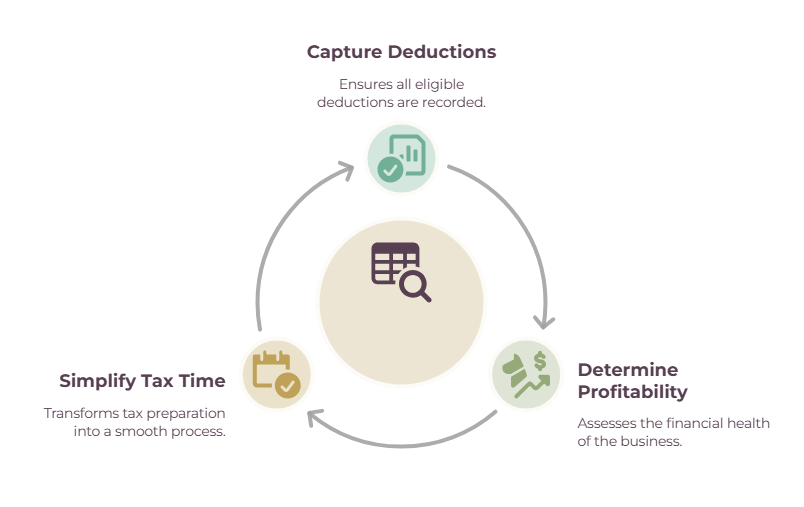
Tracking your expenses does three things: it captures every deduction so you don’t overpay tax, it shows you whether you’re actually profitable, and it turns tax time from a scramble into a formality.
There’s a big difference between guessing at your own numbers and actually knowing them. Usually, you’ll be pleasantly surprised, making the process worthwhile.
As you hopefully know, anything you spend to run your business — software, equipment, a slice of your home-office costs — is potentially deductible, but only if you’ve got a record of it.
Every untracked expense is a deduction that silently vanishes, and those add up to a bigger tax bill than you owe.
Beyond tax, tracking is how you know your real profit rather than your revenue: plenty of “good months” look a lot thinner once the subscriptions, fees, and tools are subtracted.
And when everything’s logged and categorized, tax time stops being a weekend lost to bank statements and becomes a quick export — with clean records to fall back on if you’re ever audited.
How to track your expenses, step by step
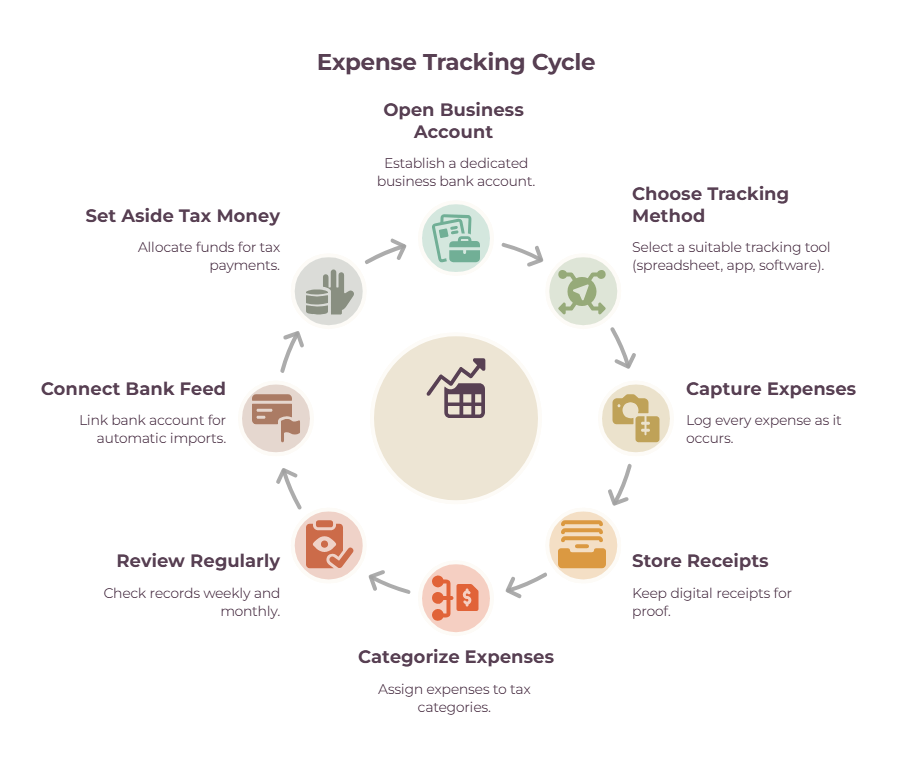
The system is simple: separate your business banking, pick a tracking method, capture every expense as it happens with a receipt, categorize it to a tax category, review weekly, and set money aside for tax as you go.
You set it up once, and after that it runs in a few minutes a week.
1. Open a separate business bank account (and card)
If you haven’t already, always set up and use a dedicated business bank account. All income goes in, and all expenses come out of this account, then pay yourself a wage to your personal account.
This makes it effortless to track expenses because you can just pull all the transactions from this account, and you won’t have to sort through any personal transactions, wondering what’s viable as an expense and what’s not.
You also look more credible to clients and lenders, and will never waste time checking whether a card charge was groceries or a client lunch. Best way to make things simple.
2. Choose your tracking method
You’ve got three options: a spreadsheet you fill in yourself, a dedicated expense app, or full accounting software that pulls transactions straight from your bank.
Pick based on how many transactions you handle and how much you want done for you (there’s a section on this next).
3. Capture every expense as it happens
The goal is seconds per expense, logged in the moment, not a dreaded month-end catch-up where you’re guessing at what a charge was for.
The expenses freelancers miss most are the small recurring subscriptions — a few dollars here and there that quietly add up to a real deduction over a year.
4. Store a digital receipt for each expense
Snap a photo and file it, either in your app or a cloud folder organized by year and month. Keep the receipt tied to the transaction so it’s there if you need to prove it. (A receipt scanner app automates this if you deal with a lot of paper.)
5. Categorize into tax categories as you go
Map each expense to a deductible bucket — software, home office, equipment, travel, marketing, professional fees — the moment you log it.
Categorizing in real time is what makes tax time trivial, versus sorting a year’s worth in one painful sitting. (See freelance tax deductions for what fits where.)
6. Review on a rhythm
A ten-minute weekly pass keeps your records accurate and catches anything you missed; a slightly longer monthly review lets you spot spending patterns and check you’re on track. A recurring calendar reminder is what makes it actually happen.
7. Connect your bank feed if you use software
When your business account is linked to accounting software, every transaction imports automatically, so nothing slips through the cracks — the biggest time-saver once your volume grows.
8. Set aside money for tax as you go
Since no one’s withholding tax for you, park roughly 25–30% of each payment in a separate tax pot.
In the US, the IRS says sole proprietors, partners, and S corporation shareholders generally have to make estimated payments if they expect to owe $1,000 or more when the return is filed.
That $1,000 isn’t the whole test. You’ll usually avoid an underpayment penalty if you’ve paid at least 90% of this year’s tax or 100% of what you owed last year, whichever is smaller, and higher-income taxpayers, farmers, and fishermen have their own rules.
If you had no tax liability last year at all, you may owe no estimated payments.
(Just a reminder, this is general guidance, not tax advice — the right percentage depends on your situation.)
How to Track Expenses: Spreadsheet, App, or Accounting Software?

There are three ways to track expenses: a free spreadsheet you fill in yourself, a dedicated expense app, or full accounting software that imports and categorizes straight from your bank.
There’s no right or wrong answer, only the method that works best for you, your available time, and how you like to do things.
The best way to define this is by considering how many transactions you have and whether you want to manage everything manually or automatically.
Most freelancers start simple and upgrade when the admin outgrows the tool.
- A spreadsheet is free, endlessly customizable, and perfectly good when you’re starting out or handling a handful of expenses a month. The trade-off is that it’s all manual, so it lives or dies on your discipline. Our free expense tracking template gives you the columns and categories already set up.
- An expense or accounting app connects to your bank, imports transactions automatically, and categorizes them for you, which saves real time once you’re past a few dozen expenses a month. For which tool suits you, see our roundup of expense tracking software, and for the big accounting names, FreshBooks vs QuickBooks.
- Which to pick? Start with a spreadsheet if your expenses are few and simple, and move to software when the time you spend on manual entry is worth more than the subscription. There’s no prize for making it harder than it needs to be.
What counts as a deductible business expense?
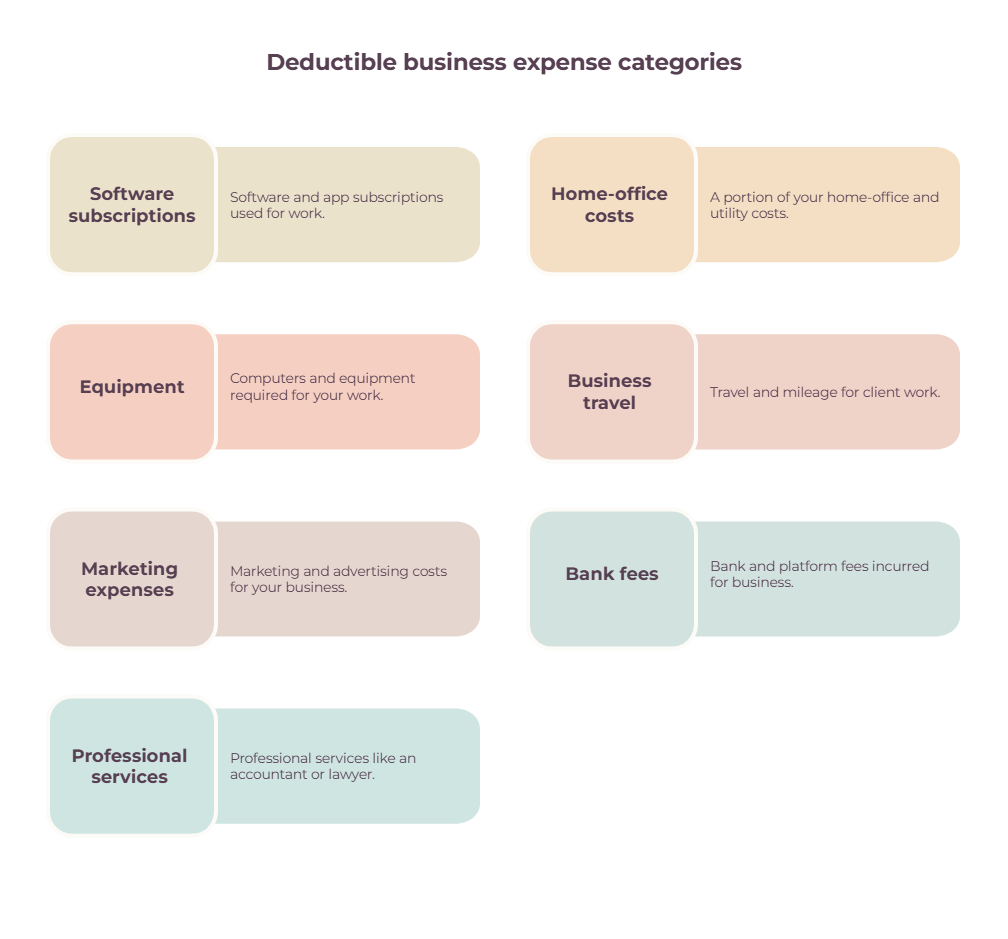
Broadly, anything ordinary and necessary for your work is a deductible business expense — software and subscriptions, home-office costs, equipment, business travel, marketing, and professional fees like accounting or legal help.
You keep the receipts or invoices, and this allows you to prove your claim against it when completing your taxes. Simple rule to remember: would a reasonable person in your line of work spend this to do the job?
The common categories for freelancers are worth knowing so you can tag expenses as you go:
- Software and app subscriptions
- A portion of your home-office and utility costs
- Computers and equipment
- Travel and mileage for client work
- Marketing and advertising
- Bank and platform fees
- Professional services like an accountant or lawyer.
You’re probably already aware that, as a freelancer, business and personal life can blend. You might use your personal phone contract to take calls, or have a laptop you use for both work and day-to-day life.
In these cases, you can only claim the business-use share, usually by a percentage. So if you pay $50 a month for your phone contract, but only use it for roughly 50% business calls, the rest personal, scrolling, etc.
You can only claim up to $25 per month.
Rules differ by country and situation, so treat this as a map rather than the final word, and check specifics with an accountant. Our guide to freelance tax deductions goes deeper on each category.
How long should you keep receipts and records?
Keep your expense records for generally at least three years, and longer in several common situations. The IRS sets six years if you under-report income by more than 25%, seven for a worthless-securities or bad-debt claim, four for employment tax records, and indefinitely if you file a fraudulent return or none at all. Digital copies are accepted, so a clear scan filed in your app or a cloud folder is enough.
Three years is the IRS’s standard period of limitations, not a ceiling, and it runs from the date you filed rather than the date you spent.
Records tied to property stay relevant until the period runs out for the year you sell or dispose of the asset, which is why a laptop you’re depreciating outlives the three-year rule.
Other countries set their own windows. If in doubt, keep records longer rather than less.
In the UK, you have to keep your receipts for 5-6 years (depending on whether you’re self-employed or a limited company).
The practical move is to store receipts digitally as you capture each expense, tied to the transaction, so “keeping records” happens automatically rather than as a separate chore.
A receipt scanner app makes this effortless if you collect a lot of paper receipts.
How to Track Expenses Consistently

The system only works if it becomes routine, so capture expenses in the moment, run a ten-minute weekly tidy, and do a slightly longer monthly review — all anchored to a recurring reminder so it never piles back up.
It sounds boring, but it’s not about fancy software. Rather, doing the small, boring check-ins consistently. This can break down into three habits.
Log or photograph an expense when it happens, while you still remember what it was for.
Do a weekly ten-minute pass to check everything imported or entered, and make sure nothing’s uncategorized.
And run a monthly review to spot patterns, tidy up, and move your tax money into its pot.
Set one recurring reminder — a Friday-afternoon calendar block works well — and the whole thing stops relying on willpower.
A simple system you’ll actually keep beats a perfect one you abandon in a month.
For fitting this into the bigger picture of your money, see how to manage finances as a freelancer and our accounting tips for freelancers.
The bottom line
Tracking your expenses isn’t accounting. It’s a habit. Once you know how to track expenses consistently, the process becomes simple.
Separate your business banking, capture each expense as it happens, categorize it, and review weekly, and you’ll claim every deduction you’re owed, always know your real profit, and turn tax time into a five-minute export instead of a lost weekend.
You don’t have to do all of it today. Start with the step that pays off fastest: open a separate business account, and build the rest of the habit from there.
Frequently Asked Questions
How do I track my business expenses as a freelancer?
Open a separate business bank account, choose a tracking method (a spreadsheet, an expense app, or accounting software), and capture every expense as it happens with a digital receipt.
Categorize each one to a tax category, review your records weekly, and set aside money for tax as you go. It takes a few minutes a week once it’s set up.
Do I need a separate bank account to track expenses?
It depends on how your business is set up.
A US sole proprietor generally isn’t required to hold one, but if you’ve formed an LLC or a corporation, keeping business money in its own account is part of the legal separation that protects your personal assets, and mixing funds can undermine it.
Requirements also vary by country and state, and some banks require a business account for business activity under their own account terms.
Whatever your structure, a dedicated account is still the single best thing you can do for tracking.
It keeps business and personal spending from mixing, so your records are clean by default and tax time is far simpler.
Should I use a spreadsheet or an app to track expenses?
Use a spreadsheet if you’re starting out or have only a handful of expenses a month — it’s free and simple.
Move to an app or accounting software once you’re handling enough transactions that automatic bank imports and categorization save you meaningful time. Many freelancers start with a spreadsheet and upgrade later.
What business expenses can freelancers deduct?
Anything ordinary and necessary for your work — software and subscriptions, home-office costs, equipment, business travel, marketing, bank and platform fees, and professional services like accounting or legal help.
Expenses used for both business and personal life can usually only be claimed for the business share. Rules vary by country, so confirm specifics with an accountant.
How long should I keep receipts?
Generally, at least three years, which is the IRS’s standard period of limitations.
Some situations run longer: six years if you under-report income by more than 25%, seven years for a worthless-securities or bad-debt claim, and indefinitely if you don’t file a return.
Records for assets you’re depreciating should be kept until the period runs out for the year you dispose of them. Digital copies are fine.
How often should I update my expense records?
Capture each expense as it happens, then do a quick ten-minute review weekly and a fuller review monthly.
Weekly keeps your records accurate and stops small oversights from piling up; monthly lets you spot patterns and set aside tax money. A recurring reminder makes it a habit rather than a scramble.
Related guides: expense tracking software · expense tracking template · the best receipt scanner apps · freelance tax deductions · accounting tips for freelancers