
The Best Expense Tracking Software to Use (Free & Paid)
Search “expense tracking software” and you’ll drown in enterprise spend management platforms. Approval chains. Corporate cards. Per-seat pricing. Dashboards built for a finance department you don’t have.
You’re a business of one. You want your spending logged, categorized, and ready for tax without a January scramble.
Most of these platforms were never built for you. They’re built for teams that need to approve and control employee spending, and they charge by the head — which is where the money is. Your one subscription isn’t.
What you actually need is smaller: a tool that connects to your bank, imports transactions, sorts them into the right categories, and holds onto your receipts.
Several of the best ones do that for free.
So we’re skipping the corporate platforms. Below: the best expense tracking tools for freelancers (free and paid), what each one is best at, what to look for, and how to pick the one that fits how you work.
(Prices are approximate, in USD, and verified September 2026. Software pricing changes often — confirm on each provider’s page before subscribing.)
Quick Takeaways
- The top picks: Wave (best free books), Zoho Books (free full accounting under $50k revenue), QuickBooks Solopreneur (tax and mileage), FreshBooks (invoicing-first), and Expensify (receipt automation).
- You can still track expenses at $0 — Wave, Zoho Books, Zoho Expense and QuickBooks Solopreneur all have free plans, though each caps something.
- Expensify’s free plan is back in play for solo freelancers. The free Submit plan covers unlimited receipt SmartScans, mileage tracking and categories; Collect, the paid workspace, starts around $5 per member a month.
- Good software imports from your bank and categorizes for you — that’s the real time-saver over a spreadsheet.
- As a freelancer, look for bank feeds, receipt capture, tax-category tagging, and mileage — not enterprise approval workflows.
- The best tool is usually the cheap one you’ll actually keep using, not the most powerful, feature-rich one on the list.
The best expense tracking software, compared
Wave is the pick for free books and expenses, Zoho Books for free full accounting under $50k in revenue, QuickBooks Solopreneur for tax and mileage, FreshBooks for invoicing-first freelancers, and Expensify for heavy receipt scanning. Here they are side by side.
| Tool | Best for | Price (approx) | Free plan | Receipt scanning |
| Wave | Free books + expenses | Free Starter; Pro around $19/mo or $190/yr (intro $9.50/mo for 3 months, then $19) | Yes | Pro only — around $8/mo add-on on Starter ($72/yr) |
| Zoho Books | Free full accounting (under $50k revenue) | Free under $50k; Standard around $20/mo, or $15/mo billed annually | Yes | Yes — 50 autoscans/mo on Free, 200 on Standard |
| FreshBooks | Invoicing-first freelancers | Lite around $23/mo (90% off for 3 months, then $23); 5 clients | No | Yes, Plus+ — not on Lite |
| QuickBooks Solopreneur | Tax and mileage | Free plan; Lite around $20/mo (50% off for 3 months, then $20) | Yes, limited | Yes — 2 receipts/mo on Free, unlimited on Lite |
| Expensify | Receipt automation | Free Submit plan; Collect around $5/member/mo; Control custom, from around $9/member/mo | Yes — unlimited SmartScans, mileage and categories | Yes (SmartScan) |
| Zoho Expense | Dedicated expense + mileage app | Free up to 3 users; Standard around $4/user/mo ($3 billed annually) | Yes | Yes — 20 scans/user/mo on Free, 200 on Standard |
What expense tracking software does (and what to look for)
Expense tracking software connects to your bank, imports and auto-categorizes your transactions, stores your receipts, and turns it all into reports. This means tracking becomes a near-automatic feed instead of manual logging.
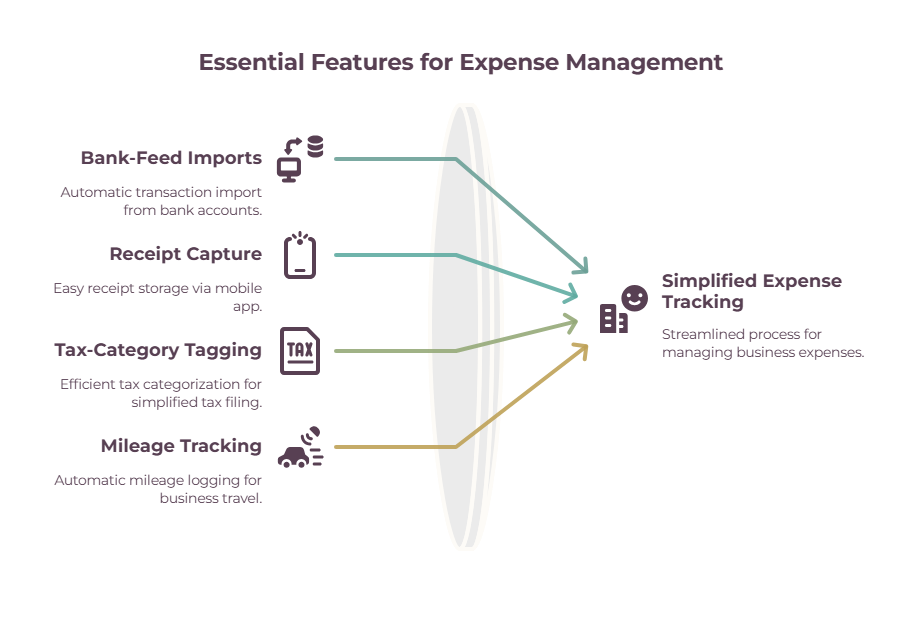
Once your account is linked, most of the work happens on its own. A charge lands, the software pulls it in, guesses the category, and files it.
All you need to do is go through and confirm the transactions every now and then, and reconcile any differences.
This means when searching for the right tool, long, multi-page feature lists are not really worth bothering with.
All you need is:
- Bank-feed imports (so transactions arrive automatically)
- Receipt capture (snap a photo, attach it to the transaction)
- Tax-category tagging (ideally mapped to Schedule C, so tax time is a straight export)
- Mileage tracking if you drive for work.
What you can safely ignore is the enterprise stuff — approval workflows, corporate-card controls, multi-department reporting — which is exactly what the tools ranking for this search tend to lead with.
Match the software to a business of one, and the choice gets a lot simpler.
However, you’ll always need to check what’s available in the free plan.
Sure, almost every tool has one, and nearly every one will have some sort of cap on the features you want. We’ll cover this below, but bear this in mind when shopping.
The best expense tracking software for freelancers, reviewed

Wave
Best free books and expense tracking- Price: Free Starter; Pro ~$19/mo or ~$190/yr for auto receipt scanning & bank feeds (often discounted to ~$9.50/mo for 3 months, then $19)
- Platform: Web, iOS, Android
- Free plan: Yes — core books and expenses, no revenue cap
- The catch: Receipt scanning on Starter is a ~$8/mo (or ~$72/yr) add-on in the US — twice the price of a full Zoho Expense seat, for one feature
Wave gives you free accounting and expense tracking with no revenue limit, so it’s the best no-cost way to log and categorize your spending — just know that automatic receipt scanning and bank feeds are the paid part.
Zoho Books
Best free full accounting (under $50k)- Price: Free under $50k revenue; Standard ~$20/mo, or ~$15/mo billed annually
- Platform: Web, iOS, Android
- Free plan: Yes — under $50k/year, with 50 receipt scans a month
- The catch: Bank feeds start at Standard, so the free plan means manual entry — and crossing $50k forces an upgrade whether your needs changed or not
Zoho Books is a full accounting tool — expense tracking, receipt scanning, and double-entry books — free for businesses under $50,000 a year. The most generous free tier here for real accounting, not just expense logging.
QuickBooks Solopreneur
Best for tax and mileage- Price: Free plan; Lite ~$20/mo (50% off for 3 months, then $20)
- Platform: Web, iOS, Android — mobile app requires Lite
- Free plan: Yes — 5 mileage trips and 2 receipts a month
- The catch: The 2-receipt cap makes the free plan a trial, not a tool — and with no mobile app you don’t get the automatic GPS mileage tracking either
QuickBooks Solopreneur is built around tax: it tracks expenses and mileage and sorts everything into Schedule C categories. The pick if tax time is your real pain point — and the tool your accountant already knows.
FreshBooks
Best for invoicing-first freelancers- Price: Lite ~$23/mo, currently ~$1/mo for the first year; Plus ~$43/mo
- Platform: Web, iOS, Android
- Free plan: No — 30-day free trial only
- The catch: Receipt scanning isn’t on Lite — automatic expense capture, emailed receipts, bank reconciliation and accountant access all start at Plus, roughly doubling your cost to ~$43/mo
FreshBooks pairs unlimited expense tracking with the best invoicing experience around, plus built-in time tracking. The natural pick for service freelancers who live in invoices as much as expenses.
Expensify
Best for receipt automation- Price: Free Submit plan; Collect ~$5/member/mo; Control custom pricing, quoted from ~$9/member/mo
- Platform: Web, iOS, Android
- Free plan: Yes — unlimited receipt SmartScans, mileage tracking, categories and tags, and personal card import
- The catch: The free plan stops at capture — reimbursements, corporate card management and QuickBooks/Xero integrations all need Collect, and Control is quote-only rather than published
Expensify’s SmartScan photographs a receipt and pulls out the details automatically, so capture and categorization happen with one snap. The strongest pick if you’re drowning in receipts — and the free Submit plan scans as many as you throw at it.
Zoho Expense
Best dedicated expense app- Price: Free up to 3 users; Standard ~$4/user/mo (~$3 billed annually); Premium ~$6/user/mo (~$5 annually)
- Platform: Web, iOS, Android
- Free plan: Yes — up to 3 users, 20 receipt scans per user a month
- The catch: An expense tracker, not full accounting — you’ll still want books elsewhere, and the free scan cap is 20 a user where Expensify’s free plan is unlimited
Zoho Expense is a purpose-built expense and mileage app — snap receipts, log trips, and categorize on the go — free for up to three users. The pick when you want a focused tracker with proper expense reporting around the scanning.
Free vs Paid Expense Tracking Software — Do You Even Need It?

Most freelancers can still track expenses for free with Wave, Zoho Books, or Zoho Expense, and only need to pay for automatic receipt scanning, richer reports, or full accounting.
If your expenses are few, a spreadsheet does the job. Software earns its place when the auto-import saves more time than it costs.
The best way to move forward is to start free or on a spreadsheet and see how far it gets you.
A free tool that imports and categorizes your transactions covers the vast majority of freelance needs.
You then only need to upgrade when you need something specific, such as when you want receipts scanned automatically instead of typed in, you need proper reports for tax or an accountant, or you’ve outgrown expense logging and want full double-entry books.
However, always check what your preferred platform’s free tier offers, as this can change yearly.
For example, Expensify’s free-with-the-card option is gone and QuickBooks Solopreneur added a free plan, so the cheapest route is worth rechecking before you commit to any one tool.
And if you’re only handling a handful of expenses a month, you may not need software at all — a spreadsheet is free and completely adequate.
The expense tracking template gives you one ready to go, and the how to track expenses guide covers the whole system, whichever route you pick.
How to choose the right expense tracker
Pick based on your main need — free books, tax, invoicing, or receipts — and only pay once a free plan stops covering you. This table sums it up.
| If you… | Pick | Why |
| Want free books with no revenue cap | Wave | Free core accounting however much you earn — but receipt scanning is a ~$8/mo add-on |
| Want the most complete free accounting | Zoho Books | Double-entry books and 50 receipt scans a month, free under $50k revenue |
| Care most about tax and mileage | QuickBooks Solopreneur | Schedule C categories and mileage; the free tier covers 5 trips a month, Lite unlocks unlimited |
| Live in invoices too | FreshBooks | Best invoicing, unlimited expenses — but no free plan, around $23/mo after the intro |
| Are drowning in receipts | Expensify | One-snap SmartScan capture, now around $5/member/mo on Collect |
| Want receipts and mileage for $0 | Zoho Expense | Focused tracker, free for up to 3 users with 20 scans a month |
| Want the cheapest way to start | QuickBooks Solopreneur free plan | Mileage and receipts at $0, with an upgrade path when the caps bite |
Most freelancers can start on a free plan and stay there for a long time. Pay when a specific feature — automatic receipt scanning, richer reporting, or full accounting — will save you more time than it costs.
The wrap-up
Skip the enterprise spend-management platforms — as a freelancer, the right expense tracking software is the free or cheap one that fits how you actually work.
Connect it to your bank, let it categorize for you, keep your receipts attached, and expense tracking stops being a chore and becomes something that mostly runs itself.
Nearly all of these let you start free.
Pick the one that matches your main need, watch for the cap your plan puts on the feature you use most, and upgrade only when a feature earns its keep.
Frequently Asked Questions
What’s the best expense tracking software for freelancers?
For most freelancers, Wave is the best free option and Zoho Books the best free full-accounting tool.
QuickBooks Solopreneur is best if tax and mileage are your priority, FreshBooks if you want invoicing built in, and Expensify if you’re drowning in receipts.
The right one depends on whether your main need is free books, tax, invoicing, or receipt capture.
Is there free expense tracking software?
Yes. Wave offers free accounting and expense tracking with no revenue cap, Zoho Books is free for businesses under $50,000 in annual revenue, Zoho Expense is free for up to three users, and QuickBooks Solopreneur now has a limited free plan.
Expensify’s free Submit plan also covers solo freelancers, with unlimited receipt SmartScans, mileage tracking and categories. What went away was the free-with-the-card deal, which moved to the annual Control plans.
What does expense tracking software do?
It connects to your bank account, automatically imports your transactions, sorts them into categories, stores your receipts, and generates reports like profit-and-loss or tax summaries.
In short, it turns manual expense logging into a near-automatic feed, so your records stay up to date with little effort.
What’s the best expense tracker for tax and mileage?
QuickBooks Solopreneur is the strongest for tax, with Schedule C categorization and mileage tracking built in, and its free plan covers 5 trips a month if you want to try it.
Zoho Expense is a good dedicated option for mileage and receipts specifically, with GPS tracking on its free tier, and most full accounting tools include some mileage tracking.
Should I use software or a spreadsheet?
Use a spreadsheet if your expenses are few and you’re happy logging them by hand. It’s free and simple.
Move to software once you’re handling enough transactions that automatic bank imports and categorization save you real time. Many freelancers start with a spreadsheet and upgrade later.
Does expense tracking software scan receipts?
Most do, though usually with a monthly cap or on a paid tier.
Zoho Books includes 50 scans a month free and Zoho Expense 20 per user; QuickBooks Solopreneur’s free plan allows just 2; FreshBooks starts automatic receipt capture on Plus, not Lite; and Wave charges $8/month or $72/year for it unless you’re on Pro, where it’s included.
If receipts are your main headache, check each tool’s scan limits specifically — the receipt scanner apps roundup goes deeper.
Related guides: how to track expenses · expense tracking template · the best receipt scanner apps · FreshBooks vs QuickBooks · freelance tax deductions