Freelance Workflow Management: A Better System for Client Work
As a solo freelancer, you are the entire company. Sales, project management, accounts, admin — all you, all at once. Good freelance workflow management gives all of that a system; without one, every project gets handled from scratch. That’s exactly how things start slipping through the cracks.
You already know what that looks like. The job that ballooned because the brief was never pinned down. The invoice that went out three weeks late because you were “too busy” — so a good month somehow ended with nothing in the bank.
The client who went quiet after delivery, and you never circled back for more work. None of it is a failure of effort. It’s a failure of process — the same tasks reinvented every time, so something always gets dropped.
The fix isn’t working harder. It’s to stop treating each project as a one-off and start running your work as a repeatable pipeline: one clear path that every client and every project follows, from first inquiry to final payment and beyond. That’s freelance workflow management.
This guide covers what it actually is, the stages of a freelance workflow, how to build the system step by step, where workflows usually break, and what’s worth automating. (This is about the system itself — for the software that runs it, there’s a tools guide linked further down.)
Quick Takeaways
- Freelance workflow management means running your whole client lifecycle as a repeatable system — lead, proposal, onboarding, project, delivery, invoicing, offboarding — not just keeping a daily to-do list.
- Standardize each stage once with a checklist and a template or canned email, so every project runs the same way, and nothing is improvised.
- Workflows tend to break at the same points: no written brief (scope creep), a messy onboarding handoff, and late invoicing with no follow-up.
- Automate the repetitive handoffs — intake forms, contracts, booking, payment reminders — not the creative work or the client relationship.
- Keep it lean: the system matters more than the software, and the best workflow is the one you’ll actually follow.
What is freelance workflow management?
Freelance workflow management is the practice of running your entire client lifecycle — from first inquiry to final payment and follow-up — as one repeatable system, so every project moves through the same defined stages instead of being handled ad hoc.
It’s about the process that connects everything, not the individual tasks and not which app you use.
That distinction matters, because “workflow” gets used loosely. Managing your day — deciding what to work on and staying focused — is task and time management, and there are separate guides for that (the 1-3-5 rule and time management for freelancers cover it).
Workflow management sits a level up: it’s the repeatable path a piece of client work travels from the moment someone enquires to the moment you file the finished project and ask for a testimonial.
Get that path defined once, and every project after it becomes easier, faster, and far less stressful.
The stages of a freelance workflow
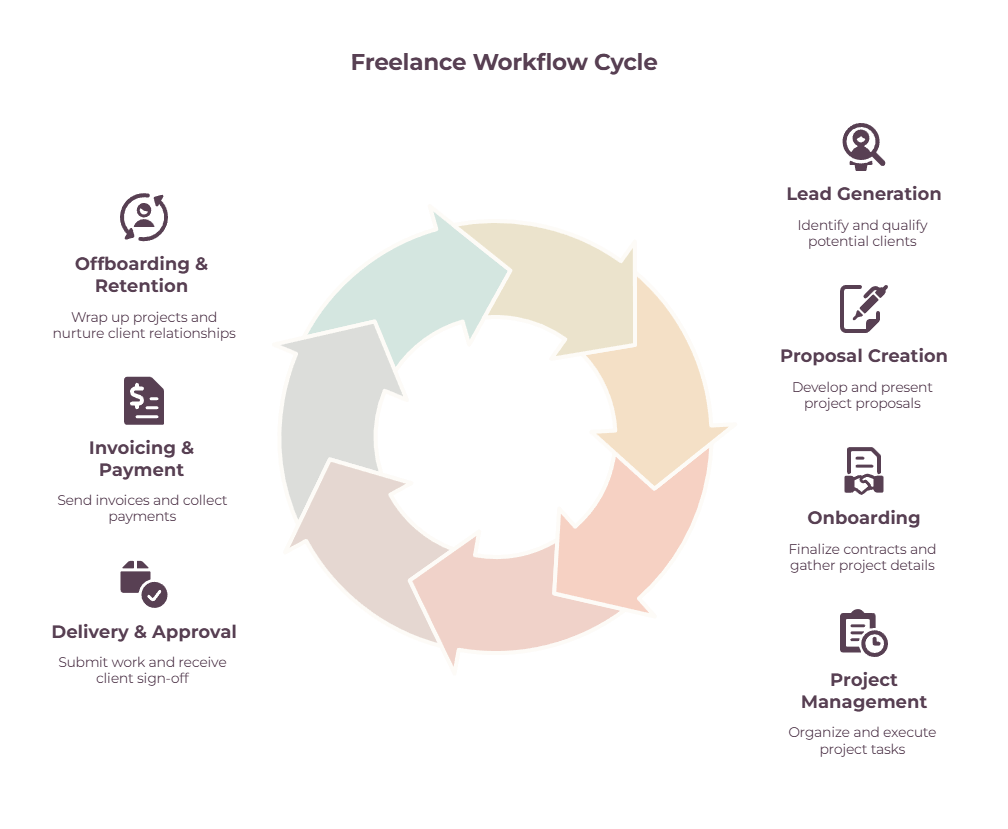
A freelance workflow runs as a loop: lead, proposal, onboarding, project work, delivery and approval, invoicing, and offboarding — with the final stage feeding repeat work back to the start. Once you can see the whole loop, you can see exactly where a project is at any moment, and exactly where things tend to get stuck.
1. Lead or inquiry
Someone gets in touch, or you spot an opportunity.
The job here is to capture every inquiry in one place and qualify it quickly, so you spend time on good-fit work and politely pass on the rest rather than chasing everything.
2. Proposal and quote
You turn a qualified lead into a clear proposal with scope and pricing. Having a repeatable proposal you adapt — rather than writing each from a blank page — is what makes this fast.
For larger jobs, this is where you agree on a deposit up front. A pro forma invoice is useful here to set out what you’ll charge so the client can approve it internally, though the deposit itself is requested with a real invoice at the next stage.
3. Onboarding and contract
The client says yes. Now the contract gets signed, the deposit is paid, and an intake questionnaire or brief pins down exactly what’s needed before any work starts. This stage is where scope is set — and where scope creep is prevented.
4. Project and task management

The actual work. Break the project into tasks and move them across a simple board — Pending, In Progress, Review, Done — so you always know what’s next.
This is the one place you should open every day; pair it with a focus method like the 1-3-5 rule to actually move it forward.
5. Delivery, review and approval
You hand the work over through a defined process, the client reviews it, and you make revisions — within the capped number of rounds your scope specified — until they sign off. A clear handover and a firm revision limit keep this from dragging on forever.
6. Invoicing and payment
With the work approved, you invoice promptly — on completion or at agreed milestones — and follow up on a schedule if it isn’t paid. Making this a fixed stage rather than an afterthought is what keeps your income steady.
(How to send an invoice and the free Google Sheets invoice template cover the mechanics.)
7. Offboarding and retention
The part almost everyone skips. Wrap the project up cleanly, file the assets, ask for a testimonial or referral while you’re fresh in the client’s mind, and note a time to check back in about more work.
This stage quietly feeds your next leads — which is what makes the whole thing a loop rather than a line.
How to build your freelance workflow system, step by step

Map what currently happens from inquiry to payment, define your stages, standardize each one with a checklist and a template, pick a single home for it all, automate the repetitive handoffs, and review the whole thing every few months.
You build it once and then mostly just follow it.
- Map your current flow. Before improving anything, write down what actually happens now, from first contact to getting paid. You’ll quickly see where things stall — for most freelancers it’s the onboarding handoff and the chasing of late payments.
- Define your stages. Use the seven above as a starting point and adapt them to your work. A designer’s stages differ from a copywriter’s, but the shape is the same.
- Standardize each stage. For every stage, create a short checklist and a reusable template or canned email — a proposal, a welcome message, a project brief, a delivery note, an invoice, a follow-up, an offboarding email. This is the real work of workflow management, and it’s what stops you improvising the same things over and over.
- Pick one home for it. Decide where the workflow lives — an all-in-one freelance platform, or a lean stack you assemble yourself. The point is a single source of truth so nothing falls between tools (more on choosing this below).
- Automate the handoffs. Once a step repeats often enough, hand it to software — intake forms, contract signing, booking, payment reminders (see invoice automation for freelancers).
- Review and refine. Every few months, look at the workflow and cut any step that isn’t earning its place. A system should get leaner over time, not heavier.
Where freelance workflows break (and how to fix them)
Most freelance workflows fail at the same handful of points: no written brief, a messy onboarding handoff, late or skipped invoicing, and no follow-up after delivery. Fixing these four is most of the battle.
- No written brief or scope. Unclear or inconsistently understood requirements are a common route into scope creep. A well-defined and documented scope helps keep the project on track. If “just a few tweaks” isn’t defined anywhere, it expands forever. Fix it with an intake questionnaire, a written scope, and a capped number of revision rounds agreed before you start.
- The onboarding handoff. The stretch between “yes” and “work started” is where clients go quiet or get confused about what happens next. Fix it with a set welcome sequence — contract, deposit, brief, and a kickoff — that runs the same every time so the client always knows the next step.
- Late or skipped invoicing. The “busy but broke” trap: the work gets done, the invoice slips, and cash flow suffers. In UK government research, 24% of businesses surveyed attributed late payments to administrative errors, including invoicing errors. Fix it by treating invoicing as a non-negotiable workflow stage that fires on completion or at each milestone, not something you get to eventually.
- No follow-up or offboarding. Without a wrap-up stage, every client is one-and-done, and you’re forever hunting new leads. Fix it with a simple closing routine that files the work and asks for a testimonial, a referral, or the next project.
What to automate in your freelance workflow

Automate the repetitive, non-creative handoffs — intake forms, contracts and e-signatures, appointment booking, payment reminders, and recurring invoices — and keep the actual client work and judgment with you.
Automation is there to remove the friction between stages, not to replace the parts of the job that need a human.
The best candidates are the steps you do the same way every time. An intake form collects the brief without a back-and-forth email chain. E-signature turns contract-signing from days into minutes.
A booking link ends the “what time works for you?” ping-pong. And automatic payment reminders chase your invoices so you don’t have to — the awkward part of getting paid, handled for you (see invoice automation for freelancers).
A step is worth automating once you’re repeating it often enough that setup time pays itself back.
What you shouldn’t automate is the relationship — the personal note, the judgment call, the actual creative work are why the client hired you rather than a piece of software.
Tools that host your freelance workflow
There are two ways to house all this.
An all-in-one freelance platform (the kind that bundles proposals, contracts, projects, and invoicing) keeps everything under one login and cuts the handoffs between stages.
A lean stack — a project board, a separate invoicing tool, and a simple tracker — costs less and lets you pick the best of each, at the price of a little more glue between them.
Either works; the right one depends on how much you’re juggling and what you’ll actually keep up with.
What matters far more than the specific app is that the system exists and lives in one place. The best tool is the one you’ll open every day, not the one with the longest feature list.
For a broader look at the software that can run your client work, see our guide to freelance management tools. If you’re specifically juggling several projects at once, our best freelancer management tools for multi-project workflows guide goes deeper.
Keep your workflow lean
A solo freelancer doesn’t need a twelve-tool stack or an enterprise-grade process, and building one is its own kind of procrastination — a way to feel productive without doing the work.
Start with the stages and a single checklist for each, then add tools only where they remove real, repeated friction. A workflow you’ll actually follow beats an elaborate one you abandon after a fortnight, every time.
If your challenge is less about the system and more about staying consistent day to day, how to maintain a steady workflow as a solo freelancer and the 1-3-5 rule are the companions to this guide.
The bottom line
Workflow management isn’t extra admin piled on top of the work — it’s what makes the admin disappear.
Map your stages, standardize each one once, automate the handoffs, and every project starts to run along the same rails, leaving you free to do the work you’re actually paid for.
You build the system once; after that, it quietly does the remembering for you.
Frequently Asked Questions
What is freelance workflow management?
It’s running your entire client lifecycle — from inquiry to proposal, onboarding, project work, delivery, invoicing, and offboarding — as one repeatable system, so every project follows the same defined stages instead of being handled from scratch each time.
It focuses on the process that connects your work, not just daily tasks or which app you use.
What are the stages of a freelance workflow?
The typical stages are: lead or inquiry, proposal and quote, onboarding and contract, project and task management, delivery and approval, invoicing and payment, and offboarding and retention.
The last stage loops back to the first, because a good wrap-up generates testimonials, referrals, and repeat work.
How do I set up a workflow as a freelancer?
Map out what currently happens from first contact to payment, define your stages, and standardize each stage with a checklist and a reusable template or email.
Then pick a single home for it all, automate the repetitive handoffs like intake forms and payment reminders, and review the system every few months to keep it lean.
How do I manage multiple clients at once?
Run every client through the same defined stages and keep them all visible in one place — a board or tool where you can see which stage each project is at.
A shared, repeatable process is what lets you juggle several clients without dropping any, because nothing depends on you remembering each project’s status from memory.
What’s the best software for freelance workflow management?
There’s no single best tool — it comes down to whether you prefer an all-in-one platform or a lean stack of separate tools, and which one you’ll actually use daily.
For a full comparison of the options, see our guide to the best freelancer management tools for multi-project workflows.
How do I stop scope creep and things slipping between stages?
Write everything down.
A clear intake brief and a written scope with a capped number of revision rounds prevent scope creep, and a standardized process for each stage — especially onboarding and invoicing — stops work slipping between the cracks.
The failures almost always happen where nothing was defined.
Related guides: freelance management tools · best freelancer management tools for multi-project workflows · how to maintain a steady workflow as a solo freelancer · productivity tools for freelancers · how to send an invoice · the 1-3-5 rule