Business Expense Tracker: The Best Free Apps & Limits

It’s March. There’s a shoebox, a card statement with forty transactions you can’t identify, and an accountant waiting on an email — suddenly, finding a business expense tracker feels urgent.
This isn’t a discipline problem. Expense tracking is the one piece of business admin with no deadline attached — right up until the moment it has a very firm one.
So you go looking for one, and every roundup hands you the same five accounting platforms at $23 to $38 a month.
Which is a strange answer to give someone who typed the word “free” into Google, and who mostly wants something on their phone that works tonight.
Here’s the thing those roundups skip: picking a tracker is mostly about picking a meter you can live with. Every free plan below is capped, and every cap sits on the exact action you’ll perform most — scanning a receipt or logging a drive.
Eight options below, with the cap named first, honest pros and cons, and a free spreadsheet at the end for anyone whose expenses don’t justify an app at all.
Quick Takeaways
- Zoho Expense is the best free business expense tracker for most people — free for up to three users, though capped at 20 receipt scans per user each month.
- Expensify’s free Submit plan has no scan cap, which makes it the strongest free option when receipts are the bulk of the job.
- If mileage is most of your deduction, a dedicated tracker beats a general expense app: Everlance is free for 30 auto-detected trips a month, MileIQ for 40 drives.
- Wave’s accounting is free, but receipt scanning is a paid add-on at around $8/month on the free plan, and included once you’re on Pro.
- Watch the intro discounts — QuickBooks Solopreneur is around $10/month for three months and about $20 after that.
- If your month is twelve subscriptions and a train ticket, a spreadsheet does this in fifteen minutes. There’s a free one further down.
The best business expense trackers at a glance
Eight options compared on the things that decide it: what the free tier caps, what paid costs, and who each one suits.
Prices are in US dollars and were taken from each provider’s own pricing page in September 2026 — several run intro discounts, so check what a plan renews at before you commit.
| Tool | Best for | Free plan (and its cap) | Paid from | Platform |
| Zoho Expense | Best free tracker overall | Free up to 3 users — 20 receipt scans per user/month | ~$3/user/mo (annual) or ~$4/user/mo | Web, iOS, Android |
| Expensify | Receipt scanning on a free plan | Submit — free, but no approvals, payments, or accounting integrations | ~$5 per member/month | Web, iOS, Android |
| Everlance | Mileage-heavy work | Free — 30 auto-detected trips/month | ~$10.99/mo or ~$89.99/yr | iOS, Android, web |
| MileIQ | Mileage only, nothing else | Free — 40 drives/month | ~$13.99/mo or ~$11.66/mo annual | iOS, Android, web |
| QuickBooks Solopreneur | Tracking plus tax estimates | Free tier — 2 receipts, 5 trips/month, no mobile app | ~$10/mo for 3 months, then ~$20/mo | Web, iOS, Android |
| Wave | Free books alongside | Starter free — scanning not included | Pro ~$19/mo (scanning included); scanning add-on ~$8/mo on Starter | Web, iOS, Android |
| Keeper | Finding write-offs you’d miss | None — free trial only | ~$199/yr | Web, iOS, Android |
| A spreadsheet | A dozen expenses a month | Free, uncapped | Free | Anywhere |
First, how do you want to track?
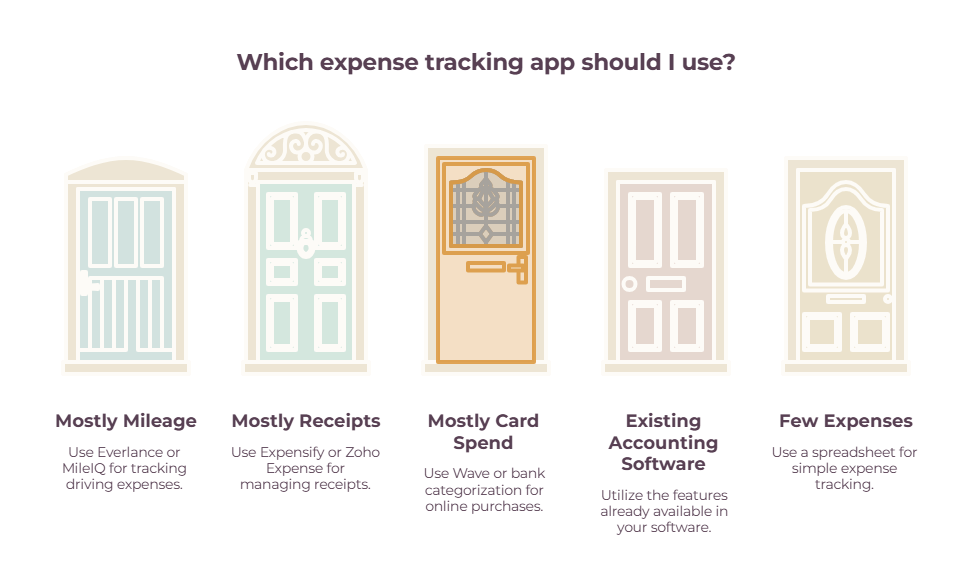
The fastest way to cut eight tools down to two is to work out what you’re actually capturing. Most small businesses and freelancers fall into one of five patterns, and a mileage-heavy consultant should not buy the same app as a receipt-heavy photographer.
➡️ Mostly mileage — driving to clients, sites, or jobs → Everlance or MileIQ.
➡️ Mostly receipts — materials, meals, gear, travel → Expensify or Zoho Expense.
➡️ Mostly card spend — subscriptions and online purchases on one business card → Wave or your bank’s own categorization.
➡️ You already pay for accounting software → use what’s already in it before buying anything else. Expense tracking should sit inside your wider bookkeeping setup for the self-employed, not become another disconnected system.
➡️ A handful of expenses a month → a spreadsheet and fifteen minutes.
Expense tracking is only one part of the admin stack. Keeping client paperwork organized at the same time calls for a broader setup, which is where tools for tracking freelance contracts and expenses come in.
The best free business expense trackers
Four options that cost nothing to start, ordered by how usable the free tier actually is. Each entry names the cap first, because the cap decides whether you’re still using the thing in month three — the feature list rarely does.

Zoho Expense
Best free tracker overall- Price: Free up to 3 users; Standard ~$3/user/mo billed annually (~$4 monthly); Premium ~$5/user/mo annually (~$6 monthly)
- Platform: Web, iOS, Android
- Free plan: Yes — 3 users, AI receipt capture, GPS mileage, accounting integrations, 5 GB storage
- The catch: 20 receipt scans per user each month — though the three-user ceiling is the limit that actually pushes you to pay
Zoho Expense has the most complete free tier here: three users, automatic receipt capture, GPS mileage and accounting integrations at no cost. Standard lifts scanning to 200 per user for a few dollars a month. Capterra reviewers praise the automated capture while flagging a heavy initial setup.
Expensify
Receipt scanning on a free plan- Price: Submit free; Collect ~$5 per member/mo; Control custom pricing, quoted from ~$9 per active member/mo
- Platform: Web, iOS, Android
- Free plan: Yes — the Submit workspace, with unlimited receipt SmartScans, mileage tracking, categories and tags, and personal card import
- The catch: Submit stops at capture — no reimbursements, corporate card management or QuickBooks/Xero integrations — and Control is quote-only rather than published
Expensify’s free Submit workspace scans as many receipts as you throw at it, and the scanning is the part people rate most: Capterra reviewers call it fast and accurate, and the mobile app makes capture a ten-second job. Support speed is the recurring complaint.
Wave
Best free books alongside- Price: Starter free; Pro ~$19/mo or ~$190/yr (often ~$9.50/mo for the first 3 months). Card payments 2.9% + $0.60
- Platform: Web, iOS, Android
- Free plan: Yes — unlimited invoices, estimates, bills and bookkeeping records
- The catch: Receipt digitization isn’t on the free plan — ~$8/mo or ~$72/yr as a Starter add-on in the US, and included on Pro
Wave gives away an unusual amount of real accounting, so your expenses sit next to your income rather than in a separate app. Price the scanning in before you decide: if receipt capture is why you came, Wave’s real cost is around $8 a month on top of the free plan, or a move to Pro.
QuickBooks Solopreneur
Tracking plus tax estimates- Price: Lite ~$10/mo for 3 months, then ~$20/mo; Simple Start ~$19 for 3 months, then ~$38/mo
- Platform: Web, iOS, Android
- Free plan: Technically — 2 receipts and 5 trips a month, with no mobile app
- The catch: The GPS mileage tracking lives in the mobile app, which the free tier doesn’t include; and $10 is a three-month promo
QuickBooks Solopreneur categorizes transactions automatically, captures receipts, tracks mileage by GPS and estimates quarterly taxes — the tax side is the reason to pick it over a pure tracker, and your accountant already knows it. Budget for $20 rather than the advertised $10.
The best mileage-first business expense tracker apps
If you drive for work, mileage is often the single largest deduction you have, and general expense apps track it poorly — they’ll take a manual entry, but they won’t reliably catch the drive you forgot to log. Two dedicated trackers do it properly. Both are free up to a monthly trip cap that a busy month clears in about two weeks.
Everlance
Best for mileage-heavy work- Price: Free (Basic); Starter ~$10.99/mo or ~$89.99/yr; Professional ~$19.99/mo or ~$119.99/yr
- Platform: iOS, Android, web
- Free plan: Yes — 30 automatically detected trips a month, unlimited manual trips, receipt uploads, exportable log
- The catch: 30 auto-detected trips is about three client visits a week; reviewers also mention battery drain
Everlance tracks drives automatically and handles expenses in the same app, which suits anyone whose car is central to the work. Professional adds automatic expense tracking, an AI deduction finder, 1099 filing and $1M audit defense. G2 reviewers praise the trip logging and the support.
MileIQ
Best pure mileage tracker- Price: Free; Unlimited ~$13.99/mo, or ~$11.66/mo billed annually
- Platform: iOS, Android, web
- Free plan: Yes — 40 drives a month, tracked automatically
- The catch: Mileage only — if you also need receipts, that’s a second app to open
MileIQ runs in the background, logs every drive and lets you classify a whole day with a swipe. G2 reviewers rate the simple setup and bulk classification highest; correcting or deleting drives is the common gripe. Forty drives a month is two on a working day.
The paid tracker is worth it for one specific reason
Keeper
Best for finding missed write-offs- Price: Standard ~$199/yr; Premium ~$399/yr; Business ~$1,199/yr for S-corps and partnerships
- Platform: Web, iOS, Android
- Free plan: No — free trial only
- The catch: Priced as tax filing rather than as a tracker, so it’s the wrong shape if you already have an accountant
Keeper watches your accounts, flags likely deductions and stores the evidence, then files for you — federal and up to two state returns, reviewed and signed by a tax pro. Premium adds quarterly payments, three-plus states, audit protection and amendments.
What “free” actually costs you

Every free plan on this page is metered, and each meter sits on the action you’ll perform most. That’s the comparison that matters, and it’s the one no other roundup makes.
Work out roughly how many receipts and how many drives you have in a normal month, then read this:
| Tool | What the free plan caps | Roughly when you’d hit it |
| Expensify Submit | Nothing on scanning | The one to beat if receipts dominate |
| Zoho Expense | 20 receipt scans per user/month | A photographer or trades business clears it in two weeks |
| Everlance | 30 auto-detected trips/month | Three client visits a week |
| MileIQ | 40 drives/month | Two drives a working day |
| QuickBooks Solopreneur | 2 receipts and 5 trips/month | Your first week |
| Wave | Scanning isn’t free at all | Immediately |
The useful way to read that table is to pick the tool whose meter sits on the thing you do least.
Someone driving daily and buying almost nothing should pay for mileage tracking and take receipt capture for free.
Someone buying constantly and driving rarely should do the exact opposite. The mistake is picking the tool with the best feature list and discovering in week three that its one limit is the one you were always going to hit.
Do you even need an app?
If your business expenses are a dozen subscriptions, a train ticket, and the occasional piece of equipment, an app is overhead.
A spreadsheet you fill in for five minutes on a Friday does the same job, costs nothing, has no cap, and won’t change its pricing on you in eighteen months.
The reason apps win for most people is capture — photographing a receipt while you’re still standing in the store beats keeping it intact until Friday. If that’s not your problem, you don’t need to solve it.
A free business expense tracker spreadsheet is available below.
It has an expense log with categories that map to a tax return, a mileage tab with an editable rate cell that does the deduction math, quarterly totals, and a short How-to-Use tab. Make a copy in Google Sheets, or download it for Excel.
Those categories matter because good tracking starts with knowing which freelance tax deductions are actually worth recording.
You can always move to an app later. Starting with a spreadsheet at least means you have a year of data to import when you do.
What to look for in a business expense tracker
Six things separate a tracker you keep from one you abandon in week three, and most feature lists lead with the wrong ones.
- Capture in under ten seconds. If logging an expense takes longer than the coffee did, you’ll stop.
- Categories that match your tax return. Anything else means re-sorting everything in March, which is the job you were trying to avoid.
- Mileage that runs on its own. Manual mileage entry is the first habit to slip.
- A bank or card feed. Card spend should arrive by itself; you shouldn’t be typing in subscriptions.
- An export your accountant can open. CSV at minimum, and a direct integration if you already use accounting software.
- A price that doesn’t jump. Check the renewal rate, not the headline. Several tools here advertise a three-month discount at half the real price. Receipt capture deserves a closer look when that’s the part slowing you down most.
So which business expense tracker should you pick?
- Receipts are the bulk of it → Expensify. Free, and the only free plan without a scan cap.
- You want a proper free tracker and scan a handful a month → Zoho Expense. The best-specified free tier here.
- Mileage is most of your deduction → Everlance, or MileIQ if mileage is all you need.
- You want tracking and tax estimates together → QuickBooks Solopreneur, budgeted at $20 rather than $10.
- You want free bookkeeping alongside → Wave, with the receipt add-on priced in from the start.
- You’ve no accountant and suspect you’re missing write-offs → Keeper.
- A dozen expenses a month → the spreadsheet, and Friday afternoons.
Whichever it is, install it before the next receipt rather than after. The one in your pocket right now is the test.
Frequently Asked Questions
What is a business expense tracker?
A business expense tracker is an app or spreadsheet that records what your business spends, sorts it into categories, and stores the evidence for tax time.
Most modern trackers capture receipts by photo, pull card transactions in automatically, and log mileage by GPS, so the record builds itself rather than being reconstructed in March.
What’s the best free business expense tracker?
Zoho Expense has the most complete free plan — free for up to three users with mileage tracking, accounting integrations, and 5 GB of storage — but it caps receipt scanning at 20 per user each month.
Expensify’s free Submit plan has no scan cap, so it’s the better free choice if receipts are the bulk of what you track.
What’s the best business expense tracker app for a small business?
For most small businesses, Zoho Expense or Expensify covers it, with a mileage tracker like Everlance added if driving is a significant part of the work.
If you already pay for accounting software, check what it includes before buying anything — expense tracking and mileage are often already there.
Can I track business expenses in a spreadsheet instead?
Yes, and for a business with a dozen expenses a month, a spreadsheet is often the better answer. It costs nothing, has no limits, and exports anywhere.
The trade-off is capture: you have to keep the receipt until you sit down, which is where most spreadsheet systems break. There’s a free template above.
Do I need to keep the paper receipt if I scan it?
The IRS accepts digital copies where the image is legible and complete, so a scan can stand in for the paper in most cases.
Retention periods and conditions still apply, and this isn’t tax advice — worth a quick check with your accountant, and worth keeping originals for anything unusual.
How do expense trackers handle mileage?
The better ones detect drives automatically using your phone’s GPS and let you classify each as business or personal, then apply the IRS standard mileage rate to produce a deduction figure.
General expense apps often only accept manual entries, which is why drivers usually pair one with a dedicated mileage tracker like Everlance or MileIQ.
Does a business expense tracker replace accounting software?
Not usually. A tracker captures and categorizes spending; accounting software also handles income, invoicing, reconciliation, and financial statements.
Some tools do both — Wave and QuickBooks Solopreneur, for instance — but a dedicated tracker like MileIQ or Expensify sits alongside your books rather than replacing them.
How much should a business expense tracker cost?
For a solo operator, somewhere between nothing and about $20 a month is the realistic range, and plenty of people never leave the free tier. Anything above that is usually priced for teams with approval workflows.
Check the renewal price rather than the intro offer — several tools here advertise three months at roughly half what you’ll actually pay.
Related guides: the best receipt scanner apps · best tools for tracking freelance contracts and expenses · freelance tax deductions · bookkeeping for self employed · accounting software for freelancers