
Workflow Automation Tools: The Best for Saving Time

You take on a fourth client and find out why workflow automation tools matter: the work was never the bottleneck.
The bottleneck is the twenty minutes attached to every project that nobody quotes for. Copying the brief into your task app. Making the folder. Setting the reminder. Writing the kickoff email you have written ninety times. Drafting the invoice. Logging the hours. Chasing the invoice.
Multiply that by four clients, and it is most of a working day a week, none of it billable, all of it identical every time.
For one person, automation is capacity. Every repeated task you hand to software comes back as billable time, and that is what makes the next project possible at all rather than just louder.
The thing is, these tools are cheap, and the pricing units are what get you. Zapier bills per task. Make bills per operation. n8n bills per execution. IFTTT bills per applet.
The same five-step workflow costs four Zapier tasks (the trigger is free) and one n8n execution, so “which is cheapest” has no answer until you know your own volume.
Below: six platforms with pricing read from their own pages, what each free plan actually caps, an honest read on AI agents, the order to automate things in when you’re one person, and a free worksheet that does the math on your numbers.
Quick Takeaways
- Zapier is the fastest start and has the most connections — free covers 100 tasks a month and two-step Zaps only, then $19.99/month for multi-step.
- Make gives the most runs per dollar, from around $12/month, but its free plan caps you at 2 active scenarios with a 15-minute gap between runs.
- n8n is the pick for long, multi-step workflows, and it’s free forever if you self-host. Its cloud plans are priced in euros, from €20/month billed annually.
- Watch the billing unit rather than the headline price — tasks, operations, executions and applets are not the same thing, and the same five-step workflow can cost 4 units or 1.
- AI agents are real (Zapier Agents is free to 400 activities a month), but for most solo work a plain trigger-and-action rule is cheaper and far more predictable.
- Before buying anything, check what’s already built into the tools you pay for. It covers more than most freelancers expect.
The best workflow automation tools at a glance
Six platforms compared on what decides it: what the free plan gives you, what paid costs, and which unit each one bills.
Prices are US dollars unless marked otherwise, taken from each provider’s own pricing page in September 2026. The free tiers differ far more than the headline prices do.
| Tool | Best for | Free plan (and its cap) | Paid from | Bills per |
| Zapier | Fastest start, most connections | 100 tasks/mo — two-step Zaps only | $19.99/mo (Professional) | Task |
| Make | Most runs per dollar | 1,000 credits/mo — 2 active scenarios, 15-min minimum interval | ~$12/mo (Core) | Operation / credit |
| n8n | Long multi-step workflows, self-hosting | Community Edition free to self-host | €20/mo billed annually (Starter) | Execution |
| Activepieces | Free self-hosting, MIT-licensed core | 100 credits per day | $16/mo billed annually (Plus) | Credit |
| IFTTT | Two simple links | 2 applets | $2.99/mo (Pro) | Applet |
| Zapier Agents | Work that needs judgment | 400 activities/mo | $33.33/mo (Pro) | Activity |
Two footnotes worth reading: n8n prices its cloud plans in euros on its own site, so the dollar figure moves with the rate. And Zapier’s $19.99 is the base of a sliding task scale, not a flat fee — more tasks cost more.
What workflow automation tools actually do

A workflow automation tool watches for something happening in one app, then does something in another, without you touching it. The vocabulary differs — Zapier calls them Zaps, Make calls them scenarios, n8n calls them workflows, IFTTT calls them applets — and the mechanic underneath is near-enough identical.
Every automation is a trigger and one or more actions, with optional logic in the middle: filters that stop it running when conditions aren’t met, paths that branch, and formatting that reshapes data between apps.
Three that a freelancer would actually build:
- A client submits your intake form → a project is created in your task app, a folder appears in Drive, and a welcome email sends.
- You mark a project complete → an invoice drafts with the logged hours attached and a reminder schedules for fourteen days out.
- A payment lands in Stripe → the invoice marks paid, the receipt files to the right folder, and the client drops out of your chase list.
None of those are clever. That’s the point — the value is in never doing them again, not in the sophistication.
The pricing trap: tasks, operations, executions and applets
Here’s the thing that decides your bill, and it isn’t on any comparison page.
Every platform meters a different unit:
| Tool | Unit | What counts as one | Free allowance |
| Zapier | Task | Each successful action — triggers and filters are free | 100 tasks/month (shared with MCP actions), two-step Zaps only |
| Make | Operation (credit) | Each module that runs, including the trigger | 1,000 credits/month, 2 active scenarios |
| n8n | Execution | One whole workflow run, however many steps | No cloud free tier; unlimited self-hosted; you pay for hosting |
| Activepieces | Credit | One whole flow run, however many steps — AI steps cost 2–20 | Daily credit refill, hard cap until it resets |
| IFTTT | Applet | Each automation you have, not each run | 2 applets |
| Zapier Agents | Activity | Each action, web search, scrape or knowledge lookup the agent makes | 400 activities/month, max 10 per run |
Take one workflow with five steps, running 200 times a month. On Zapier, the trigger is free, so that’s four billable actions — roughly 800 tasks, and fewer if any step is a filter. On Make, every module counts, including the trigger, so it’s 1,000 credits.
On n8n, it’s 200 executions. On Activepieces, it’s also 200 credits, because the step count doesn’t matter.
Same work, and a 5× spread between the cheapest and most expensive meter.
So the shape of your automations matters more than the number of them:
- Long workflows, run occasionally → n8n, where step count doesn’t raise the price.
- Short workflows, run constantly → Zapier, where the per-task model stays honest.
- Somewhere in between → Make, which is usually the cheapest per run once you’re past a handful.
- A couple of automations you never change → IFTTT, billing per applet rather than per run.
Work out your volume before you compare prices. The free worksheet further down does it from your own numbers.
The best workflow automation tools compared

Prices and plan limits were taken from each provider’s own pricing page in September 2026. Review figures are from G2 and Capterra, checked 12 September 2026 — counts move weekly, so treat them as a snapshot.

Zapier
Fastest start, most connections- Price: Free (100 tasks/mo); Professional from ~$19.99/mo on annual billing (~$239.88/yr); Team from ~$69/mo
- Platform: Web, iOS, Android
- Free plan: Yes — unlimited Zaps, Tables and Forms, plus Copilot
- The catch: Free is two-step Zaps only with 15-minute polling, and $19.99 is the base of a sliding task scale
Zapier connects more apps than anything else here and has the gentlest builder, so it’s the quickest way to get a first automation live. Bills per successful action — triggers, filters and formatters are free. 4.5 on G2 from 2,087 reviews, where ease of use leads the praise and cost is the main complaint.
Make
Most runs per dollar- Price: Free (1,000 credits/mo); Core ~$12/mo, Pro ~$21/mo, Teams ~$38/mo — all billed annually, all with 10,000 credits
- Platform: Web, iOS, Android
- Free plan: Yes — 1,000 credits a month
- The catch: Free caps you at 2 active scenarios, a 15-minute minimum gap between runs and a 5-minute execution limit
Make’s visual canvas makes complex logic far easier to follow than a vertical step list, and it’s usually the cheapest per run once you’re past a handful of automations. Paid tiers differ on features, not credits. 4.8 on Capterra from 406 reviews, with ease of use the weakest sub-score at 4.3.
n8n
Long multi-step workflows- Price: Community Edition free to self-host; Cloud Starter €20/mo billed annually (2,500 executions); Pro €50/mo (10,000); Business €667/mo (40,000, self-hosted only)
- Platform: Web, self-hosted
- Free plan: No free cloud tier — a trial only; free forever means self-hosting the Community Edition
- The catch: Fair-code licensed rather than OSI open source, so read the terms before reselling automation to clients — and self-hosting makes you the sysadmin
n8n bills per execution, so a fifteen-step workflow costs the same as a three-step one — the best economics here for complex automation. Every tier includes unlimited users and workflows. Cloud pricing is in euros. 4.7 on G2 from 312 reviews, with the learning curve the dominant criticism.
Activepieces
Free, MIT-licensed self-hosting- Price: Community Edition free to self-host; cloud Free (100 credits/day, 1 user); Plus ~$16/mo billed annually or ~$20 month-to-month (10,000 credits/mo, 5 users); Team ~$166/mo annually or ~$200 monthly (50,000 credits, 25 users)
- Platform: Web, self-hosted
- Free plan: Yes, two ways — the self-hosted Community Edition, or cloud Free with 100 credits a day, unlimited flows, agents, tables, MCPs and API
- The catch: The cloud free allowance resets daily, so a busy morning can stop your runs until tomorrow; self-hosting removes that cap but Community Edition is the automation core only — access control, audit history and Agents are the paid layer
Activepieces runs every paid plan on its cloud or your own servers at the same price, and one credit covers a whole run however many steps it has. Its GitHub README states the Community Edition “is released as open source under the MIT license,” with enterprise features under a separate commercial licence — the cleanest licence story here if you want to build commercially. 4.8 on G2 from 142 reviews, where the interface leads the praise and a thin integration library is the consistent complaint.
IFTTT
Two simple links- Price: Free (2 applets); Pro ~$2.99/mo billed annually (~$35.88/yr, 20 applets); Pro+ ~$8.99/mo (~$107.88/yr, unlimited)
- Platform: Web, iOS, Android
- Free plan: Yes — 2 applets, but unlimited applet runs
- The catch: Built for simple consumer-grade links; business app coverage is thinner than the rest
IFTTT bills per applet rather than per run, which makes it remarkable value for a small set of automations that fire constantly. 4.5 on G2 from 117 reviews, where the simple setup and IoT breadth win praise and limited customization is the leading gripe. The right answer for two or three unchanging links — the wrong one for multi-step client work.
Zapier Agents
Work that needs judgment- Price: Free (400 activities/mo); Pro ~$33.33/mo (~$400/yr, 1,500 activities)
- Platform: Web
- Free plan: Yes — 400 activities a month, capped at 10 per agent run
- The catch: Only worth it when the task needs a decision — a rule fails loudly, a model fails quietly
Zapier Agents read context and choose an action rather than following a fixed rule, which earns its place on things like triaging inbound enquiries or summarizing a call into notes. An activity is any action, web search or knowledge lookup, so one job can cost several. For anything deterministic, a plain automation is cheaper and more predictable.
AI workflow automation tools: what’s actually worth it

AI is the fastest-growing part of this category and the most oversold part of it. Worth separating the two things it now does.
Natural-language builders describe an automation in a sentence and get a draft workflow. Zapier has Copilot, Make has Maia on paid plans, n8n has an AI Assistant in preview with monthly credit allowances by tier. These are useful and low-risk — you still review what they built.
Agents are different. Instead of following a fixed rule, an agent reads context and decides what to do. Zapier Agents is free up to 400 activities a month, then $33.33/month ($400/year) for 1,500.
The test for a one-person business: does the task need judgment?
Worth an agent:
- Triaging inbound enquiries where “is this a real lead” is a call someone has to make.
- Summarizing a call recording into project notes.
- Drafting a first-pass reply that you’ll edit.
Not worth an agent:
- Anything deterministic. If the rule is “when a form comes in, make a task,” you know the answer already, and paying per activity for a decision you’ve made in advance is a poor trade.
There’s a reliability point too, and it matters more when you’re the only person watching. A rule fails loudly — the Zap errors and you get an email.
A model fails quietly, doing something plausible and wrong, and you find out when a client mentions it. Start agents on one non-critical use case and watch them for a month.
For task management with AI in it, the best AI to-do list apps cover the adjacent ground.
Open-source and self-hosted workflow automation tools

Self-hosting removes the per-run bill and hands you the maintenance instead. Good trade for a technical freelancer with steady volume; bad trade for almost everyone else.
One correction first, because nearly every roundup gets it wrong.
n8n is not open source in the usual sense.
Its own GitHub README states that “n8n is fair-code distributed under the Sustainable Use License and n8n Enterprise License,” and describes the project as Source Available rather than open source.
The code is visible and self-hostable, and there are restrictions attached — which matters if you plan to resell automation as a service to your clients. Read the license before you build a business on it.
Activepieces is the cleaner licence.
Its README states the Community Edition “is released as open source under the MIT license,” with enterprise features under a separate commercial licence — so the core is MIT, and you can build commercially on it without the restrictions n8n’s fair-code licence carries.
The real cost of self-hosting is a server, updates, backups, and being your own support desk when something breaks at 11 pm before a deadline.
If that sounds like a project rather than a chore, it’s a cheap route. If it sounds like a chore, pay the €20.
What to automate first when you’re one person
The common mistake is automating the interesting thing rather than the frequent one.
Rank your repeated tasks by minutes multiplied by frequency and the order usually surprises people. The dull four-minute job you do daily beats the impressive hour-long one you do once a quarter, by a wide margin.
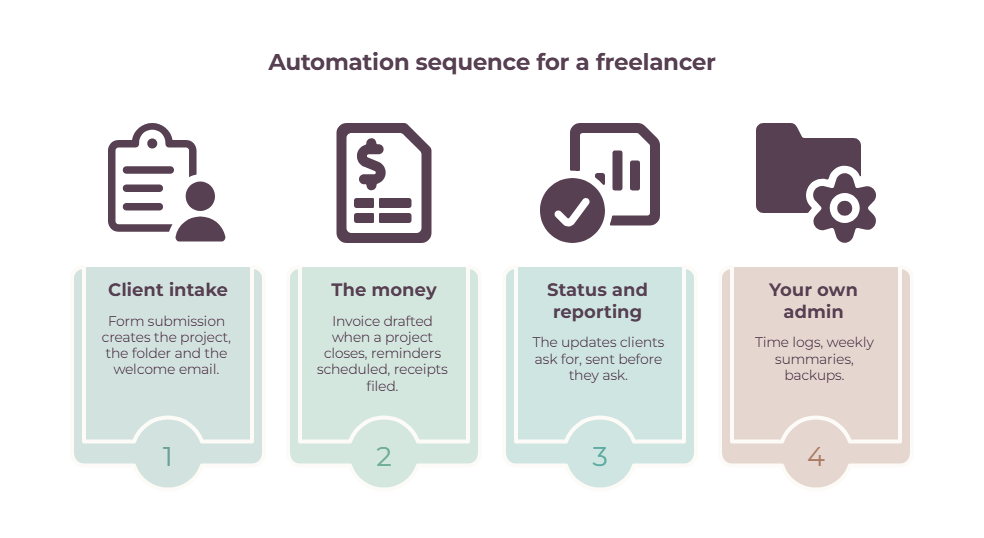
A sensible sequence:
➡️ First, client intake. Form submission creates the project, the folder and the welcome email. It happens with every new client; it’s identical every time, and getting it wrong is visible to the person paying you.
➡️ Second, the money. Invoice drafted when a project closes, reminders scheduled, receipts filed. This is where automation pays for itself fastest — see invoice automation and finance automation tools for the details.
➡️ Third, status and reporting. The updates clients ask for, sent before they ask. Cheap to build, disproportionate effect on how organized you seem.
➡️ Fourth, your own admin. Time logs, weekly summaries, backups. Least urgent, and the first thing to slip when you’re busy, which is exactly why it should run itself.
Work out what it’s worth before you buy anything.
The free Automation ROI & Volume Worksheet below takes your repeated tasks, the minutes each one costs, how often you run them, and your hourly rate, and returns the hours and dollars you’d get back in a year.
It also totals your monthly runs and steps, and shows what that volume looks like in Zapier tasks, Make operations, and n8n executions — so you pick a tier from your own numbers rather than a marketing page.
Do you even need a workflow automation tool?
Quite possibly not yet.
Most of the tools a freelancer already pays for have automation built in. Project tools trigger tasks on status changes.
Invoicing tools send their own reminders. Form tools notify and create records. Using what you already own costs nothing extra and breaks less often, because there’s no connection between two companies to go wrong.
That makes the freelance management tools already in your stack the first place to look before adding another automation platform.
The test is simple: does the workflow cross two apps that don’t already talk to each other? If not, look in the settings before you look at pricing pages.
Our Freelance workflow management tools guide covers the platforms that handle the whole client pipeline in one place, and for many freelancers that’s the better answer than a connector plus five subscriptions.
One more caution. An automation you don’t understand is a liability. When an invoice doesn’t send, and you can’t remember what you built eighteen months ago, the time you saved comes back with interest.
Three rules you could explain out loud beat thirty fragile ones.
So which workflow automation tool should you pick?
- You want something automated this week → Zapier, free, and live with the two-step limit until it bites.
- You’re watching the monthly bill → Make, cheapest per run once you’re past a handful of automations.
- Your workflows are long → n8n, where five steps and fifteen steps cost the same.
- You’re technical, have steady volume, and want it free → n8n self-hosted if you want the longest workflows and have read the fair-code licence, or Activepieces Community Edition if you’d rather have MIT and a gentler setup.
- You need two simple links and nothing more → IFTTT at $2.99/month.
- The work needs judgment → an AI agent, free tier, one use case, watched for a month.
- You’re not sure → the worksheet, then this list again.
Whichever it is, start with the one task you did five times last week. Not the impressive one.
Frequently Asked Questions
What are workflow automation tools?
Workflow automation tools connect the apps you already use so that something happening in one triggers an action in another, without you doing it.
A form submission creates a task, a completed project drafts an invoice, a payment files a receipt. Zapier, Make, n8n, Activepieces, and IFTTT are the main platforms.
How do workflow automation tools work?
Each automation has a trigger and one or more actions, with optional logic in between — filters that stop it from running unless conditions are met, branches for different cases, and formatting that reshapes data as it moves.
You build it once in the platform’s editor, then it runs on its own until you change it.
What are the best AI workflow automation tools?
Zapier, Make, and n8n all now include AI: Zapier has Copilot and its separate Agents product, Make has Maia on paid plans, and n8n has an AI Assistant in preview.
For most solo work, the natural-language builders add more value than agents do, because they help you build ordinary automations faster without adding unpredictability to how they run.
What’s the best free workflow automation tool?
Make’s free plan gives the most usable capacity — 1,000 credits a month — but limits you to 2 active scenarios and a 15-minute gap between runs.
Zapier’s free plan allows unlimited Zaps but only 100 tasks a month and two steps each. If you can self-host, n8n’s Community Edition is free with no run limit at all.
How do I choose between Zapier, Make and n8n?
Match the tool to the shape of your automations. Short workflows running constantly suit Zapier’s per-task billing and its larger app library.
Long workflows suit n8n, which charges per execution regardless of step count. Make sits between the two and is usually cheapest per run, at the cost of a steeper learning curve.
Is n8n open source?
Not in the strict sense. n8n’s GitHub README describes it as “fair-code distributed under the Sustainable Use License and n8n Enterprise License” and Source Available rather than open source.
You can read and self-host the code for free, and there are restrictions on commercial use worth reading before you sell automation services built on it.
How do you calculate the ROI of workflow automation?
Multiply the minutes a task takes by how often you run it in a month, convert that to hours, and multiply by your hourly rate — that’s the monthly value of automating it. Subtract the subscription cost. Most freelancers find one or two boring, frequent tasks carry nearly all the return, which is why ranking them first matters more than picking a tool.
Do workflow automation tools support AI agents and LLMs?
Increasingly, yes. Zapier sells Agents as a separate product with its own free tier, n8n is built to work with AI agents and models and lets Enterprise users supply their own API key, and Make includes conversational building on paid plans.
Support and pricing here are changing fast, so check current terms rather than a roundup.
Are workflow automation tools worth it for a one-person business?
Usually, once you have two or three tasks you repeat weekly across different apps. Below that, the automation built into tools you already pay for covers it.
The return comes from frequency rather than complexity, so the answer is to count how often you repeat something before you subscribe to anything.
Related guides: freelance workflow management tools · finance automation tools · invoice automation · freelancer task management tools · how to maintain a steady workflow as a solo freelancer · freelance management tools