Freelance Contract Template: 5 Powerful Ways, Fewer Mistakes

Every freelancer has the story — and it’s usually the reason they finally start using a freelance contract template. The “just a few more tweaks” that quietly became a second project you never got paid for. The client who went quiet owing you money, with nothing signed to point to.
The logo you designed appearing on their site before the invoice was paid.
None of it happened because the client was a villain — it happened because the whole deal lived in a friendly email chain and a couple of assumptions.
The thread is always the same: a handshake deal with no written terms, so the moment something went sideways, there was nothing to fall back on.
A contract fixes that — not because you distrust the client, but because written terms let both sides relax and stop guessing what was agreed.
Below is a free freelance contract template you can download and use today, plus a plain-English breakdown of what to include, the five clauses that prevent the most common mistakes, and how to put it all to work.
(This is general information, not legal advice — more on that at the end.)
Quick Takeaways
- Grab the free freelance contract template below, fill in the blanks, and send it for e-signature before any work starts.
- A solid freelance contract covers, at minimum, scope, timeline, payment, revisions, IP ownership, and cancellation.
- The clauses that save you real money: a written scope (against scope creep), a late fee, an IP clause that transfers ownership only on final payment, and a kill fee for canceled work.
- Use a contract even for small or friendly jobs — those are often exactly where things go wrong.
- This is a starting template and general information, not legal advice — laws vary by country and state, so adapt it, and get a lawyer to review it for high-value or complex work.
Get the free freelance contract template
Download the template, fill in every bracketed field — the parties, the scope, the fee, the dates — delete the guidance notes, and send it to your client for e-signature before you begin any work.
Keep the signed copy for your records. It’s written in plain English, not dense legalese, so you and your client can both actually read it.
Using it takes a few minutes:
- Fill in the placeholders. Everything in [brackets] is a blank to complete — your details and the client’s, exactly what you’re delivering, the fee and payment schedule, and the dates.
- Send it for signature before work starts. Use any e-signature tool. Signing after you’ve already done the work defeats the point.
- Take your deposit. Once it’s signed, invoice your deposit and start when it’s paid.
- Keep a copy. Save the signed version somewhere you’ll find it. You’ll almost never need it — which is exactly why you want it when you do.
A quick but important caveat: this template is general information to get you started, not legal advice.
Contract law differs from one country and state to the next, so adapt it to your situation, and for high-value or complicated projects, have a qualified lawyer review it first.
Do freelancers really need a contract?

Yes — even for small jobs, and even for clients you like and have worked with before.
A contract exists to prevent the exact problems that keep freelancers up at night: scope quietly expanding, invoices going unpaid, “we thought that was included,” and clients vanishing the moment the work lands.
It’s tempting to skip it for a quick job or a friendly referral, but those are often where things go wrong precisely because everyone was relaxed about the terms.
A signed agreement doesn’t make you look distrustful — it makes you look like a professional who runs a real business, and it protects the client just as much as it protects you, because they know exactly what they’re getting and for how much.
The small jobs are where a contract feels like overkill and turns out to matter most.
What to include in a freelance contract template
A good freelance contract template has around ten core sections: the parties, scope of work, timeline, payment terms, revisions, IP ownership, cancellation, confidentiality, termination, and independent-contractor terms.
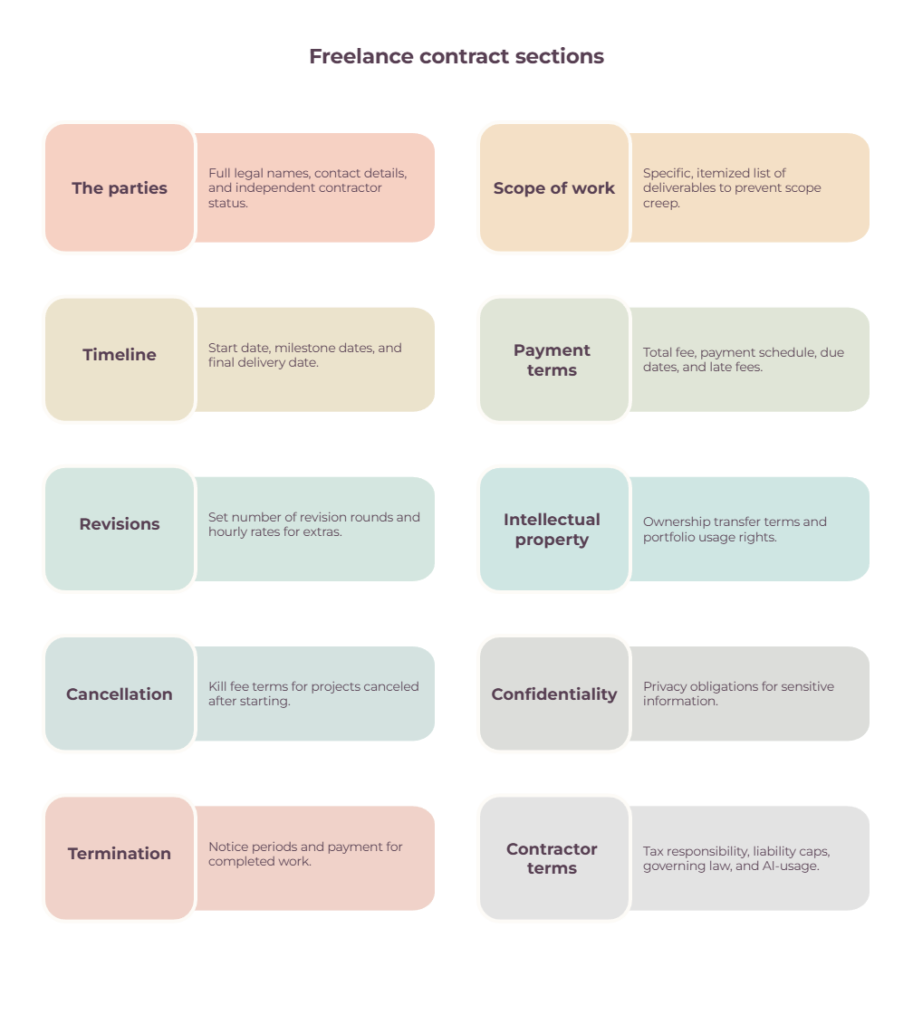
Here’s what each one does, and — more usefully — the real-world problem it stops from happening.
1. The parties (and contractor status)
The full legal names and contact details of you and the client, plus a line stating you’re an independent contractor, not an employee.
It sounds like a formality, but it sets out who’s actually bound by the agreement and keeps your tax and legal status clear.
For US freelancers, the IRS notes that worker status depends on the actual relationship, not simply what the contract calls it.
2. Scope of work and deliverables
A specific, itemized list of exactly what you’re delivering — “5 responsive pages: Home, About, Services, Contact, Blog,” not “a website.”
This is your single best defense against scope creep: if it isn’t on the list, it isn’t included, and anything extra gets quoted separately.
Vague scope is how a one-week job becomes a one-month one for the same money.
3. Timeline
Start date, any milestone dates, and the final delivery date — with a line noting that deadlines assume the client provides feedback and materials on time, so their delays move the dates.
It protects you from being blamed for a late delivery that was actually caused by a client who sat on their approval for two weeks.
Once the contract is signed, how to manage freelance projects with clients covers the day-to-day side of keeping milestones, feedback, and responsibilities on track.
4. Payment terms
The total fee, the schedule (a deposit up front plus the balance on delivery is standard, or milestone payments), when invoices are due, how to pay, and a late fee for overdue balances — plus the right to pause work until you’re paid.
This is the clause that protects your cash flow. (Our guides to how to send an invoice and the free Google Sheets invoice template cover the billing side.)
5. Revisions
A set number of revision rounds — usually two or three — with a clear definition of what counts as a round, and extra revisions billed at an hourly rate.
Without this, “one more small change” becomes an endless, unpaid loop, because there’s no natural point where the work is done.
6. Intellectual property
Who owns the finished work, and when ownership transfers. Ownership follows whatever your contract says, which is why this clause is worth writing deliberately rather than leaving to chance.
The freelancer-friendly version, and the one this template uses, transfers IP to the client on final payment rather than on delivery. Under a clause like that, the work stays yours until you’re paid in full, which is most of your leverage in a dispute.
In the US, the Copyright Office explains that the creator is generally the initial copyright owner, with specific exceptions for works made for hire.
Freelancers commonly keep the right to show the work in a portfolio too.
Worth noting that default ownership rules vary by country, and plenty of client-supplied contracts ask for work-for-hire terms instead, so read what you’re signing as carefully as what you’re sending.
7. Cancellation and kill fee
What happens if the client pulls the plug after you’ve started? A kill fee — commonly 25–50% of the remaining fee, on top of everything you’ve already earned — means a project canceled halfway doesn’t leave you eating the loss for time you can’t get back.
8. Confidentiality

What information each side keeps private, and for how long. Often light for freelance work, but important if you’re handling anything sensitive.
9. Termination
How either side can end the agreement, the notice period, and the fact that the client pays for all work completed up to that point. It gives both parties a clean, fair exit instead of a messy standoff.
10. Contractor terms, liability, and governing law
The housekeeping that still matters: you’re responsible for your own taxes, your liability is capped (usually at the fees paid), and which country or state’s law applies.
A newer one worth adding in 2026 is an AI-usage clause — stating whether and how AI tools may be used on the work, which more clients are now asking about.
5 Powerful Ways Your Contract Prevents Mistakes
Most freelance disputes trace back to the same handful of clauses left vague or left out entirely: scope, the late fee, IP transfer, revisions, and the kill fee.
Nail these five, and your contract stops being paperwork and starts being protection.
- Vague scope. “Build me a website” with no deliverables list is an open invitation to scope creep. Itemize everything.
- No late fee. Without a stated penalty, a late invoice has no teeth. A late fee (and the right to pause work) gives clients a reason to pay on time.
- Handing over IP before payment. If your contract is silent on timing, or transfers ownership on delivery, you’ve given away most of your leverage. Where you can, tie the transfer to full payment.
- Unlimited revisions. No cap means no finish line. Two or three rounds, then hourly.
- No kill fee. Canceled projects happen. Without a kill fee, you absorb the full cost of the time you’d set aside.
How to use your freelance contract template

Fill in the template, send it for e-signature before you start work — never after — take your deposit, and keep the signed copy.
The trick is to make it a standard, non-negotiable step in how you take on every client, not something you scramble to put together once a job feels risky.
In practice, the contract sits right at the start of your client onboarding: proposal accepted, contract signed, deposit paid, work begins.
Signing before you start is what gives the contract its full force — signing after the work is underway offers far less protection, though it’s still better than nothing.
Pair it with a deposit so you’ve got money in before you commit time. A pro forma invoice can set out the amount for the client to approve first, though the deposit itself gets collected with a real invoice.
Build the whole sequence into your process so it happens automatically every time (see freelance workflow management for setting that up).
If you want to manage contracts, client details, projects, and billing in one place, our guide to freelance management tools covers the main options.
Once it’s a habit, you reuse the same template for every project with minutes of editing.
Is a free freelance contract template legally binding?
A signed contract will usually be enforceable where the basics are in place — an offer, acceptance, and something of value changing hands (your work for their money), though whether any particular agreement holds up depends on its wording and on the law where you and your client are based.
A well-written freelance contract template is a genuinely solid starting point, and a signed one is far stronger protection than the handshake most freelancers operate on.
That said, a template is general information, not legal advice, and contract law varies by country and state — so the same wording won’t carry identical weight everywhere.
For routine freelance work, a clear template like this one is usually plenty.
For higher-stakes situations — large sums, complex or unusual intellectual property, big corporate clients, or anything that makes you uneasy — it’s worth having a qualified lawyer review or adapt it for your jurisdiction.
The cost of an hour of legal time is small next to a dispute over a project worth thousands.
The bottom line
A contract is the boring insurance you’re always glad you had.
Fill in the template, get it signed before you start, and most of the disputes that keep freelancers awake — the vanishing client, the endless revisions, the work used before it’s paid for — simply can’t happen, because the terms were agreed in writing from the start.
Download it below, make it a standard step in every project, and you’ll spend a lot less time hoping a job goes smoothly and a lot more time knowing it will.
Frequently Asked Questions
What should a freelance contract include?
At minimum: the parties’ details, a specific scope of work and deliverables, the timeline, payment terms (including a deposit and late fee), revision limits, IP ownership, and a cancellation clause.
Stronger contracts also cover confidentiality, termination, your independent-contractor status, and increasingly an AI-usage clause.
Do freelancers need a contract for small jobs?
Yes. Small and friendly jobs are often where disputes happen precisely because no one bothered with terms.
A contract takes minutes with a template and protects both sides, so there’s little reason to skip it regardless of the project’s size.
Who owns the work, me or the client?
It depends on your contract, which is exactly why the IP clause matters.
A common freelancer-friendly approach, and the one this template uses, is for ownership to transfer to the client only once they’ve paid in full — so until then, the work stays yours under a clause like that.
Freelancers often keep the right to display the work in a portfolio too.
Bear in mind that default rules vary by country and that client-supplied contracts may ask for different terms, so check what any agreement actually says.
What is a kill fee?
A kill fee is an agreed payment you receive if a client cancels a project after you’ve started.
It typically runs 25–50% of the remaining fee, on top of the work you’ve already completed, and it compensates you for the time you’d reserved that you can no longer bill to anyone else.
Is a free freelance contract template legally binding?
Usually, provided both parties sign and the basics are there: an offer, acceptance, and payment involved.
Enforceability still turns on the specific wording and on where you’re both based, so treat a template as a strong starting point rather than a guarantee.
A template is a strong starting point, but it’s general information rather than legal advice, and laws vary by location — so adapt it to your situation and get a lawyer to review it for high-value or complex work.
How do I get a freelance contract signed?
Fill in the template, then send it through any e-signature tool so the client can sign digitally before work begins.
E-signatures are widely accepted and legally valid in most places, and they’re far faster than printing, signing, and scanning. Keep the completed, signed copy for your records.
Related guides: freelance management tools · freelance workflow management · pro forma invoice · how to send an invoice · invoice template · Google Sheets invoice template · how to manage freelance projects with clients