Bookkeeper Software vs. Bookkeeper: How to Make the Right Choice

When someone searches for “bookkeeper software,” they’re usually asking a question bigger than which app to download. They’re asking whether software can replace the person.
Whether a $38/month QuickBooks subscription can do what a $300/month bookkeeper does. Or whether skipping the bookkeeper is the kind of savings that costs you more when tax season arrives and two years of miscategorized expenses need sorting out.
The short answer: it depends on five things. And most freelancers get the decision wrong in both directions. Some pay for a bookkeeper they don’t need yet. Others avoid one until the cleanup bill dwarfs what monthly help would have cost.
Quick Takeaways
- Bookkeeper software and accounting software are the same tools — there’s no separate product category
- Software runs $0–$115/month; a freelance bookkeeper runs $200–$600/month for the same workload
- The BLS projects bookkeeping clerk employment to decline 6% through 2034, driven by automation
- The break-even rule: if bookkeeping takes you more than 5 hours a month, a $200–$400/month bookkeeper is likely saving you money
- Bench (2024) and Botkeeper (2026) both shut down — own your data, don’t rent it from a startup
Is Bookkeeper Software the Same as Accounting Software?
Practically, yes. QuickBooks, Xero, Wave, FreshBooks, and Zoho Books all handle bookkeeping (recording transactions, categorizing, reconciling) and accounting (financial statements, reporting, tax prep). There’s no separate “bookkeeping only” software category worth buying into.

Bookkeeping is the recording layer: entering transactions, categorizing them, reconciling bank statements, producing a clean trial balance.
Accounting is the interpretation layer: financial statements, tax strategy, forecasting, compliance. The AIPB and NACPB certify bookkeepers; the AICPA certifies CPAs.
Different credentials, different scope.
But the software doesn’t care. A bookkeeper records transactions in QuickBooks Online. A CPA pulls reports from the same QuickBooks Online file. The tool is identical. The person using it is different.
So the real question isn’t “which bookkeeper software should I pick?”
It’s whether you need just the software, the software plus a person, or a person who brings their own software. The rest of this post answers that.
What Does Bookkeeper Software Actually Automate?
Bank feeds, transaction categorization (roughly 70–80% accuracy with AI rules), invoice creation, receipt scanning, and basic financial reports. What it doesn’t automate: month-end close, judgment calls on categorization, accruals, sales tax filings, 1099 preparation, and the “is this number right?” question that catches expensive mistakes.
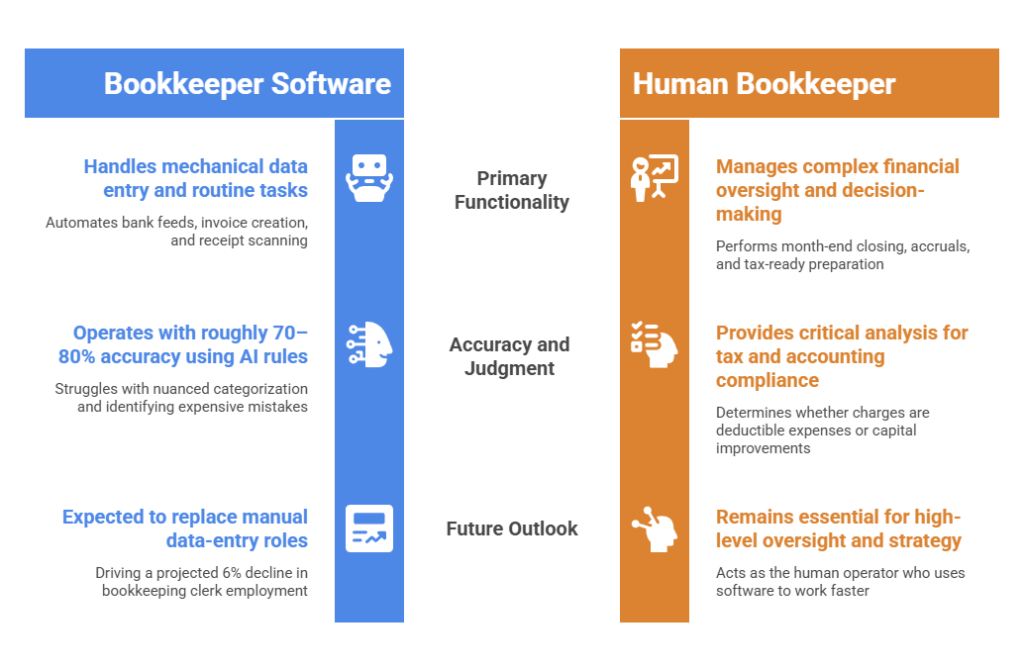
Software handles the mechanical parts well, pulling bank and credit card transactions automatically through Plaid. Software will then typically suggest categories based on rules you set and patterns it learns (QuickBooks Intuit Assist and Xero’s Just Ask Xero both use AI for this now).
It generates invoices with auto-reminders for overdue payments. It scans receipts via your phone and matches them to transactions.
And it produces a P&L, balance sheet, and cash flow statement whenever you need one.
What software handles poorly or not at all is where a bookkeeper earns their fee.
Closing the books at month-end: accruals, reclassifications, prepaid expense adjustments. Deciding whether that $2,400 charge was a repair (deductible expense) or an improvement (capitalize and depreciate over several years).
The IRS treats those differently, and software doesn’t know the difference. Filing sales tax returns across multiple jurisdictions. Preparing a clean tax-ready package so your CPA doesn’t charge you $150/hour to sort through your mess.
The Bureau of Labor Statistics projects bookkeeping clerk employment to decline 6% through 2034, and they cite automation as the primary driver. This will likely decline further with the advent of AI, particularly in data-entry roles.
The judgment-and-oversight work that small businesses actually need isn’t something software replaces yet. It’s something software makes faster for the human doing it.
How Much Does Bookkeeper Software Cost vs. Hiring a Bookkeeper?
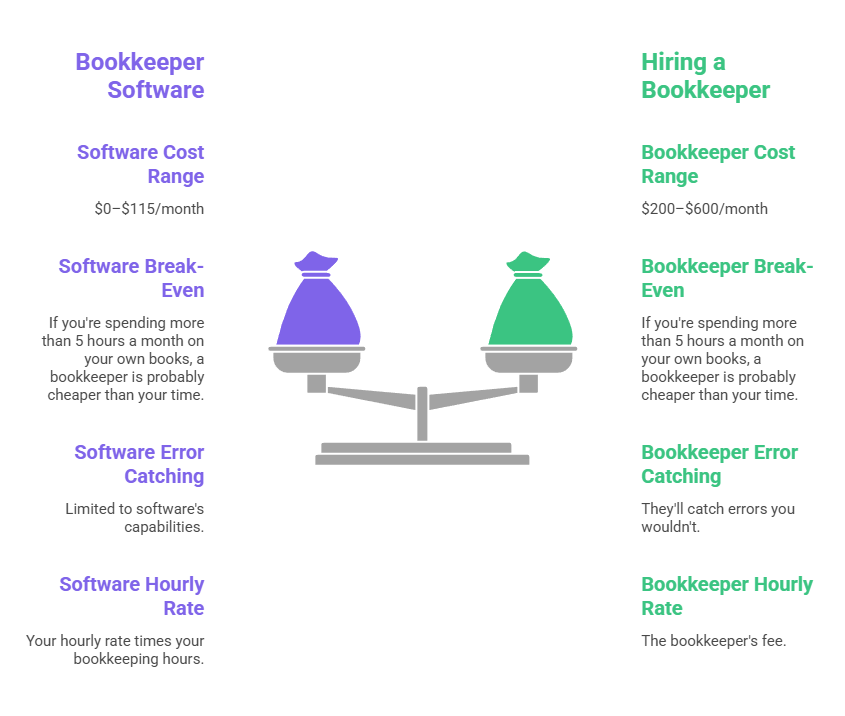
Software runs $0–$115/month for most small businesses. A freelance bookkeeper runs $200–$600/month for the same workload. The break-even point is roughly 5 hours a month: if you’re spending more than that on your own books, a bookkeeper is probably cheaper than your time.
The bookkeeper software side
Wave Starter is genuinely free — unlimited invoicing, manual transaction entry, and full reports, including a balance sheet. Wave Pro at $19/month adds automatic bank feeds and auto-categorization.
A quick note on Wave: the popular claim that “Wave killed its free tier” is wrong. They gated bank feeds and multi-user access behind Pro, but kept unlimited invoicing and full reporting free.
Zoho Books has a free tier for businesses under $50K annual revenue.
FreshBooks Lite is $23/month.
Xero Early is $25/month (20-invoice cap; Growing at $55/month removes it).
QuickBooks Online Simple Start runs $38/month, and QBO Plus at $115/month is the ceiling for most small businesses.
The bookkeeper side
The BLS median wage for bookkeeping clerks is $23.66/hour (May 2024 data).
ZipRecruiter’s April 2026 national average for freelance bookkeepers is $24.31/hour. For a small service business, a freelance bookkeeper typically spends 5–15 hours a month at $25–$40/hour, putting the monthly cost between $200 and $600.
A common rule of thumb across practitioner sources: budget 1–3% of annual revenue for bookkeeping.
This isn’t software vs. bookkeeper. It’s your hourly rate times your bookkeeping hours vs. the bookkeeper’s fee.
A freelancer billing $75/hour who spends 5 hours a month on books is burning $375 in opportunity cost. A $300/month bookkeeper is the cheaper option.
And they’ll catch errors you wouldn’t.
How Do You Know If You Need a Bookkeeper or Just Bookkeeper Software?
Five questions decide it. If you answer yes to all five, software alone is enough. Hit a no on any of the last three, and you probably need a person.

Are you under 50 transactions a month?
Software handles that volume easily. Over 100 and the categorization, reconciliation, and error-checking time starts compounding. The 50–100 range depends on your comfort level and how varied the transactions are.
Is your business structure simple?
Sole proprietor or single-member LLC, cash basis, one revenue stream, one bank account, one credit card. If that’s you, software was built for your exact situation.
S-corp, C-corp, partnership, multiple entities, accrual basis. Those require someone who knows what they’re doing with journal entries and entity-specific filings.
Do you have fewer than 5 hours a month of bookkeeping work?
Track it for one month. Include categorizing transactions, reconciling your bank statement, invoicing, chasing payments, pulling reports, and organizing receipts. Under 5 hours and it’s probably not worth outsourcing.
Over 5 and the math starts favoring a person.
Are you comfortable categorizing your own transactions?
This is where most DIY bookkeeping goes wrong. Software will suggest categories, but you need to know whether that Home Depot charge was a repair, supplies, or a capital improvement. The IRS treats them differently.
If you’re guessing, the mistakes compound. Practitioner sources consistently report that cleanup engagements for miscategorized DIY books run $1,500–$5,000+.
Is your tax situation straightforward?
No inventory, no multi-state sales tax, no employees, no 1099 contractors above the filing threshold, no international transactions. If all of that’s true, Schedule C with software is manageable.
Add any one of those, and a bookkeeper (or, at a minimum, a quarterly CPA review) starts earning their fee. If you’re filing Schedule C with simple books, our bookkeeping for self-employed guide walks through the weekly routine.
What About the Hybrid Option — Software Plus a Part-Time Bookkeeper?
The hybrid model is the sweet spot for businesses between $100K and $500K in revenue. You run the software daily, a bookkeeper reviews and closes the books monthly, and your CPA gets clean data at year-end. Several services bundle this starting around $150–$300/month.
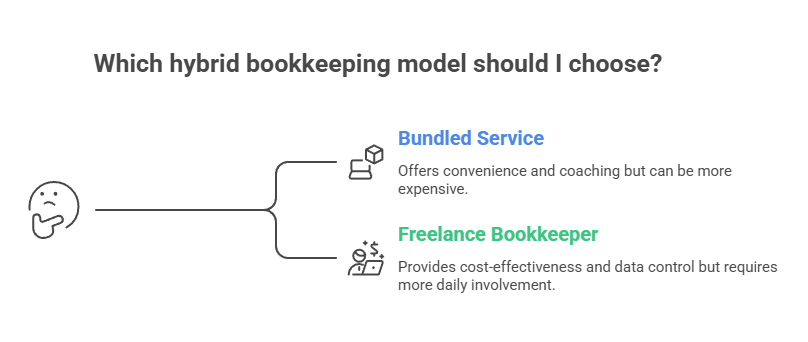
There are two main ways to set it up.
Option 1: A bundled service that pairs software with a human bookkeeper.
QuickBooks Live Expert Assisted (~$59/month plus your QBO subscription) gives you coaching and Q&A with a QuickBooks-certified bookkeeper, but they don’t work in your books directly.
QuickBooks Live Full-Service (~$300+/month) is hands-on.
Wave Advisors starts at around $149/month. Merritt Bookkeeping offers a flat $250/month regardless of business size, email-only, built on QBO.
Option 2: A freelance bookkeeper working inside your own software.
Often the best value. You keep Wave or QBO, handle daily invoicing and receipt capture, and a freelance bookkeeper spends 5–10 hours a month reconciling, closing the books, and prepping for your CPA.
Typical cost: $200–$400/month. Your bookkeeper works in your software, so the data stays with you.
Make sure the data stays with you — whatever you choose.
This matters far more than you may realize.
Bench Accounting shut down without warning on December 27, 2024, locking roughly 12,000 customers out of their own financial data right before tax season.
Employer.com acquired Bench three days later, but the damage was done.
Then in February 2026, Botkeeper, the AI-bookkeeping startup, shut down as well. Both raised tens of millions in venture capital. Both left customers scrambling for their data.
The lesson is simple: use a bookkeeper who works in software you control, not a platform that bundles everything behind a proprietary system and vanishes if the funding dries up.
Which Bookkeeper Software Is Right If Software Is Enough?
For most solo freelancers, Wave Starter (free) or QuickBooks Online Simple Start ($38/month) covers everything you need. If you want free with bank feeds, Zoho Books’ free tier works for businesses under $50K revenue. For open-source desktop options, GnuCash and Manager.io are both free.
If software is your answer after running through the five questions above, the detailed comparison lives in our guide to accounting software for freelancers.
It covers Wave, QuickBooks, FreshBooks, Xero, Zoho Books, and Bonsai side by side with pricing, features, and honest assessments.
For the readers who want free specifically: Wave Starter at $0 gives you unlimited invoicing and full reports. Zoho Books’ free tier is the most feature-complete free cloud option but caps at $50K revenue.
GnuCash is free desktop software with real double-entry accounting and a steep learning curve. Manager.io is free desktop with a much cleaner interface.
Our open source QuickBooks alternatives guide and desktop accounting software without subscription guide go deeper on those.
The Software Is the Easy Part
Bookkeeper software in 2026 is genuinely good. Bank feeds work. AI categorization catches most transactions correctly. Reports generate instantly.
For a sole proprietor under $100K with simple, cash-basis books, the software does the job, and the cost is often zero.
The harder question is one most “best bookkeeping software” listicles skip: are you the right person to operate it?
If you know a repair from a capital improvement, if you reconcile monthly without being reminded, if your CPA doesn’t spend the first hour of your tax appointment untangling your chart of accounts, then software is enough.
If any of that sounds optimistic, a freelance bookkeeper at $200–$400/month working inside your own QuickBooks or Wave account is almost certainly the highest-ROI line item in your business.
You get clean books, your CPA gets clean data, and you get 5–10 hours a month back to bill clients instead.
Frequently Asked Questions
What is the simplest bookkeeping software?
For most freelancers, Wave is the simplest bookkeeping software to start with because it combines invoicing, expense tracking, and financial reports in an easy-to-use interface. If you prefer desktop software, Manager.io offers a cleaner learning experience than more traditional options like GnuCash.
Can ChatGPT do my bookkeeping?
No. ChatGPT can help explain bookkeeping concepts, categorize sample transactions, create bookkeeping workflows, and answer accounting questions, but it cannot automatically reconcile accounts, connect to your bank, or maintain accurate books on your behalf. You’ll still need bookkeeping software, a bookkeeper, or both.
Can I do bookkeeping myself?
Yes. Many freelancers successfully manage their own bookkeeping using software such as Wave, QuickBooks, or Zoho Books. If you have a simple business structure, fewer than 50 monthly transactions, and spend less than five hours a month on bookkeeping, DIY bookkeeping is often the best option. For a step-by-step process, see our guide to bookkeeping for self-employed professionals.
When should I hire a bookkeeper instead of using software?
Consider hiring a bookkeeper when bookkeeping regularly takes more than five hours per month, your tax situation becomes more complex, or you’re no longer confident categorizing transactions correctly. At that point, the time savings and error prevention often outweigh the monthly cost.
Is bookkeeping software the same as accounting software?
In practice, yes. Most modern tools such as QuickBooks, Xero, Wave, FreshBooks, and Zoho Books handle both bookkeeping tasks (recording and categorizing transactions) and accounting tasks (reporting and financial statements). The difference is usually the person using the software, not the software itself.