What Are the Best Finance Automation Tools for Freelancers?

It’s 11 pm on a Sunday, and you’re entering receipts into a spreadsheet, working out roughly what you owe in taxes, and writing yet another “just checking in on that invoice” email. None of it is the work clients pay you for—and all of it is exactly what finance automation tools are designed to handle.
It’s the unpaid second job that comes with running your own business. In one freelancer survey, the freelancers who track it spend around five hours a week on non-billable tasks like accounting and client admin (freelancermap).
Most of those hours are automatable. Not “hire a bookkeeper” automatable, but software you already half own automatable.
The invoices can send and chase themselves, the expenses can file themselves, the tax money can set itself aside, and the books can mostly reconcile on their own.
This isn’t a roundup of the best finance software (we have a full finance software guide for that). It’s about the automation layer on top: the set-it-and-forget-it systems that do the boring money work while you do the paid work.
Quick Takeaways
- Freelancers lose hours every week to non-billable admin — finance automation claws much of that back.
- Automate the five recurring jobs: invoicing and chasing, expense capture, mileage, tax set-aside, and reconciliation.
- Auto-reminders get you paid faster: one invoicing vendor found that pairing SMS with email reminders lifts the odds of payment within a week of the due date by 56%.
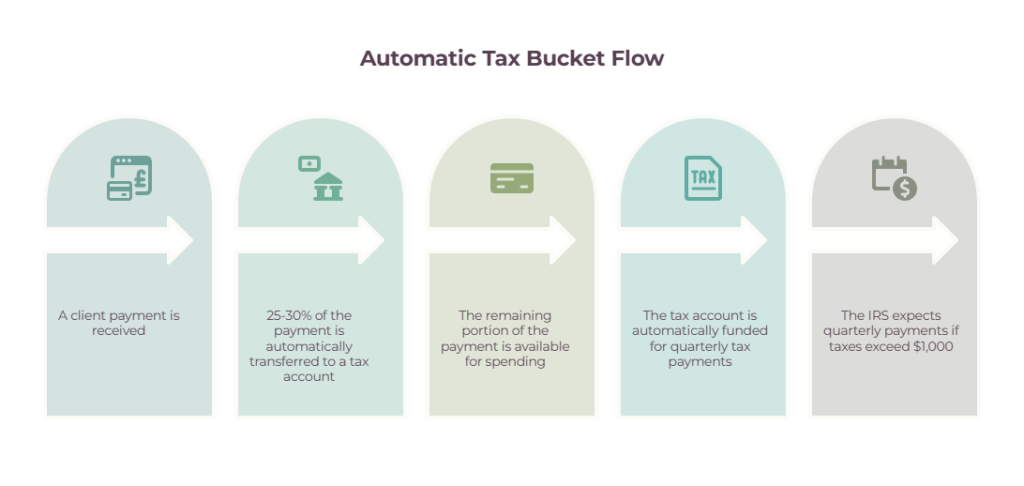
- A tax bucket that sweeps 25–30% of every deposit kills the April panic before it starts.
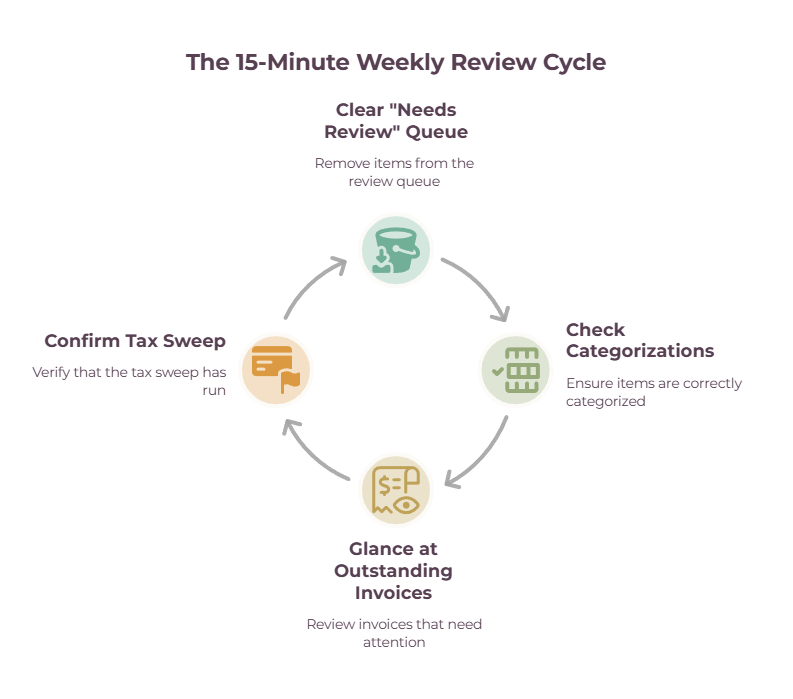
- Automation scales whatever you tell it, mistakes included, so keep a 15-minute weekly review.
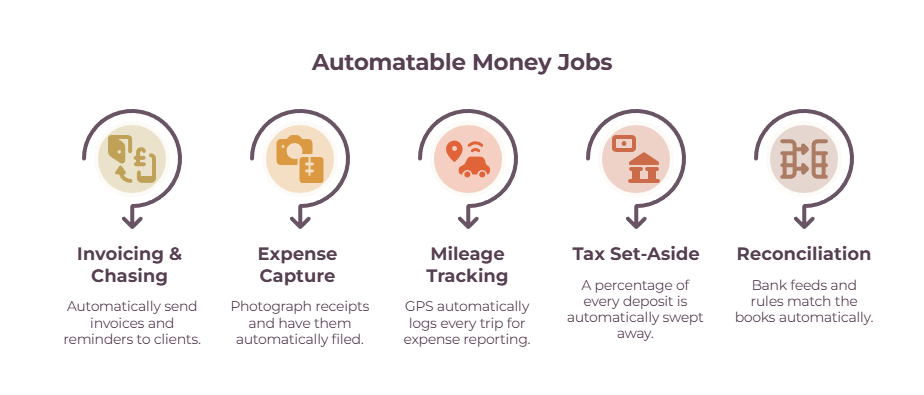
The best finance automation tools for freelancers (by what they automate)
The fastest way to choose is to start from the task you’re sick of doing by hand. Here are the headline picks at a glance, then the details by category:
| Tool | Automates | Free tier | 2026 starting price | Platform | Main limitation |
| FreshBooks | Recurring invoices, reminders, and late fees | No (trial) | ~$23/mo | Web, iOS, Android | Automated reminders need Plus |
| Wave | Invoicing, receipt OCR, and reminders | Yes | $0 (Pro ~$19/mo) | Web, iOS, Android | Auto-import on Pro only |
| QuickBooks Solopreneur | Categorization, mileage, bank import | No (trial) | ~$20/mo | Web, iOS, Android | Full reconciliation needs QuickBooks Online |
| Dext | Receipt OCR, supplier coding rules | No (trial) | ~$25/mo | Web, iOS, Android | Pricey for solos |
| Hurdlr | Mileage, expenses, and real-time tax | Yes | ~$8/mo | iOS, Android | Light on full bookkeeping |
| Found | Tax set-aside, Schedule C, invoicing | Yes | $0 | Web, iOS, Android | Must bank with Found |
| Lili | Tax Savings % sweep | No (paid tiers) | ~$15/mo (Pro) | Web, iOS, Android | Tax Savings is paid-only |
| Stripe Billing | Recurring billing, retry failed payments | No | 0.7% of volume | Web | Learning curve |
| Zapier | Wiring tools together | Yes (limited) | ~$20/mo | Web | Multi-step plans add up |
Auto-invoicing and chasing payments
This is the highest-payoff automation for most freelancers, because chasing money is the task people hate most and put off longest.
🔵 FreshBooks is the strongest for hands-off billing: recurring invoices, automatic payment reminders, and automatic late fees all run without you — though the automated reminder and late-fee features live on the Plus tier and up, not Lite.
🟢 Wave does the same reminder cadence for free on its core plan (recurring invoicing and auto bank-import sit behind the ~$19/month Pro tier).
🟡 Bonsai bundles recurring invoices and retainers with contracts and a CRM if you want one login for everything, and Stripe handles the payment side.
For the wider invoicing picture, our guides on the best invoicing tools and keeping track of invoices go deeper.
Auto expense and receipt capture
The goal here is that an expense files itself the moment it happens.
🔵 QuickBooks auto-imports every bank and card transaction and categorizes it using rules that learn from your history.
🟢 Dext is the OCR specialist: photograph a receipt, and it extracts the data, and its supplier rules mean every receipt from a given vendor codes itself the same way forever.
🟡 Expensify scans receipts on a free individual tier, and Wave does free receipt OCR plus bank-feed matching.
The full picture on what to track and keep is in our guide to tracking freelance contracts and expenses, and there’s a dedicated receipt scanner roundup too.
Auto mileage tracking
If you drive for work, manual logs are a losing game — they’re easy to forget on a busy day, so they undercount. At the 2026 IRS rate of 72.5 cents a mile, those forgotten miles add up fast.
GPS auto-trackers run in the background and log every drive.
🔵 MileIQ does mileage only (its price jumped after its 2025 acquisition by Bending Spoons).
🟢 Everlance and Hurdlr add expenses and tax estimates on top.
🟡 TripLog moved to unlimited free auto-tracking in 2026. Pick one, let it record everything, and swipe each trip business or personal once a week.
Auto tax set-aside and estimates
This is the automation that prevents the worst freelance money disaster: an April tax bill you didn’t save for.
Found and Lili are freelancer banking apps (both fintechs working with partner banks, not banks themselves) that set tax money aside automatically.
Found sets aside a portion of each deposit for estimated taxes and categorizes income to Schedule C as it lands; Lili’s Tax Savings feature (on its Pro tier and up) saves a percentage of every business deposit you choose.
Hurdlr calculates real-time federal, state, and self-employment tax estimates as you earn, and Keeper flags deductible transactions with a bookkeeper checking the AI’s work. For the why and how much behind all this, see our bookkeeping for the self-employed guide.

Auto bank reconciliation and bookkeeping
Reconciliation — the matching of what your books say against what your bank says — is tedious and almost fully automatable.
QuickBooks Online, Xero, and Zoho Books all pull transactions through a bank feed, suggest categories from your rules, and flag only what needs a human eye. Xero includes unlimited users even on entry plans; Zoho Books has a free tier for businesses under $50k in revenue.
A newer wave of AI bookkeeping tools promises to go further, though for a solo freelancer, they’re less proven than the established names. Our accounting software for freelancers guide covers these in depth.
Recurring and subscription billing
If you run retainers or a productized service, Stripe Billing charges clients on a schedule automatically and retries failed cards with AI-timed attempts (Stripe says its recovery tools claw back around a third of failed payments on average).
It costs 0.7% of billing volume on top of processing fees and has a steeper learning curve than a simple invoicing tool.
Recurring billing is also built into FreshBooks, Wave Pro, and Bonsai retainers if you’d rather keep it inside your invoicing tool. A cash flow tool helps you see the recurring revenue land.
The connective tissue that wires it together
The tools above are powerful alone, but the magic is in making them talk. Zapier and Make connect thousands of apps with no code, and Plaid is the bank-feed plumbing behind most auto-import.
Two recipes freelancers commonly run: “when a Stripe payment succeeds, create a sales receipt in QuickBooks and log a row in a Google Sheet,” and “when a new invoice is created in FreshBooks, post a summary to a cash-flow spreadsheet.” Before you build one, check whether a native integration already does the job. Most accounting tools connect directly to Stripe and PayPal without a middleman.
How to set up your finance automation tools (step by step)
Pick one task, set it up once, and it runs for years. Here’s the setup for the four highest-payoff automations.
1. Recurring invoices and reminders
Build your invoice template once with your logo, payment terms, accepted methods, and a stated late-fee policy. Set the recurrence (monthly is standard for retainers).
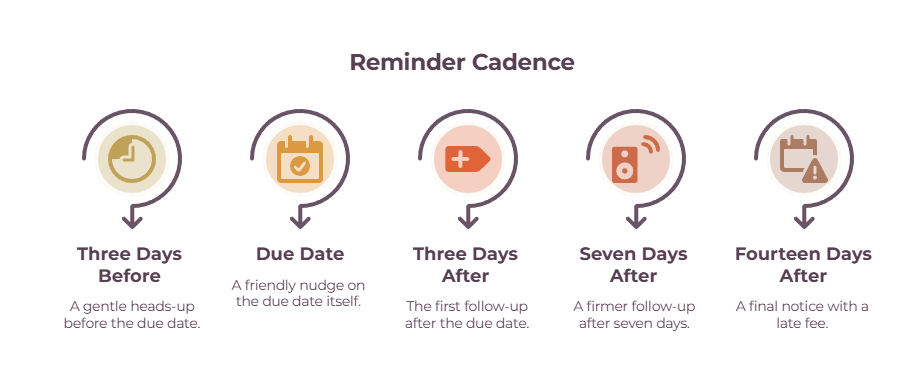
Then turn on the reminder cadence: a gentle nudge a few days before the due date, one on the due date, then follow-ups at 3, 7, and 14 days overdue.
Switch on automatic late fees if your tool supports them (FreshBooks does on Plus). Write the reminder emails to sound like you, with merge fields for the client name and amount, so they don’t read as robotic.
2. Bank-feed rules
Connect your business bank and card to your accounting tool. Let it import transactions and suggest categories, then build rules so future ones file themselves: “Adobe to Software,” “this client’s deposits to Income,” and so on.
From then on, your only job is a quick weekly look at the “needs review” queue rather than manual data entry.
3. Automatic tax set-aside
Either use a freelancer bank with a tax bucket (Found or Lili) that skims a percentage off each deposit, or set a standing rule in your business bank to move 25–30% of every incoming payment to a separate tax savings account.
The IRS generally expects quarterly estimated payments once you’ll owe $1,000 or more for the year, so this habit is what keeps those payments funded.
4. A simple Zapier recipe
Start with one: “When a Stripe payment succeeds, add a row to my income spreadsheet and send a thank-you email.”
Build it, test it with a small live payment, and watch it fire. Keep a human in the loop for anything client-facing, automating the logging and not the relationship.
How to get the most from finance automation tools
Automation scales whatever you tell it to do, mistakes included. The freelancers who win at this review weekly and never fully set-and-forget.
The biggest trap is blindly trusting auto-categorization. Rules engines mis-assign transactions, and a wrong rule is wrong on every future transaction until you catch it.
Block 15 minutes a week to clear the review queue and reconcile against your statements monthly. That single habit catches the errors before they reach your tax return.
A few more guardrails:
- Segment your clients so reliable payers get gentle reminders and chronic late payers get a firmer cadence — blasting everyone with the same robotic sequence strains good relationships.
- Don’t over-chase. Past around six reminders on a single invoice, response rates fall, and you just look aggressive.
- Don’t duplicate native integrations. Don’t build a Zapier automation for something your accounting tool already handles directly.
- Separate business and personal accounts first. Automation built on commingled accounts just makes the mess faster.
- Check your tax estimate each quarter, not only in April, so you don’t underpay early in the year.
The payoff: hours saved, faster payment, fewer errors
Set up well, finance automation buys back hours every month, gets your invoices paid faster, and stops deductions and tax deadlines slipping through the cracks.
The time saving is the obvious win — much of that weekly admin load disappears once invoices, expenses, and tax set-aside run themselves.
But the money wins matter more still. Following up on invoices is one of the most reliable ways to get paid sooner: invoicing company Chaser’s 2022 Late Payments Report found that pairing SMS with email reminders raised the chance of payment within a week of the due date by 56%, and businesses that automate their follow-ups tend to get paid earlier overall.
Automated mileage and expense capture mean you stop leaving deductions on the table, and an automatic tax bucket means the quarterly bill is already funded when it arrives.
The compounding part is what makes it worth a weekend. You set each automation up once, and it keeps paying you back every week after — in time you didn’t spend, invoices that got chased without you, and a tax bill that stopped being a surprise.
(Treat vendor claims of “500+ hours saved a year” as marketing; the everyday payoff is steadier and still very worth it.)
Where to start
You don’t automate everything at once. That’s a common obstacle that slows everything down.
Pick the task that wastes the most time or causes the most stress — for most freelancers, that’s chasing invoices or setting aside tax money — and automate just that one this week.
Get it running, trust it for a month while you spot-check it, then add the next. Within a quarter, you’ll have a money system that mostly runs itself.
From there, the next two steps: our finance software guide helps you choose the underlying tools each automation runs on, and the financial planning guide for freelancers covers the longer game once the day-to-day is on autopilot.
Frequently Asked Questions
What financial tasks can a freelancer automate?
The big five are sending and chasing invoices, capturing expenses and receipts, tracking mileage, setting aside tax money, and reconciling your books. Each has a tool that handles it with little ongoing effort, and most connect so the data flows between them automatically.
Can bookkeeping be fully automated?
Mostly, but not entirely. Bank feeds and rules can categorize and reconcile the bulk of your transactions, but you still need a short weekly review to catch miscategorizations. The realistic goal is 90% automated with a 15-minute human check, not zero involvement.
How do I automate setting aside money for taxes?
Use a freelancer banking app with a tax bucket (like Found or Lili) that skims a set percentage off every deposit, or create a standing rule in your business bank to move 25–30% of each payment into a separate tax savings account the moment it lands.
What’s the easiest finance automation to start with?
Automatic invoice reminders. Turn them on in your invoicing tool, set a cadence around the due date, and you’ll get paid faster without sending a single chase email yourself. It takes ten minutes to set up and starts working immediately.