The Best Project Management Software for Freelancers

Five clients. Three deadlines this week. A revision request buried in your email. And the nagging sense you’ve forgotten something important. Which is when most freelancers start looking for the best project management software for freelancers — something simple enough for solo work, but structured enough to stop deadlines slipping through the cracks.
The problem: the tools that rank first are built for 50-person teams running sprints, resource dashboards, and sprint retros.
You don’t need any of that. You need to know what’s due, for which client, and when — without it taking 90 minutes to set up.
Some freelancers handle that with a notebook. Others need software. This guide helps you work out which camp you’re in, and if you do need a tool, which one matches how you actually work — not how a SaaS company thinks you should.
Quick Decision Guide: Which Tier Do You Need?

The honest test: if you’re losing track of tasks or missing deadlines, you need more structure. If you’re not, don’t fix what isn’t broken. The detail and reasoning behind each recommendation is below.
And if you’re looking for a full freelance setup beyond just project management, our guide on choosing the right freelance management tools can help you decide which tools are actually worth paying for.
Do You Actually Need Project Management Software?
If you’re managing three or fewer clients with straightforward deliverables, you probably don’t. A notebook, a spreadsheet, or a free Trello board handles that fine. The best project management software for freelancers starts becoming worth the cost when you’re juggling five or more clients with overlapping deadlines.
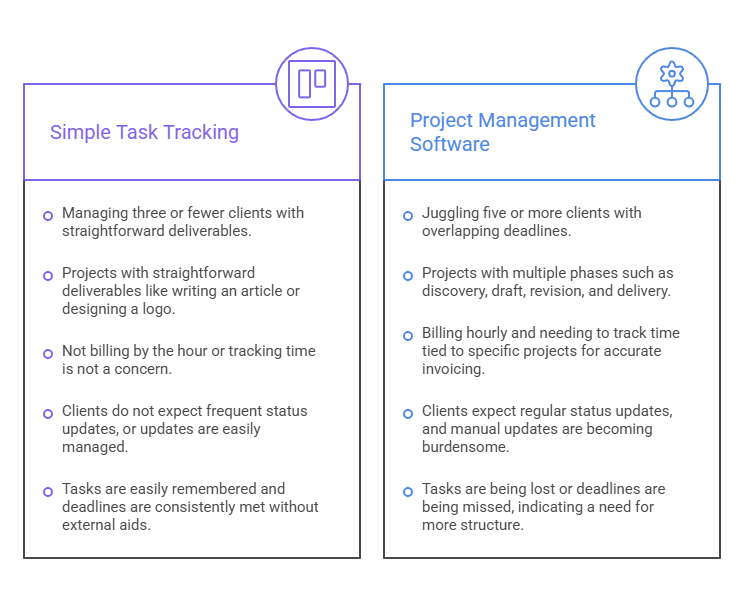
You’re fine without dedicated PM software if your client list is short, your projects have simple deliverables (write article, design logo, build page), you don’t bill by the hour, and you can track everything in a single list.
Notion’s free plan, Trello, Todoist, Apple Reminders, or a physical notebook all work at this level. There’s no shame in simple.
Most experienced freelancers on Reddit and Hacker News still use some version of this setup, and some of them earn six figures doing it.
You need PM software when you’re managing five or more concurrent clients with overlapping deadlines.
Or when your projects have multiple phases (discovery, draft, revision, delivery) and things start falling through the cracks. Or when you bill hourly and want to track time tied to specific projects so you can generate accurate invoices without guessing.
And if clients expect status updates and you’re tired of sending “here’s where things stand” emails every week.
The test is straightforward: are you losing track of tasks or missing deadlines? If yes, you need more structure. If no, don’t fix what isn’t broken.
Which is The Best Project Management Software for Freelancers?
It depends on how much structure you need. Trello and Notion for minimal setups, ClickUp and Moxie for mid-range needs, and Bonsai or HoneyBook if you want project management, invoicing, and contracts in one place.
| Tool | Free Tier | Paid From | Time Tracking | Invoicing | Best For |
| Trello | 10 boards | $5/mo | No | No | Simplest visual PM |
| Notion | Unlimited (individual) | $10/mo | No | No | Most flexible free option |
| Todoist | 5 projects | $4/mo | No | No | Best mobile task manager |
| ClickUp | Unlimited tasks | $7/mo | Yes (free) | No | Best free full PM |
| Moxie | 14-day trial | $10/mo | Yes | Yes | Best value all-in-one |
| Bonsai | 7-day trial | $17/mo | Yes | Yes | Contracts + invoicing + PM |
| HoneyBook | 7-day trial | $29/mo | Mobile only | Yes | Best client experience |
| Teamwork | 5 projects | $10.99/mo | Yes (free) | Partial | Best for client collaboration |
Minimal (free) — for 1 to 5 clients with simple projects
Trello
The simplest project management tool that actually works. Create a board per client or a single board with columns for To Do, In Progress, and Done. Drag cards between columns. That’s the whole system.
No learning curve, no setup time, no features you’ll never touch. Free for up to 10 boards, which is enough for most solo freelancers.
Notion
The most flexible free option. Build whatever system makes sense to you: a client database, a kanban board, a calendar view, or all three.
The downside is the setup time.
You can spend an entire afternoon designing the perfect dashboard instead of doing client work. Start with a simple template and resist the urge to customize for the first month. Notion’s free plan is unlimited for individual users.
Todoist
The best choice if you work mainly from your phone. Clean mobile app, natural language entry (“Email Sarah about revisions tomorrow at 2 pm”), and enough structure for basic project tracking.
The free plan caps at 5 projects, which gets tight if you count each client separately. Pro at $4/mo removes the limit.
Mid-range ($7-$11/mo) — for freelancers who need time tracking and more structure
ClickUp
The most generous free tier of any full PM tool. Unlimited tasks, built-in time tracking, docs, and multiple views (list, board, calendar, Gantt). The free plan is genuinely usable for solo work.
The interface can feel overwhelming at first because there are features everywhere, but you can ignore 80% of them and use it as a powerful task manager with time tracking. If you’ve outgrown Trello and want something free, start here.
Moxie
The best value if you want project management and invoicing in the same tool. At $10/m,o you get task management, time tracking, invoicing, contracts, proposals, a CRM, and expense tracking.
That’s less than Todoist Pro plus a separate invoicing app. Moxie was built specifically for freelancers (formerly Hectic), and it shows in how clean the interface stays. No enterprise bloat.
All-in-one ($17-$39/mo) — for freelancers who want everything in one place
Bonsai
Handles the entire client lifecycle: proposals, contracts with e-signatures, project management, time tracking, invoicing, and basic accounting. One login that covers everything from pitching a client to getting paid.
Starts at $17/mo, though the Professional plan at $32/mo is what most freelancers need. If you also need accounting software, Bonsai’s built-in features are lighter than QuickBooks or Xero, but they cover the basics.
HoneyBook
The most polished client-facing experience. Beautiful proposals, smart payment scheduling, and a client portal that makes solo operations look like established firms. Starts at $29/mo. Time tracking is mobile-only and basic. Limited to US and Canada.
Best for creative freelancers (photographers, designers, event planners) where client presentation matters as much as project tracking.
Teamwork
The strongest option if clients need direct access to your project workspace.
Teamwork was built for agencies, and that DNA shows — client-level permissions, task-level time tracking, and milestone views come standard.
The free plan covers 5 projects with 2 users, which is tight but workable for testing. Paid plans start at $10.99/mo per user with a client collaboration layer that’s genuinely better than sharing a Trello board and hoping nobody drags the wrong card.
Invoicing is partial — you can log billable hours and export them, but you’ll still need a separate tool to actually send the invoice.
Best for freelancers who work closely with clients on deliverables (developers, consultants, marketing contractors) rather than those who deliver finished work and move on.
Skip these (overkill for solo freelancers)
Monday.com requires a 3-seat minimum on all paid plans. You’re paying at least $27/mo for team collaboration features you’ll never use. The free plan caps at 2 users and 3 boards. Not worth it solo.
Asana recently cut its free plan to just 2 users and locked time tracking behind the $24.99/mo Advanced tier. The free version used to be the standard recommendation for freelancers. It isn’t anymore.
Wrike needs a 5-seat minimum ($50/mo) to access time tracking. Built for project teams, not solo operators.
The Best Project Management Software for Freelancers Overall: Moxie
If you want one recommendation without reading any further, it’s Moxie at $10/month.
The reasoning: most freelancers who need project management software also need time tracking and invoicing. Moxie does all three in one tool for less than a Todoist Pro subscription, plus a separate invoicing app.
The interface stays clean because it was built specifically for freelancers, not adapted from team software. No enterprise features cluttering the sidebar. No upsell tier that locks the feature you actually need behind a higher plan.
The trade-off: Moxie isn’t free. If you’re managing three clients with simple deliverables, Trello (free) is genuinely all you need — there’s no shame in starting there, and plenty of six-figure freelancers never use anything more complex.
If you’ve outgrown Trello but aren’t ready to pay, ClickUp’s free tier is the strongest option on the market right now. Unlimited tasks, built-in time tracking, multiple views. The interface takes a week to get used to, but it’s free forever.
And if you need contracts, proposals, and a polished client portal alongside project management, Bonsai ($32/mo for the Professional plan) is the upgrade — but only if those features actually justify the extra $22/month for you.
Quick picks by use case:
- Best overall: Moxie ($10/mo)
- Best free: Trello (genuinely simple, genuinely works)
- Top free pick with full PM features: ClickUp (unlimited tasks, time tracking included)
- Best for mobile-first freelancers: Todoist ($4/mo)
- Best all-in-one with contracts and proposals: Bonsai ($17–$32/mo)
- Top client experience for creatives: HoneyBook ($29/mo+)
Which Features Actually Matter for Freelancers?
Deadline visibility across all clients, time tracking linked to billing, and client-facing project views. Everything else is optional until you need it.
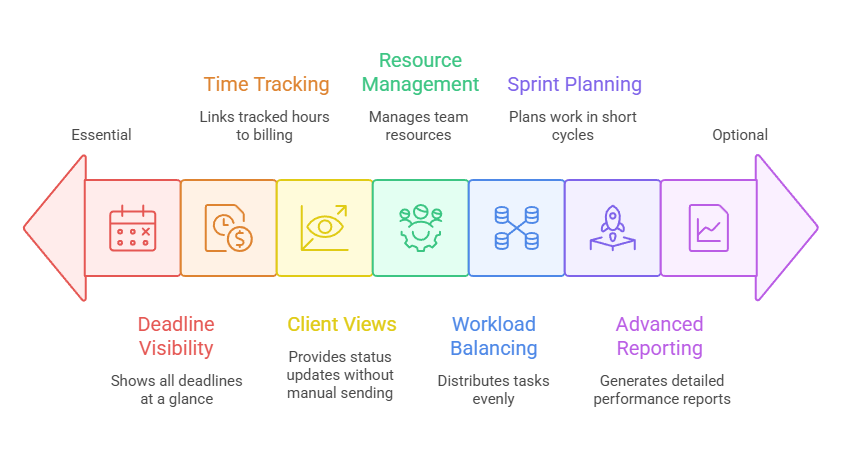
Deadline visibility is the single most important feature. You need one view showing every deadline across every client.
Calendar, sorted list, kanban board, whatever format clicks for you. If the tool can’t answer “what’s due this week across all my clients” at a glance, it’s not solving your problem.
That kind of cross-project visibility becomes especially important once several client projects overlap. Our guide to the best freelancer management tools for multi-project workflows compares which tools handle it best.
Time tracking linked to projects matters if you bill hourly. Starting a timer, assigning it to a client and project, then generating an invoice from those tracked hours is the workflow that saves the most admin time.
ClickUp, Moxie, Bonsai, and Teamwork all do this natively. Trello and Notion don’t.
If you bill hourly and use Trello, you’ll need a separate tracker like Toggl or Harvest, plus a separate invoicing tool.
That works, but it’s the stack most freelancers eventually want to consolidate.
Client-facing views matter if your clients want status updates without you sending them. Shared Trello boards and Notion pages work at a basic level. Dedicated portals (Bonsai, HoneyBook, Teamwork) look more professional.
Whether you need this depends entirely on client expectations.
Features you can safely ignore as a solo freelancer: resource management, workload balancing, sprint planning, advanced reporting dashboards, and anything labeled “enterprise.”
What Does a Simple Freelance PM System Look Like?
Pick one tool for tasks and deadlines, connect it to your time tracker if you bill hourly, and link that to your invoicing tool. Three tools maximum. Most freelancers need two or fewer.

The minimalist (free)
Trello with one board and columns per project stage, plus a calendar app for deadlines. Total cost: $0. This handles 3 to 5 clients with simple deliverables. It’s what most experienced freelancers describe when you ask what they actually use day to day.
The structured stack ($0-$15/mo)
ClickUp (free) for task management and time tracking, plus your existing invoicing tool. Total cost: whatever the invoicing app costs. Works for freelancers managing 5+ clients who bill hourly.
The all-in-one ($10-$32/mo)
Moxie ($10/mo) or Bonsai ($17-$32/mo) for everything: PM, time tracking, invoicing, contracts, and CRM. One login, one system. Works for freelancers who want to stop juggling apps and are willing to pay for the convenience.
The system that works is the one you’ll actually open every morning. If you set up ClickUp and never check it, go back to Trello. If you built a Notion database but still reach for your notebook, the notebook is your PM tool.
That’s fine.
The goal is to stop missing deadlines and stop losing track of client work. The tool doesn’t matter nearly as much as the habit of checking it.
If you’re also trying to get your cash flow and bookkeeping sorted, those systems connect naturally. Your PM tool tracks the work.
Your invoicing tool bills for it. And your accounting software records the income. The simpler each piece is, the more likely you’ll actually use all three.
Use the Simplest Tool That Works
The best project management software for freelancers is the simplest one that keeps you from missing deadlines. For most solo freelancers, that’s Trello or Notion. Both are free. Both work.
For freelancers who need time tracking and invoicing in the same place, Moxie at $10/mo is the best value available.
And for freelancers managing complex client relationships with contracts and proposals, Bonsai handles the full lifecycle starting at $17/mo.
Start free. Upgrade when the free option starts creating friction. And stop feeling guilty about using a notebook if a notebook is what works for you.
Frequently Asked Questions
What is the best project management software for freelancers?
The best tool depends on your workflow. Trello is the simplest option for freelancers managing a handful of clients, ClickUp offers the strongest free feature set, and Moxie is often the best value if you want project management, time tracking, and invoicing in one platform.
Do freelancers really need project management software?
Not always. Freelancers managing three or fewer clients with simple deliverables can often stay organized with a notebook, spreadsheet, or basic task manager. Dedicated project management software becomes more valuable as the number of clients, deadlines, and project stages increases.
Which project management features matter most for freelancers?
The most important features are deadline visibility, task organization, and time tracking if you bill hourly. Client portals, advanced reporting, and team-management features can be useful, but most solo freelancers can ignore them.
Is Trello enough for freelance project management?
For many freelancers, yes. Trello‘s boards and cards provide enough structure to track projects, deadlines, and client work without adding unnecessary complexity. Many experienced freelancers continue using Trello even after their businesses reach six figures.
When should freelancers upgrade from a free project management tool?
A paid tool usually becomes worthwhile when you’re managing five or more active clients, tracking billable hours, coordinating multiple project phases, or spending too much time switching between separate apps for project management, time tracking, and invoicing.
Related guides: freelance management tools · accounting software for freelancers · best invoicing tool for freelancers · cash flow management tools · bookkeeping for self employed · project management and invoicing software · best freelancer management tools for multi-project workflows