What Are the Best Tools for Comparing Bank Accounts?

You search for the “best tools for comparing bank accounts”, click the number-one result, and open the account it recommends. Weeks later, you find out it was ranked number one in large part because that bank paid the site the most.
That’s the problem with anything “affiliate-based” at the moment. You’ve probably seen countless influencers on the ‘gram saying how amazing this new product is because it changed their life. Just make sure you use their discount code in the bio.
The same applies here.
There are certainly more authoritative and honest platforms out there that try to give you the whole picture (we aim to be one of them!), but you’ve got to know what you’re looking for.
So the real question is which tool actually surfaces the fees, rates, and freelancer features that matter to you — and which one you should cross-check it against, so you’re not just picking whoever paid the most for the top slot.
Below: the comparison tools worth using, what each is genuinely good and bad at, how they make their money, the one free unbiased tool every freelancer should use, and the freelancer accounts these tools quietly leave out.
Quick Takeaways
- The tools worth using: NerdWallet and Bankrate for curated best-of picks, WalletHub for real user reviews and business accounts, DepositAccounts for the deepest rate database, and the FDIC’s BankFind for confirming a bank is actually insured.
- Most comparison sites are affiliate-funded — genuinely useful, but the #1 pick isn’t automatically the best one for you.
- For real user reviews (not just an editor’s opinion), use WalletHub or DepositAccounts.
- Always verify a bank — or a fintech’s partner bank — is FDIC-insured yourself via BankFind. It’s free and takes a minute.
- The freelancer catch: these tools thinly cover the fintechs you actually use (Found, Lili, Relay, Novo), so you’ll often have to compare those yourself.
The best bank account comparison tools at a glance
Need a quick curated shortlist? Use NerdWallet or Bankrate. If you’re looking for real user reviews and business accounts, use WalletHub. To find the highest rates, check DepositAccounts. Finally, confirm any bank is safe with the FDIC’s free BankFind. Here they are side by side.
| Tool | Best for | What it compares | How it works | Freelancer fintechs / business accounts? | User reviews? | How it makes money |
| Nerd Wallet | Beginners wanting curated picks + a quiz | Checking, savings, CDs, and some business | Editorial best-of + quiz | Some business, light on fintechs | Expert-led | Affiliate |
| Bankrate | Rate-focused shoppers | Checking, savings, CDs, money-market | Editorial best-of, scored on APY/fees | Light on fintechs | Expert-led | Affiliate |
| WalletHub | Filtering + user reviews, incl. business | 650+ checking, 250+ small-business accounts | Filterable tool + user reviews | Business compare page; some fintechs | Yes (real users) | Affiliate |
| Deposit Accounts | Rate hunters and savers | 275,000+ deposit rates | Rate database + alerts + bank health grades | Rates only; no feature comparison | Yes (10,000+ reviews) | Affiliate (LendingTree) |
| U.S. News | A credible second opinion | Checking, savings, CDs, online banks | Editorial (80+ banks evaluated) | Light on fintechs | Expert-led | Affiliate |
| FDIC BankFind | Safety / insurance check | FDIC status + bank financials | Official government database | N/A (institutions, not features) | No | Government (free) |
All of these are free to use. Methodology and figures verified July 2026; APYs and features change constantly, so confirm the details on the tool before you decide.
What to compare when you’re choosing a bank account as a freelancer
The numbers that matter most for freelancers are monthly and overdraft fees, minimum balance requirements, the APY on your balance, transaction limits, accounting integrations, and whether your deposits are FDIC-insured — details a generic “best bank” headline often skips.
Before you open a tab on any comparison site, know what you’re comparing.
- Fees — monthly maintenance, overdraft, ATM, and wire fees. With variable income, avoid accounts that charge a monthly fee unless it’s easily waived.
- Minimum balance — some accounts waive fees only if you keep a balance you may not reliably hit in a slow month.
- APY — the interest your balance earns. On a healthy buffer, the difference between 0% and 2% is real money.
- Transaction limits — some accounts cap free transactions; freelancers with lots of small client payments can blow past them.
- Sub-accounts / buckets — the feature that makes the four-account cash flow system run automatically.
- Integrations — does it sync with QuickBooks, Xero, or Stripe? This saves hours at tax time.
- Invoicing and tax tools — some freelancer accounts set aside tax and send invoices in-app.
- Cash and ATM access — still matters if any clients pay in cash or check.
- FDIC insurance — non-negotiable, and for fintechs, you check the partner bank (more on that below).
The best tools for comparing bank accounts, reviewed
Each tool below comes with what it’s genuinely best at, how it works, and one real strength and one honest limitation — because every one of them has both.

NerdWallet
Best for beginners who want curated picks- What it compares: Checking, savings, CDs, and some business accounts
- How it works: Editorial “best of” lists + a bank-matching quiz (surveys ~100 institutions)
- Business/freelancer accounts: Some business coverage; light on fintechs
- User reviews: Expert-led, limited user reviews
- How it makes money: Affiliate — its own disclosure says partner pay can affect how products appear
NerdWallet is the friendly front door. Its editors survey around 100 institutions and score them across five categories and 30 subcategories, then publish clean “best of” lists plus a quiz that points you toward an account based on what you care about. The strength is approachability. The honest limitation is how it earns — it’s affiliate-funded, so the lists lean toward partners, and small credit unions or freelancer fintechs that don’t pay may be absent. Great for a starting shortlist, not a final answer.
Bankrate
Best for rate-focused shoppers- What it compares: Checking, savings, CDs, money-market accounts
- How it works: Editorial “best of” lists scored heavily on APY, fees, and minimums
- Business/freelancer accounts: Light on fintechs; consumer-account focus
- User reviews: Expert-led
- How it makes money: Affiliate
Bankrate has been comparing financial products since the 1970s, and it shows in the depth of its rate data. Its best-checking and best-savings lists are scored heavily on APY, minimum deposits, and the balance needed to dodge fees. The strength is trustworthy, detailed rate information from an established name. The limitation is the same affiliate model as NerdWallet, plus a focus on mainstream consumer accounts rather than freelancer tools. Use it to sanity-check rates, not to find a business account built for self-employment.
WalletHub
Best for real user reviews and business accounts- What it compares: 650+ checking and 250+ small-business accounts
- How it works: Filterable comparison tool (not a static list) with a dedicated business-checking page
- Business/freelancer accounts: Yes — proper business-checking comparison
- User reviews: Yes — real user ratings and reviews
- How it makes money: Affiliate (redirect-to-apply); needs a free account for full features
WalletHub is the most genuinely comparative of the bunch. It’s a filterable tool rather than a static list — it has compared more than 650 checking accounts and 250-plus small-business accounts — and, crucially, it layers in ratings and reviews from actual users, not just editors. The strength is that combination: filters, real user reviews, and a dedicated business-checking comparison that most rivals don’t bother with. For a freelancer who wants to actually compare (and read what real customers say), it’s the best all-rounder. The limitation is that you’ll need to create an account for the full features, and it uses the same redirect-to-apply affiliate model — so weigh the user reviews more heavily than the ranking order.
DepositAccounts
Best for chasing the highest rates- What it compares: 275,000+ deposit rates from banks and credit unions
- How it works: Searchable rate database + rate-change alerts + bank health grades
- Business/freelancer accounts: Rates only — no business feature comparison
- User reviews: Yes — 10,000+ consumer reviews
- How it makes money: Affiliate (owned by LendingTree); states a “not-for-hire” stance
If your goal is the best possible return on your cash buffer, DepositAccounts is the power tool. Owned by LendingTree, it tracks over 275,000 rates from banks and credit unions, sends alerts when rates change, grades banks on financial health, and hosts more than 10,000 consumer reviews. The strength is unmatched depth for rate hunting, plus a large base of real reviews and a stated “not-for-hire” approach. The limitation is scope: it’s rates-first, so it won’t help you compare business features or freelancer fintech tools, and it’s worth remembering it’s owned by a lending marketplace. Brilliant for “where do I park my savings,” not for “which account fits my freelance business.”
U.S. News (Banking)
Best for a credible second opinion- What it compares: Checking, savings, CDs, online banks (evaluates 80+ banks)
- How it works: Editorial evaluation and “best of” rankings
- Business/freelancer accounts: Light on fintechs; not freelancer-specific
- User reviews: Expert-led
- How it makes money: Affiliate/editorial
U.S. News evaluates 80-plus banks and credit unions and publishes measured, editorial best-of lists. It carries the same credibility as its college and hospital rankings. The strength is a thorough, reputable second opinion to cross-check the others. The limitation is that it’s editorial and affiliate-supported like the rest, and not built with freelancers in mind. Treat it as a cross-check, not your only source.
FDIC BankFind
Best free, unbiased safety check- What it compares: FDIC-insurance status and bank financials (institutions, not features)
- How it works: Official government database
- Business/freelancer accounts: N/A — use it to confirm a bank (or a fintech’s partner bank) is insured
- User reviews: None
- How it makes money: It doesn’t — government-run, free, zero commercial bias
This is the one tool here with zero commercial motive. BankFind is the FDIC’s official database — it confirms whether a bank is genuinely FDIC-insured and lets you see its locations, history, and financial reports. The strength is exactly that independence: nobody paid for a placement here, so it’s the definitive way to confirm your money will be insured. The honest limitation is that it only verifies insurance and institutional data — it won’t compare rates, fees, or features; it doesn’t confirm coverage amounts for your specific accounts, and a bank can be insured while still having problems. Use it alongside the comparison tools, never instead of them.
Also worth a look
Forbes Advisor, Investopedia, and MyBankTracker all publish solid editorial best-of lists and reviews. They run on the same affiliate-editorial model as NerdWallet and Bankrate, so they’re most useful as extra cross-checks rather than a single source of truth.
Are bank comparison sites trustworthy? How do they make money?
Most bank comparison tools earn a commission when you open an account through them, so their rankings tend to favor partners who pay — the top pick is usually a solid product, but not automatically the best one for your situation.

Read them as a strong starting shortlist, not gospel.
The model is simple: when you click through and open an account, the site gets paid. That’s not shady on its own — it’s how free comparison tools stay free — but it creates a tilt.
As NerdWallet’s advertiser disclosure puts it, partner compensation can affect how and where products appear.
The practical result is that a genuinely great credit union or a freelancer-focused fintech can be missing entirely, simply because it doesn’t have an affiliate deal.
Three habits keep you honest:
➡️ Cross-check two tools. If an account tops both NerdWallet and WalletHub, that’s a stronger signal than one list alone.
➡️ Weight real user reviews. WalletHub and DepositAccounts show what actual customers say — often a better guide than the ranking order.
➡️ Verify the insurance yourself. Whatever a comparison site says, confirm the bank is FDIC-insured on BankFind before you move money.
Why do comparison tools miss the best freelancer accounts
The accounts built for freelancers — Found, Lili, Relay, Novo, Bluevine — are often absent or buried in mainstream comparison tools, which lean toward traditional banks and high-APY consumer accounts. For those, you’ll usually have to compare the features yourself.

It’s the biggest blind spot in every tool above.
Part of the reason is structural: many of these fintechs aren’t banks themselves.
They’re financial technology companies that hold your deposits at a partner bank, which means the standard comparison databases (organized around chartered banks) don’t always list them cleanly. Different affiliate relationships do the rest.
So for freelancer accounts, do it yourself.
Line the contenders up against the checklist earlier in this guide — fees, APY, sub-accounts, integrations, invoicing and tax tools — and pay special attention to insurance.
Because a neobank holds your money at a partner bank, “Is it FDIC-insured?” means finding that partner bank’s name (usually in the fine print) and checking it on BankFind.
Once you’ve picked an account, the next job is running the money well. Our guide to cash flow management tools for freelancers covers the four-account system and the freelancer banks (like Relay and Found) worth a look, and our accounting software for freelancers guide handles the integration side.
So which tool should you actually use?
It comes down to the job.
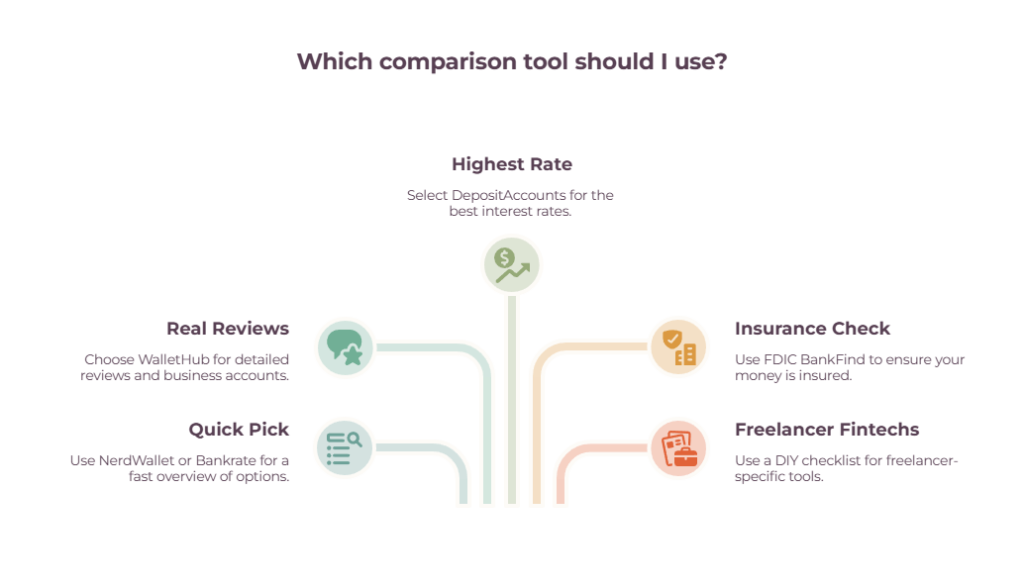
For a quick, curated shortlist, start with NerdWallet or Bankrate. For real user reviews and a proper business-account comparison, use WalletHub. To chase the highest rate on your cash, DepositAccounts is unbeatable.
To confirm an account is safe, FDIC BankFind is the free, unbiased final check. And for the freelancer fintechs, the tools tend to miss; compare them yourself with the checklist above.
| Your job | Use | Why |
| Quick curated shortlist | NerdWallet / Bankrate | Editorial best-of |
| Real user reviews + business | WalletHub | Filters + reviews |
| Highest savings rate | DepositAccounts | 275,000+ rates |
| Confirm it’s insured | FDIC BankFind | Official, unbiased |
| Compare freelancer fintechs | Do it yourself | Tools miss them |
The best comparison tool is the one you use with your eyes open — shortlist with the sites, sanity-check the reviews, verify the insurance, and don’t let a ranking make the decision for you. Once the account is open, keep the money working with our cash flow management tools for freelancers and solid bookkeeping for self-employed habits.
Frequently Asked Questions
What’s the best tool for comparing bank accounts?
There isn’t one best tool — it depends on the job.
NerdWallet and Bankrate are best for quick curated picks, WalletHub for real user reviews and business accounts, DepositAccounts for the deepest rate comparison, and the FDIC’s BankFind for confirming a bank is insured. Using two together beats relying on any single one.
Are bank comparison sites like NerdWallet and Bankrate trustworthy?
They’re useful but not neutral. Most earn a commission when you open an account through them, so rankings favor partners who pay — NerdWallet’s own advertiser disclosure notes that partner compensation can affect how products appear.
The picks are generally solid, but cross-check a second tool and read real user reviews before deciding.
How do I check if a bank is FDIC-insured?
Use the FDIC’s free BankFind tool. Search the bank’s name, and it confirms whether the institution is FDIC-insured, along with its locations and financial history.
For a fintech that isn’t a bank itself (like Found or Lili), find its partner bank in the fine print and search that name instead.
What should a freelancer compare when choosing a bank account?
Monthly and overdraft fees, minimum balance requirements, the APY on your balance, transaction limits, sub-accounts for budgeting, integrations with tools like QuickBooks or Xero, any built-in invoicing or tax features, and FDIC insurance.
These matter more for freelancers than the headline “best bank” label most lists lead with.
Do comparison tools cover fintechs like Found, Lili, or Novo?
Often not well. Mainstream comparison tools lean toward traditional banks and consumer accounts, so freelancer-focused fintechs are frequently missing or buried.
To compare those, line them up yourself against a feature checklist and verify their partner bank’s FDIC insurance directly.
Is there a free, unbiased bank comparison tool?
The FDIC’s BankFind is free and has no commercial bias, but it only verifies insurance and institutional data — it won’t compare rates or features.
For unbiased-leaning rate data with real user reviews, DepositAccounts is a strong option, though it’s owned by a lending marketplace. Combining an official tool with a review-driven one gives you the clearest picture.