How to Track Freelance Project Progress the Right Way
A project can look completely fine for three weeks and then fall apart in the final four days. Every check-in suggests a cheerful “yep, on track,” until two days before the deadline the truth arrives: it isn’t close. This is a common failure when there is no clear system for how to track freelance project progress — updates feel positive, but they are not grounded in real visibility.
The work slipped a week, everyone scrambled, and the relationship never fully recovered.
The delay wasn’t the failure. The surprise was. Nobody saw it coming because nobody was actually tracking progress — they were just exchanging reassurances.
That’s the whole reason this guide exists. Tracking freelance project progress isn’t about surveillance, and it isn’t about another standing status call where everyone performs busyness.
It’s a light system that tells you early, while there’s still time to act, whether a project is on time, on budget, and on scope. These kinds of systems are a core part of modern freelance management tools.
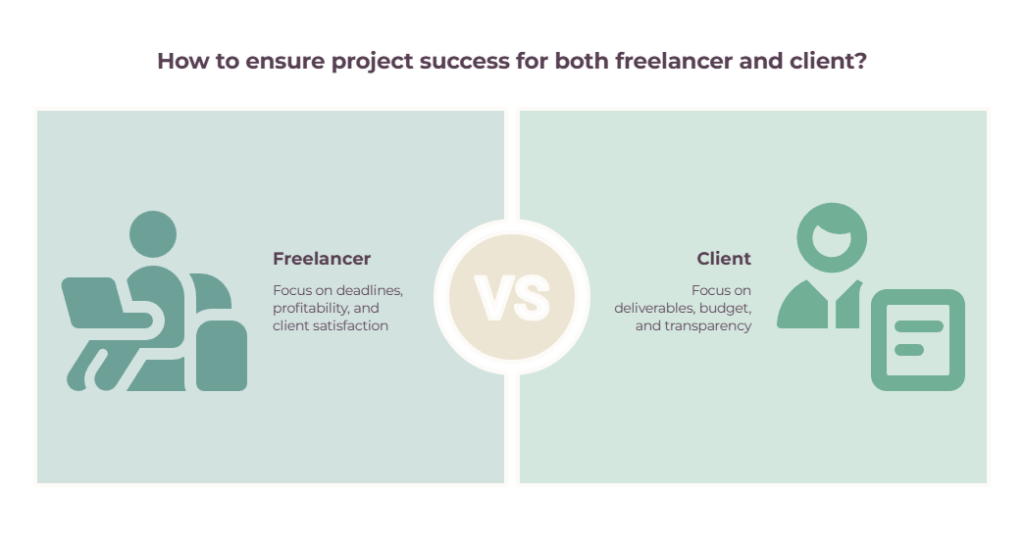
And the part most articles miss: the system is nearly identical whether you’re the client who outsourced the work or the freelancer doing it. The framing shifts a little; the method barely changes. Let’s fix yours.
Quick Takeaways
- Tracking progress isn’t surveillance — it’s a light system that warns you early if a project is slipping.
- The same method serves both sides: clients get visibility without micromanaging, freelancers stay ahead of deadlines, and keep clients confident.
- You can’t track against a vague scope, so start with milestones and a clear definition of “done.”
- “Percent complete” is usually fiction; track milestones hit, task status, and hours against estimate instead.
- The one mistake that matters most is finding out a project is late only when it’s already late.
Why tracking progress in freelance projects matters (for both sides)
A surprising share of projects don’t finish the way they were planned, and on a freelance project, there’s no project manager and no buffer to absorb the slip. It’s one person and one client, which makes early visibility everything.
PMI’s 2018 Pulse of the Profession found that around 43% of projects weren’t completed within their original budget, and roughly half missed their original timeline.
That’s enterprise data, with whole project teams behind those numbers. A freelance project has none of that cushion, so the margin for a silent slip is even thinner.
If you’re the freelancer, tracking answers to three questions you can’t afford to get wrong:
- Am I going to hit the deadline?
- Am I still profitable, or have I quietly blown past the hours I quoted?
- Is the client still happy?
If you’re the client, tracking answers the mirror image:
- Is the deliverable I paid for actually on track?
- Am I still within budget?
- Will I be blindsided at the deadline?
Same system, two seats at the table. And underneath all of it sits trust. The fastest way to lose a client, or a good freelancer, is the silence-then-ambush pattern from my opening story. Tracking, done right, is simply how you make sure nobody gets ambushed.
How to track freelance project progress: start with milestones and a definition of “done”
You can’t track progress against a vague scope. Break the project into milestones and decide what “done” means for each one — before any work starts. This is the foundation, and almost everything else collapses without it.
A milestone is a checkpoint that marks meaningful progress, not just activity. For a website build, yours might be: discovery complete, wireframes approved, design signed off, build complete, launched.
Most projects land somewhere between three and a dozen. The point of each one is that it’s a moment you can both look at and agree: yes, we’re here.
Define “done” for each milestone before work starts. “Homepage design done” shouldn’t be a vibe. It should mean something specific — delivered in Figma, two revision rounds included, approved in writing. That’s your shared quality bar. Without it, “90% done” is a story, not a status.
This serves both sides of the table:
- For the freelancer, milestones are your progress markers and often your payment triggers — so staying on top of them is also how you get paid on time.
- For the client, milestones are the right altitude of visibility. You don’t need to watch every task; you need to know whether the agreed-upon checkpoints are being hit.
If you’re assigning the work, our guide on how to assign tasks to freelancers covers nailing those deliverables upfront. If you’re the freelancer organizing your end, task management tools help you lay the checkpoints out.
Pick a tracking method (and dodge the percent-complete trap)
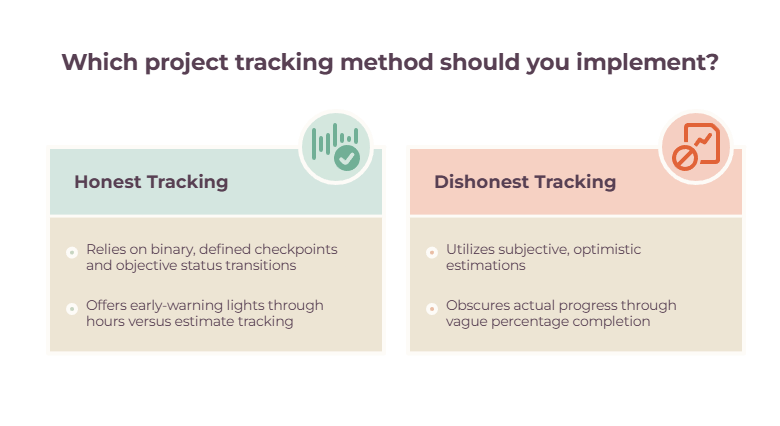
There are three honest ways to measure how far along a project is, and one dishonest one. Skip percent-complete and track milestones hit, task status, or hours against estimate instead.
Let’s start with the trap, because nearly everyone falls into it.
“The project is 75% done” feels precise. It’s usually fiction.
There’s an old line among programmers — the ninety-ninety rule, credited to Tom Cargill of Bell Labs — that the first 90% of the work takes the first 90% of the time, and the last 10% takes the other 90%.
Percent-complete numbers are subjective and reliably optimistic, and they give everyone a warm sense of safety right up until the deadline detonates.
Three reliable ways to track project progress
- Milestone-based. Track which checkpoints are actually finished, not a made-up percentage. A project can be “10% done” by hours but on track because the biggest milestone is complete, or “99% done” and in real danger because one critical piece is missing. Binary, defined milestones don’t lie.
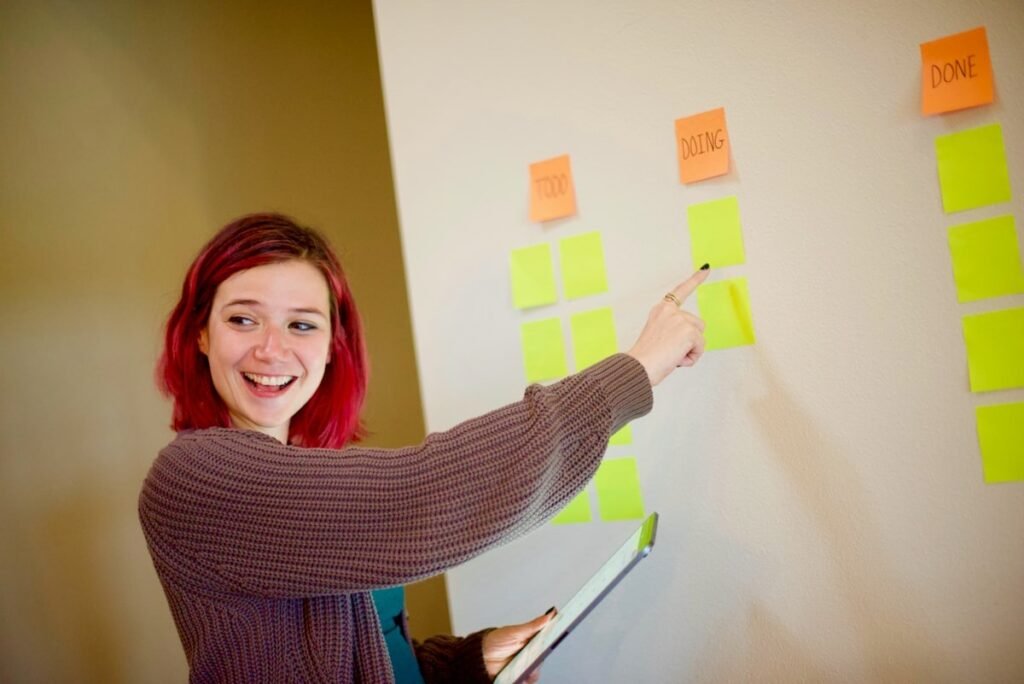
- Task status (Kanban). Move work across columns: To Do, In Progress, In Review, Done. It’s the most popular approach in freelance tools because it’s visual and honest. A task is in one column or another; there’s no fudging it.
- Time against estimate. Compare hours logged to hours quoted. This is the freelancer’s profitability early-warning light and the client’s budget-burn signal, and it’s important enough to get its own section next.
One more thing worth borrowing from bigger teams: RAG status. Green means on track, amber means there are issues worth watching, red means real trouble. The only thing that makes it work is honesty, so don’t report green unless it’s green.
The entire value of amber is that it surfaces a problem while there’s still time to fix it. The tools that run these views are covered in our guide to the best project management software for freelancers.
Track time and budget (the are-we-on-track signal)
Milestones cover scope and schedule. Time and budget tell you whether the project is healthy underneath the surface.
If you’re the freelancer, track your hours against your estimate — even on fixed-price work. Especially fixed-price work, because that’s where you quietly end up working for free without noticing.
Picture it: you quoted 40 hours, you’re at 35, and half the scope is still ahead of you. That’s not a delivery-day problem — that’s a today problem, and tracking is the only reason you’d catch it with time left to do something about it. Plenty of time tracking tools will ping you as you approach your estimate, so the overrun shows up before it happens.
If you’re the client, budget burn is your version of the same metric. Are the hours tracking sensibly against the deliverables that are actually appearing?
You want this at a glance, not an audit. A tool that shows tracked time against the milestone it belongs to lets you see project health without interrogating anyone — and keeping an eye on it ties into your wider cash flow picture.
A quick word on monitoring
Clients sometimes reach for screenshot-and-keystroke tools — use them sparingly, if at all. Heavy surveillance usually reads as distrust and slows the work down rather than speeding it up.
For most creative and knowledge work, tracking outcomes (milestones hit) beats tracking activity (mouse movements).
None of this is legal or financial advice, but it’s solid relationship advice: track the work, not the person.
Set a check-in cadence and know what a good update contains
This is where tracking turns into communication, and where most freelance relationships are quietly won or lost. Set the rhythm at kickoff, and make sure every update actually says something.
Agree three things up front: how often updates happen (weekly is the sensible default for an active project), through which single channel (one primary place, not five), and what the feedback loop looks like (how many revision rounds, how fast approvals come back).
Decide this before you need it, because sporadic communication is where projects drift.
What does a good progress update actually contain?
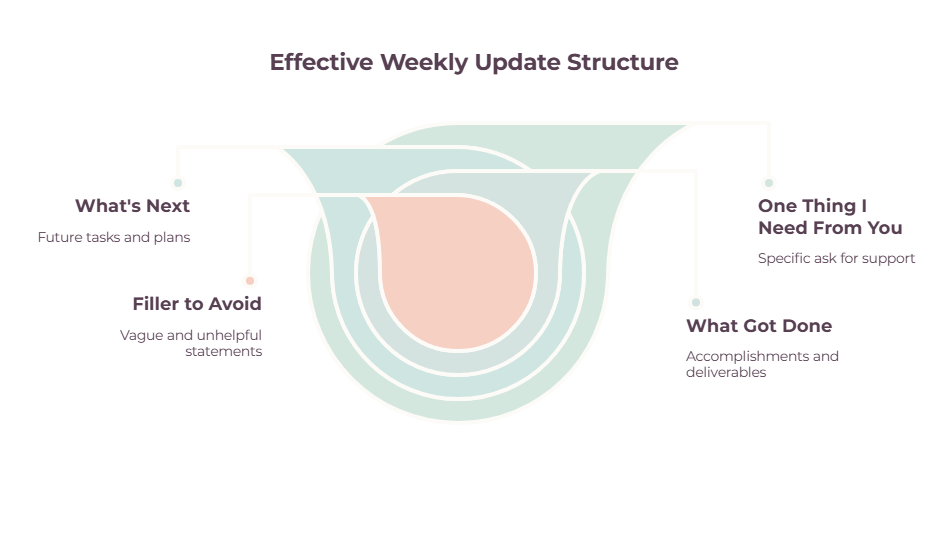
The best format is brutally simple. Three parts, sent every week:
- What got done this week. Concrete outcomes, not tasks. Not “worked on the site,” but “finished the homepage and services page, both in Figma, link here.”
- What’s happening next. What the other side can expect in the coming week, so nobody’s left guessing.
- One thing I need from you. A single specific ask — an approval, an asset, a decision — that keeps things moving.
Compare that to the update that says nothing: “Made progress this week, will keep going, let me know if you have questions.” That sentence could describe any project at any stage. It’s filler, and it quietly erodes confidence every time you send it.
Lead with async over meetings.
A short written update or a two-minute Loom screen recording respects everyone’s time and leaves a written record you can both look back on.
Standing status calls have their place, but defaulting to them is theater: in an HBR survey of 182 senior managers, 71% called meetings unproductive and inefficient, and 65% said meetings kept them from completing their own work.
If you’re the client here, your job is to define the cadence you expect and then mostly let it run. Visibility without micromanaging means a reliable update lands on schedule, and there’s a shared place to check status, so you never have to send the “just checking in?” email.
Micromanaging almost always fills a vacuum left by the absence of a system. For more on the wider client relationship, see our guide on managing freelance projects with clients.
Catch slippage early (the whole point)
Tracking only matters if it changes what you do. Watch the leading indicators that a project is drifting, before the deadline confirms the bad news for you.
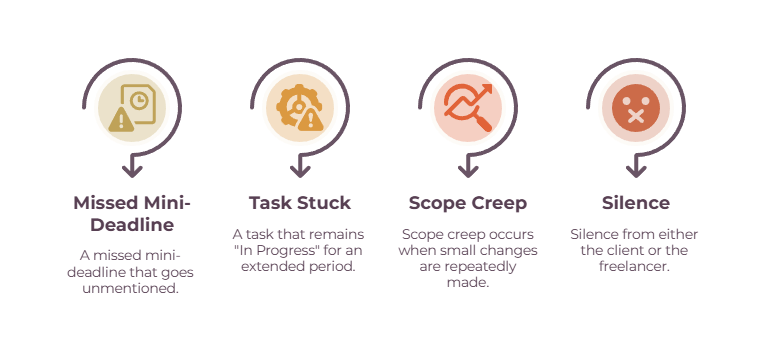
The warning signs are usually quiet:
- A missed mini-deadline that nobody mentions. This is the canary. A milestone-based system makes it impossible to hide.
- A task stuck at “In Progress” for days. On a board, work that sits in one column too long almost always means a blocker that no one flagged.
- Scope creep. “Just one small change” that becomes ten. It eats your progress without ever showing up as progress.
- Silence. This one cuts both ways. A freelancer who goes quiet, or a client who disappears mid-project, is a reliable sign of trouble ahead.
When something slips, resist the urge to just move the deadline and move on. Find the actual blocker and clear it. And if you’re heading into amber, say so early and bring a proposed fix with you.
The same delay often plays out in two very different ways: the freelancer who flags a likely two-day slip a week out keeps the client’s trust and usually the next project, while the one who reveals it at the deadline loses both.
Same delay. Completely different outcome, decided entirely by when it got surfaced.
Track scope so progress isn’t eaten alive
Scope creep is the silent killer of freelance projects. If new work keeps slipping in unbilled and untracked, you can never be “on track,” because the finish line keeps moving.
PMI’s 2018 Pulse of the Profession found that 52% of projects experienced scope creep, and freelancers are especially exposed because they manage everything alone and often dread pushing back.
The fix is one sentence, said early: “That’s outside our original scope. I can add it — here’s the cost and the timeline impact, want me to go ahead?” That single line converts invisible, unbilled work into either a logged change or properly billed work.
Both sides need this for different reasons.
For the freelancer, untracked scope changes mean your progress is being measured against a target that keeps sliding away from you, plus you’re giving away work for free.
For the client, tracking scope is how you avoid surprise costs and actually understand why a timeline moved. If you bill against project stages, project management and invoicing software helps you tie a scope change to the invoice cleanly.
The tools, briefly
You don’t need a big stack to do this well. Match the tool to the tracking job, and start with the gap you actually have rather than paying for empty seats. (Verify current pricing at publish.)
For project and task tracking:
- Trello. Simple Kanban boards are best for a clean visual read on status. Generous free tier.
- Asana. Task and milestone tracking with list, board, and timeline views. Strong for milestone reporting.
- ClickUp. All-in-one with Gantt charts, dashboards, and built-in time tracking. Powerful, occasionally heavy.
- Monday.com. Colorful, customizable boards with dashboards and dependencies.
- Notion. Flexible enough to build your own simple tracker or a shared client view.
If you’re tracking several client projects at once, our guide to the best freelancer management tools for multi-project workflows compares how these tools handle cross-project visibility, overlapping deadlines, and priorities across clients.
For time and budget:
- Toggl Track. One-click timers, project estimates, and overrun alerts. Best for the on-budget signal.
- Harvest. Time tracking that flows straight into invoices.
- Clockify. Free tier for basic tracking; good for billable-vs-non-billable views.
For status and client visibility:
- Loom. Async video updates that show progress without a meeting.
- Google Docs or Sheets. A shared status tracker is still a perfectly good single source of truth.
- Client portals (Bonsai, Moxie, Plutio). Give the client a self-service view of progress, files, and invoices, which cuts the “where are we at?” emails to roughly zero.
For the deep, feature-by-feature comparison, our guide to the best project management software for freelancers goes further than we can here.
Common mistakes to avoid
Most tracking failures come down to the same short list. Watch for these in your own setup.
- Tracking activity instead of outcomes. Hours logged and tasks touched aren’t progress. Deliverables accepted are.
- No defined milestones. Without checkpoints, you’re guessing and calling it tracking.
- Percent-complete fiction. “80% done” is the most dangerous number in freelancing.
- Status-meeting theater. A standing call where everyone performs busyness isn’t tracking.
- No single source of truth. When status lives across email, Slack, and text messages, nobody actually knows where things stand.
- Finding out it’s late only when it’s late. Every other mistake on this list eventually rolls up into this one.
Where to start
You don’t need the elaborate version. You need the lightest system that keeps anyone from being surprised: a handful of milestones with a clear definition of done, a weekly update that actually says something, and an eye on your hours and your scope.
Set it up before the next project starts, not after the next one goes sideways.
If you’re the freelancer, start tomorrow by writing the milestones for your current project and sending a three-part update at the end of the week, even if it feels like there’s “nothing to report.”
If you’re the client, agree the cadence and ask for a shared status view you can check without nudging anyone. Either way, the goal is the same, and it’s worth keeping simple: no surprises at the deadline, whichever side of the project you’re sitting on.
For the wider picture around this, our guides on managing freelance projects with clients and the best project management software for freelancers are the natural next reads.
Frequently Asked Questions
How do you keep track of freelance projects?
Break each project into milestones with a clear definition of “done,” pick one tool to track status (a Kanban board or task list), track your hours against the estimate, and send or expect a short weekly update.
The combination tells you early whether you’re on time, on budget, and on scope.
What should a project status update include?
Three things: what got done this week (concrete deliverables, not vague activity), what’s happening next, and one specific thing you need from the other person. Keep it short and send it on a regular cadence — weekly works for most active projects.
How do you track project progress without micromanaging?
Track milestones and outcomes, not activity or mouse movements. Agree a regular update cadence and a shared status view at kickoff, then let it run. Micromanaging usually fills the gap left by the absence of a system, so build the system, and the urge mostly disappears.
How do freelancers track work across multiple clients?
Give each client their own project or board, track milestones and hours per client, and run the same weekly update rhythm for each. A single tool with separate projects per client keeps everything visible without mixing the work together.
Related guides: freelance management tools · how to assign tasks to freelancers · freelancer task management tools · best project management software for freelancers · time tracking and invoicing software for freelancers · cash flow management tools · how to manage freelance projects with clients · best freelancer management tools for multi-project workflows