How to Be More Productive: What Actually Works (for Freelancers)
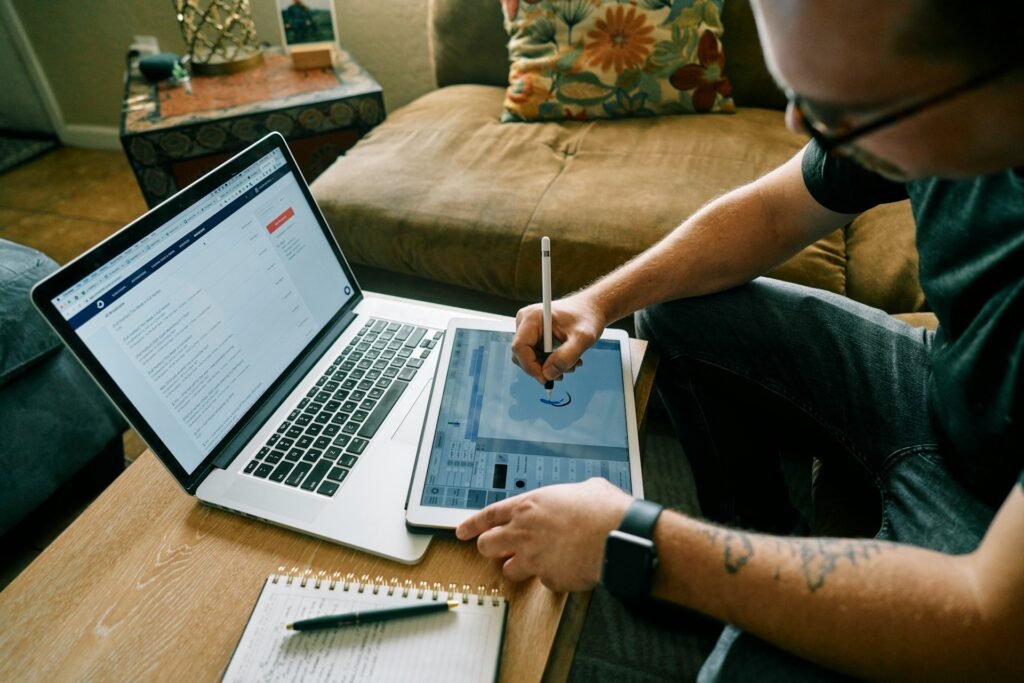
You worked ten hours today. You answered every email, cleared your notifications, tidied your files, jumped on two calls, and you’re exhausted. And yet the one project that actually pays your rent this month? Barely touched. You were busy from morning to night — you just weren’t productive.
That gap between busy and productive is where most freelancers lose. When you work for yourself, your income tracks your output — the finished, billable work — not the hours you sat at your desk.
So “be more productive” isn’t about squeezing more tasks into the day. It’s about protecting the small amount of focused time that actually moves your business, and refusing to let everything else eat it.
This guide skips the generic list of 25 tips. Instead, here are a handful of powerful shifts that genuinely move the needle, the freelance day they add up to, and the popular advice worth ignoring.
Choosing the apps is a separate job: productivity tools for freelancers compares the options for task management, time tracking, time blocking, notes, email, and focus.
Quick Takeaways
- Busy isn’t productive. For a freelancer, productivity means finishing the work that pays — not logging more hours.
- Protect your deep-work hours. Sustained, demanding focus runs out long before the working day does, so guard the hours you get and do your most important task first.
- Manage energy, not just time. Match demanding work to your peak hours and admin to your low ones.
- Do less, better. Pick the vital few tasks, single-task them, and say no to the rest — what feels like multitasking is usually task-switching, and the switching costs you.
- Build a system, don’t rely on willpower. A repeatable routine beats motivation every time.
Why you’re busy but not productive
Being busy means filling your day with activity; being productive means finishing the things that actually matter. For a freelancer, the difference is money, because a day spent on email, admin, and small fires can feel full while the work that earns sits untouched.
Just because you’re moving, doesn’t mean you’re making progress.
The trap is that busywork feels good.
Clearing your inbox, tidying your task list, and knocking out little jobs all give you a hit of accomplishment, so you keep doing them — and admin becomes the most convincing form of procrastination there is, because it looks exactly like work.
Meanwhile the big, important, slightly uncomfortable task (the proposal, the deliverable, the pitch) keeps sliding to tomorrow.
The first step to being more productive is simply noticing the difference and being honest about which one you spent your day on. Everything below is about tilting the balance toward the work that counts.
The real shifts that actually make you more productive
Real productivity comes from a handful of principles, not a long list of hacks: build a system instead of relying on willpower, protect your deep-work hours, manage your energy, single-task, do less better, and cut the friction that steals your focus. Get these right, and the tips take care of themselves.
- Build a system, don’t rely on willpower. Motivation is unreliable — some days it’s there, most days it isn’t. A repeatable routine carries you when motivation doesn’t, which is why productive people lean on habits, not discipline. (To assemble yours, see productivity recipe.)
- Protect your deep-work hours. Focused, demanding work is limited in a way that admin isn’t — how much you get varies by person, task and day, but it runs out well before the clock does. Treat those hours as sacred: do your most important task first, before email or messages get a chance to hijack you.
- Work in focus blocks. Concentration fades after a stretch, and brief interruptions to a long task restore attention rather than breaking it — which is the mechanism behind working in blocks. Use the Pomodoro technique’s 25 minutes on, 5 off, or longer 60–90 minute sessions with real breaks. Put them on your calendar.
- Manage energy, not just time. You’re sharper at some hours than others. Schedule your hardest, most creative work for your peak window and save the low-focus jobs — invoicing, email, filing — for the slump. An hour at the right time beats three at the wrong one.
Protect your attention and cut the noise
- Single-task. On demanding cognitive work, what feels like multitasking is usually rapid switching between tasks, and each switch carries a measurable cost in time and accuracy. Do one thing at a time, finish it, move on.
- Do less, better. Productivity isn’t doing more things; it’s finishing the ones that matter. Pick the vital few each day — the 1-3-5 rule (one big, three medium, five small) is a clean way to do it — and let the rest wait or disappear.
- Cut the friction. Turn off notifications — receiving one is enough to hurt your performance on the task in front of you, even if you never pick the phone up — keep one dedicated workspace, and batch your email instead of living in it (see email management systems). Every removed distraction is focus you get back.
- Rest on purpose. Breaks, sleep, and clear boundaries aren’t the opposite of productivity — they’re what sustains it. In one dose-response study, restricting sleep to six hours a night produced deficits equivalent to two nights of no sleep at all, and the subjects were largely unaware it was happening. Burnout is the least productive state there is.
A more productive freelance day, put together
Put the shifts together and a productive day has a shape: start with your most important task in your peak hours, work in protected focus blocks, batch the small stuff into a slot, and end with a clean shutdown. The structure does the work so you don’t have to decide from scratch.
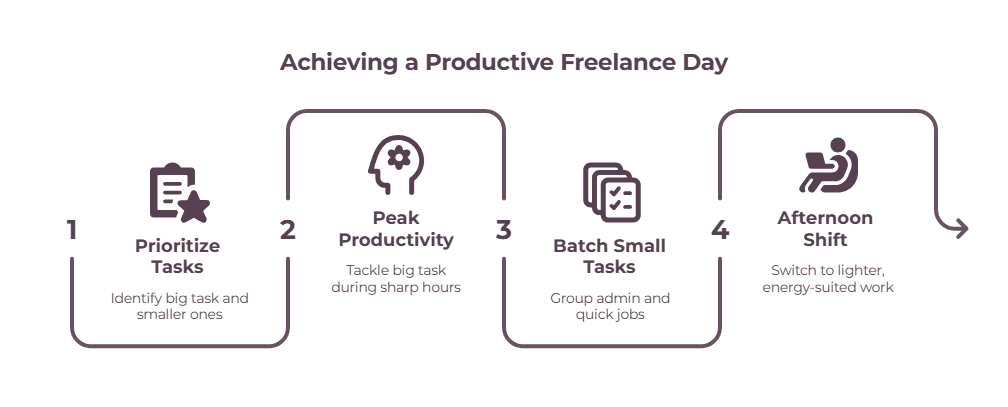
Here’s how it flows.
You begin by choosing the day’s priorities — your one big task and a few smaller ones — then spend your first, sharpest block on that big task before you open your inbox.
Small jobs get handled with the 2-minute rule or batched into a single admin slot rather than scattered through the morning where they’d fragment your focus. Email is checked at set times, not constantly.
When your energy dips in the afternoon, you switch to lighter work that suits it. And you end the day by shutting down properly and noting tomorrow’s priorities, so you start the next morning already pointed in the right direction.
To turn this from a good day into a repeatable system, build it into your own productivity recipe.
Being more productive at home and with AI
If you work from home, your biggest productivity lever is controlling distraction; if you want to use AI, use it to remove busywork rather than add another thing to manage. Both are about protecting focus, not adding tools.

Working from home removes the commute but adds a house full of interruptions, so the priority is a consistent setup and clear boundaries — a dedicated spot, set hours, notifications off — which our guide to staying focused when working from home covers in depth.
As for AI, it genuinely helps when it takes admin off your plate — drafting routine emails, summarizing notes, breaking a big task into steps, or auto-scheduling your day — so you get more of your good hours back for real work.
The best AI to-do list apps roundup shows where it helps and where it just becomes another shiny thing to fiddle with.
What doesn’t work (skip these)
A few popular moves feel productive but aren’t:
- Chasing hacks and new apps. Downloading your fifth to-do app is procrastination in disguise. Pick one, protect your focus hours, and get to work.
- Just working more hours. Long hours without focus produce tired, mediocre work and lead straight to burnout. More time isn’t the answer; more protected time is.
- Multitasking on work that needs focus. It feels efficient and costs you on both jobs. Single-task.
- Productivity theater. Color-coded systems and elaborate dashboards can become the work instead of supporting it. If you’re spending more time organizing the work than doing it, simplify.
The takeaway
Being more productive isn’t about doing more — it’s about protecting the focused hours that actually move your business and refusing to let busywork steal them.
Do your most important task first, work in real focus blocks, match your work to your energy, and build it into a routine you’ll keep.
Get that right, and you’ll finish more that matters in a few protected hours than you used to in a scattered ten.
Frequently Asked Questions
How can I be more productive as a freelancer?
Protect a block of focused time each day for your most important, billable work, and do it before email and admin.
Pick a few priorities rather than a long list, single-task them, batch the small jobs, and build the whole thing into a repeatable routine so you’re not relying on motivation.
Why am I busy but not productive?
Because busywork — email, admin, small tasks — feels like progress while the important work goes untouched. It gives you a sense of accomplishment without moving anything that matters.
The fix is to notice the difference and do your most important task first, before the busywork fills your day.
How many hours of focused work can you actually do in a day?
Fewer than the length of your working day, though how many varies by person, by task and by how well you slept.
The useful point isn’t a target number: it’s that demanding focus is a limited resource while email and admin aren’t, so the hours you do get should go to your most important work rather than whatever arrives first.
Consistency beats marathon sessions.
Does multitasking make you more productive?
Not for work that demands real concentration.
What feels like multitasking there is usually your attention switching rapidly between tasks, and each switch carries a cost in time and accuracy.
Genuinely automatic tasks are a different case — you can walk and hold a conversation — but two things competing for the same focus will both take longer and come out worse.
How can I use AI to be more productive?
Use AI to remove busywork, not to add another tool to manage — drafting routine replies, summarizing notes, breaking big tasks into steps, or scheduling your day. That frees up your focused hours for the work only you can do.
It stops helping the moment it becomes something you fiddle with instead of work.
What’s the fastest way to be more productive?
Protect your first focused hour for your single most important task, before you check anything. It’s the one change that moves the needle immediately, because it guarantees the work that matters gets done before the day’s distractions arrive.
Related guides: productivity recipe · the 1-3-5 rule · time blocking app · the 2-minute rule · how to stay focused when working from home · productivity tools for freelancers