How to Keep Track of Invoices for Freelancers: Avoid Mistakes

It’s the 15th, rent is due next week, and you’re scrolling through sent emails trying to figure out which clients have actually paid. If you’ve never learned how to keep track of invoices properly, this is the moment it costs you.
That $2,400 design invoice went out three weeks ago. You think. You can’t find the confirmation. You’re not sure what number it was.
And the $800 one from the copywriting project — did that ever get sent at all?
The 2025 QuickBooks Small Business Late Payments Report surveyed 2,487 US small businesses and found that 56% were owed money on unpaid invoices, with the average outstanding balance sitting around $17,500.
Nearly half had invoices more than 30 days overdue.
The problem isn’t that freelancers don’t invoice. It’s that most don’t know how to keep track of invoices after they go out. his guide shows you how to keep track of invoices with a system that works. It takes about 30 minutes to set up and 15 minutes a week to run.
How to Keep Track of Invoices – Quick Takeaways
- 56% of US small businesses are owed money on unpaid invoices, averaging $17,500 outstanding (QuickBooks, 2025)
- A minimum viable invoice tracker needs just seven columns: invoice number, date sent, client, amount, due date, status, and date paid
- The pre-due-date reminder is the single most effective step — most late payments are forgetting, not refusal
- Cash-basis freelancers generally can’t deduct unpaid invoices as bad debt on Schedule C — the money was never reported as income
- The system works in a spreadsheet, in free invoicing software, or on paper — the tool matters less than doing it weekly
How to Keep Track of Invoices in 15 Minutes a Week
Five steps, same day each week, 15 minutes total. Mark payments received, send pre-due-date reminders, follow up on overdue invoices, check your aging, and note what you expect to come in next week. Keep track of invoices like this every Friday and nothing slips through.
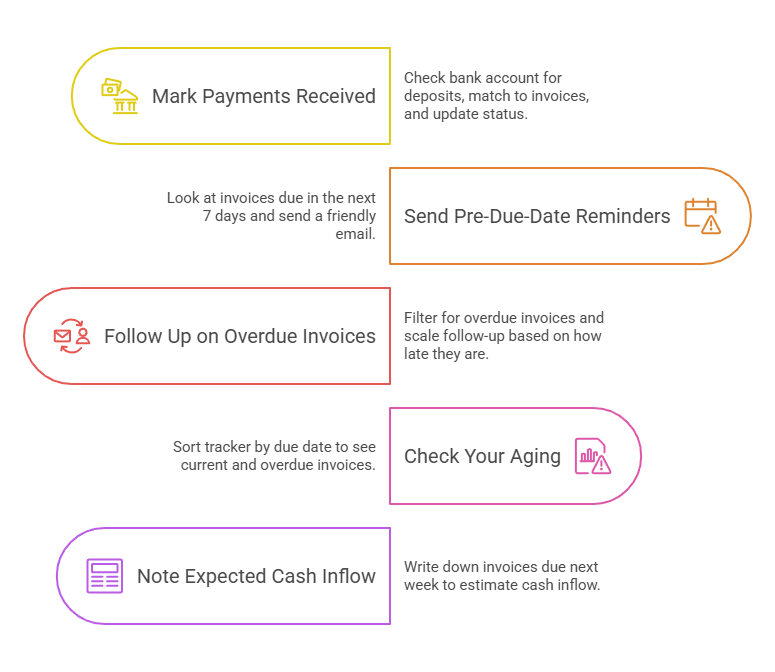
Mark anything paid this week (about 2 minutes)
Open your tracker. Check your bank account or payment processor for deposits since last Friday. Match each deposit to an open invoice and flip the status to “Paid” with today’s date.
If a deposit doesn’t match any invoice, flag it.
It’s either a partial payment, a payment for work you forgot to invoice, or income from a source you haven’t recorded.
Send pre-due-date reminders (about 3 minutes)
Look at invoices due in the next 7 days. Send a short, friendly email: “Hi [name], just a heads-up that Invoice 2026-014 for $1,800 is due next Wednesday. Payment link is below if you’d like to take care of it early.”
This is the single most effective step in the entire system. Most late payments aren’t refusals. They’re people who forgot.
A reminder before the due date catches clients while the intent to pay is still warm. Every major invoicing tool (Wave, FreshBooks, QuickBooks, Xero) can automate this if you’d rather not send it manually.
Follow up on anything overdue (about 5 minutes)
Filter your tracker for invoices past their due date with status still “Sent.” Scale your follow-up to how late it is. Three to seven days overdue gets a friendly nudge with the invoice re-attached.
Fourteen days gets a firmer message referencing your original payment terms. Thirty days gets a direct email with a specific payment deadline and mention of next steps. (More on this in the next section.)
Check your aging (about 2 minutes)
Sort your tracker by due date. How much is current (not yet due)? How much is 1–30 days overdue? 31–60? 60+? This is your accounts receivable aging report.
You don’t need accounting software to produce one. A sorted spreadsheet does the job. Anything past 60 days needs escalation or a hard conversation.
Note what’s expected next week (about 3 minutes)
Which invoices are due for payment in the coming 7 days? Write the total somewhere visible. That number is your expected cash inflow for the week. If it’s lower than your upcoming expenses, you know now, not when the rent check bounces.
This invoice review fits inside the broader weekly bookkeeping routine we’ve covered separately. Together, they take about 30 minutes and keep your entire financial picture current.
How to Keep Track of Invoices With a Simple Tracking System
Seven pieces of information per invoice, a consistent numbering system, and a weekly habit. You can run this in a Google Sheet, in free invoicing software like Wave or Zoho Invoice, or in a paper ledger. The tool you use to keep track of invoices matters far less than the routine.
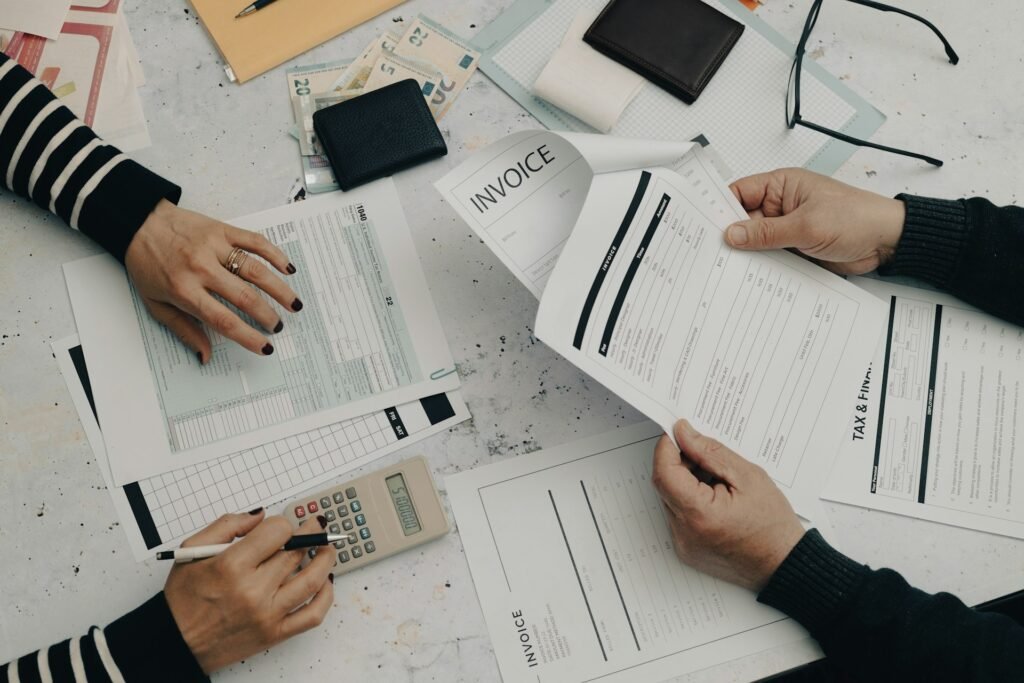
The seven columns for a minimum viable tracker: invoice number, date sent, client name, amount, due date, status (draft/sent/paid/overdue), and date paid.
That’s enough to keep track of invoices and answer the two questions that actually matter at any moment: who owes you money right now, and how long have they owed it?
If you want more detail, add payment terms, project description, payment method, and a notes column. The Vertex42 invoice tracker and Microsoft’s built-in “Invoices Tracker” template both follow this structure.
Our Excel invoicing guide covers spreadsheet templates in more depth.
For numbering, the IRS doesn’t require a specific format, but sequential numbering is the audit-safe default. YYYY-NNN works well for freelancers (2026-001, 2026-002, and so on): it resets cleanly each January, gives tax-year context at a glance, and avoids the “Invoice 1” signal that you started freelancing last Tuesday.
New York’s Tax Department explicitly cites the lack of sequential numbering as evidence of inadequate recordkeeping. Most states don’t have a comparable rule, but sequential is the safest standard everywhere.
One common mistake: starting a separate numbering sequence per client (Client A gets “Invoice 1,” Client B also gets “Invoice 1”).
This guarantees duplicate numbers in your records and makes reconciliation miserable. Use a single global sequence across all clients.
How to Keep Track of Invoices and Follow Up on Overdue Payments
Be specific, be brief, and don’t apologize for asking to be paid for work you’ve already done. State the invoice number, the amount, and how many days it’s overdue. Attach the original invoice. Include a payment link. The awkwardness is almost always in your head.
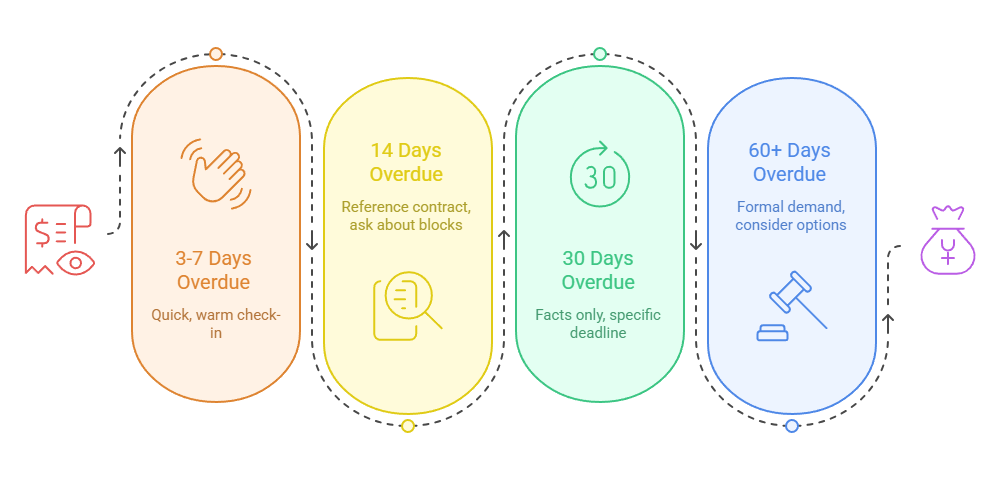
3–7 days overdue
Quick, warm, no drama. “Hi [name], just checking in on Invoice 2026-014 for $1,800. It was due last Friday. I’ve re-attached it below with a payment link for convenience. Let me know if anything needs clarifying.”
That’s it. No paragraph of context. No apology.
14 days overdue
Reference your contract terms. Mention your late-fee policy if you have one. The standard rate across practitioner sources is 1.5% per month (18% annualized), and it’s enforceable in all 50 states as long as it was disclosed in writing before work began.
Ask whether something specific is blocking payment: a missing PO number, a billing-address issue, an internal approval queue.
30 days overdue
Facts only. Invoice number, amount, date sent, days overdue. State that late fees are accruing if applicable. Give a specific payment deadline (“by May 15”). Mention that you’ll need to consider other options if it isn’t resolved.
Keep it professional, but don’t soften the core ask.
60+ days overdue
At this point, your options are a formal demand letter (sent certified mail or with read receipt), small claims court (limits vary by state — California caps at $12,500 for individuals, Texas allows up to $20,000 in JP courts), or a collections agency.
The FDCPA generally doesn’t apply to freelancers collecting their own invoices since you’re the original creditor and these are business debts. But best practice is to keep your communications professional regardless.
Stop delivering new work after a second milestone payment is significantly past due. Don’t hand over final files until payment clears. Build a “stop work” clause into your contracts so this isn’t a surprise when it happens.
The cash-basis bad-debt reality
One point most freelancer advice gets wrong: if you’re on a cash basis (most sole proprietors are), you generally can’t deduct unpaid invoices as bad debt on Schedule C.
The IRS logic is straightforward — you never reported the income because you never received the cash, so there’s no basis to deduct.
The unpaid invoice is lost revenue, not a tax write-off. Only accrual-method taxpayers who already booked the invoice as income can claim the deduction.
When Should You Switch How You Keep Track of Invoices — Spreadsheet to Software?
When you’re sending more than about 20–25 invoices a month, when you want clients to pay online through a link in the invoice, or when you’re spending more time maintaining the tracker than doing the work it tracks.
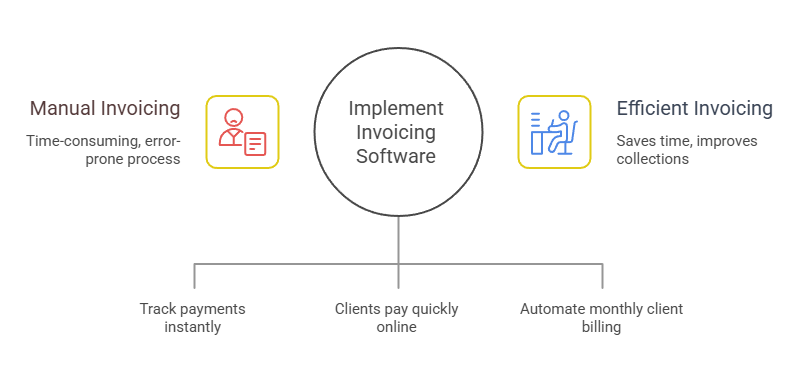
Three triggers tell you it’s time.
Trigger 1: Volume is eating your time
Past 20–25 invoices a month, manually updating statuses and calculating aging eats into real work time. Invoicing software tracks status changes automatically the moment a client pays through an embedded link.
You stop chasing spreadsheet cells and start seeing at a glance what’s paid, what’s overdue, and what’s coming due this week.
Trigger 2: You want clients to click “Pay Now”
The single biggest improvement to your collection speed is letting clients pay online through a link in the invoice instead of writing a check or initiating a bank transfer. Wave, Square, Stripe, and PayPal all embed payment links directly.
FreshBooks analyzed over 1.39 million invoices and found that those with specified payment terms were paid at significantly higher rates than those without. A payment link plus clear terms is the fastest path to getting paid.
Trigger 3: You bill the same clients every month.
If you bill retainer clients on a recurring basis, recurring invoices with automatic reminders eliminate the manual send-and-track cycle entirely.
Wave Starter handles unlimited recurring invoices for free. Zoho Invoice’s free tier covers 500 invoices per year with auto-reminders and a client portal. For open source options, Invoice Ninja’s free tier handles unlimited invoices for up to 20 clients.
And if you’re not sure which software is worth using in the first place, our guide on how to find the best invoicing tool for freelancers breaks down the top options.
And if you’re ready to move beyond invoicing into full bookkeeping, our guide to accounting software for freelancers compares every major option.
How Long Do You Need to Keep Track of Invoice Records?
Three years from the filing date for most freelancers. Six years if you underreport income by more than 25%. Seven if you claim a bad-debt deduction. The IRS accepts both paper and digital records.
IRS Publication 583 lists invoices as supporting documents that substantiate the income and expenses on your return. The IRS recordkeeping page lays out the retention windows: three years is the default, six years for substantial underreporting, seven for bad-debt claims, and indefinite for unfiled or fraudulent returns.
The IRS doesn’t prefer paper over digital.
Both are accepted as long as the system can “index, store, preserve, retrieve, and reproduce” records in legible format.
The practical version: scan anything on paper, store everything in a cloud folder organized by year, and don’t delete anything until the window closes.
If you’re being conservative (and it costs nothing to be), keep six years.
Keep Track of Invoices Weekly, Collect Monthly, Sleep Better Nightly
The system is simple. Number your invoices sequentially. Track seven columns per invoice. Spend 15 minutes every Friday marking payments, sending reminders, following up on overdue ones, and checking your aging.
That’s it.
Even a Google Sheet with conditional formatting on the “Status” column works.
Wave or Zoho Invoice with auto-reminders works better. What matters is that you do it weekly, because the freelancers who know exactly how much they’re owed at any given moment are the ones who actually collect it.
And the ones who don’t?
They’re the 56% sitting on $17,500 in outstanding invoices, wondering why the numbers don’t add up in April.
Frequently Asked Questions
What is the best way to keep track of invoices?
The best approach is to use a consistent system that records every invoice’s number, client, amount, due date, status, and payment date. Whether you use a spreadsheet or invoicing software, reviewing your invoices weekly is the key to catching overdue payments before they become a problem.
Can you track invoices in Excel?
Yes. A simple spreadsheet can track invoice numbers, clients, amounts, due dates, payment status, and payment dates effectively if you only have a few invoices per month. If you’d like to learn how to make an invoice in Excel, we have a separate guide for that.
How do you keep a record of invoices?
Keep a copy of every invoice you send, along with the date sent, payment status, and proof of payment when received. Most freelancers store digital copies in cloud storage organized by year, client, or invoice number to make tax filing and recordkeeping easier.
What are common invoicing mistakes to avoid?
Common mistakes include failing to use invoice numbers, not tracking payment status, forgetting to send reminders before due dates, following up too late on overdue invoices, and relying on memory instead of a dedicated tracking system. Small tracking mistakes can quickly turn into cash-flow problems.
How long should you keep invoice records?
Most freelancers should keep invoice records for at least three years after filing their tax return. However, certain situations can extend that period to six or seven years, which is why many business owners choose to keep records longer.