The Best 7 Project Management and Invoicing Software Tools

If you searched “project management and invoicing software,” you probably got a list of 25 tools, most of which are built for 30-person agencies. Scoro starts at $19.90/user with a 5-seat minimum. Wrike’s invoicing is an enterprise add-on.
Monday.com’s native invoicing lives inside its CRM product and doesn’t connect to a payment gateway yet.
That’s not the project management and invoicing software a solo freelancer needs.
You need one tool that lets you manage projects, track your time (if you bill hourly), send an invoice from the same place, and get paid. Ideally under $20/month. Ideally without a per-seat minimum that assumes you have a team.
This guide covers the 7 project management and invoicing software tools that genuinely work for freelancers, the honest case for not using an all-in-one, and a clear recommendation for each freelancer type.
If invoicing matters more than project management for your workflow, our guide to the best invoicing tools for freelancers compares standalone invoicing software in more depth — including free options, accounting-first tools, and platforms catering specifically to freelancers.
Quick Takeaways
- Most “best PM + invoicing” listicles are written for agencies — 7 of the top 10 ranking pages target mid-market or enterprise buyers
- Moxie ($10/month annual) is the best all-in-one for solo creative freelancers; Paymo ($5.90/user) is the best value for real project management
- The free stack (Wave + Trello + Toggl Track) costs $0/month and covers the basics — no vendor blog will recommend it because none of them sell it
- Bonsai was acquired by Zoom in November 2025; HoneyBook nearly doubled its prices in February 2025 — most comparison articles still show the old numbers
- An all-in-one wins when time-to-invoice is your main workflow; separate tools win when you need real PM or already use QuickBooks/Xero
7 Project Management and Invoicing Software Tools That Actually Work for Freelancers
Seven stand out: Moxie, Paymo, Bonsai, HoneyBook, Harvest, FreshBooks, and Avaza. Each fits a different freelancer type. Below is what each does best, what it actually costs in 2026, and where it falls short.
| Tool | Price | Best For | Link |
| Moxie | $10/mo (annual) | Solo creative freelancers wanting one clean tool | Visit → |
| Paymo | $5.90/user/mo (annual) | Hourly billers who need real PM (Gantt, dependencies) | Visit → |
| Bonsai | $9/seat/mo (annual) | US solos who want tax prep bundled in | Visit → |
| HoneyBook | $29/mo (annual) | Wedding photographers, event planners, coaches | Visit → |
| Harvest | $10.80/seat/mo (annual) | Hourly billers who only need time-to-invoice | Visit → |
| FreshBooks | $23/mo Lite (annual) | Freelancers needing accounting + invoicing + light PM | Visit → |
| Avaza | $11.95/mo flat (annual) | Small teams (2–3 people) at a predictable cost | Visit → |
#1 – Moxie
- Price: $10/month annual ($12 monthly); no free tier, 14-day trial
- Covers: Proposals, contracts, projects, time tracking, invoicing, expense tracking, client portal
- Best for: Solo creative freelancers who want one clean tool under $15/month
Formerly called Hectic (not the same product as AND CO, which Fiverr shut down in 2023). Moxie runs the smoothest proposal-to-contract-to-project-to-invoice pipeline at this price point.
Time tracking is built in, invoicing from tracked hours works cleanly, and you get branded proposals and a client portal. The PM side is task lists and kanban boards, which is enough for most solos but won’t satisfy anyone who needs Gantt charts.
#2 – Paymo
- Price: $5.90/user/month annual; free tier for 1 user
- Covers: Kanban, Gantt charts, task dependencies, workload views, time tracking, invoicing (Stripe/PayPal)
- Best for: Hourly billers (writers, developers, consultants) who want real PM features at a low price
The strongest actual project management on this list. Automatic desktop time tracking, retainer billing, and multi-currency are included on paid plans. The gap is that it doesn’t do proposals, contracts, or e-signatures natively.
If you need the PM depth that most freelancer tools skip, Paymo is the best value in the category.
#3 – Bonsai
- Price: $9/seat/month annual
- Covers: Proposals, contracts with e-sign, project tasks, time tracking, invoicing, expense tracking, basic tax prep (quarterly estimates, Schedule C)
- Best for: US solos who want tax features bundled in, with the caveat that the Zoom acquisition adds uncertainty
Bonsai was acquired by Zoom in November 2025. The product is running normally as of April 2026, but the long-term roadmap under Zoom ownership is an open question. Per-seat pricing scales painfully if you add a VA or contractor.
The tax prep features (estimated quarterly taxes, Schedule C categorization) are the standout that no other tool on this list matches.
#4 – HoneyBook
- Price: $29/month annual ($36 monthly); raised prices nearly double in February 2025
- Covers: Client management, proposals, contracts, invoicing, scheduling, polished client portal
- Best for: US/Canada wedding photographers, event planners, and coaches who prioritize client experience over PM depth
If you’re reading a comparison article that quotes $19/month, it’s outdated. HoneyBook’s strength is the client-facing experience: visual proposals, branded contracts, and a polished booking flow. The weakness is project management.
There’s no Gantt, no task dependencies, no workload view. It’s a CRM with invoicing, not a PM tool.
#5 – Harvest
- Price: $10.80/seat/month annual; free tier for 1 seat, 2 projects
- Covers: Time tracking, invoicing from tracked hours (Stripe, PayPal, ACH)
- Best for: Hourly billers who only need the time-to-invoice pipeline and already manage projects elsewhere
Time tracking is the core product and it’s among the best in the category. Invoicing from tracked hours is straightforward. PM features are essentially nonexistent though. No task boards, no project views, no proposals, no contracts.
You’ll need a separate PM tool alongside it. Harvest is the tool you pair with something else, not the tool that replaces everything.
#6 – FreshBooks
- Price: $23/month Lite annual; Plus at $53/month removes the 5-client cap
- Covers: Invoicing, time tracking, Projects feature (per-job organization, expenses, profitability reporting)
- Best for: Freelancers who need accounting + invoicing + light project tracking in one place
The strongest invoicing of any tool here, with solid time tracking and a Projects feature on every tier. Projects organizes work by job or client with expenses and profitability reporting per project.
It’s not true PM (no kanban, no Gantt), but it’s better project-level organization than most accounting tools offer. Our pillar guide covers FreshBooks in more depth.
#7 – Avaza
- Price: $11.95/month flat annual; limited free tier
- Covers: Projects (task boards + Gantt), time tracking, invoicing (Stripe, PayPal, Payoneer), quoting, expense management
- Best for: Small teams (2–3 people) who want PM + invoicing at a predictable monthly cost
The standout is flat-rate pricing instead of per-seat: you pay one price regardless of team size (within plan limits), making it genuinely affordable for small teams. Retainer billing and multi-currency are included.
No native contracts or e-signatures. If you’re a solo who’s about to hire a VA or bring on a subcontractor, Avaza’s pricing model won’t punish you for it.
What Does “Project Management and Invoicing” Actually Mean for a Freelancer?
For most freelancers, it means task tracking, time tracking, and invoicing in one platform. Not Gantt charts, not dependencies, not resource allocation. It’s knowing what’s due, how long you spent on it, and turning that into an invoice without re-typing everything.
The freelancer version of project management is task lists or kanban boards per client, deadline tracking, time tracking if you bill hourly, and a way to see all active projects at a glance.
These are also the core capabilities to compare across freelance management tools, although some platforms extend further into contracts, client communication, finances, and team coordination.
Most solos don’t need dependencies, critical paths, workload balancing, or portfolio views. The tools that offer those features (Scoro, Productive, Wrike) are excellent for agencies. They’re overkill for one person.
On the invoicing side, the tool should generate a professional invoice (ideally populated from tracked time), send it with a payment link, track whether it’s been paid, and send reminders when it hasn’t.
If it also handles proposals, contracts, and expense tracking, that’s a bonus. If it connects to your bookkeeping (exports to QuickBooks or Xero, or produces its own P&L report), that’s even better.
Do You Need All-in-One Project Management and Invoicing Software or Separate Tools?
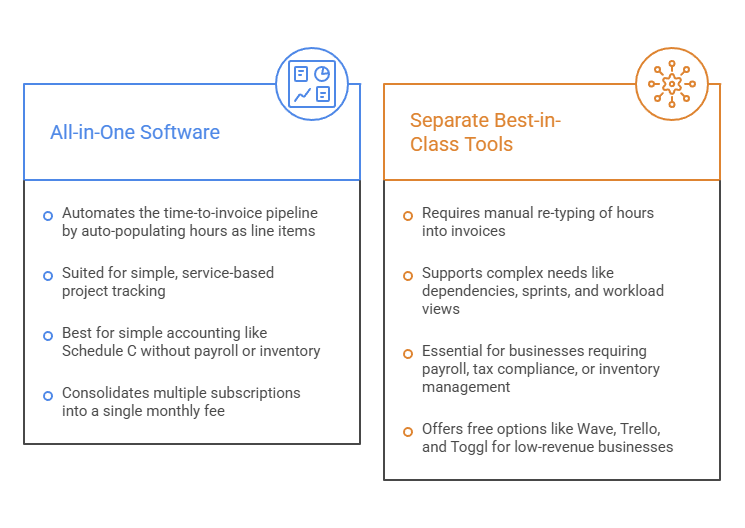
If your main workflow is “track time on a project, then generate an invoice from those hours,” an all-in-one saves real time. If you bill fixed-fee, have complex PM needs, or already use QuickBooks or Xero, separate best-in-class tools often make more sense.
When an all-in-one wins
You’re service-based and project-based. You bill retainers or hourly. Your accounting is simple (Schedule C, no payroll, no inventory). And you’re currently paying for 3+ separate subscriptions that don’t talk to each other.
The killer feature is the time-to-invoice pipeline: track hours on a project, click “create invoice,” and the hours auto-populate as line items. That step alone replaces 15–20 minutes of manual data entry per invoice.
When separate tools win
You need genuine PM with dependencies, sprints, or workload views. You have employees or inventory (QBO or Xero is non-negotiable for payroll and tax). The client dictates your stack (Jira, Basecamp, or their own portal).
Or you’re cost-sensitive and under ~$100K revenue.
The $0/month stack that covers the basics
Wave for invoicing and accounting ($0), Trello for project boards ($0), and Toggl Track for time tracking (free for 1 user). It’s not elegant, it doesn’t flow automatically, and you’ll re-type hours into invoices manually. But it works. And it costs nothing.
If you’re building out the rest of your software stack too, our guide to the best apps for freelancers covers the broader toolkit beyond project management and invoicing.
What’s the Best Project Management and Invoicing Software for Your Situation?
It depends on how you bill, what industry you’re in, and whether you already have an accounting tool.

Solo creative freelancer on a budget?
Start with Moxie at $10/month. Cleanest all-in-one pipeline at this price.
Hourly biller who needs real PM?
Paymo at $5.90/user is the best value in the category. Gantt charts, dependencies, workload views included.
US freelancer who wants tax prep bundled in?
Bonsai handles quarterly estimates and Schedule C categorization, though the Zoom acquisition is worth watching.
Wedding photographer, event planner, or coach?
HoneyBook’s client experience is hard to match despite the price increase. Best in US and Canada.
Already using QuickBooks or Xero?
FreshBooks or Avaza integrate cleanly on top without replacing your existing accounting.
Don’t want to pay for anything?
Wave for invoicing and accounting, Trello for project boards, and Toggl Track for time tracking gives you a complete stack at $0/month. You lose the automatic time-to-invoice flow, and you’ll re-type hours manually. But it covers the job.
Our guide to keeping track of invoices covers the weekly system that makes any tool combination work, and our open source QuickBooks alternatives guide covers Invoice Ninja and other free self-hosted options.
How Does Your Project Management and Invoicing Software Connect to Your Bookkeeping?
If the tool has built-in accounting (Bonsai, FreshBooks), your invoicing data feeds directly into your P&L and tax reports. If it doesn’t (Moxie, HoneyBook, Harvest, Paymo, Avaza), you’ll need to export invoicing data or sync to QuickBooks/Xero for your bookkeeping.
The IRS doesn’t care which tool you use.
Publication 583 just requires that your system clearly shows income and expenses with supporting documents. But your CPA cares that the numbers are clean and exportable. Keeping those expense records organized also makes it easier to identify and document freelance tax deductions when it’s time to file.
Moxie, HoneyBook, Paymo, Harvest, and Avaza all integrate with QuickBooks Online or Xero (most with both). The integration typically syncs invoices and payments automatically, so your accounting stays current without manual entry.
If you’re not using accounting software yet, our bookkeeping for self-employed guide covers the weekly routine, and our bookkeeper software guide covers when it makes more sense to hand the whole thing to a person.
Pick Your Project Management and Invoicing Software, Then Build the System
Most freelancers don’t need 25 options.
They need one tool that fits their billing style, their budget, and their workflow. Or they need a clear understanding of why separate tools are the better call for their situation.
If you’re starting from scratch today: Moxie at $10/month is the easiest all-in-one for a solo freelancer. Paymo at $5.90 is the best value if you want real PM. And Wave + Trello + Toggl at $0 is the honest free answer that no vendor blog will ever recommend, because none of them sell it.
The tool you pick handles the creation side. The system for tracking what happens after you send the invoice is what actually gets you paid.
Frequently Asked Questions
What is project management and invoicing software?
Project management and invoicing software combines task management, project tracking, time tracking, and invoicing in a single platform. For freelancers, the main benefit is being able to track work, record billable hours, and create invoices without switching between multiple tools.
Is it better to use an all-in-one platform or separate tools?
It depends on your workflow. All-in-one platforms work best for freelancers who want to manage projects, track time, and send invoices from one place. Separate tools are often the better choice if you need advanced project management features, already use accounting software like QuickBooks or Xero, or want to keep costs as low as possible.
What is the best project management and invoicing software for freelancers?
There isn’t a single best option for everyone. Moxie is a strong all-in-one choice for solo freelancers, Paymo offers the best value for freelancers who need real project management features, and FreshBooks is ideal for those who want accounting and invoicing built in. The right tool depends on your budget, billing model, and workflow.
Can project management software generate invoices?
Many modern project management tools can generate invoices directly from tracked time, project milestones, or fixed-fee projects. This reduces the amount of manual data entry required and allows freelancers to issue more accurate invoices to their clients.
Does project management and invoicing software replace bookkeeping software?
Usually not. While some tools include basic accounting features, most focus on project delivery and invoicing rather than full bookkeeping. Many freelancers connect their project management software to accounting platforms such as QuickBooks or Xero to keep their financial records organized.
Related guides: best invoicing tools for freelancers · how to keep track of invoices · freelance management tools · best apps for freelancers · freelance tax deductions