What Are the Best Freelance Workflow Management Tools?

Your to-do list is spotless. Every task checked off, every deadline color-coded. And you’re still drowning. Even the best task list won’t help if you don’t have the right freelance workflow management tools behind it.
Here’s why. You write each proposal from a blank page. Then you retype the same client details into your invoicing app. You copy the contract terms you’ve used forty times. You chase payment with an awkward email two weeks after the work shipped.
The tasks were never the problem. The problem is everything between them — the handoffs, where your time quietly leaks out.
That end-to-end flow, from first inquiry to final paid invoice, is your workflow. And workflow tools exist to run the whole thing, not just the middle. Get the right one, and the proposal you accept becomes the project you start, becomes the invoice you send, becomes the follow-up that lands the next job — with almost none of the retyping.
Below are the best freelance workflow management tools, lined up so you can compare them at a glance, and then how to actually pick one and set it up.
And with the average freelancer losing around five hours a week to unproductive admin (freelancermap), the right tool earns its price back fast.
Quick Takeaways
- Workflow management is broader than tasks or projects: it’s the repeatable system that moves work from first inquiry to final payment.
- The best all-rounder for most solo freelancers is Moxie or Bonsai; HoneyBook for client experience, Dubsado for deep automation, Indy or Agiled for budget, Notion plus Zapier to build your own.
- Pick the tool by the stage that hurts most, not the longest feature list.
- All-in-one platforms win for repeatable client services work; a stitched-together stack wins for product or highly custom work.
- Don’t buy a $99 platform to use one-fifth of it — that’s the most common regret in freelancer communities.
The best freelance workflow management tools at a glance
| Tool | Best for | Workflow coverage | Free tier | 2026 starting price | Main limitation |
| Moxie | Best all-around value | CRM, proposals, contracts, projects, time, invoicing, scheduling, portal | No (14-day trial) | $10/mo (billed annually) | Portals and automations need Pro (~$20/mo annual) |
| Bonsai | Solo freelancers wanting tax tools built in | CRM, proposals, contracts, projects, time, invoicing, portal, tax add-on | No (7-day trial) | $9/user/mo (billed annually) | Per-user pricing scales badly past 3–4 people |
| HoneyBook | Client-experience-first creatives | CRM, proposals, contracts, invoicing, scheduling, portal, automations | No (7-day trial) | $29/mo (billed annually) | Steep 2025 price hike; thin project management |
| Dubsado | Deep, custom automation | CRM, forms, proposals, contracts, invoicing, scheduling, workflows | Yes (3-client cap, no time limit) | $35/mo or $335/yr | Setup takes weeks; advanced features need Premier |
| Indy | Budget-conscious solos | Proposals, contracts, invoices, tasks, time, forms, portal | Yes (usable free plan) | ~$12.50/mo (2-yr) / $25 monthly | Thin integrations; no real CRM pipeline |
| Plutio | Customization and white-label | Proposals, contracts, projects, time, invoicing, portal, automations | No (14-day trial) | $19/mo (Core) | Core caps active clients; learning curve |
| Agiled | Widest features, lowest price | CRM, proposals, contracts, projects, time, invoicing, portal | Yes (limited) | $7/mo (Solo) | Occasional bugs; slow support |
| SuiteDash | Portal-heavy work, unlimited users | CRM, projects, invoicing, proposals, portals, automations | No (14-day trial) | $19/mo flat | Steep setup; best features on top tier |
| Notion + Zapier | Builders who want total control | Whatever you build (projects + automation glue) | Yes (both) | ~$10 + ~$20/mo | No native invoicing, contracts, or payments |
Before you choose a tool
A few notes before you read the table too literally: verify every price on the vendor’s page before you commit, since this category reprices (and runs discounts and deals) often, and the figures above are the cheapest annual tiers (monthly runs higher).
Payment processing fees — usually around 2.9% plus about 30 cents per US card charge — are separate from every subscription here.
If you spot “Hectic” mentioned elsewhere, that’s just Moxie’s old name. And note that Bonsai was acquired by Zoom in late 2025, so keep an eye on potential roadmap changes.
A quick word on each tool
The table tells you what. Here’s the why, grouped by the job each one does best.
The all-rounders
Moxie is the one I’d point most solo freelancers to first: a flat monthly rate, the full lead-to-paid flow in one place, and onboarding terms an attorney actually vetted. The catch is that client portals and automations sit on the Pro tier.
Bonsai covers the same ground and throws in genuinely useful tax and expense tracking, which makes it tempting if you hate April. Just watch the per-user pricing — it’s a sweetheart deal for one person and gets expensive the moment you add a collaborator.
The specialists
HoneyBook is built for freelancers whose client experience is part of the product — photographers, designers, event pros — and its proposals and portals are the most polished in the category. It also raised its entry price sharply in 2025, so price it carefully.
Dubsado has the deepest automation engine here, the kind where a signed contract can trigger a whole sequence of emails, forms, and invoices without you touching it. The cost is set up: budget weeks, not hours, which we’ll come back to.
The budget picks
Indy has a free plan you can actually run a business on and a paid Pro tier (around $12.50/mo on a two-year plan, $25 monthly) that covers the essentials, at the price of thin integrations and no real sales pipeline.
Agiled packs the widest feature list of anyone at the lowest price ($7/mo), though you’ll trade away some polish and meet the occasional bug. Plutio is the pick if you want to customize and white-label everything on a budget.
The flat-rate portal play
SuiteDash charges one flat fee for unlimited users, which makes it a standout the moment you’d otherwise pay per seat, especially if client portals are central to how you work. Setup is involved.
The build-your-own
Notion plus Zapier isn’t a workflow tool so much as the parts to build one: Notion holds your projects and client data, Zapier wires the steps together.
You get total control and pay almost nothing, but there’s no native invoicing, contracts, or payments, and you become the person who maintains the whole contraption.
If invoicing is your main pain point, our guides to the best invoicing tool for freelancers and time tracking and invoicing software go deeper than I can here.
What freelance workflow management actually is
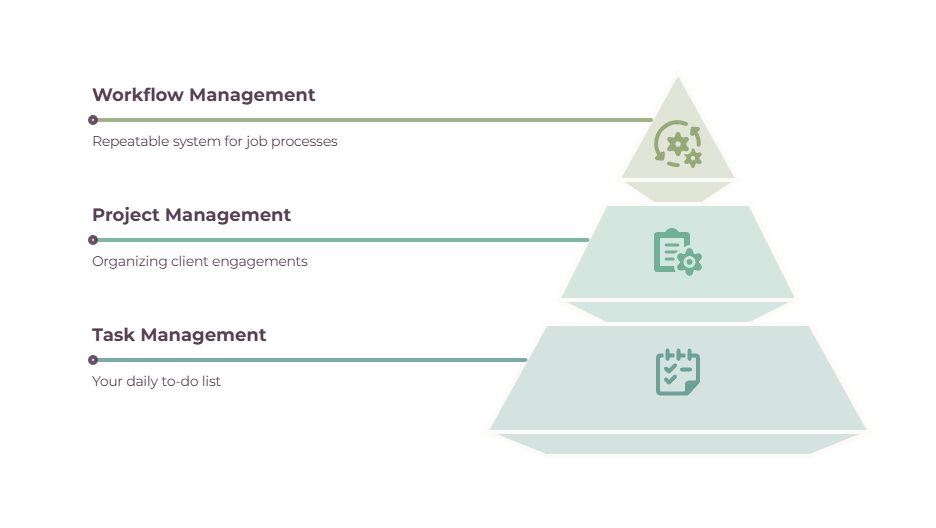
Task management is your to-do list: what needs to be done today and this week. Project management is how you organize a single client engagement — its tasks, deadlines, and deliverables. Workflow management is bigger than both. It’s the repeatable system for how any piece of work moves through your business, start to finish.
For most freelancers, that flow looks like this:
inquiry → proposal → contract → onboarding → doing the work → review → invoice → payment → follow-up
A real workflow tool runs that entire pipeline. Here’s the quick test: if you keep a tidy task list but still write every proposal from scratch, re-enter client details into a separate invoicing app, and ask for payment by hand, you’ve got task management, not workflow management.
The leak is in the handoffs between stages, and closing those leaks is the entire point of the tools above.
This is also where this post draws its lines.
For the daily task layer, see our guide to freelancer task management tools. For project tools specifically, see the best project management software for freelancers.
And if you’re after broad business management rather than the flow of work itself, freelance management tools covers that wider ground.
This post is about the workflow — the path a job travels from hello to paid, and the platforms that run it end-to-end.
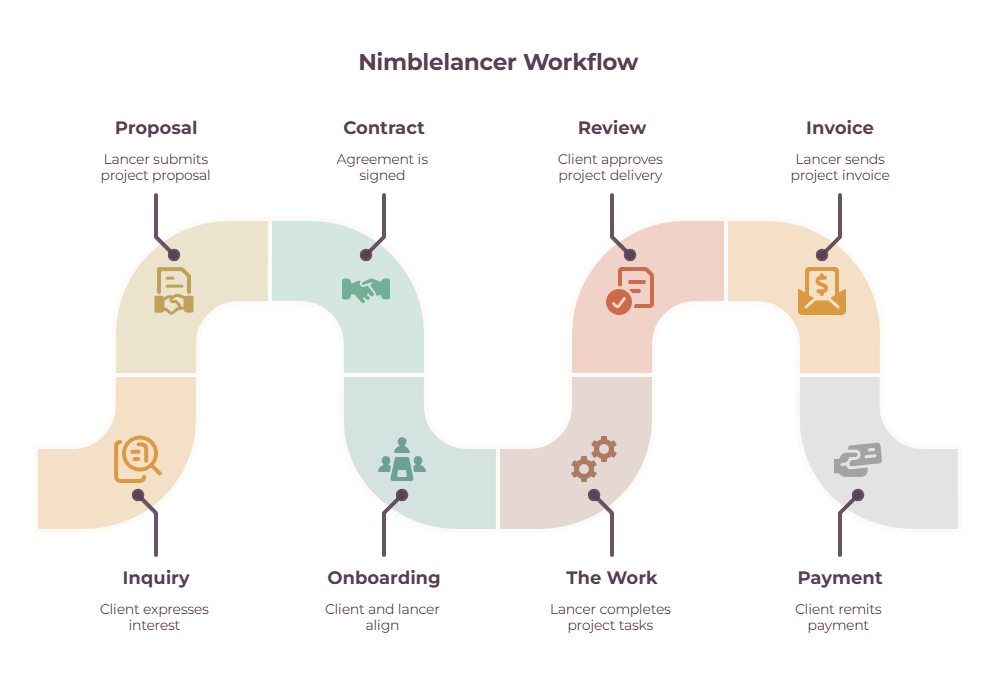
The stages of a freelance workflow (and which tools handle each)
Map this against your own business as you read, because the right tool is simply the one that covers the stages where you’re bleeding time.
- Inquiry and lead. A CRM or pipeline to track who’s interested. Most all-in-ones handle this; Indy and the DIY stack are weakest here.
- Proposal. Every platform covers it. HoneyBook and Bonsai get the most praise for proposals that look good on the client’s screen.
- Contract and e-sign. Attorney-style templates with built-in signatures. This one feature is among the biggest reasons people abandon a stitched-together stack.
- Onboarding. Intake forms and questionnaires that collect what you need before work starts. Dubsado and Moxie are strong here.
- Doing the work. Projects and tasks. Agiled, Plutio, and a dedicated PM tool lead; Dubsado and HoneyBook thin out, with no Gantt charts or task dependencies.
- Review and approval. Usually handled through a client portal, which sits behind higher tiers on Moxie and Indy.
- Invoice and payment. Everyone includes invoicing. Remember, the processing fees are always separate.
- Follow-up and retention. Recurring invoices and automated thank-yous or review requests. This is where Dubsado’s and HoneyBook’s automation engines earn their keep.
Run your own week against that list. The stage that makes you sigh is the stage your tool needs to fix.
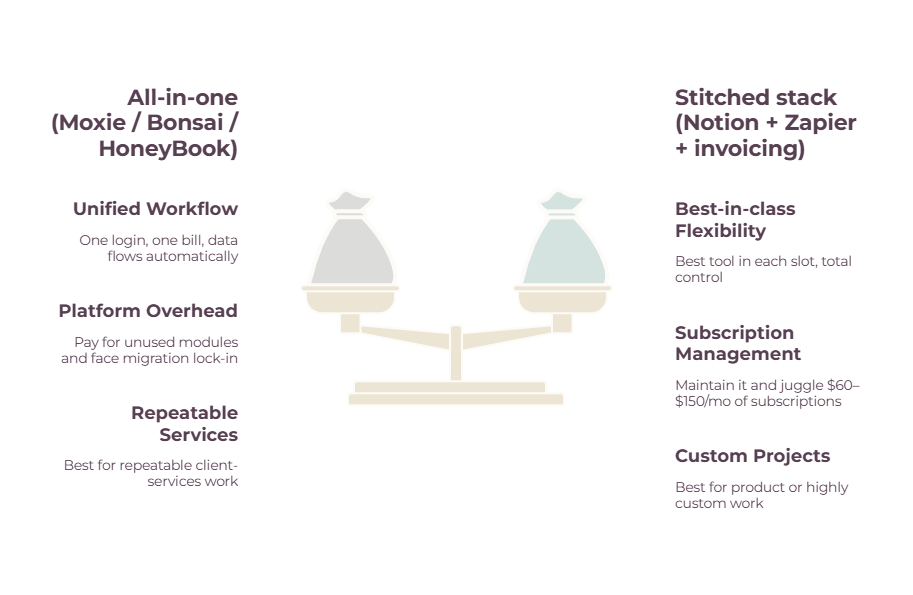
All-in-one vs. stitched: which actually wins

An all-in-one platform gives you one login, one bill, and data that flows from a signed proposal straight into an invoice without you lifting a finger.
The tradeoff is that you’ll pay for modules you may never open, and if you leave later, you’re migrating everything you built.
A stitched stack — something like Notion or Trello for projects, Zapier for automation, and a separate tool for contracts and invoices — gives you the best option in each slot plus total control.
The tradeoffs: you build and maintain the connections yourself, you juggle several subscriptions that often total $60 to $150 a month, and nothing talks to anything until you wire it up.
A useful rule of thumb is this: if your work is client-services and repeatable, an all-in-one almost always wins, because that connected flow is the whole benefit.
If you’re product-focused, highly custom, or you genuinely like building systems, a stitched stack can serve you better and sometimes cost less.
The one thing to avoid either way: don’t buy a $99-a-month platform to use a fifth of it.
For the automation layer specifically, finance automation tools for freelancers are worth a look.
How to choose the right tool for you
Don’t start with the feature lists. Start with the stage that hurts most, then work outward.
- Name the stage that hurts. Drowning in proposals and contracts? Look at Dubsado, HoneyBook, or Bonsai. Drowning in the actual project work? Agiled, Plutio, or a dedicated PM tool. Just need to get paid faster? Start with an invoicing-first tool.
- Solo or scaling? Flat-rate platforms (Moxie, Plutio, SuiteDash, Agiled) beat per-user pricing the moment you add a VA or collaborator. Bonsai is a great deal for exactly one person.
- Budget. Indy and Agiled are the cheapest full platforms, SuiteDash’s flat fee covers unlimited users, and HoneyBook sits at the premium end after its price rise.
- Kind of work. Client-services work rewards an all-in-one. Product or highly custom work rewards a stitched stack.
Answer those four, and the shortlist usually narrows to two.
How to set up your workflow (the short version)
Whatever tool you land on, the setup that makes it pay off is the same handful of moves.
- Map your stages on paper first — inquiry through follow-up — before you so much as open a free trial. You can’t automate a flow you haven’t named. For a step-by-step approach, see our guide to freelance workflow management.
- Pick the tool for the stages you struggle with, not the one with the most features.
- Templatize the repeatable parts: proposals, contracts, onboarding questionnaires, invoices. This is where most of your time savings actually live.
- Automate the handoffs: a signed proposal opens the project, tracked time flows into the invoice, a paid invoice fires off the thank-you, and the review request.
- Start small. Get one workflow running end-to-end before you try to build ten. The temptation to construct an elaborate machine on day one is exactly how people lose a weekend and quit.
Common mistakes to avoid
Most workflow-tool regret traces back to the same short list:
- Tool sprawl. Five apps that don’t talk, so you become the integration layer, copying data between them by hand.
- Over-engineering. Weeks spent building conditional automations you don’t need yet.
- Buying an all-in-one you use 20% of. The single most common complaint in freelancer communities.
- No templates. Every project restarts from a blank page, which defeats the purpose.
- Manual handoffs. Re-typing the same client details into the next tool — the exact leak you bought the software to plug.
Picking yours
The best workflow tool isn’t the one with the longest feature list. It’s the one that closes the handoff, leaking your time right now. So map your flow, find the stage that makes you wince, and pick the tool that fixes that one thing. You can always grow into the rest later, and most of these let you.
If you’re a solo freelancer buried in admin, start a trial with Moxie or Bonsai and run a single project through it end-to-end this week.
If you’d rather own every piece and don’t mind the upkeep, build a Notion and Zapier stack instead. Either way, the goal is the same: stop being the glue between your own tools.
Frequently Asked Questions
What is freelance workflow management?
It’s managing the whole repeatable system of how work moves through your business, from the first client inquiry through proposal, contract, the work itself, invoicing, payment, and follow-up.
It’s broader than task management (your to-do list) or project management (organizing one engagement), because it covers the handoffs between every stage.
What’s the best all-in-one workflow tool for freelancers?
For most solo client-service freelancers, Moxie or Bonsai offer the best all-around coverage at a fair price. HoneyBook is strongest if client experience is part of your product, and Dubsado wins if you’ll genuinely use deep automation.
The “best” one is whichever covers the stage you currently struggle with most.
Is an all-in-one tool better than separate apps?
For repeatable client-services work, usually yes — the connected flow from proposal to payment is the whole benefit. For product-focused or highly custom work, a stitched-together stack of best-in-class tools can work better and sometimes cost less.
The deciding factor is whether you’ll actually use most of an all-in-one’s features.
How much do freelance workflow tools cost?
Most full platforms run from about $7 to $40 a month on annual billing, with Agiled and Indy at the budget end and HoneyBook at the premium end. A stitched-together stack of separate tools often totals $60 to $150 a month.
Payment processing fees (around 2.9% plus 30 cents per card transaction) are separate from the subscription everywhere.
Related guides: freelance management tools · best invoicing tool for freelancers · time tracking and invoicing software for freelancers · freelancer task management tools · best project management software for freelancers · finance automation tools · freelance workflow management