The Best Invoice Management System for Freelancers

Five clients owe you money.
The invoices are buried somewhere in your sent folder, and if someone asked right now which ones are paid, which are overdue, and who to chase first, you couldn’t say. So you chase no one, and the money keeps sitting in their accounts instead of yours.
Getting paid on time comes down to having a system, not nagging harder or hoping clients remember.
An invoice management system is the repeatable workflow that takes every invoice from “sent” to “paid” without anything slipping through the cracks. For a freelancer, that system is the difference between getting paid in a week and chasing money for months.
One quick thing to clear up: this is not the enterprise “accounts payable” software big companies use to manage the supplier bills they have to pay. This is the simple workflow you use to manage the invoices you send. Below are the five stages that make it work, the tool or free template that runs them, and how to get paid faster.
Quick Takeaways
- An invoice management system is a five-stage workflow: create → send → track → chase → record.
- The game-changer is status tracking — seeing at a glance what’s paid, viewed, or overdue instead of guessing.
- Automatic reminders (at the due date, then +5 and +10 days) do the chasing for you.
- You can run the whole thing with a simple invoicing tool or a free tracker spreadsheet — no enterprise “AP automation” required.
- Late payment is common for freelancers, so the system’s real job is closing the small gaps that let invoices slip.
What is an invoice management system?
An invoice management system is the process and tools you use to create, send, track, and get paid on your invoices, with a clean record of every one.
For a freelancer, it’s about the money coming in — not the enterprise accounts-payable systems companies use to manage the supplier bills they owe. Same two words, opposite side of the transaction.
Running invoices ad hoc — firing off a PDF whenever you remember, then losing track — is how money slips. A system means nothing gets forgotten, you always know exactly where you stand, and your income is recorded and tax-ready without a scramble. It doesn’t need to be complicated.
Five stages cover it.
The 5-stage invoice management system
Every invoice moves through the same five stages: create it clearly, send it fast, track its status, chase it automatically, and record it for your books. Set the stages up once, and getting paid becomes a routine instead of a worry. Here’s each one.
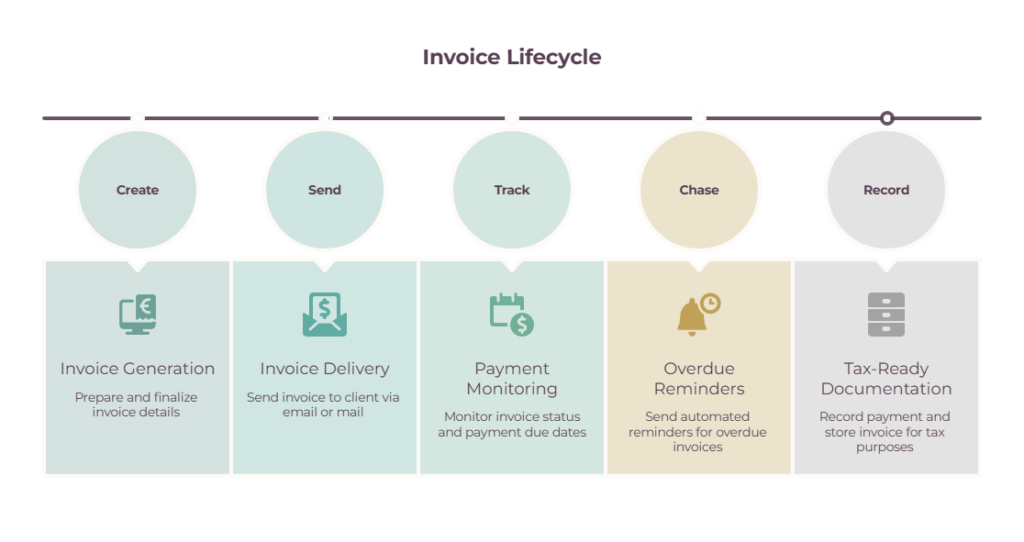
1. Create a clear, professional invoice
Build a branded invoice with your details, clear line items, the total, payment terms, a due date, and a unique invoice number — plus the client’s PO number if they gave you one. Clarity is what gets an invoice approved instead of queried.
A vague “Services — $2,000” invites questions and delays; itemized work with a firm due date gets paid.
If the client’s finance team issued a purchase order, quote its number, because corporate systems often reject invoices that don’t match one (more on that in purchase order vs invoice).
For building the invoice itself, see how to invoice as a freelancer.
2. Send it fast — the day the work ships
Send the invoice the moment you deliver the work, not at the end of the month, because the clock to payment only starts when the invoice lands in the client’s inbox. Every day you sit on it is a day added to when you get paid.
The freelancer who batches all their invoicing into one monthly session waits weeks longer for every single payment. Make sending the last step of finishing a job, and set your default terms so it takes seconds.
3. Track every invoice’s status
Keep one view of every invoice’s status — sent, viewed, paid, or overdue — so you always know what’s outstanding and who to chase, without digging through your inbox. This is the single habit that ends payment-chasing anxiety.
Instead of a vague sense that “a few people owe me,” you see it plainly: $4,300 overdue across two clients, one of them 50 days late.
That clarity tells you exactly what to do next. A tool dashboard shows this automatically, or you can run it in a simple sheet — our free invoice tracker template below is built for exactly this.
4. Chase automatically, not awkwardly

Set an automatic reminder sequence — a nudge at the due date, then again at +5 and +10 days — and, where local rules allow, set out any late fee in your terms, so chasing happens without you writing a single uncomfortable email. The follow-up that actually gets you paid is the one you don’t have to force yourself to send.
Left to willpower, the “just following up 🙂” email gets put off for days. Automated, a polite reminder goes out on schedule and quietly does the work.
This matters because late payment is the norm, not the exception: Remote’s 2025 report found 85% of freelancers are paid late at least some of the time, and a Bonsai analysis found 29% of invoices are paid at least a day late.
A system with built-in reminders is how you stay ahead of it. For the wider money impact, see cash flow problems for freelancers.
Note (before committing to a tool): Reminder automation is usually the feature sitting behind the paywall.
Wave will schedule reminders for you either on its Pro plan ($19/mo, or $190/yr) or once you’ve switched on online payments — so the free plan can still chase for you, you just pay per transaction instead of per month.
Enabling payments costs nothing by itself; the fee only lands when a client actually pays through the invoice. Cards run around 2.9% + $0.60, bank payments around 1% with a $1 minimum.
On a $2,000 invoice, that’s roughly $59 by card or $20 by bank transfer, which is a decent argument for nudging clients toward the bank option on your larger jobs.
5. Record it for clean, tax-ready books
Mark every invoice paid when the money lands, so your income is recorded, reconciled, and ready at tax time, with a searchable payment history for when a client asks about an old job. The recording step is what turns invoicing from admin into actual bookkeeping.
A good tool does this automatically; in a tracker, you just switch the status to “paid.” Either way, reconcile monthly, so your records match your bank, and tax season becomes a two-minute export instead of a reconstruction.
Our guides to bookkeeping for self-employed and accounting tips for freelancers cover the record-keeping side.
Do you need invoice management software, or is a spreadsheet enough?
A free tracker spreadsheet runs the whole system fine when you send a handful of invoices a month; dedicated invoicing software earns its place once you want automatic reminders, online payments, and status tracking without updating anything by hand. You never need enterprise AP software as a freelancer either way.
Start with whichever removes the most friction for you right now:
| If you… | Use | Why |
| Send a few invoices a month | Our free invoice tracker template | Free, covers create → track → record |
| Want auto-reminders + online payment | Wave Pro (around $16–19/mo) or FreshBooks | Automates chasing — reminders need Pro or online payments enabled |
| Bill by the hour | FreshBooks or Harvest | Turns tracked time into invoices |
| Want the full tool comparison | Freelance billing software | Which tool to pick, compared |
Note: online payment is where these tools make their money. Wave charges around 2.9% + $0.60 per card transaction and around 1% for bank payments, with similar rates across FreshBooks and most invoicing platforms.
On a $2,000 invoice, that’s roughly $58 to get paid a week or two faster — usually worth it, but worth pricing in rather than discovering on the first payout.
Grab the free template: our freelancer invoice tracker is a simple spreadsheet with a status drop-down, an automatic “days overdue” column that flags late invoices in red, and running totals for what you’ve invoiced, been paid, and are still owed.
When you’re ready to automate the chasing, see our guide to the best invoicing tools for freelancers for the strongest options, or our freelance billing software comparison for a broader look at billing platforms.
How to get paid on time as a freelancer
The system gets you paid faster when you set the terms up front: take a deposit, bill on Net 15 instead of Net 30, make paying one click, and let the automatic reminders and a late fee handle the follow-up.
Most late payments come from small process gaps, and each of these closes one.
- Take a deposit on larger projects, so you’re never fully exposed to a slow payer.
- Shorten your terms. Net 15 gets you paid sooner than Net 30, simply because the due date arrives sooner.
- Make paying effortless — a one-click online payment link beats “here are my bank details” every time.
- Let the reminders run — the due-date / +5 / +10 sequence from stage four.
- Add a late fee to your terms — where it’s allowed. You may rarely charge it, but its presence gets invoices paid. Just note that what you can charge (and any interest cap) varies by jurisdiction, so agree the terms in your contract upfront and check your local rules.
Common invoice management mistakes freelancers make
- Sending invoices late or batching them into one monthly session.
- Vague line items with no due date or terms, which get queried and delayed.
- Not tracking status — guessing what’s paid instead of knowing.
- Never chasing, or chasing too late, because it’s an awkward job you keep avoiding.
- No late-payment terms, so there’s no consequence to paying you slowly.
- Invoices scattered across email with no central record.
- Treating invoicing as annoying admin rather than the process that actually pays you.
The bottom line
Set up the five stages once — pick a tool or grab the free tracker, add clear terms and automatic reminders — and getting paid stops being something you chase and becomes something that just happens.
An invoice management system isn’t complicated; it’s the difference between money that lands on time and money you’re still waiting on.
Frequently Asked Questions
What is an invoice management system?
It’s the process and tools a freelancer uses to create, send, track, and get paid on their invoices, with a record of each one.
In plain terms, it’s the workflow that moves every invoice from sent to paid — different from the enterprise “accounts payable” systems companies use to manage supplier bills they owe.
How do freelancers keep track of invoices and payments?
Most freelancers use either invoicing software (which tracks status automatically) or a simple invoice tracker spreadsheet.
The key is one central place that shows every invoice’s status — sent, paid, or overdue — plus running totals of what you’re owed, so nothing gets lost across emails.
How do I know which invoices are paid or overdue?
Track each invoice’s status in one place and let it flag overdue ones for you. Invoicing tools show a live dashboard; a tracker spreadsheet can calculate “days overdue” automatically and highlight late invoices. Either way, you get an at-a-glance view instead of guessing.
Do I need invoice management software, or is a spreadsheet enough?
A spreadsheet is enough when you send a handful of invoices a month and don’t mind updating it by hand. Software is worth it once you want automatic payment reminders, online payments, and hands-off status tracking.
Many freelancers start with a free tracker and move to a tool like Wave as they grow. Wave’s free plan handles creating and sending invoices; automatic payment reminders arrive once you’re on Pro or you’ve switched on online payments.
How do I automatically chase late-paying clients?
Use an invoicing tool that sends reminder emails on a schedule — typically at the due date, then a few days later, and then a week or two overdue. Add a late-fee clause to your terms as well.
Automating the follow-up means chasing happens on time, without you having to force yourself to send the email.
What’s the best free way to manage invoices as a freelancer?
Combine a free invoicing tool like Wave with a simple tracker, or use our free invoice tracker template to run the whole create-to-paid system in one spreadsheet.
Both cost nothing and cover create-to-paid for most freelancers. The automation is where the cost starts — Wave’s scheduled reminders need the Pro plan or online payments turned on, and online payments carry processing fees.
Related guides: best invoicing tool for freelancers · freelance billing software · how to invoice as a freelancer · cash flow problems for freelancers · purchase order vs invoice · bookkeeping for self-employed