The Best Finance Software Options for Freelancers and Consultants

Most people searching for finance software options for freelancers and consultants think they’re shopping for one thing. They’re actually shopping for six.
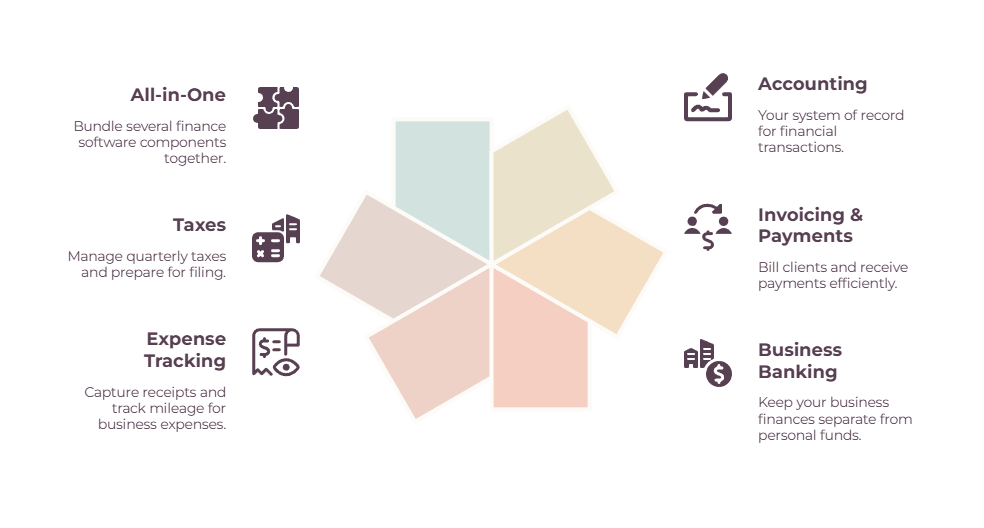
The bank account, the invoicing, the bookkeeping, the expense tracker, the tax tool, and the all-in-one platforms that try to do several at once are separate jobs.
The reason picking software feels overwhelming is that every “best accounting software” list quietly pretends the other five categories don’t exist.
You don’t need all six. A freelancer just starting out needs maybe three. A consultant running retainers and paying subcontractors might need five.
The skill isn’t finding the one perfect app.
It’s knowing which categories apply to you and picking one good tool for each.
Freelancing is a proper business now, with 64 million Americans freelancing (Upwork, 2023) and full-time freelancers in knowledge work reporting a median income of $85,000, edging out the $80,000 typical for comparable employees (Upwork Research Institute, 2025).
That’s gross, before you cover your own taxes and benefits, but it’s still a business worth running on more than a shoebox and a banking app.
Quick Takeaways
- “Finance software” is really six categories — most freelancers need three, most consultants need five.
- Freelancers optimize for free, mobile, and automatic taxes; consultants optimize for retainers, project profit, and getting paid fast.
- The cheapest viable freelancer stack runs about $0–10/month; a solo consultant’s runs $60–120.
- You outgrow starter tools at predictable moments: 5 clients, your first subcontractor, your first international invoice.
- An all-in-one beats a stack of separate tools right up until one category becomes the thing you live in.
This is the map of the whole stack. For the deep dive on any one category, the links point you to the dedicated guide.
What “finance software options for freelancers and consultants” actually means
Finance software isn’t one tool; it’s six jobs: accounting, invoicing and payments, business banking, expense tracking, taxes, and the all-in-one platforms that bundle several at once. Most people need three or four of them, not all six.
Here’s the quick version of each:
- Accounting is your system of record — where income and expenses live, and the source of your tax numbers.
- Invoicing and payments is how you bill and get paid.
- Business banking is a dedicated account that keeps business money separate from personal.
- Expense tracking captures receipts and mileage so deductions don’t slip away.
- Taxes covers quarterly estimates and filing.
- All-in-one platforms roll proposals, contracts, invoicing, and sometimes bookkeeping into a single subscription.
The mistake almost every “finance software” article makes is treating the whole thing as a synonym for accounting software. It isn’t. You assemble a stack from these categories the way you’d assemble any toolkit: one tool per job you actually do, nothing for the jobs you don’t.
If you want the bookkeeping category specifically, our guide to accounting software for freelancers goes deeper than this overview will, and the whole money system sits inside our pillar guide to managing freelance finances.
Freelancer or consultant? Why your stack is different
A freelancer and a consultant need different software because they bill differently. Freelancers send many small invoices and want them to be cheap and automatic. Consultants send fewer, larger invoices, run retainers, and need to know which engagement actually made money.

That difference shows up across six dimensions, and it’s worth seeing them side by side before you shop:
| Dimension | Freelancer | Consultant |
| Invoice size and volume | Many smaller invoices | Fewer, larger invoices |
| Billing model | Mostly one-off projects | Monthly retainers are common (needs recurring billing) |
| Proposals and SOWs | Often skips straight to the invoice | Scopes and proposes first |
| Project profitability | Rarely tracked | Must know which engagement makes money |
| Currency | Usually domestic | Often international clients |
| Subcontractors | Rare | Triggers 1099 tracking and bill pay |
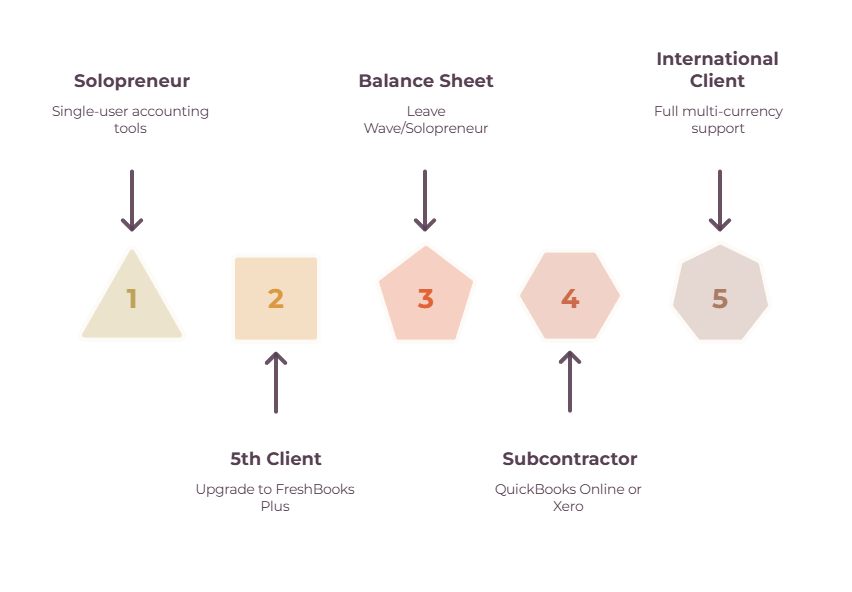
There’s also a complexity threshold that matters more than any feature comparison. Freelancer-grade tools like QuickBooks Solopreneur, Wave, and FreshBooks Lite are built for one person with simple needs.
You outgrow them at a specific point: when you need double-entry accounting, a balance sheet, multiple users, project profitability, or to issue 1099s to subcontractors. When that day comes, the answer is QuickBooks Online or Xero. Not before. Buying that complexity early just means paying for features you stare at and never use.
The six categories, and what fits freelancers vs consultants
Below is each category with the tools that lead it, and whether each leans towards freelancer or consultant. Pick one per category you actually need and move on.
Accounting and bookkeeping
Every business needs exactly one system of record. This is it.
| Tool | Best for | Free tier | Starting price | Leans | Main weakness |
| Wave | Free entry point | Yes | $0 (Pro $19/mo) | Freelancer | No time tracking, thin support |
| QuickBooks Solopreneur | One-person tax prep | No | ~$20/mo | Freelancer | Not double-entry, single user |
| FreshBooks | Invoicing-first books | No | ~$19/mo | Both | Priced by client count |
| QuickBooks Online | Scaling + 1099s | No | ~$38/mo | Consultant | Price, can feel heavy |
| Xero | Teams, multi-currency | No | ~$25/mo | Consultant | Learning curve |
| Zoho Books | Zoho users | Yes (under $50k revenue) | ~$20/mo | Both | Per-tier caps |
| GnuCash | Free, no subscription | Yes | $0 | Freelancer | Dated, manual, desktop-only |
If you’re fee-averse or want to own your software outright, the free and offline options have their own guide — see our roundups of open-source QuickBooks alternatives and desktop accounting without a subscription.
Consultants weighing the heavier tools should read the best accounting software for consulting businesses, which goes deeper into project-based bookkeeping than this overview does.
Invoicing and payments
How you bill, and more importantly, how the money actually reaches you.
Wave and FreshBooks both handle invoicing as part of their accounting. If you want invoicing on its own, Stripe and PayPal cover card payments, and Invoice Ninja is a solid open-source option with a free tier.
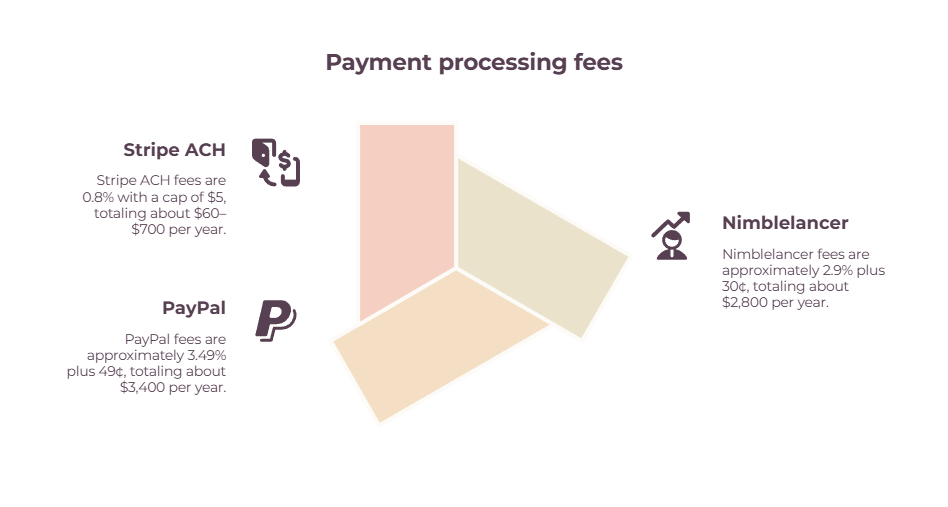
The detail nobody mentions: payment fees dwarf software cost. Cards run about 2.9% plus a fixed fee (PayPal’s checkout rate is higher, around 3.49% plus $0.49), but Stripe‘s ACH bank transfers are roughly 0.8%, capped at $5.
On $96,000 of annual revenue, collecting by ACH instead of PayPal can save you somewhere around $2,000–$3,000 a year — often more than your entire software budget. For consultants sending five-figure invoices, offering ACH matters more than shaving a few dollars off a subscription.
The mechanics of billing well live in our guides to invoicing as a freelancer, the best invoicing tools, and keeping track of invoices.
Business banking
A dedicated business account is the foundation of clean books, and for an LLC, it’s part of keeping your liability protection intact.
One note before the table: most of these are fintech companies, not banks. Your money sits at an FDIC-insured partner bank behind the scenes, which is fine, though worth knowing.
| Tool | Best for | Starting price | Leans | Note |
| Found | Auto tax set-aside | $0 | Freelancer | No team accounts |
| Lili | Mobile-first + support | $0 | Freelancer | Free tier lacks invoicing; moved upmarket in 2026 |
| Novo | Integrations | $0 | Freelancer | No interest, no intl wires |
| Relay | Multi-account budgeting | $0 | Consultant | Built for owners + bookkeepers |
| Mercury | International clients | $0 | Consultant | Overkill for most solos |
| Bluevine | Interest-bearing checking | $0 (entry tier) | Both | Top APY tiers are paid; credit lines via partners |
Expense and receipt tracking

Capturing receipts and mileage so deductions don’t evaporate before tax time.
🔵 Hurdlr and Everlance are the mobile-first picks for freelancers, both strong on automatic mileage at the 2026 IRS rate of 72.5 cents a mile.
🟢 Expensify handles high receipt volume and reimbursements.
🟡 Dext is the choice when a bookkeeper is involved, syncing captured receipts straight to Xero or QuickBooks, though its roughly $300-a-year minimum makes it pricey for solos.
🟠 And if you already run QuickBooks, its built-in receipt capture may be all you need.
For the full picture on what counts and how long to keep it, see our guide to tracking freelance contracts and expenses and the receipt scanner roundup.
Tax estimation and filing
Quarterly estimates and Schedule C are the tax burden employees never carry, and a few tools exist just to make them survivable. Self-employment tax alone is 15.3% on top of income tax, so this category earns its place.
🔵 Keeper scans your transactions for write-offs and includes filing, with a chat-style interface that suits gig workers.
🟢 FlyFin pairs an AI deduction tracker with CPA-filed returns, which fits freelancers with high transaction volume.
🟡 Hurdlr produces real-time quarterly estimates but exports to TurboTax rather than filing itself.
🟠 Found, Lili, and QuickBooks bake tax set-aside and estimates into their banking or accounting.
🔴 TurboTax Premium (the tier that absorbed the old Self-Employed product) remains the default for DIY filing.
The weekly habit that keeps any of these accurate is covered in bookkeeping for the self-employed.
All-in-one platforms
These replace a stack of separate tools with one subscription: proposals, contracts, time tracking, invoicing, payments, and sometimes bookkeeping, all in one place.
| Tool | Best for | Free tier | Starting price | Leans |
| Indy | Generous free tier | Yes | ~$25/mo ($19 annual) | Freelancer |
| Moxie | Flat-price bundle | No | ~$12/mo | Freelancer |
| Bonsai | Contracts + taxes | No | ~$25/mo ($19 annual) | Both |
| HoneyBook | Creative client flow | No | ~$29/mo annual ($36 monthly) | Freelancer |
| Harvest | Time-to-invoice + profit | Yes (1 seat) | ~$11/seat/mo | Consultant |
| Plutio | Per-workspace pricing | No | ~$19/mo | Freelancer |
| Agiled | Free all-in-one | Yes | $0 | Both |
One watch item: Bonsai was acquired by Zoom — the deal was announced in November 2025 and closed that December.
It stays a standalone product with its own brand for now, and nothing has changed in price, but if you build your business on it, keep an export plan documented.
For the wider set of platforms that manage clients as well as money, see our freelance management tools guide.
Build a stack or buy an all-in-one?
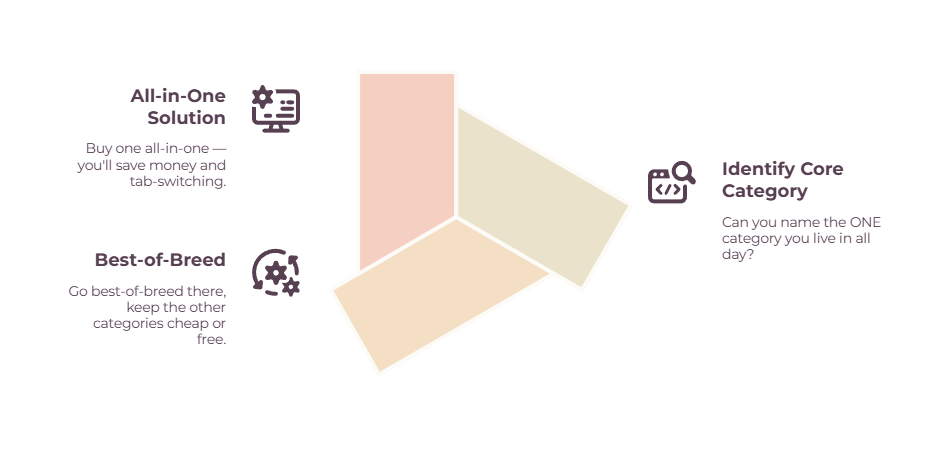
Stitch separate best-of-breed tools together when one category is where you spend your day. Buy an all-in-one when no single category dominates, and you’d rather have one login and one bill.
The case for separate tools is depth.
A dedicated invoicing app or time tracker does its one job better than any bundle, and as one freelancer on Indie Hackers put it, you can rent the function you need for a few dollars a month rather than building everything yourself.
If invoicing or time tracking is the thing you touch ten times a day, the specialist will serve you better.
The case for an all-in-one is friction.
One subscription, one login, and a single client-facing flow from proposal to payment beats reconciling five tools that don’t quite talk to each other.
The trap is bloat.
Another Indie Hackers user described abandoning a platform because it had so many features they already covered elsewhere that it just added confusion. If you’re paying for a suite to use a third of it, you’ve bought the wrong thing.
So the test is simple.
If you can name the one category you live in, go best-of-breed there and keep the rest cheap.
If you can’t, an all-in-one will probably save you money and tab-switching both.
Recommended stacks by situation
Four starting points, based on who you are right now. Copy the closest one and adjust.
| Situation | Banking | Accounting | Invoicing | Extras | Rough monthly |
| Solo freelancer, starting | Found or Lili | Wave (free) | Wave (free) | Free mileage app | $0–10 |
| Established freelancer | Found or Lili | Wave or FreshBooks Lite | included | Keeper / FlyFin; all-in-one if proposals matter | $25–60 |
| Solo consultant | Mercury or Relay | QuickBooks Online or FreshBooks Plus | included | Harvest for time + profit | $60–120 |
| Consulting practice + subs | Relay | QuickBooks Online Plus or Xero | included | Harvest, Dext, Bill.com if needed | $150+ |
The pattern to notice: the freelancer stacks lean on free tools and automation, while the consultant stacks pay for project profitability, multi-user access, and 1099 handling. Start where you are. You can always add a category when a clear need shows up.
How to choose, and when to upgrade
Start with the cheapest tool that covers the categories you actually use today, and upgrade only when you hit a specific wall — not because a comparison chart told you to.
The walls are predictable, which means you can stop worrying about them until they arrive:
- Cross five active billable clients, and FreshBooks Lite’s client cap will push you to Plus.
- Need a balance sheet or proper double-entry, and Wave or QuickBooks Solopreneur has taken you as far as it can.
- Pay your first subcontractor, and you’ll want QuickBooks Online or Xero to handle the 1099.
- Land your first international client, and you need full multi-currency support.
- Hire your first team member, and single-user tools (plus Moxie‘s five-person cap) become the bottleneck.
Until one of those happens, more expensive software won’t make you more money. It’ll just cost more. The right move is almost always to under-buy slightly and let the friction tell you when to upgrade.
When the consulting side gets complex enough to need it, our guides to accounting software for freelancers and the best accounting software for consulting businesses cover that jump in detail.
The bottom line
The best stack is the smallest one that covers what you do today and bends when you grow. There’s no prize for running the most sophisticated setup, and plenty of freelancers waste money on consultant-grade tools they’ll never fill.
You’re assembling a system, not chasing the perfect app — pick one tool for each category you actually use, leave the rest, and add as the work demands.
Start with the category that’s causing you the most pain right now. If that’s the books, our accounting software guide is the next stop. If it’s the whole money picture, the pillar guide to managing freelance finances ties it all together.
Frequently Asked Questions
Do freelancers really need accounting software, or is a spreadsheet enough?
A spreadsheet works when you’re brand new with a handful of clients. The moment you’re chasing deductions, tracking quarterly taxes, or losing time at filing season, free software like Wave pays for itself instantly — and since it’s free, there’s little reason to wait.
What’s the difference between finance software for freelancers and consultants?
Freelancers want cheap, mobile, and automatic: many small invoices, simple taxes. Consultants need retainers, proposals, project profitability, and often multi-currency and 1099s for subcontractors, which pushes them toward FreshBooks Plus, QuickBooks Online, or Xero, plus a time tracker like Harvest.
Is an all-in-one better than separate tools?
It depends on whether one category dominates your day. If invoicing or time tracking is where you live, a specialist tool wins. If no single job dominates, an all-in-one like Bonsai, Moxie, or HoneyBook saves money and tab-switching.
When should I switch from QuickBooks Solopreneur to QuickBooks Online?
When you need double-entry accounting, a balance sheet, multiple users, project profitability, or to issue 1099s. QuickBooks Solopreneur is a single-entry, single-user tool, so any of those needs is the signal to move up to QuickBooks Online.